


Member
I have not had a chance to look deeper into this but, this is what i did find out.
Start car put in neutral, let coast - video will shut off as soon as wheels start to move.
shut car off, leave key in the on position and do the same thing, let coast - video will NOT shut off.
This tells me there is a way around it without any adapters.
this also tells me there is a power source (acc) to some module or something that tell the head unit when the wheels are in motion but, only when the car is started. has nothing to do with parking brake or being in park.
Kill the acc power to this and all should be good.
As soon as weather gets better where i live I'm going to check it out.
Will keep you posted
Start car put in neutral, let coast - video will shut off as soon as wheels start to move.
shut car off, leave key in the on position and do the same thing, let coast - video will NOT shut off.
This tells me there is a way around it without any adapters.
this also tells me there is a power source (acc) to some module or something that tell the head unit when the wheels are in motion but, only when the car is started. has nothing to do with parking brake or being in park.
Kill the acc power to this and all should be good.
As soon as weather gets better where i live I'm going to check it out.
Will keep you posted

MBWorld Fanatic!
Quote:
Start car put in neutral, let coast - video will shut off as soon as wheels start to move.
shut car off, leave key in the on position and do the same thing, let coast - video will NOT shut off.
This tells me there is a way around it without any adapters.
this also tells me there is a power source (acc) to some module or something that tell the head unit when the wheels are in motion but, only when the car is started. has nothing to do with parking brake or being in park.
Kill the acc power to this and all should be good.
As soon as weather gets better where i live I'm going to check it out.
Will keep you posted
nice! cant wait to see what you find out. an alternative is to have your friends push the car while its off and in neutral, that way you can watch your dvds until you get to your destination. Originally Posted by stealtheo
I have not had a chance to look deeper into this but, this is what i did find out.Start car put in neutral, let coast - video will shut off as soon as wheels start to move.
shut car off, leave key in the on position and do the same thing, let coast - video will NOT shut off.
This tells me there is a way around it without any adapters.
this also tells me there is a power source (acc) to some module or something that tell the head unit when the wheels are in motion but, only when the car is started. has nothing to do with parking brake or being in park.
Kill the acc power to this and all should be good.
As soon as weather gets better where i live I'm going to check it out.
Will keep you posted


Senior Member
Quote:
Originally Posted by Savage c-300
nice! cant wait to see what you find out. an alternative is to have your friends push the car while its off and in neutral, that way you can watch your dvds until you get to your destination.


Junior Member
Quote:
FREE TV FREISCHALTUNG MERCEDES W204 NTG4 Command System item number: 320206024753
Seller of this item? Sign in for status query this item in My eBay
They observe these articles as a guest in My eBay.
As a guest, you can:
My eBay on this computer up to ten items pursue
A few hours before the end of this offer an e-mail reminder receive
See larger image
Starting price: $ 139.00
VAT
Your maximum bid: $
Bid>
(Enter $ 139.00 a)
--------------------------------------------------------------------------------
Deal ends: 22 hours 31 minutes (17.01.08 21:08:40 CET)
Shipping: $ 8.00
Insured shipping
Service to Germany
(Other services)
Left: Worldwide
Location: Salzkotten, Germany
Overview: 0 Bid (e)
--------------------------------------------------------------------------------
Other possibilities:
Bid abgeben
Get notified by Instant Messenger
Send to a friend
Listing and payment details: Hide ads
Quoting Start: 10.01.08 21:08:40 CET
Starting price: $ 139.00
VAT
Duration: 7 days
Payment methods: transfer,
Cash payment for the clearance,
COD
Further details
Seller Information
Seller: conexx de-video * (5972)
Ratings: 99.2% Positive
Member: in Germany since 20.08.00
Registered as a business seller
Detailed reviews call
Add to Favourite Sellers
All items of the seller: eBay Store | List View
Visit the shop of the seller:
Conexx of car multimedia shop
Ask the seller
Please send the seller an e-mail
Buy
1st Look at the valuation profile of the seller's
Assessment points: 5972 | 99.2% Positive
Detailed reviews call
2nd Find out about the buyer protection
Withdrawal accepted: Seller to withdraw.
Beschreibung
blah blah blah...Originally Posted by achu717
Back to home category: Parts & Accessories> Auto Parts & Accessories> built-in navigation systems> Manufacturers navigation systems MercedesFREE TV FREISCHALTUNG MERCEDES W204 NTG4 Command System item number: 320206024753
Seller of this item? Sign in for status query this item in My eBay
They observe these articles as a guest in My eBay.
As a guest, you can:
My eBay on this computer up to ten items pursue
A few hours before the end of this offer an e-mail reminder receive
See larger image
Starting price: $ 139.00
VAT
Your maximum bid: $
Bid>
(Enter $ 139.00 a)
--------------------------------------------------------------------------------
Deal ends: 22 hours 31 minutes (17.01.08 21:08:40 CET)
Shipping: $ 8.00
Insured shipping
Service to Germany
(Other services)
Left: Worldwide
Location: Salzkotten, Germany
Overview: 0 Bid (e)
--------------------------------------------------------------------------------
Other possibilities:
Bid abgeben
Get notified by Instant Messenger
Send to a friend
Listing and payment details: Hide ads
Quoting Start: 10.01.08 21:08:40 CET
Starting price: $ 139.00
VAT
Duration: 7 days
Payment methods: transfer,
Cash payment for the clearance,
COD
Further details
Seller Information
Seller: conexx de-video * (5972)
Ratings: 99.2% Positive
Member: in Germany since 20.08.00
Registered as a business seller
Detailed reviews call
Add to Favourite Sellers
All items of the seller: eBay Store | List View
Visit the shop of the seller:
Conexx of car multimedia shop
Ask the seller
Please send the seller an e-mail
Buy
1st Look at the valuation profile of the seller's
Assessment points: 5972 | 99.2% Positive
Detailed reviews call
2nd Find out about the buyer protection
Withdrawal accepted: Seller to withdraw.
Beschreibung

Senior Member
Quote:
Start car put in neutral, let coast - video will shut off as soon as wheels start to move.
shut car off, leave key in the on position and do the same thing, let coast - video will NOT shut off.
This tells me there is a way around it without any adapters.
this also tells me there is a power source (acc) to some module or something that tell the head unit when the wheels are in motion but, only when the car is started. has nothing to do with parking brake or being in park.
Kill the acc power to this and all should be good.
As soon as weather gets better where i live I'm going to check it out.
Will keep you posted
Originally Posted by stealtheo
I have not had a chance to look deeper into this but, this is what i did find out.Start car put in neutral, let coast - video will shut off as soon as wheels start to move.
shut car off, leave key in the on position and do the same thing, let coast - video will NOT shut off.
This tells me there is a way around it without any adapters.
this also tells me there is a power source (acc) to some module or something that tell the head unit when the wheels are in motion but, only when the car is started. has nothing to do with parking brake or being in park.
Kill the acc power to this and all should be good.
As soon as weather gets better where i live I'm going to check it out.
Will keep you posted
it wont work; unless you plan to pull the gps signal from the back of your radio as well. the radio uses the wheel speed sensors + gps info to determine if the vehicle is moving and if it is the video goes out.
also if you cut power to the wheel speed sensors the car will spit out an unimaginable amount of errors...

Senior Member
Quote:
http://www.youtube.com/watch?v=tcw4U7Kwk84
Originally Posted by NycOren
i just got the saks 5th ave i love it . and now i have the video in motion working thanks to www.mbdoctor.com. i bought and adapter there its plug and play.it unlockes tv,video,dvd and aux he is the only one who sell the adapter to bypass the system so it doesn't shut of when i drive .i paid 350 and installed it myself .its the only way to make it work ..watch the video and enjoy your car http://www.youtube.com/watch?v=tcw4U7Kwk84
do you have to do a series of key commands before you can watch it? Or do you just choose the dvd player as you drive? Also, if you get multimedia, does it come with a TV tuner? It says it unlocks TV, but didn't know if the w204 comes with the tv tuner.

Member
Quote:
I agree with you about DVD Audio... They made a big deal about it when they first came out; I remember seeing the display at tower records with all ten DVD Audio releases. I think that the ipod revolution has simply made the idea of HD audio redundant at this point.
Originally Posted by XJ9
It shows through the normal pop up screen. If you have the MM system you can have the dealer program your radio to turn on the reverse camera input. Then you just have a standard backup camera installed and you are all set.I agree with you about DVD Audio... They made a big deal about it when they first came out; I remember seeing the display at tower records with all ten DVD Audio releases. I think that the ipod revolution has simply made the idea of HD audio redundant at this point.
Is this what you did with your car? So you don't need to buy any of those adapters for VIM but gets the backup camera to work on your MM system?
I was wondering if you can also post a photo where your backup camera was installed in the rear bumper.
Thanks
MBWorld Fanatic!
If you know a MB Tech with Stardiagnostics computer system. They should be able to activate "Video In Motion."
At least on the w203 models with CD based Nav. It's an option deep in the star Diagnostics program. It's set to "OFF" in the factory settings, just need to check in "ON" if it's available. I'll ask one of the techs I know to see if it's possible on the w204.
Lots of w203 owners have done this mod, I have it on my car with TV-tuner and DVD player, also have one other video source available for back-up camera, etc...
Has to be possible!
At least on the w203 models with CD based Nav. It's an option deep in the star Diagnostics program. It's set to "OFF" in the factory settings, just need to check in "ON" if it's available. I'll ask one of the techs I know to see if it's possible on the w204.
Lots of w203 owners have done this mod, I have it on my car with TV-tuner and DVD player, also have one other video source available for back-up camera, etc...
Has to be possible!
MB World Stories
The Best of Mercedes & AMG
Explore

6 Mercedes Models That Did NOT Age Well (But Are Somehow Still Cool)
Verdad Gallardo
Manual Mercedes? 6 Times Sindelfingen Let Drivers Have All The Fun
Verdad Gallardo
Mercedes SLR McLaren 722 S Is Extremely Rare Example Modified by McLaren
Verdad Gallardo
8 Classic Boxy Mercedes Designs That Have Aged Like Fine Wine
Verdad Gallardo
Flawlessly Restored Mercedes 190E Evo II Heads to Auction
Verdad Gallardo
Electric Mercedes C-Class Unveiled: 11 Things You Need to Know
Verdad Gallardo
Mercedes EQS Gets A Major Update: Everything You Need to Know
Verdad Gallardo
5 Underrated Mercedes-Benz Models That Don't Get the Love They Deserve
Verdad Gallardo
Mercedes 300D Has Pushed Well Past 1 Million Miles and It Ain't Stopping
Verdad Gallardo
Member
would it be possible to find out if such options exist.
Senior Member
Quote:
I was wondering if you can also post a photo where your backup camera was installed in the rear bumper.
Thanks
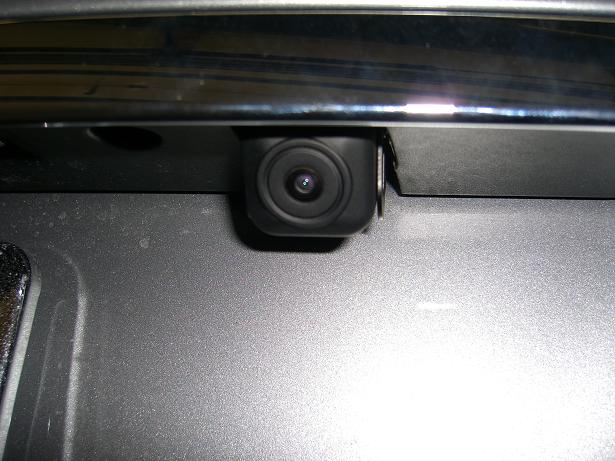
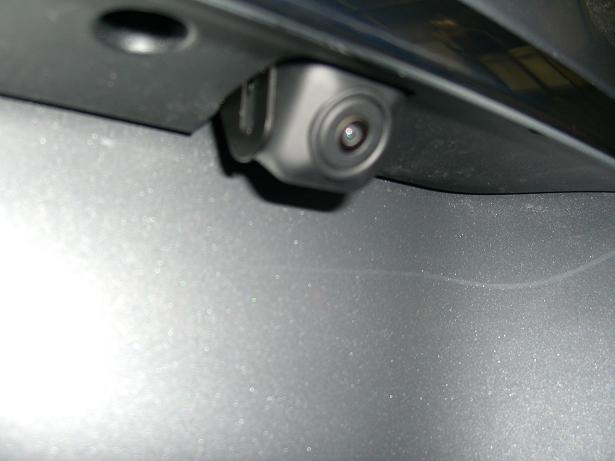
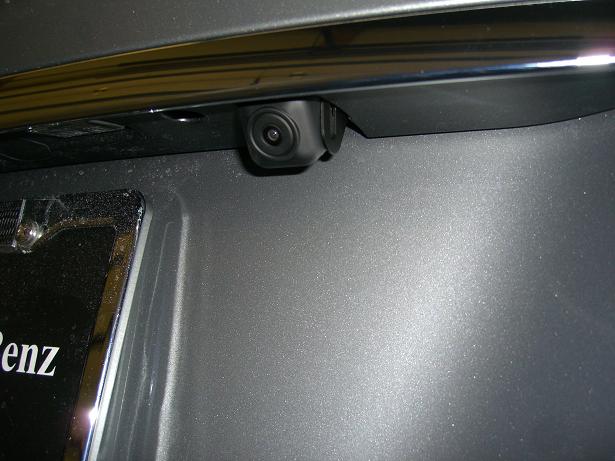
Mine was a bit different. I had someone program my backup camera input to turn it on but yes, the idea is that you do not need to have a module present to turn on the camera input, just programming. Ill take some pics of the camera mount tommorow and post them here. The camera mounts to the right of the license plate in a little cutout area. IF you look up underneath by the handle you can see the square where it goes.Originally Posted by rebel_mtc
Is this what you did with your car? So you don't need to buy any of those adapters for VIM but gets the backup camera to work on your MM system?I was wondering if you can also post a photo where your backup camera was installed in the rear bumper.
Thanks
Senior Member
Quote:
At least on the w203 models with CD based Nav. It's an option deep in the star Diagnostics program. It's set to "OFF" in the factory settings, just need to check in "ON" if it's available. I'll ask one of the techs I know to see if it's possible on the w204.
Lots of w203 owners have done this mod, I have it on my car with TV-tuner and DVD player, also have one other video source available for back-up camera, etc...
Has to be possible!
Nope, not possible. The video in motion feature was only present on euro cars because certain countries allow it. In the US the feature was neevr present even on SDS. Secondly the 204 uses the new platform SCN coding system which means there are no more selections to program period. Now the SDS machine puls your VIN and looks up your feature list at the MB corporate database and then programs the features all at once...Originally Posted by bensitto
If you know a MB Tech with Stardiagnostics computer system. They should be able to activate "Video In Motion." At least on the w203 models with CD based Nav. It's an option deep in the star Diagnostics program. It's set to "OFF" in the factory settings, just need to check in "ON" if it's available. I'll ask one of the techs I know to see if it's possible on the w204.
Lots of w203 owners have done this mod, I have it on my car with TV-tuner and DVD player, also have one other video source available for back-up camera, etc...
Has to be possible!
Member
Thanks in advance XJ9 I'm looking forward to your photos.
Also if possible what particular brand of camera did you use and is it good in terms of coverage.
A screen shot from your MM would be great.
I would also like to know if your MM automatically pops up during reverse?
If it pops up does it go back to hiding once you disengage reverse?
It would be really great if this can just be done via programing.
Also if possible what particular brand of camera did you use and is it good in terms of coverage.
A screen shot from your MM would be great.
I would also like to know if your MM automatically pops up during reverse?
If it pops up does it go back to hiding once you disengage reverse?
It would be really great if this can just be done via programing.
Senior Member
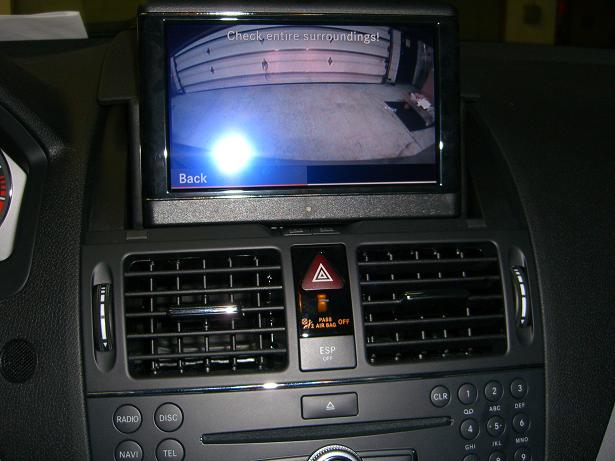
Finally took the pics yesterday. See Below. The camera comes on automatically when you put the car in reverse and turns off when you take the car out of reverse. I dont think it works if you have the radio off but honestly I never checked. Ill try it out today and post back.
As a side note I saw something very interesting yesterday as well: The guys who put in my camera were able to program the camera on in another c class using just a laptop and an adapter cable.
EDIT: Checked the radio: backup cam only works if the radio is on and screen is up.
As a side note I saw something very interesting yesterday as well: The guys who put in my camera were able to program the camera on in another c class using just a laptop and an adapter cable.
EDIT: Checked the radio: backup cam only works if the radio is on and screen is up.
MBWorld Fanatic!
very nice! I spoke to one of my Tech friends, he said he has the update with w204 on his Star Diagnostics and should en able to activate drive in motion but has not officially tried it on a 204 yet.
Love the back-up cam!!!
I'm adding that to mine soon too.
Love the back-up cam!!!
I'm adding that to mine soon too.
MBWorld Fanatic!
wow, i need this done to my w204! that is awesome... how much did that all set you back??
Senior Member
Quote:
I paid $999 for everything installed.Originally Posted by rb23lb
wow, i need this done to my w204! that is awesome... how much did that all set you back??

MBWorld Fanatic!
Quote:
Could you let us know who programmed your MM system? If you already posted it, I apologize I did search for it but maybe missed it. Is it confirmed that this is something the dealer can do for us now?Originally Posted by XJ9
I paid $999 for everything installed.
Also, do we need to run the video signal wires from the camera all the way to the radio or is there a connector in the trunk somewhere?
Thanks for all the info & pics you've provided us!

Super Member
^ I thought there was a un used video input with the MM? Not 100%
Senior Member
Quote:
Also, do we need to run the video signal wires from the camera all the way to the radio or is there a connector in the trunk somewhere?
Thanks for all the info & pics you've provided us!
I got it done at a place called midcity engineering. Originally I had tried to have it programmed in service using a special procedure which was supposed to turn the camera feature on but that plan failed so I talked to the midcity guys who at the time were interested in figuring out the programming issue and they were able to get it working. The camera mounted on the trunk lid just over from the release handle and then the wires had to run all the way forward to the radio where there were a couple of things to hook up. There were some special connectors that they had to get as well; the radio does not have like a normal RCA jack for the camera.Originally Posted by Krytech
Could you let us know who programmed your MM system? If you already posted it, I apologize I did search for it but maybe missed it. Is it confirmed that this is something the dealer can do for us now?Also, do we need to run the video signal wires from the camera all the way to the radio or is there a connector in the trunk somewhere?
Thanks for all the info & pics you've provided us!
Member
Quote:
Wonder what particular adaptor was needed in the absence of a normal RCA jack. Originally Posted by XJ9
I got it done at a place called midcity engineering. Originally I had tried to have it programmed in service using a special procedure which was supposed to turn the camera feature on but that plan failed so I talked to the midcity guys who at the time were interested in figuring out the programming issue and they were able to get it working. The camera mounted on the trunk lid just over from the release handle and then the wires had to run all the way forward to the radio where there were a couple of things to hook up. There were some special connectors that they had to get as well; the radio does not have like a normal RCA jack for the camera.
Well one thing I hope can be done to your existing set up is for it to work by automatically popping up the screen during reverse like in the movie national treasures.

Super Member
Quote:
Well one thing I hope can be done to your existing set up is for it to work by automatically popping up the screen during reverse like in the movie national treasures.
http://www.navtv.com/manuals/W204/W204.pdfOriginally Posted by rebel_mtc
Wonder what particular adaptor was needed in the absence of a normal RCA jack. Well one thing I hope can be done to your existing set up is for it to work by automatically popping up the screen during reverse like in the movie national treasures.
you can see the adaptor in there.
Super Member
Quote:
this includes camera and vim mod?Originally Posted by XJ9
I paid $999 for everything installed.
looks great btw.
Senior Member
Quote:
looks great btw.
I paid $999 for the backup cam,connectors, installation and programming. I didnt get the VIM unit at the same time. I did however hear a rumor last time I was there that they were working on building the camera function into the VIM so you would just buy the one piece.... I looked on their site but didnt see anything about it yet.Originally Posted by webada
this includes camera and vim mod?looks great btw.

Almost a Member!
Feb. 12 (UPI) -- A New York state man has been charged with watching videos as he sped through an Ontario Provincial Police speed trap near the Canada-U.S. border, police said. The speed trap was set up Monday near Gananoque, which borders upstate New York along Lake Ontario.Police said a Jeep Commander with New York license plates was clocked doing more than 50 mph in a 40 mph zone and pursuing officers reportedly noticing something unusual on the dashboard, the Ottawa Citizen reported Tuesday. When the Jeep stopped, an officer said he saw that a laptop computer was attached to the dashboard with Velcro and was playing a DVD.The unidentified driver admitted he had been watching the video along with his passengers, and was charged with speeding and viewing a television product while driving, police said.

MBWorld Fanatic!
Quote:
dude was speeding, he got what he deserved.Originally Posted by achu717
Feb. 12 (UPI) -- A New York state man has been charged with watching videos as he sped through an Ontario Provincial Police speed trap near the Canada-U.S. border, police said. The speed trap was set up Monday near Gananoque, which borders upstate New York along Lake Ontario.Police said a Jeep Commander with New York license plates was clocked doing more than 50 mph in a 40 mph zone and pursuing officers reportedly noticing something unusual on the dashboard, the Ottawa Citizen reported Tuesday. When the Jeep stopped, an officer said he saw that a laptop computer was attached to the dashboard with Velcro and was playing a DVD.The unidentified driver admitted he had been watching the video along with his passengers, and was charged with speeding and viewing a television product while driving, police said.


