When you click on links to various merchants on this site and make a purchase, this can result in this site earning a commission. Affiliate programs and affiliations include, but are not limited to, the eBay Partner Network.
"Rocco autotech" in Costa Mesa doing the backup camera for $1000.00 (MB part, Sony camera & labor). I am planning to install on my 08E350 (MB dealer quote me $1600.00, will void my warranty if NOT install by them). The job is simple (if you are good in car electronic), but still need MB dealer to set " backup camera installed " used their STAR, otherwise, it will not work correctly, especially the HU is connect to many things : audio (CD, CDC), Navi, phone, SAT radio... you can easy messed them up big time. It may work on backup camera, but unable to work with others. I leave these thing for the PRO. Joe @ Rocco had been helpful in retrofit the NAVI (antic D2B) on my W208 before, so I trust him.
For this question, I checked it with my dealer before. It should not void any warranty if you do not cause any damage while the camera installtion.
A bit off topic, but is it possible to add front and rear backup sensors to the command in our cars just like the backup camera (that is provided the bumpers have the openings for it). I was thinking about ordering the c63 replica front and rear bumpers, and I have the option to get them with the parking assist sensors. I would love to add it to my car. Does anyone know?
interesting. the parking sensors are not integrated into the multimedia screen, but instead there is a proximity light on top of the center speaker.
Good job. That is what I am thinking. The cost of the interface thing would be really a waste if you dont want the video in motion.
I think I would just buy the camera and FAKRA cable, then install it by myself. How much is the shipping to North California?
he said the camera was 200, the fakra was 22, and I just checked and my visa says $230. so I guess it was 8 dollar shipping.
Ron, how did you seal the hole where you put the camera in order to prevent the moisture? any suggestion? thanks
The harness coming off my camera had a rubber grommet on it. Just make the hole the right size and that should seal it up nicely, I've had mine in for two years and no leaks.
Does anyone have instructions on how to run the cable from the passanger seat to the boot?
I've gone as far as taking the head unit apart and the cable is ran to the rear bottom sills, but I can't fingure out how to remove the trim by the rear to the boot?
Someone from Chicago said that another module was needed to be able to program the MM system to recognize the camera and switch the display to the backup camera when reverse is selected. Is this correct? Or can the re-programming be done without a special part? If so, how?
Thanks
Someone from Chicago said that another module was needed to be able to program the MM system to recognize the camera and switch the display to the backup camera when reverse is selected. Is this correct? Or can the re-programming be done without a special part? If so, how?
Thanks
You don't need any module to activate the Back up camera. Just use the search function to find out how to go into engineering mode. Turn on your camera that way and hook your cameras power source to the reverse tail light. That's all you need to do along with the installation.
I have the Kenwood CCD rearview camera, Mid-city FAKRA cable, and a RCA extension for sale, never used or installed it. PM me if interested, pricing new was 230 + shipping, I'll take 200 shipped.
I just did the camera in our '11 C300 - super easy to do. I was darring and bought a "genuine mercedes camera" off ebay. I knew full well it was not genuine but it did mount like the factory camera. for $45.00 it's perfect, good night vision great resolution and looks factory. biggest downside is that it sends the distance grid lines in the video feed. lesson here is there is no need to spend 200+ on a camera when they cost pennies to manufacture
I am looking to fiit a reverse camera to my 2010 C250 estate (UK version) in the near future.
I have gone into engineering mode and enabled the camera, but get nothing when I select reverse. Is this normal before a camera is connected or have I done something wrong?
Also, there are several camera options (i have tried them all) which one to use??
Which menu options are the reversing lines under (once i get eevrything else going).
you need to choose SRVC, and then even if no cam is installed, the screen should turn black once you put it into reverse..
Originally Posted by geoffs
Hi,
I am looking to fiit a reverse camera to my 2010 C250 estate (UK version) in the near future.
I have gone into engineering mode and enabled the camera, but get nothing when I select reverse. Is this normal before a camera is connected or have I done something wrong?
Also, there are several camera options (i have tried them all) which one to use??
Which menu options are the reversing lines under (once i get eevrything else going).
Still can't find a solution, here is a story (it's all about w204 c-classs 2011 factory equipped with Conamd NTG 4.5 Online, but i'm sure the solution are common for SLK, e-class, c-class):
1. I've just connected my non original but still good cam to my Comand Online NTG 4.5
2. I've powered it from right rear movement light - i took the grount there also; and the anod activating wire was also connected to +12
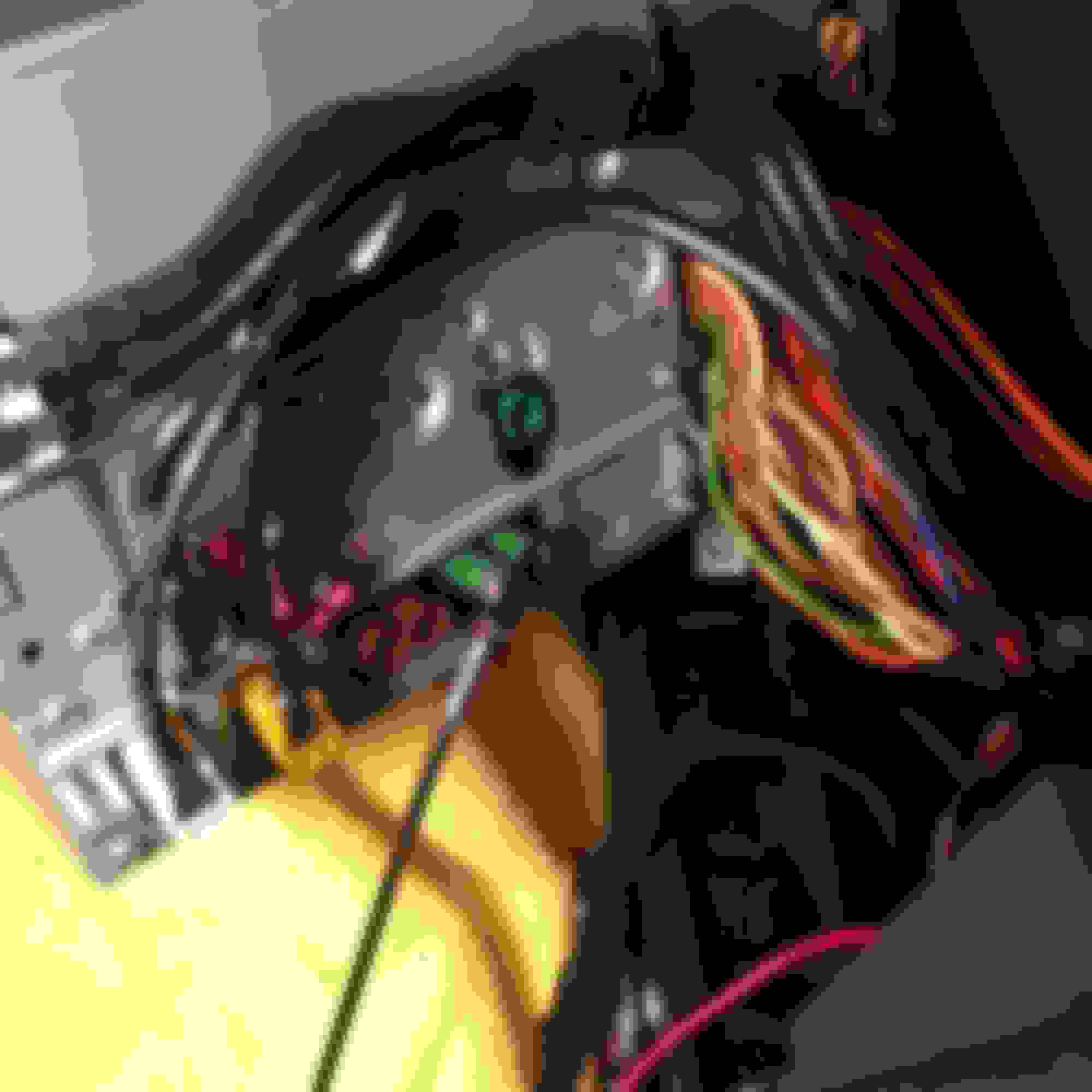
3. After it i managed to go through the salon to my Comand and connected the video to the jack #6, the right one as showed
4. Then i entered an engineering menu and made my selection as showed
5. And also i checket this - "'External video display' (in the HU parameter menu), 'Front monitor', 'RVC'", it was NTSC so a guess it's all right isn't it? I got an NTSC cam...
6. After reseting system (off, then off the car, lock, stay for 5 minutes) i saw a new point in menu "Rear view camera" and it was already switched on "Activate on R-movement".
7. And, at the and of this all when i first made an reverse gear i saw a blank black screen with "Check for surrondings" and a back button.
What did a do wrong?? Please help ASAP, can't sleep! :-)))
Hi!
3. After it i managed to go through the salon to my Comand and connected the video to the jack #6, the right one as showed
It's the green FAKRA Connextion to the left. Not right. I think that image is labeled incorrectly. Mine is connected (for certain, just check my pictures during my install) to the left
It's the green FAKRA Connextion to the left. Not right. I think that image is labeled incorrectly. Mine is connected (for certain, just check my pictures during my install) to the left
Hi, pal! Thanks for your fast reply, you just gave me a hope for tomorrows changes!
One more things - can i see your photos? This ones - during install!? Here is my mail - varekhov@yandex.ru
Hi, pal! Thanks for your fast reply, you just gave me a hope for tomorrows changes!
One more things - can i see your photos? This ones - during install!? Here is my mail - varekhov@yandex.ru
I think I replied to one of your other 3 posts. You're using the wrong FAKRA input. You said you used the 2nd green FAKRA Connextion on the right. It's the first (left) FAKRA connection. And ^^^^ he is correct about add Fuse #71. Tapping in to reverse light will just cause Unstable electricity to camera. I've read plenty post with problems where people tapped into power or a "switch" to the reverse camera light.
Hi!
Following your advice i changed a facra to the one on the left side - the result is obvious! I saw a picture! I rejoiced but much too early - the picture started to blink, then some horizontal gray bars appeared, and then black screen again.
When the time passed (3-5 minutes) the situation happened again - the picture and then blinking and then - black.
Few questions:
1.Can it be because the connection was made to the reverse light? I hoped that because of relay it can be made this way... but it's not?
Or, may be it happes because the anode and +12 are twisted together and linked to "+12" of the reverse light?
Should i detach an anode and leave only +12 AC connected?
2. I know my camera stocked by an integrated parking lines (static ones). There is a small green wire and it's said in the manual that i must cut it if i don't want this lines - so guess they are enabled by default. But i can't see them in moment the camera works!
Should a make some changes in Comand NTG 4.5 Online to enable them? Or, as i heard - there are some factory lines sewn in Comand and i can activate them!
Following your advice i changed a facra to the one on the left side - the result is obvious! I saw a picture! I rejoiced but much too early - the picture started to blink, then some horizontal gray bars appeared, and then black screen again.
When the time passed (3-5 minutes) the situation happened again - the picture and then blinking and then - black.
Few questions:
1.Can it be because the connection was made to the reverse light? I hoped that because of relay it can be made this way... but it's not?
Or, may be it happes because the anode and +12 are twisted together and linked to "+12" of the reverse light?
Should i detach an anode and leave only +12 AC connected?
2. I know my got an integrated parking lines (static ones). There is a small green wire and it's said in the manual that i must cut it if i don't want this lines - so guess they are enabled by default. But i can't see them in moment the camera works!
Should a make some changes in Comand NTG 4.5 Online to enable them? Or, as i heard - there are some factory lines sewn in Comand and i can activate them!
Do you know - what's the solution?
Thanks in advance for your answer!
To eliminate all issue with electricity I would try using the add a fuse to #71 and that should solve all problems. As I stated before. I've read numerous posts about flickering screens when tapping into reverse light for anything in relation to the backup camera. If this doesn't solve it, could it be related to PAL/NTSC setting conflicts? Glad you got the first issue resolved.
To eliminate all issue with electricity I would try using the add a fuse to #71 and that should solve all problems. As I stated before. I've read numerous posts about flickering screens when tapping into reverse light for anything in relation to the backup camera. If this doesn't solve it, could it be related to PAL/NTSC setting conflicts? Glad you got the first issue resolved.
Thanks for answer again! I'l try my best to do it in #71 fuse!
But can you, please, express your opinion about quoted above (about parking lines)?
Mercedes SLR McLaren 722 S Is Extremely Rare Example Modified by McLaren
Slideshow: A one-of-one U.S.-spec Mercedes-Benz SLR McLaren Roadster became even rarer after a factory-backed transformation at McLaren's headquarters.





 backup camera programming?








 Reversing camera update