


2010 GLK Conversion from Standard Audio to Comand with VIM and Reverse Camera
Junior Member
Joined: Jun 2012
Posts: 71
Likes: 0
From: Napa County
1975 450SLC 2012 GLK350
7" Display power:
1) The new display has a different connector to that of the standard audio 5" display. I bought an inexpensive ($30) adapter from a guy in Germany (www.kabeldaviko.de - part number 204-705).
Where can I get this adapter? The link goes to his site, but its down.
Here's a visual...
http://www.ebay.com/itm/CABLE-RETROFIT-DISPLAY-MERCEDES-COMAND-APS-GLK-X204-NTG4-/360771926005?nma=true&si=%252F5A%252FoUlmsJrkOWnfkqldvGAXXJI%253D&orig_cvip=true&rt=nc&_trksid=p2047675.l2557
So I ordered one from Ebay Espanol, kind of weird how the english site said the sale was ended, googled item after learning exact description. Found a link that was Ebay in spanish and ordered one for maybe $43, hopefully it comes ok, my whole account was in spanish because I logged in from the listing. I can read the language, basic words, so glad I found one so fast! fyi here's the Espanol link...
http://www.ebay.es/itm/360810760373?...84.m1439.l2649
1) The new display has a different connector to that of the standard audio 5" display. I bought an inexpensive ($30) adapter from a guy in Germany (www.kabeldaviko.de - part number 204-705).
Where can I get this adapter? The link goes to his site, but its down.
Here's a visual...
http://www.ebay.com/itm/CABLE-RETROFIT-DISPLAY-MERCEDES-COMAND-APS-GLK-X204-NTG4-/360771926005?nma=true&si=%252F5A%252FoUlmsJrkOWnfkqldvGAXXJI%253D&orig_cvip=true&rt=nc&_trksid=p2047675.l2557
So I ordered one from Ebay Espanol, kind of weird how the english site said the sale was ended, googled item after learning exact description. Found a link that was Ebay in spanish and ordered one for maybe $43, hopefully it comes ok, my whole account was in spanish because I logged in from the listing. I can read the language, basic words, so glad I found one so fast! fyi here's the Espanol link...
http://www.ebay.es/itm/360810760373?...84.m1439.l2649
Last edited by Scadobe; Mar 18, 2014 at 06:52 PM. Reason: added a link for a visual

Member
Joined: Jun 2014
Posts: 234
Likes: 12
From: Michigan
w205 C43, 958.1 CTT
7" Display power:
1) The new display has a different connector to that of the standard audio 5" display. I bought an inexpensive ($30) adapter from a guy in Germany (www.kabeldaviko.de - part number 204-705).
Where can I get this adapter? The link goes to his site, but its down.
Here's a visual...
http://www.ebay.com/itm/CABLE-RETROF...p2047675.l2557
So I ordered one from Ebay Espanol, kind of weird how the english site said the sale was ended, googled item after learning exact description. Found a link that was Ebay in spanish and ordered one for maybe $43, hopefully it comes ok, my whole account was in spanish because I logged in from the listing. I can read the language, basic words, so glad I found one so fast! fyi here's the Espanol link...
http://www.ebay.es/itm/360810760373?...84.m1439.l2649
1) The new display has a different connector to that of the standard audio 5" display. I bought an inexpensive ($30) adapter from a guy in Germany (www.kabeldaviko.de - part number 204-705).
Where can I get this adapter? The link goes to his site, but its down.
Here's a visual...
http://www.ebay.com/itm/CABLE-RETROF...p2047675.l2557
So I ordered one from Ebay Espanol, kind of weird how the english site said the sale was ended, googled item after learning exact description. Found a link that was Ebay in spanish and ordered one for maybe $43, hopefully it comes ok, my whole account was in spanish because I logged in from the listing. I can read the language, basic words, so glad I found one so fast! fyi here's the Espanol link...
http://www.ebay.es/itm/360810760373?...84.m1439.l2649
The link the OP referenced originally works now.
Member
Joined: Jun 2014
Posts: 234
Likes: 12
From: Michigan
w205 C43, 958.1 CTT
quick question, so i'm looking at these two units:
http://www.ebay.com/itm/271542233001...84.m1423.l2649
part number - A204 900 53 11
http://www.ebay.com/itm/261546750290...84.m1423.l2649
part number - A204 900 81 10
how can i find out what's the difference in the part numbers? also, under link one, they are selling a plug and play kit. is one needed for the 2013+ cars?
http://www.ebay.com/itm/271542233001...84.m1423.l2649
part number - A204 900 53 11
http://www.ebay.com/itm/261546750290...84.m1423.l2649
part number - A204 900 81 10
how can i find out what's the difference in the part numbers? also, under link one, they are selling a plug and play kit. is one needed for the 2013+ cars?

Newbie
Joined: Oct 2014
Posts: 1
Likes: 0
Mercedes glk
Some problems
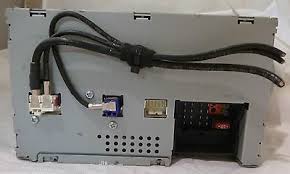 I have also purchased the NAV adapter for my GLK, but the cable connections do not match. there is a 10 pin video connecter on the radio, but not on tee nav unit. I put the original back and now the satellite radio no longer works.
 its the connection with no plug in it

Newbie
Joined: Aug 2015
Posts: 14
Likes: 0
2007 E350 Sport and 2010 GLK350 4matic
Hi,
Was considering this for my wifes 2010 GLK, does anyone know if the NAV unit from a similiar year W204 will fit into the X204, they look identical and are much more redily available from the used market.
Thanks
Was considering this for my wifes 2010 GLK, does anyone know if the NAV unit from a similiar year W204 will fit into the X204, they look identical and are much more redily available from the used market.
Thanks
MBWorld Fanatic!


Joined: Oct 2009
Posts: 3,433
Likes: 212
From: Sweden, Stockholm
W222 S63L, ML/GLE350
Here is a strange thing... I installed a Comand 4.7 to my car(X204) that had the cheapest 2009 Audio 20 system. I changed the can-bus Cables to 6 and 12 in White block from black. The unit is totaly dead. Wont Wake up at all???? Am I Missing something here?

Junior Member
Joined: Aug 2012
Posts: 36
Likes: 6
From: Oregon
2014 ML350 Bluetec
Ciao!
pg
MB World Stories
The Best of Mercedes & AMG

New Electric Mercedes-AMG GT 4-Door Coupe Unveiled: 10 Things You Need to Know
Verdad Gallardo
6 Mercedes Models That Did NOT Age Well (But Are Somehow Still Cool)
Verdad Gallardo
Manual Mercedes? 6 Times Sindelfingen Let Drivers Have All The Fun
Verdad Gallardo
Mercedes SLR McLaren 722 S Is Extremely Rare Example Modified by McLaren
Verdad Gallardo
8 Classic Boxy Mercedes Designs That Have Aged Like Fine Wine
Verdad Gallardo
Flawlessly Restored Mercedes 190E Evo II Heads to Auction
Verdad Gallardo
Electric Mercedes C-Class Unveiled: 11 Things You Need to Know
Verdad Gallardo
Mercedes EQS Gets A Major Update: Everything You Need to Know
Verdad Gallardo
5 Underrated Mercedes-Benz Models That Don't Get the Love They Deserve
Verdad Gallardo
Newbie
Joined: Oct 2013
Posts: 2
Likes: 0
GLK 2010
I NEED YOUR HELP
First time poster here. I recently bought a 2010 GLK which I am thoroughly happy about, but really wanted all the media gimmicks.
The car is a Vancouver 2 year old vehicle bought at companyofacrs.ca (great guys btw) which came with the standard Audio 20 system.
I wanted the Comand NTG4 system with Bluetooth, Navigation, DVD playback, rear seat entertainment and reversing camera - so this is how I got it all for $1,200.00 and about 2 .5 hours worth of work.
No adverts here - just to show you what I bought...
First the COMAND System - I bought a 2010 NTG 4 system (LCD and 1 DVD player head unit only) from a gent on eBay. It was originally listed as being in Ireland, but arrived from Latvia... There is no blood on it, so I am assuming nobody died in its procurement
http://cgi.ebay.com/ws/eBayISAPI.dll...m=110953408397
As it is an European system, you will need to either get access to or outright buy the North American maps so you can update it. IT IS COMPLETELY POSSIBLE to update an European system with North American maps... Buy you have to follow the below instructions.
I bought this (only a V9 disk but with 2012 map data) off ebay and will eventually sell it on after the update:
http://www.ebay.com/itm/Mercedes-Ben...vip=true&rt=nc
I also bought a chinese wireless rear view camera also from ebay - look for a CMOS one without guide lines, but there are plenty specifically designed to fit the GLK's slot just to the left of the trunk lid handle.
Then you need a FAKRA connector and coaxial wire such as:
http://www.ebay.com/itm/290602808618...84.m1497.l2649
You will also need a GPS antenna with a FAKRA connector like:
http://www.ebay.com/itm/261087063343...84.m1497.l2649
I also wanted DVD in Motion (long trips up to ski slopes and US with kids, requires this) and I bought the plug and play one from these guys SPECIFICALLY because it does not disable the navigation capability while DVD's are playing (Navi will interrupt playback with instructions):
http://www.ebay.com/itm/251148178449...84.m1497.l2649
The car is a Vancouver 2 year old vehicle bought at companyofacrs.ca (great guys btw) which came with the standard Audio 20 system.
I wanted the Comand NTG4 system with Bluetooth, Navigation, DVD playback, rear seat entertainment and reversing camera - so this is how I got it all for $1,200.00 and about 2 .5 hours worth of work.
No adverts here - just to show you what I bought...
First the COMAND System - I bought a 2010 NTG 4 system (LCD and 1 DVD player head unit only) from a gent on eBay. It was originally listed as being in Ireland, but arrived from Latvia... There is no blood on it, so I am assuming nobody died in its procurement
http://cgi.ebay.com/ws/eBayISAPI.dll...m=110953408397
As it is an European system, you will need to either get access to or outright buy the North American maps so you can update it. IT IS COMPLETELY POSSIBLE to update an European system with North American maps... Buy you have to follow the below instructions.
I bought this (only a V9 disk but with 2012 map data) off ebay and will eventually sell it on after the update:
http://www.ebay.com/itm/Mercedes-Ben...vip=true&rt=nc
I also bought a chinese wireless rear view camera also from ebay - look for a CMOS one without guide lines, but there are plenty specifically designed to fit the GLK's slot just to the left of the trunk lid handle.
Then you need a FAKRA connector and coaxial wire such as:
http://www.ebay.com/itm/290602808618...84.m1497.l2649
You will also need a GPS antenna with a FAKRA connector like:
http://www.ebay.com/itm/261087063343...84.m1497.l2649
I also wanted DVD in Motion (long trips up to ski slopes and US with kids, requires this) and I bought the plug and play one from these guys SPECIFICALLY because it does not disable the navigation capability while DVD's are playing (Navi will interrupt playback with instructions):
http://www.ebay.com/itm/251148178449...84.m1497.l2649

Junior Member
Joined: May 2016
Posts: 25
Likes: 2
From: Virginia
2010 GLK350
Thanks to mubassado's fine DIY post I was able to swap out my radio and upgrade my 2010 GLK350 from basic radio to all the bells and whistles including back up camera. It wasn't very difficult at all with a unlocked plug and play OEM kit from e.c.i seller on eBay. The only thing that wasn't clear to me was the exact type of FAKRA connector I would need for my back up camera. Heres the one I bought from Amazon:
https://www.amazon.com/gp/product/B0...?ie=UTF8&psc=1
I bought this Pioneer back up camera
https://www.amazon.com/gp/product/B0...?ie=UTF8&psc=1
I also added the Naviks VIM module to complete the mod.
Any questions please ask
https://www.amazon.com/gp/product/B0...?ie=UTF8&psc=1
I bought this Pioneer back up camera
https://www.amazon.com/gp/product/B0...?ie=UTF8&psc=1
I also added the Naviks VIM module to complete the mod.
Any questions please ask
Newbie
Joined: Aug 2015
Posts: 14
Likes: 0
2007 E350 Sport and 2010 GLK350 4matic
No Display Power Up
Hi,
Looking foe some help on the display side of this project, I did not purchase the conversion cable because I found a used 18 pin connector. Rewired as the OP stated and not getting any display/powered up display. HU seems to be working fine. Can someone verify the pinout on the back of the 7" screen relative to the OP's post?
I did notice on the original connector that I had 2 "browns" going to 2 separate pins, I tied those together and routed to the pin identified as brown in the original post.
Thanks
Looking foe some help on the display side of this project, I did not purchase the conversion cable because I found a used 18 pin connector. Rewired as the OP stated and not getting any display/powered up display. HU seems to be working fine. Can someone verify the pinout on the back of the 7" screen relative to the OP's post?
I did notice on the original connector that I had 2 "browns" going to 2 separate pins, I tied those together and routed to the pin identified as brown in the original post.
Thanks


Junior Member
Joined: Jun 2018
Posts: 18
Likes: 1
2012 Mercedes Benz GLK350 4MATIC
7" Display power:
1) The new display has a different connector to that of the standard audio 5" display. I bought an inexpensive ($30) adapter from a guy in Germany (www.kabeldaviko.de - part number 204-705).
First of all just pull off the display fascia - very easy to do as it is only held by some plastic clips.
Attached is the cable schematic and pictures of the display connectors.
You can clearly see the difference between the connectors on the 7" and 5" displays. The adapter will plug directly into the 5" display connector your car is wired with and convert it into what the 7" display needs.
Enclosed is the wiring conversion so you can make you own from the same connectors as fit the USB/Audio connectors on a computer's motherboard, then rearrange the pin connections - the pin spacing is the same - but you don't get the "cool" quadlock connector and felt tape wrap
Once you have plugged the new display into its power cable, you need to take the other display cable (square metal plug, and plug it in upside down from how it fit on the 5" display.
Pull the wire up when you do this to buy you some length, then once fitted you can pull it down again. It is a slightly tight fit, buts beats spending a minor fortune on a longer cable from Mercedes
You will need the TORX screws from the original display to refit the 7".
I snuck in the GPS antenna in a gap behind the display and just under the dash. This is a good time for you to do the same
Once you have done this, you can clip the fascia back on it and reinstall the bigger plastic trim - your display upgrade is now COMPLETE!!!
1) The new display has a different connector to that of the standard audio 5" display. I bought an inexpensive ($30) adapter from a guy in Germany (www.kabeldaviko.de - part number 204-705).
First of all just pull off the display fascia - very easy to do as it is only held by some plastic clips.
Attached is the cable schematic and pictures of the display connectors.
You can clearly see the difference between the connectors on the 7" and 5" displays. The adapter will plug directly into the 5" display connector your car is wired with and convert it into what the 7" display needs.
Enclosed is the wiring conversion so you can make you own from the same connectors as fit the USB/Audio connectors on a computer's motherboard, then rearrange the pin connections - the pin spacing is the same - but you don't get the "cool" quadlock connector and felt tape wrap
Once you have plugged the new display into its power cable, you need to take the other display cable (square metal plug, and plug it in upside down from how it fit on the 5" display.
Pull the wire up when you do this to buy you some length, then once fitted you can pull it down again. It is a slightly tight fit, buts beats spending a minor fortune on a longer cable from Mercedes
You will need the TORX screws from the original display to refit the 7".
I snuck in the GPS antenna in a gap behind the display and just under the dash. This is a good time for you to do the same
Once you have done this, you can clip the fascia back on it and reinstall the bigger plastic trim - your display upgrade is now COMPLETE!!!


Junior Member
Joined: Jun 2018
Posts: 18
Likes: 1
2012 Mercedes Benz GLK350 4MATIC
thanks and on the wiring that went to the audio 20 it has five wires and when I purchased the wiring harness to go to Comand screen it only has 4. When I reinstall the audio 20 screen the backup works. Could that fifth wire be for the camera.




Senior Member
Joined: Sep 2006
Posts: 300
Likes: 16
From: Northwest Arkansas
2016 C450
Same issue, did you ever figure this out?


