


Bluetooth Solution?

Thread Starter
Member
Joined: Jan 2012
Posts: 177
Likes: 0
From: Fairfax VA
2005 E55 AMG
Bluetooth Solution?
I'm thinking about picking up this:
I'm looking for ideas on how to hard wire this. I have the aux in the glove compartment. I'd like to wire this into the glove compartment but looking for power suggestions. Then I'll run a USB cable up through the cup holder so it can charge the phone.
Anyone use this before, reviews are good and it's $25 right now with a promo code.
I'm looking for ideas on how to hard wire this. I have the aux in the glove compartment. I'd like to wire this into the glove compartment but looking for power suggestions. Then I'll run a USB cable up through the cup holder so it can charge the phone.
Anyone use this before, reviews are good and it's $25 right now with a promo code.

Super Member
Joined: May 2009
Posts: 511
Likes: 2
From: Orlando, FL
04 E55 AMG, 03 350z Track Built/Single Turbo
I'm guessing you can tap into the cigarette lighter circuit that runs in the center dash console. Look up some guides on hard wiring radar detectors and splice it into the power and ground in the same manner.
Looks pretty cool though, I hate the fact that the MB bluetooth puck costs so much, and also doesn't stream music. Looking forward to seeing a review on this one.
Looks pretty cool though, I hate the fact that the MB bluetooth puck costs so much, and also doesn't stream music. Looking forward to seeing a review on this one.

Member
Joined: Apr 2013
Posts: 119
Likes: 1
From: South NJ
2006 E55, 1997 Mustang Cobra Conv
Funny, I was just looking at an identical product recently
But searched reviews & the phone audio quality just wasn't up to snuff. Very curious as to how the one you are trying performs. I am disgusted that a technologically high end vehicle as ours doesn't have basic capabilities you'd find in ford focus! I know, I know, it's 7 yrs older, oh well [/rant]
But searched reviews & the phone audio quality just wasn't up to snuff. Very curious as to how the one you are trying performs. I am disgusted that a technologically high end vehicle as ours doesn't have basic capabilities you'd find in ford focus! I know, I know, it's 7 yrs older, oh well
[/rant]

Member
Joined: Dec 2009
Posts: 195
Likes: 0
From: Phoenix AZ
2003 E55 AMG
i run this and works awesome,
And its not too obtrusive, i think thats the word, I would never think a fm transmitter would work so well and this one does.
And its not too obtrusive, i think thats the word, I would never think a fm transmitter would work so well and this one does.
Trending Topics

MBWorld Fanatic!


Joined: Dec 2011
Posts: 4,066
Likes: 37
From: Folsom, CA
2005 E55 AMG
i run this and works awesome, Amazon.com: GOgroove FlexSMART X2 Wireless In-Car Bluetooth FM Transmitter with Charging, Music Control, and Hands-Free Calling for Android, iPhone, Blackberry, & Windows Smartphones: Electronics
And its not too obtrusive, i think thats the word, I would never think a fm transmitter would work so well and this one does.
And its not too obtrusive, i think thats the word, I would never think a fm transmitter would work so well and this one does.
the miniBT looks pretty slick - a bit smaller
MB World Stories
The Best of Mercedes & AMG

Dubai Tuner Gives the Mercedes G-Class An Entirely New Look
Verdad Gallardo
Six Gift Ideas Your AMG Loving Dad or Grad Will Cherish

7 Craziest Things AMG Gas Ever Built
Verdad Gallardo
New Electric Mercedes-AMG GT 4-Door Coupe Unveiled: 10 Things You Need to Know
Verdad Gallardo
6 Mercedes Models That Did NOT Age Well (But Are Somehow Still Cool)
Verdad Gallardo
Manual Mercedes? 6 Times Sindelfingen Let Drivers Have All The Fun
Verdad Gallardo
Mercedes SLR McLaren 722 S Is Extremely Rare Example Modified by McLaren
Verdad Gallardo
8 Classic Boxy Mercedes Designs That Have Aged Like Fine Wine
Verdad Gallardo
Flawlessly Restored Mercedes 190E Evo II Heads to Auction
Verdad Gallardo
Member
Joined: Dec 2009
Posts: 195
Likes: 0
From: Phoenix AZ
2003 E55 AMG
Yea I almost got the mini but the way it sits in the cigarette lighter in our cars doesnt make the as easy to get to like the X2, but technology wise its the same as the X2 and no on off switch.

Member
Joined: Jun 2013
Posts: 182
Likes: 12
From: Centennial, CO
'17 GLS 63 AMG, '08 S65 AMG
Got started last night and got a little ahead of myself. While not really thinking about the mechanics of the Kinivo, I hacked off the 12v adapter thinking I would hardwire it into the system.
Well, dumb move: it's a 5v device, not 12v. So I got to spend another hour fighting with my awful soldering iron to reconnect the tiny power wires to its circuit board in the cigarette plug adapter it came with. So, tl;dr: don't do what I did.
With that said I'm waiting for a second one to come that I don't feel weird about keeping this behind the dash. I'm also going to splice in two 12v cigarette lighter plugs behind the cigarette plug that's embedded in the trim for this and my Valentine 1.
A few pics:
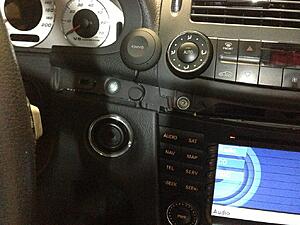
This is where I'm putting the controller. You can see I took the dash trim off (pried up with my Griot Garage interior trim tools on the driver side, and then slid it out to the right with the passenger door open) so I could run the wires.
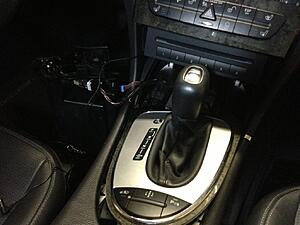
You can see I pried up the surround ring around the shifter (had to shift it back into Neutral in order to pull up on the leading edge) and then be able to pull the 12v plug surround out by pulling up and out. This is where I'm going to tap in for keyed power. Red wire with white stripe is hot, brown is ground, blue with white stripe is the light inside the cigarette plug.
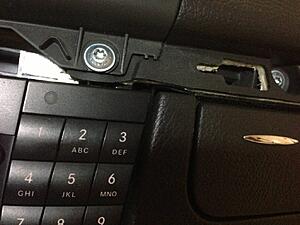
I'm just pushing the wires into the panel gaps since they're so tiny in diameter. I'm using my trim tool to push it in gently. You can't see the wires once they're in they're pushed far enough in.
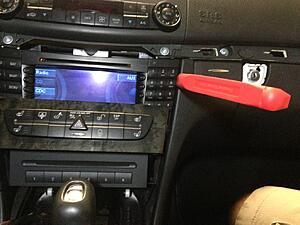
Trim tool pictured.
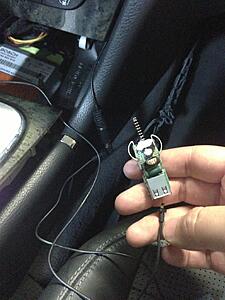
This is the guts of the adapter's 12v plug guts. To my dismay, you need this as it steps voltage down from 12v to 5v. Don't be me and break all this up.
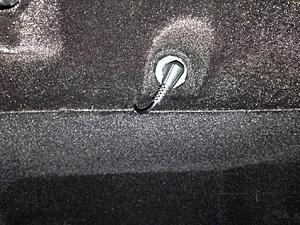
The Kinivo has a single wire running out of the bottom of it that eventually splits into 1 3.5mm audio cable and then the power plug. It also comes with a ~2 foot 3.5mm audio extension cable, which I needed to use since I ran the single cable down the side of the head unit on the driver's side, and then the extension up the right side of the head unit over to the glovebox. Not pictured: I took the inside top of the glovebox trim off to run the wire above/behind it, as you can see.
Once I get the replacement unit I will report back on how I further hack up my car's wiring.
Edit: Once I repaired the wiring I did test it and the pairing was painless and the audio really clear. Pushing the button also acts as a Siri trigger - really liking how this will work, once I get it installed...
Well, dumb move: it's a 5v device, not 12v. So I got to spend another hour fighting with my awful soldering iron to reconnect the tiny power wires to its circuit board in the cigarette plug adapter it came with. So, tl;dr: don't do what I did.
With that said I'm waiting for a second one to come that I don't feel weird about keeping this behind the dash. I'm also going to splice in two 12v cigarette lighter plugs behind the cigarette plug that's embedded in the trim for this and my Valentine 1.
A few pics:

This is where I'm putting the controller. You can see I took the dash trim off (pried up with my Griot Garage interior trim tools on the driver side, and then slid it out to the right with the passenger door open) so I could run the wires.

You can see I pried up the surround ring around the shifter (had to shift it back into Neutral in order to pull up on the leading edge) and then be able to pull the 12v plug surround out by pulling up and out. This is where I'm going to tap in for keyed power. Red wire with white stripe is hot, brown is ground, blue with white stripe is the light inside the cigarette plug.
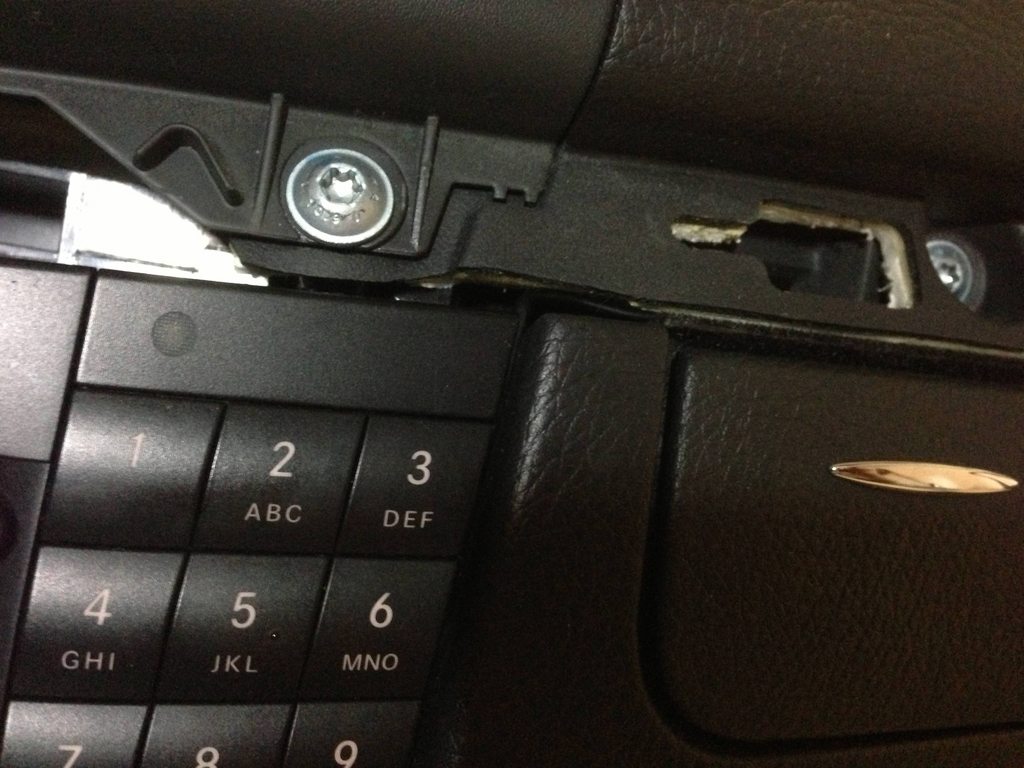
I'm just pushing the wires into the panel gaps since they're so tiny in diameter. I'm using my trim tool to push it in gently. You can't see the wires once they're in they're pushed far enough in.

Trim tool pictured.

This is the guts of the adapter's 12v plug guts. To my dismay, you need this as it steps voltage down from 12v to 5v. Don't be me and break all this up.

The Kinivo has a single wire running out of the bottom of it that eventually splits into 1 3.5mm audio cable and then the power plug. It also comes with a ~2 foot 3.5mm audio extension cable, which I needed to use since I ran the single cable down the side of the head unit on the driver's side, and then the extension up the right side of the head unit over to the glovebox. Not pictured: I took the inside top of the glovebox trim off to run the wire above/behind it, as you can see.
Once I get the replacement unit I will report back on how I further hack up my car's wiring.
Edit: Once I repaired the wiring I did test it and the pairing was painless and the audio really clear. Pushing the button also acts as a Siri trigger - really liking how this will work, once I get it installed...
Last edited by Tremek; Jul 12, 2013 at 08:44 PM.

Member
Joined: Mar 2013
Posts: 123
Likes: 1
From: Alameda, CA
'04 E55 AMG
What do you guys think about these rechargeable ones? Just plug em in the aux and leave them in the glove box and take out to charge later?
Member
Joined: Jun 2013
Posts: 182
Likes: 12
From: Centennial, CO
'17 GLS 63 AMG, '08 S65 AMG
I can't be bothered to be removing and reinstalling things from the car on a regular basis, I want dead-simple car-is-on functionality to just work. Once this is done I think I'm going to be happy, and for <$100 all in this is pretty simple to justify.
2Easy: I played with it a little bit once I got it re-soldered and really liked what I saw so far. Super simple, after I paired the phone and the Kinivo it synced with key-on just like it ought to, and the Kinivo also gave audio cues about its state plus has a blue/red LED on the front to tell you what it's doing. It also has music control buttons on the top. Audio sounded VERY clear, I think it's going to be good but will give a full review after my replacement unit shows up today. The only thing I can see not liking is not having the head unit auto-switch from satellite radio to aux for a call but that's my problem to manage. :P
2Easy: I played with it a little bit once I got it re-soldered and really liked what I saw so far. Super simple, after I paired the phone and the Kinivo it synced with key-on just like it ought to, and the Kinivo also gave audio cues about its state plus has a blue/red LED on the front to tell you what it's doing. It also has music control buttons on the top. Audio sounded VERY clear, I think it's going to be good but will give a full review after my replacement unit shows up today. The only thing I can see not liking is not having the head unit auto-switch from satellite radio to aux for a call but that's my problem to manage. :P

Member
Joined: Jun 2013
Posts: 182
Likes: 12
From: Centennial, CO
'17 GLS 63 AMG, '08 S65 AMG
More progress but more drama: the dual 12v receptacle I ordered isn't going to fit behind the ashtray. Slight change of plans:
I'm going to splice in (solder, heatshrink, etc) a 12v line from the cigarette lighter and put the dual receptacle under the passenger side dash above the footwell and above the panel with the two Torx screws. This will change my wiring a little bit but I think it will work out for the best in the end. Also going to power the V1 from that receptacle, and since the Kinivo has a USB port to output 5v I bought a 6 foot iPhone cable that I'm going to run up the back of the center armrest.
Ran out of time tonight but will keep you guys posted.
I'm going to splice in (solder, heatshrink, etc) a 12v line from the cigarette lighter and put the dual receptacle under the passenger side dash above the footwell and above the panel with the two Torx screws. This will change my wiring a little bit but I think it will work out for the best in the end. Also going to power the V1 from that receptacle, and since the Kinivo has a USB port to output 5v I bought a 6 foot iPhone cable that I'm going to run up the back of the center armrest.
Ran out of time tonight but will keep you guys posted.

Member
Joined: Jun 2009
Posts: 132
Likes: 1
From: Tucson AZ
E55 AMG, 04STI, 07GTI, 05 HAYABUSA, 05 GSX1000
What you guys think about this one?
http://www.ebay.com/itm/Wireless-Bluetooth-Audio-Receiver-12V-New-Piano-Gloss-Finish-/350708496195?pt=US_USB_Bluetooth_Adapters_Dongles&hash=item51a7daf743#ht_2590wt_1241
http://www.ebay.com/itm/Wireless-Bluetooth-Audio-Receiver-12V-New-Piano-Gloss-Finish-/350708496195?pt=US_USB_Bluetooth_Adapters_Dongles&hash=item51a7daf743#ht_2590wt_1241
Member
Joined: Jun 2013
Posts: 182
Likes: 12
From: Centennial, CO
'17 GLS 63 AMG, '08 S65 AMG
What you guys think about this one?
Wireless Bluetooth Audio Receiver 12V New Piano Gloss Finish | eBay
Wireless Bluetooth Audio Receiver 12V New Piano Gloss Finish | eBay
I got everything installed last night, decided with much deliberation not to just use vampire clips and that I was going to cut the 12v line to the outlet and splice in and solder and heatshrink the new line:

It works! I put the dual receptacle up behind the glovebox using 3m tape and wired everything including a line for my Valentine 1 and put the trim back on. Got done at 2am last night so I will go take some pics in the daylight for you guys.
Member
Joined: Jun 2013
Posts: 182
Likes: 12
From: Centennial, CO
'17 GLS 63 AMG, '08 S65 AMG
K, so initial thoughts:
Good:
- Kinivo powers up quickly and is easy to use.
- Paired very easily with my iphone 5 and seems to have no issue automatically pairing.
- Music controls are easy, Siri works by holding down the button.
- Audio playback quality through the car is very clear.
- Where I put the device on the dash let me run its power down to behind the glovebox and plug in the audio into the aux port without any cable extensions. This is good as you can't unplug the 12v power adapter from the unit.
So-so:
- Voice quality on the other end is apparently not good. My wife said she heard a rhythmic thumping while we were talking (electrical interference?) My dad said he could understand me and I was loud, but that it was obviously a marginal cell phone-sounding connection. Really disappointed by this.
- Sound volume for voice calls versus music is very different - calls are very quiet by comparison with the music playback, so I end up turning up the volume on the head unit for calls and then get blasted with super loud music when the call is over. Not sure if this is the device, my phone, or both causing this. I tried maxing out my volume on my phone for both voice and music and it didn't help - even max volume for calls was too quiet without needing amplification on the head unit, which of course makes the music too loud at the same volume. I'm going to try dropping the volume on the music controls for my phone and see if I can normalize.
Good:
- Kinivo powers up quickly and is easy to use.
- Paired very easily with my iphone 5 and seems to have no issue automatically pairing.
- Music controls are easy, Siri works by holding down the button.
- Audio playback quality through the car is very clear.
- Where I put the device on the dash let me run its power down to behind the glovebox and plug in the audio into the aux port without any cable extensions. This is good as you can't unplug the 12v power adapter from the unit.
So-so:
- Voice quality on the other end is apparently not good. My wife said she heard a rhythmic thumping while we were talking (electrical interference?) My dad said he could understand me and I was loud, but that it was obviously a marginal cell phone-sounding connection. Really disappointed by this.
- Sound volume for voice calls versus music is very different - calls are very quiet by comparison with the music playback, so I end up turning up the volume on the head unit for calls and then get blasted with super loud music when the call is over. Not sure if this is the device, my phone, or both causing this. I tried maxing out my volume on my phone for both voice and music and it didn't help - even max volume for calls was too quiet without needing amplification on the head unit, which of course makes the music too loud at the same volume. I'm going to try dropping the volume on the music controls for my phone and see if I can normalize.
Junior Member
Joined: Aug 2013
Posts: 16
Likes: 0
From: atlanta
2010 E350 Coupe
i just got the naztech bt
for IPOD 30pins for my clk350. it work awesome!!!! it as aux in too..... the sound quality is the same !
Junior Member
Joined: Aug 2013
Posts: 16
Likes: 0
From: atlanta
2010 E350 Coupe

Member
Joined: Dec 2014
Posts: 78
Likes: 0
From: CA
cls55
Hey guys sorry to bump an old thread back to life. I just wanted to share a quick easy alternative to the common fm transmitter method used or any hardwiring.
If your car has the old 30 pin iphone cable in the glovebox but doesn't charge here are two things to get.
Scosche passPORT Charging Adapter for iPod and iPhone
 Amazon.com: Scosche passPORT Charging Adapter for iPod and iPhone (Black): MP3 Players & Accessories
and
CoolStream Duo. Bluetooth Adapter / Bluetooth Receiver
The Scosche changes and enables charging via firewire to usb. This can then power 30 pin bluetooth receivers commonly used on docking stations. Just connect the scosche to the 30 pin cable, then connect the bluetooth receiver to the scosche. Now you have bluetooth music capability. It is of better quality than the fm transmitter for sure and the best part is it seems to always auto connect to my phone whenever I enter the car if the bluetooth is still left on on my phone.
If your car has the old 30 pin iphone cable in the glovebox but doesn't charge here are two things to get.
Scosche passPORT Charging Adapter for iPod and iPhone
Amazon.com: Scosche passPORT Charging Adapter for iPod and iPhone (Black): MP3 Players & Accessories
and
CoolStream Duo. Bluetooth Adapter / Bluetooth Receiver
The Scosche changes and enables charging via firewire to usb. This can then power 30 pin bluetooth receivers commonly used on docking stations. Just connect the scosche to the 30 pin cable, then connect the bluetooth receiver to the scosche. Now you have bluetooth music capability. It is of better quality than the fm transmitter for sure and the best part is it seems to always auto connect to my phone whenever I enter the car if the bluetooth is still left on on my phone.

SPONSOR
Joined: Sep 2014
Posts: 3,647
Likes: 818
From: Worldwide
2007 Mercedes E63 AMG
pointless to recommend spending 26.85 + 29.99 = $56.84 for both of those items, when the ViseeO Tune2Air for $85.00
sure you're saving a few dollars, but the Tune2Air supports next/previous track buttons on the steering wheel. will also support track name display if you use an apple product. also less pieces to eventually fail or break.
i spent 40 dollars buying other bluetooth 30 pin adapters, and should have just went straight for a tune2ar which worked flawlessly.
the above solutions are actually really good. i wish i went with the first suggestion instead of spending 189+85 for ipod interface then ViseeO Tune2Air
sure you're saving a few dollars, but the Tune2Air supports next/previous track buttons on the steering wheel. will also support track name display if you use an apple product. also less pieces to eventually fail or break.
i spent 40 dollars buying other bluetooth 30 pin adapters, and should have just went straight for a tune2ar which worked flawlessly.
the above solutions are actually really good. i wish i went with the first suggestion instead of spending 189+85 for ipod interface then ViseeO Tune2Air

Last edited by hachiroku; Mar 19, 2015 at 07:13 PM.


