



Star comms help please?

Thread Starter
Member
Joined: Jan 2017
Posts: 91
Likes: 5
W108 3.5 - 2005 E55
Star comms help please?
Hi All,
I have read just about every thread written about getting an SDS system up and running, but I still don't know where I'm going wrong.
I have v 2014.09 installed on a Dell D620, so no virtual machine issues to deal with. Have entered the necessary codes and have Xentry working.
The green led on my multiplexer is on, but I'm guessing all that indicates is that it's powered from the OBDII socket.
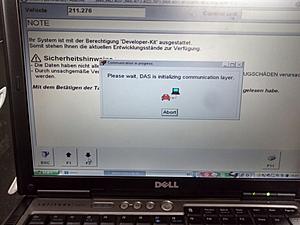
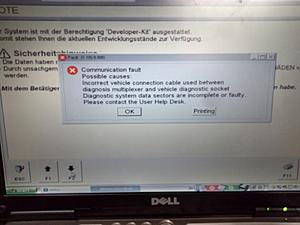
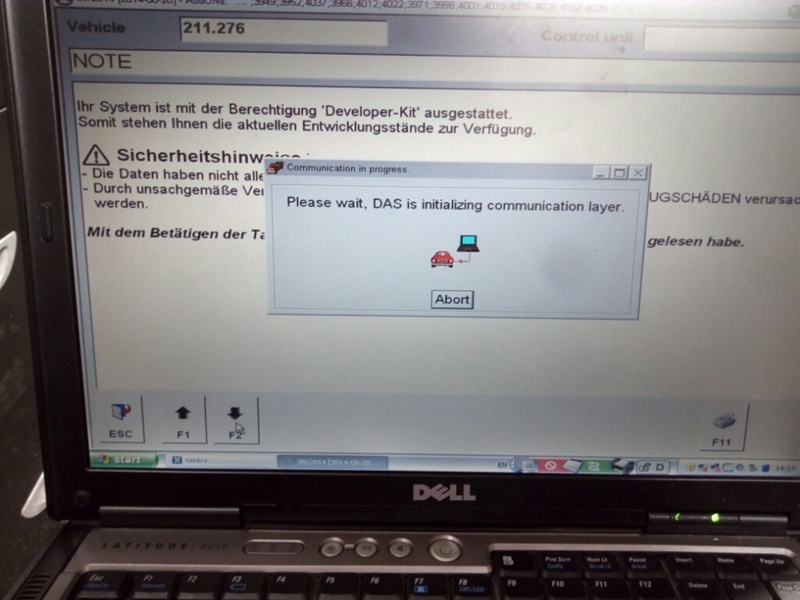
So I fire up Xentry, select W211/E55, hit down/F2 and it tries to communicate, but fails each time.
I have played with baud rates, key on/off etc and haven't had it connect as yet.
At the bottom right of the screen are the 2 red/green status indicators and the open padlock.
I can make the one on the right turn green or red by connecting or disconnecting the mux, so I assume the mux is talking to the laptop ok?
I have read that a minimum baud rate setting of 115200 is required, but I have also read that others have it running best at 9600.
Can anyone clarify the best port settings and have a guess at where I may be going wrong?
MANY thanks in advance,
Ben

I have read just about every thread written about getting an SDS system up and running, but I still don't know where I'm going wrong.
I have v 2014.09 installed on a Dell D620, so no virtual machine issues to deal with. Have entered the necessary codes and have Xentry working.
The green led on my multiplexer is on, but I'm guessing all that indicates is that it's powered from the OBDII socket.
So I fire up Xentry, select W211/E55, hit down/F2 and it tries to communicate, but fails each time.
I have played with baud rates, key on/off etc and haven't had it connect as yet.
At the bottom right of the screen are the 2 red/green status indicators and the open padlock.
I can make the one on the right turn green or red by connecting or disconnecting the mux, so I assume the mux is talking to the laptop ok?
I have read that a minimum baud rate setting of 115200 is required, but I have also read that others have it running best at 9600.
Can anyone clarify the best port settings and have a guess at where I may be going wrong?
MANY thanks in advance,
Ben

Last edited by ben73; Mar 5, 2017 at 10:43 PM.
Thread Starter
Member
Joined: Jan 2017
Posts: 91
Likes: 5
W108 3.5 - 2005 E55
One more thing...
In my reading I noted that other users set the laptop date back to within 3 months of the software version they are using. I assumed this was to be with the date range for the license codes generated by the keygens after installing the software...
Is this step critical? When using the keygens I ticked the 'expire on' box and entered dates spanning Jan 2017 to some time in 2022 thinking I'd get 5 years use from it.
I assumed because we are now within that time period, my licence key codes are ok and I didn't have to fiddle with the date.
I have now just read something that made me think this step might be more important than I first imagined.
For my 2014.09 software, should I re-generate the licence keys to be within this period and set the date back to Oct 2014?
In my reading I noted that other users set the laptop date back to within 3 months of the software version they are using. I assumed this was to be with the date range for the license codes generated by the keygens after installing the software...
Is this step critical? When using the keygens I ticked the 'expire on' box and entered dates spanning Jan 2017 to some time in 2022 thinking I'd get 5 years use from it.
I assumed because we are now within that time period, my licence key codes are ok and I didn't have to fiddle with the date.
I have now just read something that made me think this step might be more important than I first imagined.
For my 2014.09 software, should I re-generate the licence keys to be within this period and set the date back to Oct 2014?
Last edited by ben73; Mar 5, 2017 at 11:39 PM.
Thread Starter
Member
Joined: Jan 2017
Posts: 91
Likes: 5
W108 3.5 - 2005 E55
Thanks for your reply..
I maybe misunderstanding your response, but it reads like you assume I am running under a VM?
I am not running a virtual machine.
I have Star/Xentry running on the Dell D620 in WinXP.
The com port is set to com2, but I doubt it matters when running directly on the laptop (No VM)?
I maybe misunderstanding your response, but it reads like you assume I am running under a VM?
I am not running a virtual machine.
I have Star/Xentry running on the Dell D620 in WinXP.
The com port is set to com2, but I doubt it matters when running directly on the laptop (No VM)?
Thread Starter
Member
Joined: Jan 2017
Posts: 91
Likes: 5
W108 3.5 - 2005 E55
they stopped using the 38 pin connector when they stopped production of the W208 and W210 cars. With the W211 cars you connect the SDS to the OBDII port under the dash..
MBWorld Fanatic!


Joined: Oct 2012
Posts: 1,427
Likes: 100
From: Florida
2002 CLK 55 AMG cabriolet Eurocharged
as a reminder most PC DB9 connector is com1
If you connect the star Interface module before boot it will load com drivers.
Connect to car and start xentry or SD etc next. key on
If you connect the star Interface module before boot it will load com drivers.
Connect to car and start xentry or SD etc next. key on
Last edited by GatorMB; Mar 6, 2017 at 01:59 PM.
Trending Topics
MB World Stories
The Best of Mercedes & AMG

6 Mercedes Models That Did NOT Age Well (But Are Somehow Still Cool)
Verdad Gallardo
Manual Mercedes? 6 Times Sindelfingen Let Drivers Have All The Fun
Verdad Gallardo
Mercedes SLR McLaren 722 S Is Extremely Rare Example Modified by McLaren
Verdad Gallardo
8 Classic Boxy Mercedes Designs That Have Aged Like Fine Wine
Verdad Gallardo
Flawlessly Restored Mercedes 190E Evo II Heads to Auction
Verdad Gallardo
Electric Mercedes C-Class Unveiled: 11 Things You Need to Know
Verdad Gallardo
Mercedes EQS Gets A Major Update: Everything You Need to Know
Verdad Gallardo
5 Underrated Mercedes-Benz Models That Don't Get the Love They Deserve
Verdad Gallardo
Mercedes 300D Has Pushed Well Past 1 Million Miles and It Ain't Stopping
Verdad Gallardo

Super Member

Joined: Aug 2018
Posts: 697
Likes: 172
From: Seattle, WA
2019 M5 Comp, 2005 Ariel Atom 2
This is unrelated to programming settings, but I was having trouble establishing connection, or sometimes it would establish but need me to manually input vehicle details and wouldn't communicate with certain modules that it did before.
The fix? For some reason the OBDII cable on the multiplexer wouldn't go 'deep enough' into the port under the dash, even when locking the tab. I popped the under-dash cover down, unhooked the OBD socket by sliding the plastic connector off, and plugged in directly (i.e. not through the under dash cover). I've never had an issue since, and could feel that the connection was a little deeper. Definitely annoying so I use my handheld scanner for a lot of things, but worth trying if you're having odd things going on with communication.
The fix? For some reason the OBDII cable on the multiplexer wouldn't go 'deep enough' into the port under the dash, even when locking the tab. I popped the under-dash cover down, unhooked the OBD socket by sliding the plastic connector off, and plugged in directly (i.e. not through the under dash cover). I've never had an issue since, and could feel that the connection was a little deeper. Definitely annoying so I use my handheld scanner for a lot of things, but worth trying if you're having odd things going on with communication.


