



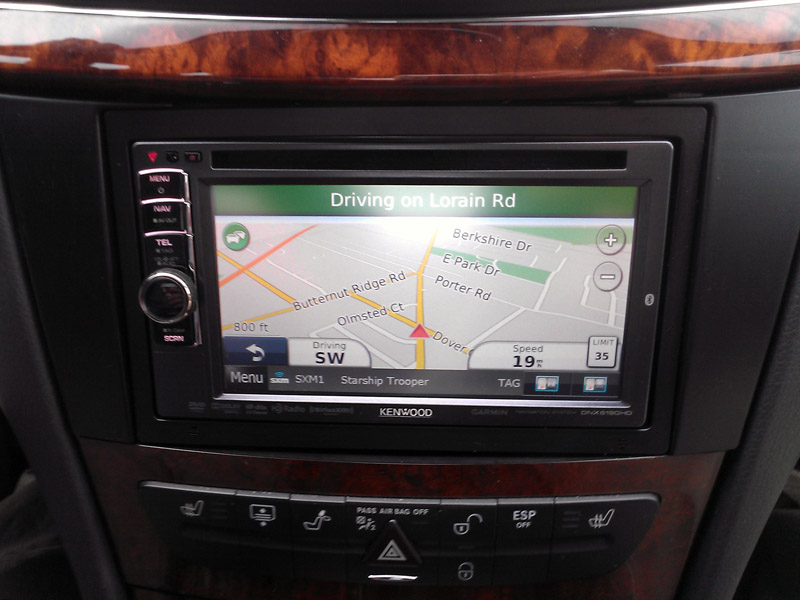

Replacing the COMAND just got easier

MBWorld Fanatic!
Joined: Dec 2004
Posts: 3,063
Likes: 27
From: Tampa, FL
2005 S500 4-Matic, 1978 450SL
The developer of the OPTI-1 was kind enough to answer several questions I had about the device. It provides an excellent path to upgrade our limited COMANDs and head units to much more modern technology, for far less than the cost of replacing the entire system. It is helpful to understand the following points:
1) The OPTI-1 does not itself provide steering wheel control. One would have to use interfaces such as the Metra Axxess ASWC or the Pac SWI series to maintain steering wheel controls.
2) There is no information from the HU displayed on the Multifunction Display in the instrument cluster. That information, which would include phone, navigation and audio information will be shown on the head unit screen.
3) OE Mercedes voice control would be nonfunctional after installation of a 3rd party head unit.
4) A 3rd party head unit will no longer access the MB CDC. However, most 3rd party units would have nav, phone, A2DP, iPod or other music player compatibility, DVD, and other capabilities (My note: Some units I have seen offer the ability to run some of the software found on smartphones, such as Pandora and others - it depends on what unit you buy. Some can have a CDC added, if you wanted one - it would depend on the particular HU. However an iPod or other music player pretty well does away with the need for a CDC anyway).
5) The Bose system active EQ is in the amp, which remains. Results have been good (better than factory, according to the developer) keeping the Bose EQ active and using sound adjustments in the new head unit; however, if the Bose active EQ is a problem, it can be deactivated by unplugging a microphone from the amp; it is a separate plug with 4 wires. (My note: I do not know the exact location of the plug, so please don't PM me and ask).
Those are pretty small sacrifices to overcome some of the limitations of our older COMANDs; the first four would apply to ANY 3rd party COMAND replacement. The ability to retain the Bose active EQ is an attractive option that is not available with other HU replacements. Without active EQ, Bose speakers can sound "dead." Other 3rd party options can require expensive audio processors that are not needed with the OPTI-1.
1) The OPTI-1 does not itself provide steering wheel control. One would have to use interfaces such as the Metra Axxess ASWC or the Pac SWI series to maintain steering wheel controls.
2) There is no information from the HU displayed on the Multifunction Display in the instrument cluster. That information, which would include phone, navigation and audio information will be shown on the head unit screen.
3) OE Mercedes voice control would be nonfunctional after installation of a 3rd party head unit.
4) A 3rd party head unit will no longer access the MB CDC. However, most 3rd party units would have nav, phone, A2DP, iPod or other music player compatibility, DVD, and other capabilities (My note: Some units I have seen offer the ability to run some of the software found on smartphones, such as Pandora and others - it depends on what unit you buy. Some can have a CDC added, if you wanted one - it would depend on the particular HU. However an iPod or other music player pretty well does away with the need for a CDC anyway).
5) The Bose system active EQ is in the amp, which remains. Results have been good (better than factory, according to the developer) keeping the Bose EQ active and using sound adjustments in the new head unit; however, if the Bose active EQ is a problem, it can be deactivated by unplugging a microphone from the amp; it is a separate plug with 4 wires. (My note: I do not know the exact location of the plug, so please don't PM me and ask).
Those are pretty small sacrifices to overcome some of the limitations of our older COMANDs; the first four would apply to ANY 3rd party COMAND replacement. The ability to retain the Bose active EQ is an attractive option that is not available with other HU replacements. Without active EQ, Bose speakers can sound "dead." Other 3rd party options can require expensive audio processors that are not needed with the OPTI-1.
Last edited by Skylaw; Nov 28, 2012 at 11:21 AM.

Thread Starter
MBWorld Fanatic!
Joined: Apr 2007
Posts: 2,430
Likes: 12
From: Cleveland Ohio
beater with a heater
Thanks Skylaw!
I think there is only 20 left, the rest are gone. Seems the car audio shops are swooping them up. There will be another run of boards maybe in February
I think there is only 20 left, the rest are gone. Seems the car audio shops are swooping them up. There will be another run of boards maybe in February

Member
Joined: Dec 2009
Posts: 195
Likes: 0
From: Phoenix AZ
2003 E55 AMG
Well I have the Non Navi comand and no aux input and I was about to swap out for a Navi Comand but I think i rather do this.
Where did you find that Install kit/ surround for the E? Also can we just use the stock brackets and mount it to the Aftermarket double din like the kenwood to install?
Where did you find that Install kit/ surround for the E? Also can we just use the stock brackets and mount it to the Aftermarket double din like the kenwood to install?
Thread Starter
MBWorld Fanatic!
Joined: Apr 2007
Posts: 2,430
Likes: 12
From: Cleveland Ohio
beater with a heater
if you have a MOST optical then it will work. I believe MOST went into E class June of 2003 build date and after...
Kit I found on line a few places, the connects2 seemed to be one of the nicest kit
but a pic of your radio up or email me it to me and I will try and find one for you
Kit I found on line a few places, the connects2 seemed to be one of the nicest kit
but a pic of your radio up or email me it to me and I will try and find one for you
Member
Joined: Dec 2009
Posts: 195
Likes: 0
From: Phoenix AZ
2003 E55 AMG
if you have a MOST optical then it will work. I believe MOST went into E class June of 2003 build date and after...
Kit I found on line a few places, the connects2 seemed to be one of the nicest kit
but a pic of your radio up or email me it to me and I will try and find one for you
Kit I found on line a few places, the connects2 seemed to be one of the nicest kit
but a pic of your radio up or email me it to me and I will try and find one for you
Awesome. Ill take a pic when I'm back home.
Member
Joined: Dec 2009
Posts: 195
Likes: 0
From: Phoenix AZ
2003 E55 AMG
if you have a MOST optical then it will work. I believe MOST went into E class June of 2003 build date and after...
Kit I found on line a few places, the connects2 seemed to be one of the nicest kit
but a pic of your radio up or email me it to me and I will try and find one for you
Kit I found on line a few places, the connects2 seemed to be one of the nicest kit
but a pic of your radio up or email me it to me and I will try and find one for you
Thread Starter
MBWorld Fanatic!
Joined: Apr 2007
Posts: 2,430
Likes: 12
From: Cleveland Ohio
beater with a heater
send me the VIN,
standard E class kit, connects2 or bestkits http://www.bestkits.com/product.php?p=745
standard E class kit, connects2 or bestkits http://www.bestkits.com/product.php?p=745
MB World Stories
The Best of Mercedes & AMG

New Electric Mercedes-AMG GT 4-Door Coupe Unveiled: 10 Things You Need to Know
Verdad Gallardo
6 Mercedes Models That Did NOT Age Well (But Are Somehow Still Cool)
Verdad Gallardo
Manual Mercedes? 6 Times Sindelfingen Let Drivers Have All The Fun
Verdad Gallardo
Mercedes SLR McLaren 722 S Is Extremely Rare Example Modified by McLaren
Verdad Gallardo
8 Classic Boxy Mercedes Designs That Have Aged Like Fine Wine
Verdad Gallardo
Flawlessly Restored Mercedes 190E Evo II Heads to Auction
Verdad Gallardo
Electric Mercedes C-Class Unveiled: 11 Things You Need to Know
Verdad Gallardo
Mercedes EQS Gets A Major Update: Everything You Need to Know
Verdad Gallardo
5 Underrated Mercedes-Benz Models That Don't Get the Love They Deserve
Verdad Gallardo
Member
Joined: Dec 2009
Posts: 195
Likes: 0
From: Phoenix AZ
2003 E55 AMG
send me the VIN,
standard E class kit, connects2 or bestkits http://www.bestkits.com/product.php?p=745
standard E class kit, connects2 or bestkits http://www.bestkits.com/product.php?p=745

Member
Joined: Oct 2012
Posts: 98
Likes: 0
From: Killeen/Ft. Hood, Texas
E55 AMG
This may be an absurd question, but what is the difference between the OPTI-1 and, say, any other analog to digital converter? Is there something special about the MOST setup that will ot work with a common ADC?
Thread Starter
MBWorld Fanatic!
Joined: Apr 2007
Posts: 2,430
Likes: 12
From: Cleveland Ohio
beater with a heater
ADC isn't the problem, anything can do that quite cheaply nowadays, but converting to MOST optical and sending the info to the amp is a different story. And there is not a product on the market for the MB line like this


Thread Starter
MBWorld Fanatic!
Joined: Apr 2007
Posts: 2,430
Likes: 12
From: Cleveland Ohio
beater with a heater
I have done a few. The L7 system is built in to the amp, an aftermarket unit obviously doesn't have L7, or an output to control it so it would be a moot point to even try to integrate it. if you go to car audio shop and demo a Kenwood, it has something similar in the EQ settings where you can turn it into a hall, disco, club, whatever they are.
Personally when I do one, we go flat output, loudness on, and maybe boost the treble or bass 1 notch.
Personally when I do one, we go flat output, loudness on, and maybe boost the treble or bass 1 notch.


Junior Member
Joined: Sep 2011
Posts: 21
Likes: 2
From: NW FLA
03 SL500, 07 S550, 92 500SEL
JBONDOX
This whole line of engineering is headed in the right direction. The strangle hold MB has placed on us for years and years is about to be broken. I hope the R&D proceeds and I hope the test team comes up with some user friendly installation instructions. I know when I did my Smart Top that was a first rate unit with good video instructions. Based on lots of traffic on these sites I'm going to say the instructions are going to need to be bullet proof. My 03 is doing fine with a cheap TT but I'd like the option to upgrade and this work should make that possible. Keep us in the loop.
Thread Starter
MBWorld Fanatic!
Joined: Apr 2007
Posts: 2,430
Likes: 12
From: Cleveland Ohio
beater with a heater
Yeah I have to get some instructions together for it. I am stuck at work on a few projects and it is been time consuming, maybe tomorrow I will find an old E class or SL and pull the radio for some 8x10 glossy's. Can’t guarantee it though as the day is crammed with appointments.
But in a nut shell.
Once you remove the comand:
1.) The red and brown wires going to it are power and ground. You will hook up the opti1 to those (black on the opti1 is ground and goes to brown of the aforementioned wires
don't lop the plug off, just strip back a little bit of the insulation exposing the copper wires, poke a small pick tool through the wires, so you have something like 8 strands on the left and 8 strands on the right. strip about 3/4" of insulation off the opti wire and put it in the hole you made with the pick tool, then wrap it around the wire, solder if you can, tape it up, and I recommend 3m super 33+ tape. Do 1 wire at a time also.
So now you have your power connections for the opti1
2.) The 2 optical wires (orange) terminate into a small black plug that is inserted into a larger black plug, on the comand wiring harness. You want to unclip the small harness away from the larger plug. In the box with the opti 1 is a black plastic plug cover/adapter. Put that on the optical wires, it only goes on 1 way so it is impossible to mess up. When done, plug that into the opti1 receptacle. You know have it pretty much wired up to work.
3.) From your new radio, there is an amplifier turn on lead, usually blue with a white stripe. Hook that up to the blue wire on the opti1. This will tell the factory amplifier to play the music coming from the new radio when the radio is on. Basically a turn on/off switch for the opti1
If you are going to use a tablet to control everything, then you will need to hook up the blue wire of the opti1 to a switched ignition source such as the cigarette lighter.
4.) RCA’s from the OPTI-1 will connect to the RCA Outputs of the aftermarket radio, usually front channel s is used, but if you have a non-fading output on your new radio, it shouldn’t be an issue. They come as a female end, so you will need a short male to male patch cord to connect in between your radio and the OPTI-1
Reason being this is like that, is because some people, like myself, would try to plug them in to the back of the radio and then stuffing 8” of depth in a 7.75” cavity breaking something, soooo… female it was.
There you have it: installed
Now other connections that I can help with are ignition power which can be taken off the cigarette lighter, ground, and illumination if needed for the aftermarket radio.
Constant power for the aftermarket radio should be taken from the driver’s side dash fuse box or off the factory amplifier. Please fuse it!
Antenna connection will be needed to run from the aftermarket radio to the audio gateway, on the SL‘s it is behind the driver’s side seat where the rear doors would be if a 4 door. To access it open up the compartment, pull off the 12” x 4” leather wrapped rectangle starting from the top and remove the screw holding the side panel. I also move the doors weather-strip. Pop the side panel out about an inch at the top, and then rotate from the bottom up. The gateway should be visible, and the antenna is on the end closest to the seat. You will need another antenna adapter which can be had from Metra Electronics called a 40-eu10. You know have antenna
For the E and the S, it is in the trunk, so plan on a longer antenna extension like 18 foot plus the adapter. It is driver’s side between the trunk arm support and the outer skin. Bottom black square plug is the antenna.
Hope that helps.
But in a nut shell.
Once you remove the comand:
1.) The red and brown wires going to it are power and ground. You will hook up the opti1 to those (black on the opti1 is ground and goes to brown of the aforementioned wires
don't lop the plug off, just strip back a little bit of the insulation exposing the copper wires, poke a small pick tool through the wires, so you have something like 8 strands on the left and 8 strands on the right. strip about 3/4" of insulation off the opti wire and put it in the hole you made with the pick tool, then wrap it around the wire, solder if you can, tape it up, and I recommend 3m super 33+ tape. Do 1 wire at a time also.
So now you have your power connections for the opti1
2.) The 2 optical wires (orange) terminate into a small black plug that is inserted into a larger black plug, on the comand wiring harness. You want to unclip the small harness away from the larger plug. In the box with the opti 1 is a black plastic plug cover/adapter. Put that on the optical wires, it only goes on 1 way so it is impossible to mess up. When done, plug that into the opti1 receptacle. You know have it pretty much wired up to work.
3.) From your new radio, there is an amplifier turn on lead, usually blue with a white stripe. Hook that up to the blue wire on the opti1. This will tell the factory amplifier to play the music coming from the new radio when the radio is on. Basically a turn on/off switch for the opti1
If you are going to use a tablet to control everything, then you will need to hook up the blue wire of the opti1 to a switched ignition source such as the cigarette lighter.
4.) RCA’s from the OPTI-1 will connect to the RCA Outputs of the aftermarket radio, usually front channel s is used, but if you have a non-fading output on your new radio, it shouldn’t be an issue. They come as a female end, so you will need a short male to male patch cord to connect in between your radio and the OPTI-1
Reason being this is like that, is because some people, like myself, would try to plug them in to the back of the radio and then stuffing 8” of depth in a 7.75” cavity breaking something, soooo… female it was.
There you have it: installed
Now other connections that I can help with are ignition power which can be taken off the cigarette lighter, ground, and illumination if needed for the aftermarket radio.
Constant power for the aftermarket radio should be taken from the driver’s side dash fuse box or off the factory amplifier. Please fuse it!
Antenna connection will be needed to run from the aftermarket radio to the audio gateway, on the SL‘s it is behind the driver’s side seat where the rear doors would be if a 4 door. To access it open up the compartment, pull off the 12” x 4” leather wrapped rectangle starting from the top and remove the screw holding the side panel. I also move the doors weather-strip. Pop the side panel out about an inch at the top, and then rotate from the bottom up. The gateway should be visible, and the antenna is on the end closest to the seat. You will need another antenna adapter which can be had from Metra Electronics called a 40-eu10. You know have antenna
For the E and the S, it is in the trunk, so plan on a longer antenna extension like 18 foot plus the adapter. It is driver’s side between the trunk arm support and the outer skin. Bottom black square plug is the antenna.
Hope that helps.

Junior Member
Joined: Mar 2009
Posts: 15
Likes: 0
From: Calgary, AB
'92 W201 2.3, '10 X164 550
All materials and parts are in to do the 2006 SL modification from COAMND-APS NTG1 to Kenwood DNX-7190HD with Sirius sat radio tuner, AXXESS ASWC steering controls, utilizing the OPTI-1 to stream front speaker signals to the BOSE amp and hard wire the rear deck fill speakers back to the Kenwood rear.... All credits to JBONDOX for known reasons
I still have 3 questions related to the diffrent antennas we have in the SL:
1- My COMAND-APS NTG1 came equipped with SAT radio, where should I find the stock antenna hook-up for it? is it at the Audio Gateway (AGW) by the CD changer and Amp area, or is it at the back of the COMAND?
As I would like to use the stock sat radio antenna for the new Sirius tuner, would this be possible? would the connectors be the same? and If it is possible connectionwise, should I be concerned with signal amplification issues?
I don't know the fiewall penetrations in this car as most people would install the NAV and SAT antennas under the hood rear grills
2- My COMAND-APS NTG1 has navigation (driven by a trunk installed DVD drive), where should I have the stock antenna connector hook-up? is it at the trunck DVD or at COMAND-APS location? the COMAND 2.0 nav antenna connector looks exactly like the Kenwwod connector (Excuse my Fakra...etc ignorance) so would it be the same for the COMAND-APS NTG1?
3- I know the radio antennas in the 2006 SL are running in mutiple places due to the roof positions. But can anyone define to me what the Rear driver fender antenna does? and what the trunck top antenna does? I have to mention that I have no phone in my car nor any wiring infrastructure for it
I'm in the process of putting a fully detailed write-up with pictures and equipment spec and pricing and I would like to ask the mod if I'm able to upload it here!!! I don't want to be banned for advertising
I still have 3 questions related to the diffrent antennas we have in the SL:
1- My COMAND-APS NTG1 came equipped with SAT radio, where should I find the stock antenna hook-up for it? is it at the Audio Gateway (AGW) by the CD changer and Amp area, or is it at the back of the COMAND?
As I would like to use the stock sat radio antenna for the new Sirius tuner, would this be possible? would the connectors be the same? and If it is possible connectionwise, should I be concerned with signal amplification issues?
I don't know the fiewall penetrations in this car as most people would install the NAV and SAT antennas under the hood rear grills
2- My COMAND-APS NTG1 has navigation (driven by a trunk installed DVD drive), where should I have the stock antenna connector hook-up? is it at the trunck DVD or at COMAND-APS location? the COMAND 2.0 nav antenna connector looks exactly like the Kenwwod connector (Excuse my Fakra...etc ignorance) so would it be the same for the COMAND-APS NTG1?
3- I know the radio antennas in the 2006 SL are running in mutiple places due to the roof positions. But can anyone define to me what the Rear driver fender antenna does? and what the trunck top antenna does? I have to mention that I have no phone in my car nor any wiring infrastructure for it
I'm in the process of putting a fully detailed write-up with pictures and equipment spec and pricing and I would like to ask the mod if I'm able to upload it here!!! I don't want to be banned for advertising
Last edited by raed_jan; Jan 21, 2013 at 05:45 PM.
Thread Starter
MBWorld Fanatic!
Joined: Apr 2007
Posts: 2,430
Likes: 12
From: Cleveland Ohio
beater with a heater
for 1 and 2, both factory antenna ends are in the trunk. I recommend running them under the left (drivers side when sitting in the seat) air vent on the hood. Run the wires in through the fuse and relay junction block also on the drivers side. there is lots of room, just follow how they did the wiring on the passenger side by the hinge and you will be fine.
it will be easier then trying to interface with the factory antennas
3. trunk is sat, fender AM/FM... you want to connect your antenna at the audio gateway, located behind the driver seat where the rear door would be. in a nut shell, pull up door sill, remove weather strip, in front of cd changer remove the rectangle cover, remove torx t20, pop the top side of the panel by the door opening, and rotate the panel up. you will see the antenna going into the AGW
I wouldnt see you banned for advertising, its not like you are selling anything. unless of course you work for Kenwood... Just kidding. email me with any questions or if you get stuck during the installation
it will be easier then trying to interface with the factory antennas
3. trunk is sat, fender AM/FM... you want to connect your antenna at the audio gateway, located behind the driver seat where the rear door would be. in a nut shell, pull up door sill, remove weather strip, in front of cd changer remove the rectangle cover, remove torx t20, pop the top side of the panel by the door opening, and rotate the panel up. you will see the antenna going into the AGW
I wouldnt see you banned for advertising, its not like you are selling anything. unless of course you work for Kenwood... Just kidding. email me with any questions or if you get stuck during the installation
Junior Member
Joined: Mar 2009
Posts: 15
Likes: 0
From: Calgary, AB
'92 W201 2.3, '10 X164 550
Thanks Jim.... You're the best
Integration is a hassle and I know that. Thanks for providing the route to install those 2 antenna
I'm also waiting for the 3M DI-NOC bubinga self adhesive wrap to do the connects2 facia in wood texture that meets the existing MB wood work ... the black shade of the kit is dark matte grey that won't match perfectly with the cup holders black.... not a big deal but I would like to present the best product possible
Integration is a hassle and I know that. Thanks for providing the route to install those 2 antenna
I'm also waiting for the 3M DI-NOC bubinga self adhesive wrap to do the connects2 facia in wood texture that meets the existing MB wood work
... the black shade of the kit is dark matte grey that won't match perfectly with the cup holders black.... not a big deal but I would like to present the best product possible


