



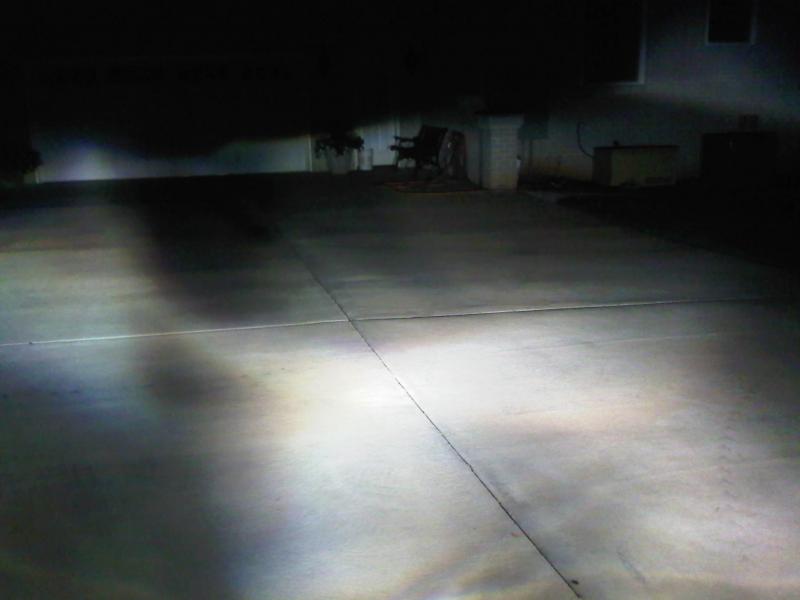
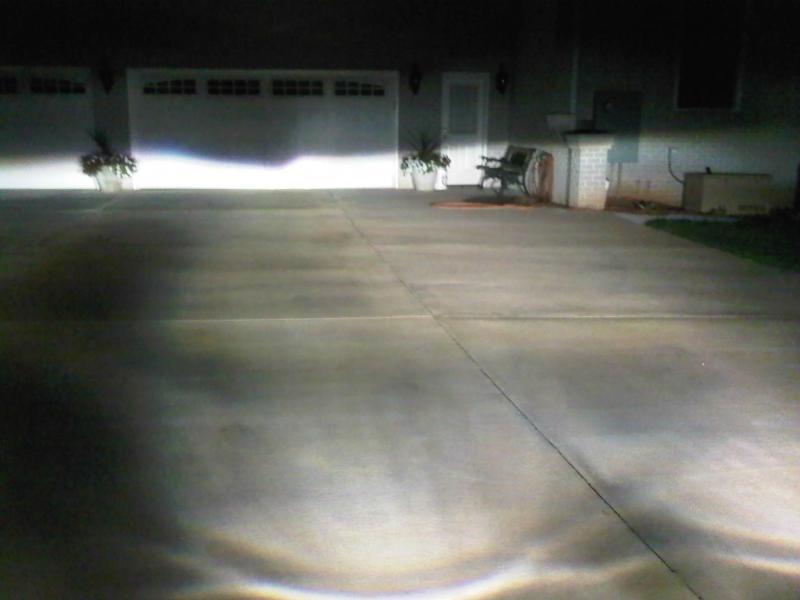
I just installed my AZN 5000K HID kit into my low beams, and I have a HUGE dark spot right in the center. I don't know what to do. 
Member
Perhaps you should have another look on the bulb to see if there's anything that may conflict with the light-source
MBWorld Fanatic!
Make sure the tip of the bulbs dont have any chips in the coating. Make sure your bulbs are seated properly.

MBWorld Fanatic!
gotta re-aim your bulbs. keep moving them until they are lined up.
I couldn't find anything that fit the white knob to adjust the height of the beam, but I'll look again. I hope that's all that's wrong. Taking those clips off and putting them back on is a pain. Thanks for everyone's input!

Senior Member
Quote:
Flat head screwdriver works. So do coinsOriginally Posted by Richard2011
I couldn't find anything that fit the white knob to adjust the height of the beam, but I'll look again.
MBWorld Fanatic!
You shouldnt have to aim the headlights if you didnt remove the headlight assembly

Newbie
Same problem I had with mine when I installed them. Take the bulb out and re-install allowing it to re-seat itself. I thought it was in right the first time, but it wasn't in 100% I guess.
Good luck!
Good luck!
Quote:
Well, when I first installed my DDM HID kit in, I did have to re-aim, because it was aimed too low.Originally Posted by xXHotelCrazyXx
You shouldnt have to aim the headlights if you didnt remove the headlight assembly
Anyways, I'll check everything again. Hopefully, I can get this resolved.
MBWorld Fanatic!
Make sure the notch on the bulb is lined up with the notch on the headlight housing. Check the obvious!

SPONSOR/MBworld Guru
Should be just a matter of readjusting. And also make sure not to touch the actual bulb or the oils will cause issues.
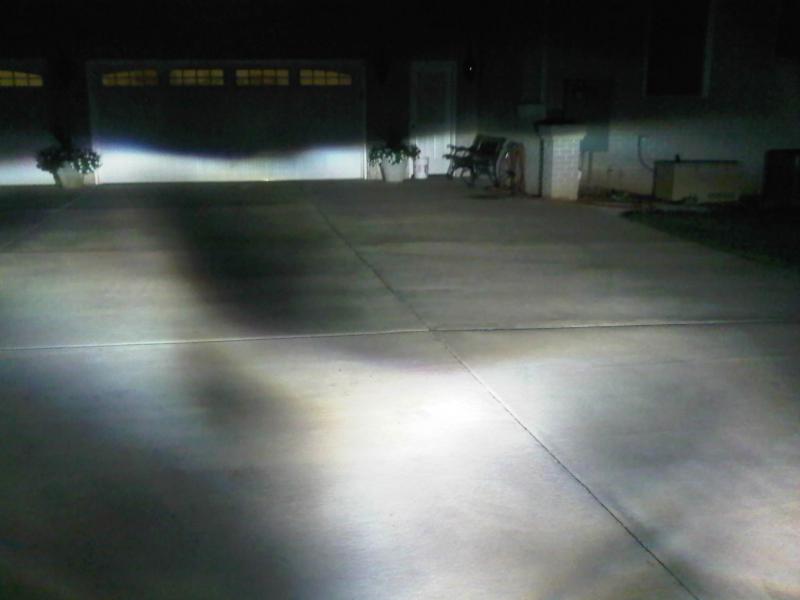
I checked today, and my passenger side bulb wasn't seated correctly. The tab wasn't in its proper spot. I re-seated that bulb, and that's all that I did, because the driver side bulb was seated correctly. Well, when it got dark, I checked again. The dark spot is a lot smaller, and but still there. I blocked each headlight one at a time to see which one was causing was the problem, and this spot seems to be coming from the driver's side. Notice that most of the light is concentrated in that one spot from that headlight. The engine bay was too hot at the time, so I didn't turn the bulb too see if that would make any difference, but I'll do that in the next couple of days.

Newbie
There is no left to right adjustment.
Your fix is to raise the bulb up, 1 full turn. Mark with a sharpie so you know how to come back to factory and what one full turn is. That will fix the dark spot.
Your fix is to raise the bulb up, 1 full turn. Mark with a sharpie so you know how to come back to factory and what one full turn is. That will fix the dark spot.

Out Of Control!!
I've seen it where some oils or contamination on the bulb glass will cause that. Make sure the bulbs are clean.
SPONSOR/MBworld Guru
Quote:
Yeah, that's my concern too. If you touched the bulb, there's a chance the oils from your fingers will contaminate the bulbs and potentially cause burn marksOriginally Posted by AsianML
I've seen it where some oils or contamination on the bulb glass will cause that. Make sure the bulbs are clean.
Quote:
Well, I just pulled the bulb out, because my knuckle may have come in contact with it during installtion, and I did not see any burn marks. I did see one light scratch that was perpendicular to the bulb near the tip, though. That may or may not be the problem. I'm going to try turning the bulb tonight to see if that might fix the problem.Originally Posted by AZN Optics
Yeah, that's my concern too. If you touched the bulb, there's a chance the oils from your fingers will contaminate the bulbs and potentially cause burn marks

Senior Member
its not your bulb, it's the halogen projector not made to handle the light output from the HIDs-
Senior Member
Quote:
Please read before you spread any more misinformation Originally Posted by xXHotelCrazyXx
^thats not the case
http://www.danielsternlighting.com/t...nversions.html

Super Member
^ I have the same HIDs as OP though from mike and mine never had the black spots

MBWorld Fanatic!
I doubt that it's the projector as well. A friend of mine installed the Diamond Vision halogen bulbs previously and the same thing happen. What happened to his was that there is a scratch on the tip of the bulb. Not sure what happened on OPs case.
When I took it out to take a look at the bulb and put it back in, it looks like it fixed itself! I probably should have put them in correctly to begin with. 
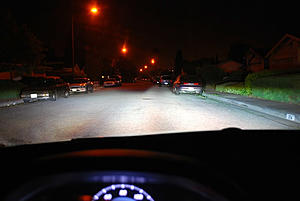
The big dark spot in the middle is gone. There's the dark spot on the left side, but that was there with the halogens, too. It looks Loonie's picture from behind the wheel. My blackberry exaggerated that particular dark spot. It's not that dark.
The big dark spot in the middle is gone. There's the dark spot on the left side, but that was there with the halogens, too. It looks Loonie's picture from behind the wheel. My blackberry exaggerated that particular dark spot. It's not that dark.
MBWorld Fanatic!
Quote:
http://www.danielsternlighting.com/t...nversions.html
Misinformation? Like I said....thats not the case. I know what I am talking about. So before you try to insult my intelligence, i suggest you take a moment and get to know who your talking to.Originally Posted by spoolIT85
Please read before you spread any more misinformation http://www.danielsternlighting.com/t...nversions.html

MBWorld Fanatic!
Only one spreading misinformation, it seems to be you spool.
MBWorld Fanatic!
That, good sir, is one buff kangaroo.


