

My 2015 C300 4Matic has (or is supposed to have) Collision Prevention Assist Plus and the owner's manual (US) states on page 70 (which refers you to page 245) that the system can be activated and deactivated. I followed the instructions in the manual which tell one to go to the menu > DriveAssist submenu > Collision Prevention to turn the system on or off. I do not have the "Collision Prevention" choice on my system - it simply isn't there. The dealer says that I shouldn't worry about it, but I am not getting any warning messages from the system and in city traffic I've had a few times that I would reasonably have expected to have the system kick in!
Just wondering if anyone else has noticed this and/or can confirm that I should be seeing that option. Thanks!!
Just wondering if anyone else has noticed this and/or can confirm that I should be seeing that option. Thanks!!

c4004matic
MBWorld Fanatic!
close


Apr 23, 2026
- Join DateOct 2014
- LocationWI
- Posts:4,524
-
iTrader Positive Feedback0
-
iTrader Feedback Score(0)
- Vehicle(s) I drive17 E43; 21 GLS580
-
Likes:268
-
Liked:1,181 Times in 774 Posts
Quote:
Just wondering if anyone else has noticed this and/or can confirm that I should be seeing that option. Thanks!!
Seems like they didn't get you the drivers assistance package after all? Does your car have the other options in the package? Also check your vehicle's detailed pricing summary on your window. I would definitely worry about it particularly because of the price.Originally Posted by tgchicago
My 2015 C300 4Matic has (or is supposed to have) Collision Prevention Assist Plus and the owner's manual (US) states on page 70 (which refers you to page 245) that the system can be activated and deactivated. I followed the instructions in the manual which tell one to go to the menu > DriveAssist submenu > Collision Prevention to turn the system on or off. I do not have the "Collision Prevention" choice on my system - it simply isn't there. The dealer says that I shouldn't worry about it, but I am not getting any warning messages from the system and in city traffic I've had a few times that I would reasonably have expected to have the system kick in! Just wondering if anyone else has noticed this and/or can confirm that I should be seeing that option. Thanks!!
Member
The Collision prevention thing is a standard feature... there's an option to turn the sensitivity to high or low. No, it's not going to prevent you from having an accident, it's suppose to help you pay attention. It beeps at you sometimes when it thinks you will collide but only if it thinks you're not paying attention.
The optional Distronic Plus is an add-on, like $3-4K. You'd know if you added this package to your car... It's radar based and automatically brakes your car for you.
"
This radar-based system maintains a safe distance from the vehicle in front automatically by braking when necessary and accelerating again when possible. When the traffic situation requires heavier braking than DISTRONIC PLUS is able to perform, the driver is warned by visual and acoustic signals."
The optional Distronic Plus is an add-on, like $3-4K. You'd know if you added this package to your car... It's radar based and automatically brakes your car for you.
"
This radar-based system maintains a safe distance from the vehicle in front automatically by braking when necessary and accelerating again when possible. When the traffic situation requires heavier braking than DISTRONIC PLUS is able to perform, the driver is warned by visual and acoustic signals."
MBWorld Fanatic!
I just came across this setting. If I remember correctly, it has to be accessed through the steering wheel menu for "settings" and not the vehicle settings in the main screen.
The default is on, so it should be operating. I've gotten a couple of warning beeps already when it thought I was moving too close to another object or car. I got a warning yesterday as I was pulling nose first into a parking spot.
Nothing like learning a new operating system ...
The default is on, so it should be operating. I've gotten a couple of warning beeps already when it thought I was moving too close to another object or car. I got a warning yesterday as I was pulling nose first into a parking spot.
Nothing like learning a new operating system ...

Member
From MB's website
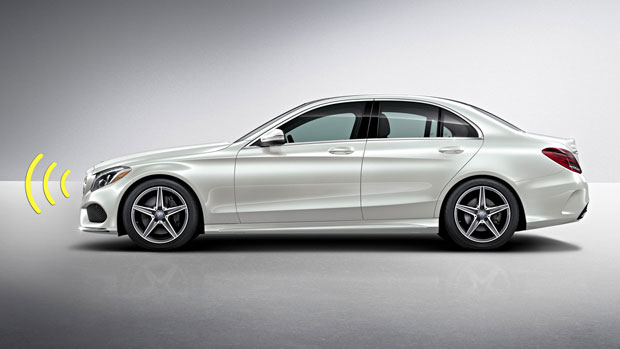
COLLISION PREVENTION ASSIST PLUS
Standard
Radar-based technology alerts you if you're approaching a vehicle ahead, or even some stationary objects, at a speed and distance that suggest a collision is likely. As soon as the driver starts to brake, its Adaptive Brake Assist automatically provides the ideal level of braking, to help prevent a collision or reduce its severity. New for 2015, the system can also provide autonomous braking from speeds up to 65 mph, and can activate the features of PRE-SAFE®.
COLLISION PREVENTION ASSIST PLUS
Standard
Radar-based technology alerts you if you're approaching a vehicle ahead, or even some stationary objects, at a speed and distance that suggest a collision is likely. As soon as the driver starts to brake, its Adaptive Brake Assist automatically provides the ideal level of braking, to help prevent a collision or reduce its severity. New for 2015, the system can also provide autonomous braking from speeds up to 65 mph, and can activate the features of PRE-SAFE®.
Member
There is a difference between CPA and CPA+. CPA+ is standard on 2015 C class and GLA. It WILL brake for you. However, it looks for a certain reaction. It's supposed to work like this--you're driving along, not paying attention, then the car beeps at you, you look up and start the react by taking your foot off the gas, and the car will brake before you can get to it. If you give it more gas, or swerve, or even simply don't lift off the throttle, then it will not brake.
c4004matic
MBWorld Fanatic!
close
Apr 23, 2026
- Join DateOct 2014
- LocationWI
- Posts:4,524
-
iTrader Positive Feedback0
-
iTrader Feedback Score(0)
- Vehicle(s) I drive17 E43; 21 GLS580
-
Likes:268
-
Liked:1,181 Times in 774 Posts
Quote:
The default is on, so it should be operating. I've gotten a couple of warning beeps already when it thought I was moving too close to another object or car. I got a warning yesterday as I was pulling nose first into a parking spot.
Nothing like learning a new operating system ...
Originally Posted by StanNH
I just came across this setting. If I remember correctly, it has to be accessed through the steering wheel menu for "settings" and not the vehicle settings in the main screen.The default is on, so it should be operating. I've gotten a couple of warning beeps already when it thought I was moving too close to another object or car. I got a warning yesterday as I was pulling nose first into a parking spot.
Nothing like learning a new operating system ...
I hope the warning sensitivity is adjustable. In our MDX I have it set at minimum, anything higher is a nuisance. In minimum it only alerts if you are about to crash which is fine for me.
Member
This is a good demo of CPA+

Newbie
Since the radar for the CPA Plus system is located behind the bumper, it seems like the system should engage not only if you are about to hit the car in front of you, but also if you are about to hit the front bumper into something. Is this the case?
Also, does the system alert/break if you are about to back into something? To date, the only "assist" I have gotten from my car is that periodically, and for no particular reason, it will randomly beep out a warning despite there being no cars around as I am driving smoothly down the highway--which only serves to scare me.
Thanks.
Also, does the system alert/break if you are about to back into something? To date, the only "assist" I have gotten from my car is that periodically, and for no particular reason, it will randomly beep out a warning despite there being no cars around as I am driving smoothly down the highway--which only serves to scare me.
Thanks.

Junior Member
Quote:
The optional Distronic Plus is an add-on, like $3-4K. You'd know if you added this package to your car... It's radar based and automatically brakes your car for you.
"
This radar-based system maintains a safe distance from the vehicle in front automatically by braking when necessary and accelerating again when possible. When the traffic situation requires heavier braking than DISTRONIC PLUS is able to perform, the driver is warned by visual and acoustic signals."
Thats partially correct, The audible alarms are only passive as a warning sign, but Collision assist WILL actively brake for you if it detects imminent possible collision, even without Distronic Plus.Originally Posted by Jinzen
The Collision prevention thing is a standard feature... there's an option to turn the sensitivity to high or low. No, it's not going to prevent you from having an accident, it's suppose to help you pay attention. It beeps at you sometimes when it thinks you will collide but only if it thinks you're not paying attention.The optional Distronic Plus is an add-on, like $3-4K. You'd know if you added this package to your car... It's radar based and automatically brakes your car for you.
"
This radar-based system maintains a safe distance from the vehicle in front automatically by braking when necessary and accelerating again when possible. When the traffic situation requires heavier braking than DISTRONIC PLUS is able to perform, the driver is warned by visual and acoustic signals."
I should know as it did save me from a potentially serious crash on the highway :P
Fast beeping, seatbelt pulls back, windows close automatically if opened and full brakes applied. Pretty scary but neat feature!


