





What's this button do?

Thread Starter
MBWorld Fanatic!
Joined: Apr 2006
Posts: 8,137
Likes: 27
From: Maryland
Eurocharged 2004 E500, Eurocharged ECU/TCU 2005 SL600, 2010 Caddy SwaggerWagon
What's this button do?
Ok, so I've never been in the backseat of my car until this last weekend. The car nookie takes place in the SUV 
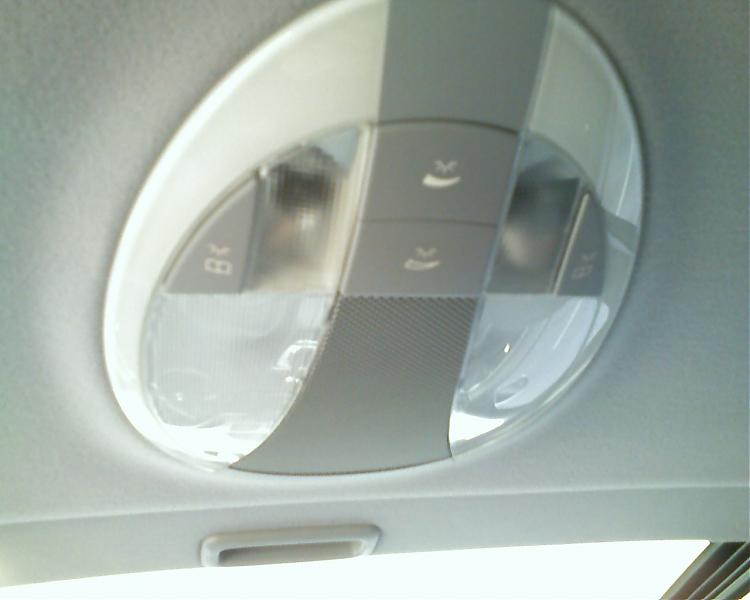
Anyway, on the rear dome light there are 4 buttons. 1 on each side and 2 in the middle. The 2 on the outside are reading lights for the rear occupants. What on Earth do the two in middle do? From the picture on them, they look like some sort of dimming buttons? Mine do absolutely nothing no matter what combination of lights are on. Headlights on, headlights off, map lights on, map lights off, dome lights on, dome lights off....nothing. Look at this pic:
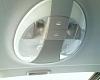
Anyway, on the rear dome light there are 4 buttons. 1 on each side and 2 in the middle. The 2 on the outside are reading lights for the rear occupants. What on Earth do the two in middle do? From the picture on them, they look like some sort of dimming buttons? Mine do absolutely nothing no matter what combination of lights are on. Headlights on, headlights off, map lights on, map lights off, dome lights on, dome lights off....nothing. Look at this pic:

MBWorld Fanatic!
Joined: Nov 2004
Posts: 1,281
Likes: 8
From: Longmont, CO
04 E320 4 Matic, 95 Audi S6, 99 Carrera 4 Cabrio, 12 Fiat 500 Sport, 00 BMW R1200C 10, BMW R1200R
Ok, so I've never been in the backseat of my car until this last weekend. The car nookie takes place in the SUV
Anyway, on the rear dome light there are 4 buttons. 1 on each side and 2 in the middle. The 2 on the outside are reading lights for the rear occupants. What on Earth do the two in middle do? From the picture on them, they look like some sort of dimming buttons? Mine do absolutely nothing no matter what combination of lights are on. Headlights on, headlights off, map lights on, map lights off, dome lights on, dome lights off....nothing. Look at this pic:
Attachment 96174
Anyway, on the rear dome light there are 4 buttons. 1 on each side and 2 in the middle. The 2 on the outside are reading lights for the rear occupants. What on Earth do the two in middle do? From the picture on them, they look like some sort of dimming buttons? Mine do absolutely nothing no matter what combination of lights are on. Headlights on, headlights off, map lights on, map lights off, dome lights on, dome lights off....nothing. Look at this pic:
Attachment 96174
Steve

Out Of Control!!
Joined: Jul 2003
Posts: 15,901
Likes: 4,633
From: North Scottsdale, AZ
'71 Pinto
Thread Starter
MBWorld Fanatic!
Joined: Apr 2006
Posts: 8,137
Likes: 27
From: Maryland
Eurocharged 2004 E500, Eurocharged ECU/TCU 2005 SL600, 2010 Caddy SwaggerWagon
With all interior lights off and just the ambient lights on, these buttons still do nothing for me. I do have my ambient set to '5' on the MFD though. So I would think at least the dimming one should do something, right?
I'll check again tonight just to make sure I haven't been smoking too much crack but I'm pretty sure they did nothing.
Then again, can you really smoke TOO MUCH crack?

Thread Starter
MBWorld Fanatic!
Joined: Apr 2006
Posts: 8,137
Likes: 27
From: Maryland
Eurocharged 2004 E500, Eurocharged ECU/TCU 2005 SL600, 2010 Caddy SwaggerWagon

MBWorld Fanatic!
Joined: Mar 2003
Posts: 2,434
Likes: 1
From: So Cal
2010 RRS ; BMW K1200R; 14 E350 ; 14 RRS on order
Yours work just fine, the button increases and decreases in VERY VERY small increments so keep your finger on it and you'll see a difference.
This is also controlled by the comand setting in your cluster.
This is also controlled by the comand setting in your cluster.
Trending Topics
MB World Stories
The Best of Mercedes & AMG

Dubai Tuner Gives the Mercedes G-Class An Entirely New Look
Verdad Gallardo
Six Gift Ideas Your AMG Loving Dad or Grad Will Cherish

7 Craziest Things AMG Gas Ever Built
Verdad Gallardo
New Electric Mercedes-AMG GT 4-Door Coupe Unveiled: 10 Things You Need to Know
Verdad Gallardo
6 Mercedes Models That Did NOT Age Well (But Are Somehow Still Cool)
Verdad Gallardo
Manual Mercedes? 6 Times Sindelfingen Let Drivers Have All The Fun
Verdad Gallardo
Mercedes SLR McLaren 722 S Is Extremely Rare Example Modified by McLaren
Verdad Gallardo
8 Classic Boxy Mercedes Designs That Have Aged Like Fine Wine
Verdad Gallardo
Flawlessly Restored Mercedes 190E Evo II Heads to Auction
Verdad Gallardo
MBWorld Fanatic!
Joined: Jul 2006
Posts: 1,779
Likes: 11
From: Long Island, NY
2004 E320
I wondered about those buttons on my car when I bought it, because there was absolutley
NO mention of that dome fixture buttons in the owner's manual.
NO mention of that dome fixture buttons in the owner's manual.
Last edited by starbrite; Jan 18, 2007 at 02:57 PM.


Newbie
Joined: Sep 2006
Posts: 4
Likes: 0
I have been having a problem with these buttons. They work fine in controlling the brightness of the rear ambient lighting. However, I cannot get the cluster control to change the rear lighting. So the front ambient lights work with the cluster control and the rear work with the rear buttons. But I think before the cluster control would change both sets of lights. Any ideas on how to fix it?
Thread Starter
MBWorld Fanatic!
Joined: Apr 2006
Posts: 8,137
Likes: 27
From: Maryland
Eurocharged 2004 E500, Eurocharged ECU/TCU 2005 SL600, 2010 Caddy SwaggerWagon
OK.
2 things:
1. I love the crack pipe. And yes, I held the little dimmer button and sure enough, it dimmed. When I was trying it before, I was tapping it. Holding it does the trick.
2. My cluster control (MFD) controls both the front and rear when I change my ambient light setting. They change together.
Thanks guys
2 things:
1. I love the crack pipe. And yes, I held the little dimmer button and sure enough, it dimmed. When I was trying it before, I was tapping it. Holding it does the trick.
2. My cluster control (MFD) controls both the front and rear when I change my ambient light setting. They change together.
Thanks guys


Junior Member
Joined: Sep 2010
Posts: 24
Likes: 0
From: London
W213 E220 2017
 Ambient Light
I have tried my rear ambient light it does not come up at all,
Any clues,
I have a panoramic sunroof with the rear ambient lights,
The front work no problem its the rear ones
Please help
Thanks
Any clues,
I have a panoramic sunroof with the rear ambient lights,
The front work no problem its the rear ones
Please help
Thanks

Super Member
Joined: Aug 2009
Posts: 600
Likes: 2
From: Northern California
09' E350 AMG Sport, 09' C300, 03' Honda S2K
If I remember correctly, the rear seats dont have ambient lighting (the circle ring like the front does). Is the front and back suppose to light up as ambient lighting, or is it only for reading lights.

Super Member
Joined: Apr 2004
Posts: 625
Likes: 82
From: Germantown, MD
'07 GL450
charliele729:
Yes, the rear seats do have the ambient ring and an adjustable setting.
netwalla:
Turn the ambient setting on the MFD all the way up to 5, then press and hold the rear illumination button until the lights are at their brightest.
Once you confirm its operation, adjust the settings to your liking.
GL.
Yes, the rear seats do have the ambient ring and an adjustable setting.
netwalla:
Turn the ambient setting on the MFD all the way up to 5, then press and hold the rear illumination button until the lights are at their brightest.
Once you confirm its operation, adjust the settings to your liking.
GL.


Super Member
Joined: Aug 2009
Posts: 600
Likes: 2
From: Northern California
09' E350 AMG Sport, 09' C300, 03' Honda S2K
Ok, I have confirm that my 09" does not have that option. There is no circle ring light, just two reading light. I guess that change it from the previous models.

Newbie
Joined: Sep 2010
Posts: 2
Likes: 0
2003 E500
I was just getting ready to go out to my car with my phone to take pics but now I see I'm not the only one. I was doing the same thing pressing those buttons and nothing was happening. I thought something was broke. I also noticed that there was ABSOLUTELY no mention of these buttons and their function in the manual. I will try holding the button down to see what happens. I can just see my neighbors wondering what the hell I'm doing sitting in my own back seat, alone in the dark, with the car running....


