



 Jun 24, 2015, 06:04 PM
Last edit by: IB Advertising
See related guides and technical advice from our community experts:
- Mercedes Benz E Class How to Install Video In Motion (VIM) Interface
Step by step instructions for do-it-yourself repairs

DIY: Video-in-motion install

Thread Starter
Super Member


Joined: Sep 2013
Posts: 971
Likes: 182
From: DFW, TX
2014 E350 Wagon, 2025 GLC 350e, 2026 E53 Wagon
DIY: Video-in-motion install
I installed a VIM interface in my 2014 W212 yesterday. I bought one from Belarus via eBay from this guy. He provides a DIY video that is pretty thorough albeit it's a very simple install.
The cable arrived in 2 weeks and it works as advertised.
The cable has no control box as the surface mount circuit board is small enough to fit in heat shrink and be dangling on the cable. The cable is long enough to work with it and you still have to have a bit of finesse to massage the extra black connector behind the COMMAND unit in the dash.

I have removed the wood trim and the COMMAND unit when I installed my aux 12V and USB connection before so it was not a big deal to do it again and completed the entire install in 15 minutes.
The two clips that you have to pull from inside the glove box look like this:

To pull the trim piece you need a small flat head screwdriver to unclip the trim at the center vents, just point a flashlight to see where the clips are, they look like tongues cut into the vent outer wall that need to be folded inward. Then you have to unclip the three wires that connect it to the car:
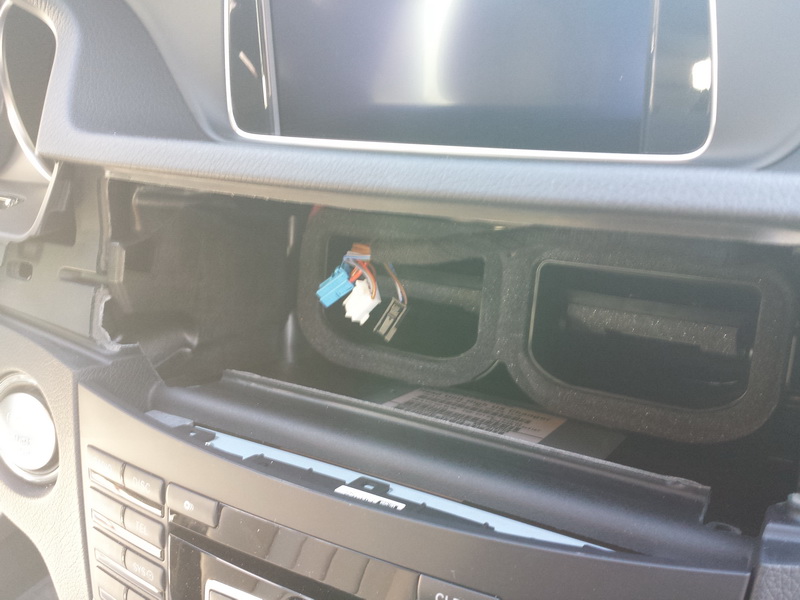
The next step is to unscrew the Torx screws that hold the metal latches in which hold the COMMAND unit in the car. You have to unscrew the entire screw and it takes the longest in the whole install. Make sure you use the T-20 Torx bit and that you don't over tighten it on the way back.
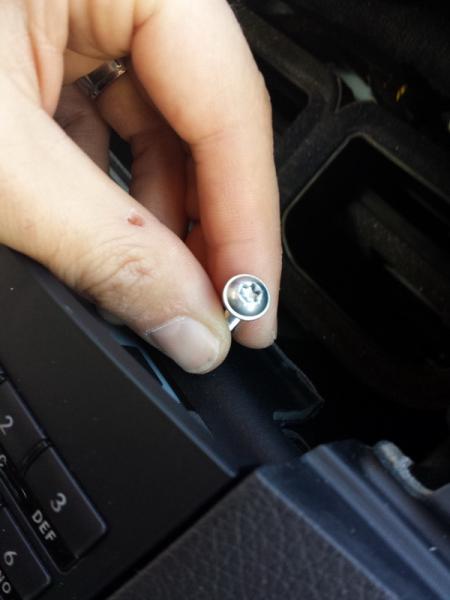
Then you need to unclip a connector on the side of the COMMAND as you're pulling it out as it's not long enough to reach as you're pulling the unit out.

And finally you need to move the two smaller clips and the optical link from the big black connector of the car to the new black connector. The hardest one to move is the optical cable, the other two are really easy as they unclip without a problem.

Once it's all done you just have to put it all back together. Unlike the eBay instructions stated the unit was OFF by default and I had to enable it by holding down the phone hang-up button for 6 seconds and the blinkers would blink to indicate that the unit switched modes. To turn it off just hold the phone button down 6 seconds and the unit turns off and things are back to normal as if it wasn't even there.
When the unit is ON it allows video to be displayed while the car is not in Park and it also displays your text messages not just read them out aloud. It also allows you to enter address information in the GPS and unlike previous VIM solutions in previous models this one does not inhibit GPS navigation, navigation works just fine even if you have VIM on and you have a DVD playing.
I think the way the system works is that every time a video source is requested the COMMAND unit must send a verification check on the CAN bus to the instrument cluster for whether the car is in motion or not and this response gets interrupted by the VIM unit and fakes an "A-OK" signal for the COMMAND unit. Otherwise the unit simply transfers CAN signals as if it wasn't there.
Either way, the unit works as advertised and does what it claims to do. For $150 I don't think it's a bad deal.
The cable arrived in 2 weeks and it works as advertised.
The cable has no control box as the surface mount circuit board is small enough to fit in heat shrink and be dangling on the cable. The cable is long enough to work with it and you still have to have a bit of finesse to massage the extra black connector behind the COMMAND unit in the dash.
I have removed the wood trim and the COMMAND unit when I installed my aux 12V and USB connection before so it was not a big deal to do it again and completed the entire install in 15 minutes.
The two clips that you have to pull from inside the glove box look like this:
To pull the trim piece you need a small flat head screwdriver to unclip the trim at the center vents, just point a flashlight to see where the clips are, they look like tongues cut into the vent outer wall that need to be folded inward. Then you have to unclip the three wires that connect it to the car:
The next step is to unscrew the Torx screws that hold the metal latches in which hold the COMMAND unit in the car. You have to unscrew the entire screw and it takes the longest in the whole install. Make sure you use the T-20 Torx bit and that you don't over tighten it on the way back.
Then you need to unclip a connector on the side of the COMMAND as you're pulling it out as it's not long enough to reach as you're pulling the unit out.
And finally you need to move the two smaller clips and the optical link from the big black connector of the car to the new black connector. The hardest one to move is the optical cable, the other two are really easy as they unclip without a problem.
Once it's all done you just have to put it all back together. Unlike the eBay instructions stated the unit was OFF by default and I had to enable it by holding down the phone hang-up button for 6 seconds and the blinkers would blink to indicate that the unit switched modes. To turn it off just hold the phone button down 6 seconds and the unit turns off and things are back to normal as if it wasn't even there.
When the unit is ON it allows video to be displayed while the car is not in Park and it also displays your text messages not just read them out aloud. It also allows you to enter address information in the GPS and unlike previous VIM solutions in previous models this one does not inhibit GPS navigation, navigation works just fine even if you have VIM on and you have a DVD playing.
I think the way the system works is that every time a video source is requested the COMMAND unit must send a verification check on the CAN bus to the instrument cluster for whether the car is in motion or not and this response gets interrupted by the VIM unit and fakes an "A-OK" signal for the COMMAND unit. Otherwise the unit simply transfers CAN signals as if it wasn't there.
Either way, the unit works as advertised and does what it claims to do. For $150 I don't think it's a bad deal.

Senior Member
Joined: Aug 2008
Posts: 436
Likes: 2
From: British Columbia
2011 E350 4 Matic
Thx for the instructions. i am waiting for my E350 to arrive from Toronto (used 2011) and will be doing as well so it helps to have these instructions.
I did this in the W204 and imagine this to be similar but it is nice to know how to remove the airvents etc.
Perhaps you know, my vehicle doesn't have the Nav, does that make it an audio 20 and NTG4?
I did this in the W204 and imagine this to be similar but it is nice to know how to remove the airvents etc.
Perhaps you know, my vehicle doesn't have the Nav, does that make it an audio 20 and NTG4?

Member
Joined: Dec 2013
Posts: 112
Likes: 7
2011 E350 Sport
Can you tell me the difference on these, I have been looking at them and he offers different ones for the same car and different prices? I have a 2011 E350, which do I need to get the same functionality you have?
Thanks
Thanks
Thread Starter
Super Member
Joined: Sep 2013
Posts: 971
Likes: 182
From: DFW, TX
2014 E350 Wagon, 2025 GLC 350e, 2026 E53 Wagon
Send him a message with your VIN and ask which one works for your car. The only two two that are different are the $135 and the $150 and the cheaper one says it only works up to 2011. If you want to save $15 ask him otherwise the $150 one worked on my 2014 flawlessly.

Junior Member
Joined: Jun 2006
Posts: 27
Likes: 0
Wow this would great to have! Being able to have the passenger use the nav is worth the price alone. My only issue is I don't want to install it myself,somehow I would screw it up lol. Who would be qualified to do the install?
Member
Joined: Dec 2013
Posts: 112
Likes: 7
2011 E350 Sport
I ordered mine yesterday, looks pretty straight forward to me so I plan to do mine myself. I am sure any reputable car stereo shop can do it... You can even direct them to the youtube video.
Trending Topics
Thread Starter
Super Member
Joined: Sep 2013
Posts: 971
Likes: 182
From: DFW, TX
2014 E350 Wagon, 2025 GLC 350e, 2026 E53 Wagon
It does not. But it will play video from an Ipod Classic 7th gen or Ipod Nano 4th gen both of which I verified using the media connector in the center console.
The COMMAND unit does not have video decode capabilities but it will play video from an AUX or media in source. So it will display analog video source but it will not decode digital signals hence the reason why it works with the iPod as the iPod is doing the heavy lifting and it only sends the decoded video and audio signals to the COMMAND unit.
The only caveat I found with the iPod was that you must have at least one audio file on it otherwise the browser will say "no media found". But as soon as you start browsing you can start and play videos.
My car has the 360 camera system and rear seat entertainment. The COMMAND manual says that AUX video does not work if you have a rear camera but mine works from the media connector. I haven't tested the AUX connector yet. I can send the rear DVD signal to one headrest, the front DVD to another headrest and play iPod video on the center screen or I can send the iPod to the headrest(s) and play a DVD from the changer at the same time.
The headrests can control the DVD menus but they can't control the iPod video other than switching the remote to control the COMMAND unit but in that case the COMMAND has to be set to display the iPod video while it's being controlled.
The whole system is very sophisticated and works great with my two kids who want to watch two different things at all times. Now mom can watch a 3rd thing at the same time.
The COMMAND unit does not have video decode capabilities but it will play video from an AUX or media in source. So it will display analog video source but it will not decode digital signals hence the reason why it works with the iPod as the iPod is doing the heavy lifting and it only sends the decoded video and audio signals to the COMMAND unit.
The only caveat I found with the iPod was that you must have at least one audio file on it otherwise the browser will say "no media found". But as soon as you start browsing you can start and play videos.
My car has the 360 camera system and rear seat entertainment. The COMMAND manual says that AUX video does not work if you have a rear camera but mine works from the media connector. I haven't tested the AUX connector yet. I can send the rear DVD signal to one headrest, the front DVD to another headrest and play iPod video on the center screen or I can send the iPod to the headrest(s) and play a DVD from the changer at the same time.
The headrests can control the DVD menus but they can't control the iPod video other than switching the remote to control the COMMAND unit but in that case the COMMAND has to be set to display the iPod video while it's being controlled.
The whole system is very sophisticated and works great with my two kids who want to watch two different things at all times. Now mom can watch a 3rd thing at the same time.
MB World Stories
The Best of Mercedes & AMG

New Electric Mercedes-AMG GT 4-Door Coupe Unveiled: 10 Things You Need to Know
Verdad Gallardo
6 Mercedes Models That Did NOT Age Well (But Are Somehow Still Cool)
Verdad Gallardo
Manual Mercedes? 6 Times Sindelfingen Let Drivers Have All The Fun
Verdad Gallardo
Mercedes SLR McLaren 722 S Is Extremely Rare Example Modified by McLaren
Verdad Gallardo
8 Classic Boxy Mercedes Designs That Have Aged Like Fine Wine
Verdad Gallardo
Flawlessly Restored Mercedes 190E Evo II Heads to Auction
Verdad Gallardo
Electric Mercedes C-Class Unveiled: 11 Things You Need to Know
Verdad Gallardo
Mercedes EQS Gets A Major Update: Everything You Need to Know
Verdad Gallardo
5 Underrated Mercedes-Benz Models That Don't Get the Love They Deserve
Verdad Gallardo
Super Member
Joined: Feb 2012
Posts: 573
Likes: 6
From: Los Angeles
'19 MBZ E450 Wagon, '19 BMW 530e
It does not. But it will play video from an Ipod Classic 7th gen or Ipod Nano 4th gen both of which I verified using the media connector in the center console.
The COMMAND unit does not have video decode capabilities but it will play video from an AUX or media in source. So it will display analog video source but it will not decode digital signals hence the reason why it works with the iPod as the iPod is doing the heavy lifting and it only sends the decoded video and audio signals to the COMMAND unit.
The only caveat I found with the iPod was that you must have at least one audio file on it otherwise the browser will say "no media found". But as soon as you start browsing you can start and play videos.
My car has the 360 camera system and rear seat entertainment. The COMMAND manual says that AUX video does not work if you have a rear camera but mine works from the media connector. I haven't tested the AUX connector yet. I can send the rear DVD signal to one headrest, the front DVD to another headrest and play iPod video on the center screen or I can send the iPod to the headrest(s) and play a DVD from the changer at the same time.
The headrests can control the DVD menus but they can't control the iPod video other than switching the remote to control the COMMAND unit but in that case the COMMAND has to be set to display the iPod video while it's being controlled.
The whole system is very sophisticated and works great with my two kids who want to watch two different things at all times. Now mom can watch a 3rd thing at the same time.
The COMMAND unit does not have video decode capabilities but it will play video from an AUX or media in source. So it will display analog video source but it will not decode digital signals hence the reason why it works with the iPod as the iPod is doing the heavy lifting and it only sends the decoded video and audio signals to the COMMAND unit.
The only caveat I found with the iPod was that you must have at least one audio file on it otherwise the browser will say "no media found". But as soon as you start browsing you can start and play videos.
My car has the 360 camera system and rear seat entertainment. The COMMAND manual says that AUX video does not work if you have a rear camera but mine works from the media connector. I haven't tested the AUX connector yet. I can send the rear DVD signal to one headrest, the front DVD to another headrest and play iPod video on the center screen or I can send the iPod to the headrest(s) and play a DVD from the changer at the same time.
The headrests can control the DVD menus but they can't control the iPod video other than switching the remote to control the COMMAND unit but in that case the COMMAND has to be set to display the iPod video while it's being controlled.
The whole system is very sophisticated and works great with my two kids who want to watch two different things at all times. Now mom can watch a 3rd thing at the same time.
Now I have to dig up my old ipod video classic


Junior Member
Joined: Aug 2003
Posts: 51
Likes: 0
From: South Florida
MY12 W212 E350
I have an MY12 W212 and tried to play a video via media interface with ipod classic 160gb and was not able to to select a video. As soon as I plug in iPod I can only control it from the car. If I go to Video I only see two options, DVD or Aux.
How did you guys get the video to play from iPod?
BTW, nice find on the adapter, ordering one for entering nav when out of park. My wife can always use it in the event we need it as opposed to having to stop and park.
How did you guys get the video to play from iPod?
BTW, nice find on the adapter, ordering one for entering nav when out of park. My wife can always use it in the event we need it as opposed to having to stop and park.
Thread Starter
Super Member
Joined: Sep 2013
Posts: 971
Likes: 182
From: DFW, TX
2014 E350 Wagon, 2025 GLC 350e, 2026 E53 Wagon
I have an MY12 W212 and tried to play a video via media interface with ipod classic 160gb and was not able to to select a video. As soon as I plug in iPod I can only control it from the car. If I go to Video I only see two options, DVD or Aux.
How did you guys get the video to play from iPod?
BTW, nice find on the adapter, ordering one for entering nav when out of park. My wife can always use it in the event we need it as opposed to having to stop and park.
How did you guys get the video to play from iPod?
BTW, nice find on the adapter, ordering one for entering nav when out of park. My wife can always use it in the event we need it as opposed to having to stop and park.

Super Member
Joined: Mar 2005
Posts: 608
Likes: 13
From: ky
Mercedes AMG
This is great I think I will order one now. The only thing stopping me is I don't know the best way to get head rest monitors. I like the factory set up the best. My car is a 2011 E350 and I have no idea how to tell if its pre-wired or not. Do some of the VIM kits have A/V outputs? Also, what is the best way to acquire the factory set up?


Member
Joined: Feb 2013
Posts: 230
Likes: 5
From: Greenville SC USA
2008 E320 Bluetec (until 11/14), 2001 SLK 320, 2004 Volvo V70, 1972 MGB, 2013 E350
You might want to check this out. 38 states have restrictions on video screens in front seat area. http://drivinglaws.aaa.com/laws/telematics/
Member
Joined: Dec 2013
Posts: 112
Likes: 7
2011 E350 Sport
Its not hard to do, just follow the video.

MBWorld Fanatic!


Joined: Sep 2008
Posts: 3,076
Likes: 28
From: Seattle, WA
99 ML430, 01 CLK55, 07 R63, 15 E63 Wagon
BTW it's even cheaper when you complete the transaction outside of eBay. Just message him on eBay.

MBWorld Fanatic!

Joined: Apr 2013
Posts: 1,506
Likes: 66
From: Sidney, BC
2009 SLK55 AMG. & 2022 GLA250 4Matic
Christy
Thx for the instructions. i am waiting for my E350 to arrive from Toronto (used 2011) and will be doing as well so it helps to have these instructions.
I did this in the W204 and imagine this to be similar but it is nice to know how to remove the airvents etc.
Perhaps you know, my vehicle doesn't have the Nav, does that make it an audio 20 and NTG4?
I did this in the W204 and imagine this to be similar but it is nice to know how to remove the airvents etc.
Perhaps you know, my vehicle doesn't have the Nav, does that make it an audio 20 and NTG4?


Member
Joined: Jan 2012
Posts: 194
Likes: 0
2004 E55 (sold) 2012 E350 4M
http://www.bimmerguru.com/mercedes_benz


