



Magic Vision Wipers for 2024 GLS 580

Thread Starter
Member


Joined: Jan 2024
Posts: 138
Likes: 62
From: Melbourne, FL
2024 GLS 580, 2022 Sprinter-based Winnebago View 24D, 2024 Bronco Raptor
Magic Vision Wipers for 2024 GLS 580
After I got my ceramic coating from the dealer, they recommended touch-free car washes for my GLS. I searched for a touch-free or touchless car wash for 3 days in Brevard County, FL, and could not find one.
Tonight, I went through a fairly new car wash from a well-known chain here in Florida. Car wash mode was enabled before entering. Everything went great until the very end. Then, a large arm came down with spinning cloths. It seemed like they were to help dry the car after the blow-dry phase. However, as soon as it went over the hood, it violently tangled with the driver's side Magic Vision wiper and tore it to shreds. There was no way to stop it. When I pulled out of the car wash, with numerous cars behind me going through the automated car wash, there was a piece of rubber dangling from the arm up towards the top of my windshield and some other pieces scattered around on top of my moonroof.
I drove around and flagged down the site manager. He said that if I returned with a receipt, he would refund the total cost of the replacement. I told him it wasn't a normal everyday wiper, and he said he understood that. We'll see what he says when he sees the bill...
Tomorrow, it is supposed to rain all day long. I have an important appointment across town at 1pm. If I could go to Walmart/Sam's Club/Costco/etc. this would not be a concern. But as far as I know, only an MB dealer can get the part for me. Is that true?
I saw another thread that said Valeo sold matching Magic Vision wiper blades and that they were the OEM behind MB's Magic Vision system. Do any shops stock those, or is it online ordering only?
What is the part number for the driver's side Magic Vision Wiper for the 2024 GLS 580? I read through the Owner's Manual, and I could not find this information. Is it required to buy a pair, or can I buy the driver's wiper alone?
If I search mbparts.mbusa.com, (and several other sites), I only see wipers that work for the 2020-2023 GLS 580. I don't see any that are approved for the 2024 GLS 580. I've attached a screenshot of my filters. The result set is empty.
I will check with the local dealer tomorrow morning to see if they have any stock. If they do not, which is likely, this could be a bad situation.
How do I keep the wipers from automatically turning on (perhaps due to a light rain) and scratching up the windshield (since there is no rubber and there is currently a plastic piece directly in contact with the windshield)?
Unfortunately, I don't have access to another vehicle at this time. So I need to sort this out tomorrow morning within a few hours...
Tonight, I went through a fairly new car wash from a well-known chain here in Florida. Car wash mode was enabled before entering. Everything went great until the very end. Then, a large arm came down with spinning cloths. It seemed like they were to help dry the car after the blow-dry phase. However, as soon as it went over the hood, it violently tangled with the driver's side Magic Vision wiper and tore it to shreds. There was no way to stop it. When I pulled out of the car wash, with numerous cars behind me going through the automated car wash, there was a piece of rubber dangling from the arm up towards the top of my windshield and some other pieces scattered around on top of my moonroof.
I drove around and flagged down the site manager. He said that if I returned with a receipt, he would refund the total cost of the replacement. I told him it wasn't a normal everyday wiper, and he said he understood that. We'll see what he says when he sees the bill...
Tomorrow, it is supposed to rain all day long. I have an important appointment across town at 1pm. If I could go to Walmart/Sam's Club/Costco/etc. this would not be a concern. But as far as I know, only an MB dealer can get the part for me. Is that true?
I saw another thread that said Valeo sold matching Magic Vision wiper blades and that they were the OEM behind MB's Magic Vision system. Do any shops stock those, or is it online ordering only?
What is the part number for the driver's side Magic Vision Wiper for the 2024 GLS 580? I read through the Owner's Manual, and I could not find this information. Is it required to buy a pair, or can I buy the driver's wiper alone?
If I search mbparts.mbusa.com, (and several other sites), I only see wipers that work for the 2020-2023 GLS 580. I don't see any that are approved for the 2024 GLS 580. I've attached a screenshot of my filters. The result set is empty.
I will check with the local dealer tomorrow morning to see if they have any stock. If they do not, which is likely, this could be a bad situation.
How do I keep the wipers from automatically turning on (perhaps due to a light rain) and scratching up the windshield (since there is no rubber and there is currently a plastic piece directly in contact with the windshield)?
Unfortunately, I don't have access to another vehicle at this time. So I need to sort this out tomorrow morning within a few hours...
Thread Starter
Member
Joined: Jan 2024
Posts: 138
Likes: 62
From: Melbourne, FL
2024 GLS 580, 2022 Sprinter-based Winnebago View 24D, 2024 Bronco Raptor
I finally found 167-820-94-01 (https://mbparts.mbusa.com/oem-parts/...ade-1678209401) for 2020-2023 models. But it does not list MY24 as compatible.
Thread Starter
Member
Joined: Jan 2024
Posts: 138
Likes: 62
From: Melbourne, FL
2024 GLS 580, 2022 Sprinter-based Winnebago View 24D, 2024 Bronco Raptor
The wipers were off. The spinning cloth arm somehow got down into the area where the wipers are stowed and entangled the driver's side wiper. At no point did the wipers activate or start wiping during the car wash.
I only asked how to disable them to drive across town without them coming on. I found via the manual that moving the dial to the last position does disable the rain-sensing feature, and the wipers won't come on no matter what.
I only asked how to disable them to drive across town without them coming on. I found via the manual that moving the dial to the last position does disable the rain-sensing feature, and the wipers won't come on no matter what.

MBWorld Fanatic!

Joined: Jul 2007
Posts: 1,351
Likes: 90
From: Germantown, MD/Rehoboth Beach, DE
2024 GLS450
Thread Starter
Member
Joined: Jan 2024
Posts: 138
Likes: 62
From: Melbourne, FL
2024 GLS 580, 2022 Sprinter-based Winnebago View 24D, 2024 Bronco Raptor
So, they verified with my VIN that 167-820-94-01 is compatible with the MY24 GLS with Magic Vision. I was unable to install the driver's side wiper myself because I could not get the old wiper out when there was barely any of it left. Thankfully, a MB mechanic was able to quickly replace the wiper for me. It was $165 for a single new wiper (with a passenger-side spare left over, as they are only sold in sets).
Trending Topics

MBWorld Fanatic!

Joined: May 2023
Posts: 1,122
Likes: 310
'23 GLS450
Splaktar, are your wipers hiding "underneath" the hood when not in use? I don't think you can even access the wipers to change them out unless you put them in "service mode" (for the regular wipers, at least).
MB World Stories
The Best of Mercedes & AMG

6 Mercedes Models That Did NOT Age Well (But Are Somehow Still Cool)
Verdad Gallardo
Manual Mercedes? 6 Times Sindelfingen Let Drivers Have All The Fun
Verdad Gallardo
Mercedes SLR McLaren 722 S Is Extremely Rare Example Modified by McLaren
Verdad Gallardo
8 Classic Boxy Mercedes Designs That Have Aged Like Fine Wine
Verdad Gallardo
Flawlessly Restored Mercedes 190E Evo II Heads to Auction
Verdad Gallardo
Electric Mercedes C-Class Unveiled: 11 Things You Need to Know
Verdad Gallardo
Mercedes EQS Gets A Major Update: Everything You Need to Know
Verdad Gallardo
5 Underrated Mercedes-Benz Models That Don't Get the Love They Deserve
Verdad Gallardo
Mercedes 300D Has Pushed Well Past 1 Million Miles and It Ain't Stopping
Verdad Gallardo
Thread Starter
Member
Joined: Jan 2024
Posts: 138
Likes: 62
From: Melbourne, FL
2024 GLS 580, 2022 Sprinter-based Winnebago View 24D, 2024 Bronco Raptor
That's a whole 'nother drama as part of this story. I went to the dealer yesterday, and I couldn't change my wipers!
They aren't fully blocked "underneath" the hood, but they don't fold up, as they hit the hood part-way.
So the manual for the MY24 GLS says that you should turn the vehicle on and then immediately off, then press the rear wiper fluid button for 3 seconds within 15 seconds of turning off the vehicle to put them into service mode. It doesn't say that you should not have your foot on the brake for this, but I found that on YouTube. Either way, with or without the foot on the brake (and a full engine start or not), pressing and holding the rear wiper fluid button did not cause the front wipers to enter service mode, but it did waste half a tank of wiper fluid.
YouTube also suggests that you turn the wipers on and then turn off the ignition when they are in the UP position, then you can change them. Well, that doesn't work for the MY24 GLS since the wipers seem to be on battery power. So even with the ignition off, they finish their wipe and go to their closed position.
I spoke to a MB attendant in the parking lot, and he knew a trick. It was to run the wipers and then pull the lever to open the hood (in the driver's compartment). This caused the wipers to stop in the up position.
Either the manual seems to be incorrect, or my vehicle has an issue. I'll have to sort that out at my dealer back home in the coming weeks.
We had to get a mechanic to change the wipers since we could not get it out when it was broken. The manual says that there needs to be a click when you rotate the wiper out, then you push the button and extract the wiper from the base. Well, we couldn't rotate the wiper out to click it, because there was no wiper left. Thankfully, a MB mechanic was able to resolve the issue in about 5 minutes.
They aren't fully blocked "underneath" the hood, but they don't fold up, as they hit the hood part-way.
So the manual for the MY24 GLS says that you should turn the vehicle on and then immediately off, then press the rear wiper fluid button for 3 seconds within 15 seconds of turning off the vehicle to put them into service mode. It doesn't say that you should not have your foot on the brake for this, but I found that on YouTube. Either way, with or without the foot on the brake (and a full engine start or not), pressing and holding the rear wiper fluid button did not cause the front wipers to enter service mode, but it did waste half a tank of wiper fluid.
YouTube also suggests that you turn the wipers on and then turn off the ignition when they are in the UP position, then you can change them. Well, that doesn't work for the MY24 GLS since the wipers seem to be on battery power. So even with the ignition off, they finish their wipe and go to their closed position.
I spoke to a MB attendant in the parking lot, and he knew a trick. It was to run the wipers and then pull the lever to open the hood (in the driver's compartment). This caused the wipers to stop in the up position.
Either the manual seems to be incorrect, or my vehicle has an issue. I'll have to sort that out at my dealer back home in the coming weeks.
We had to get a mechanic to change the wipers since we could not get it out when it was broken. The manual says that there needs to be a click when you rotate the wiper out, then you push the button and extract the wiper from the base. Well, we couldn't rotate the wiper out to click it, because there was no wiper left. Thankfully, a MB mechanic was able to resolve the issue in about 5 minutes.


Super Member
Joined: Apr 2011
Posts: 541
Likes: 232
2021 GLS580 | 2011 ML350 BlueTec | 2009 Pontiac G8 GXP
So the manual for the MY24 GLS says that you should turn the vehicle on and then immediately off, then press the rear wiper fluid button for 3 seconds within 15 seconds of turning off the vehicle to put them into service mode. It doesn't say that you should not have your foot on the brake for this, but I found that on YouTube. Either way, with or without the foot on the brake (and a full engine start or not), pressing and holding the rear wiper fluid button did not cause the front wipers to enter service mode, but it did waste half a tank of wiper fluid.


In any event you were on the right track, while the manual icon looks like the rear wiper button, it's actually the front wiper button. And you don't have to push it all the way to the wash position, just pressing it to the wipe position and holding activated wiper service mode on ours.
Last edited by jkaetz; Mar 10, 2024 at 02:05 PM.
MBWorld Fanatic!


Joined: Jun 2015
Posts: 9,138
Likes: 4,626
From: Maryland
2024 S580
Sucks!
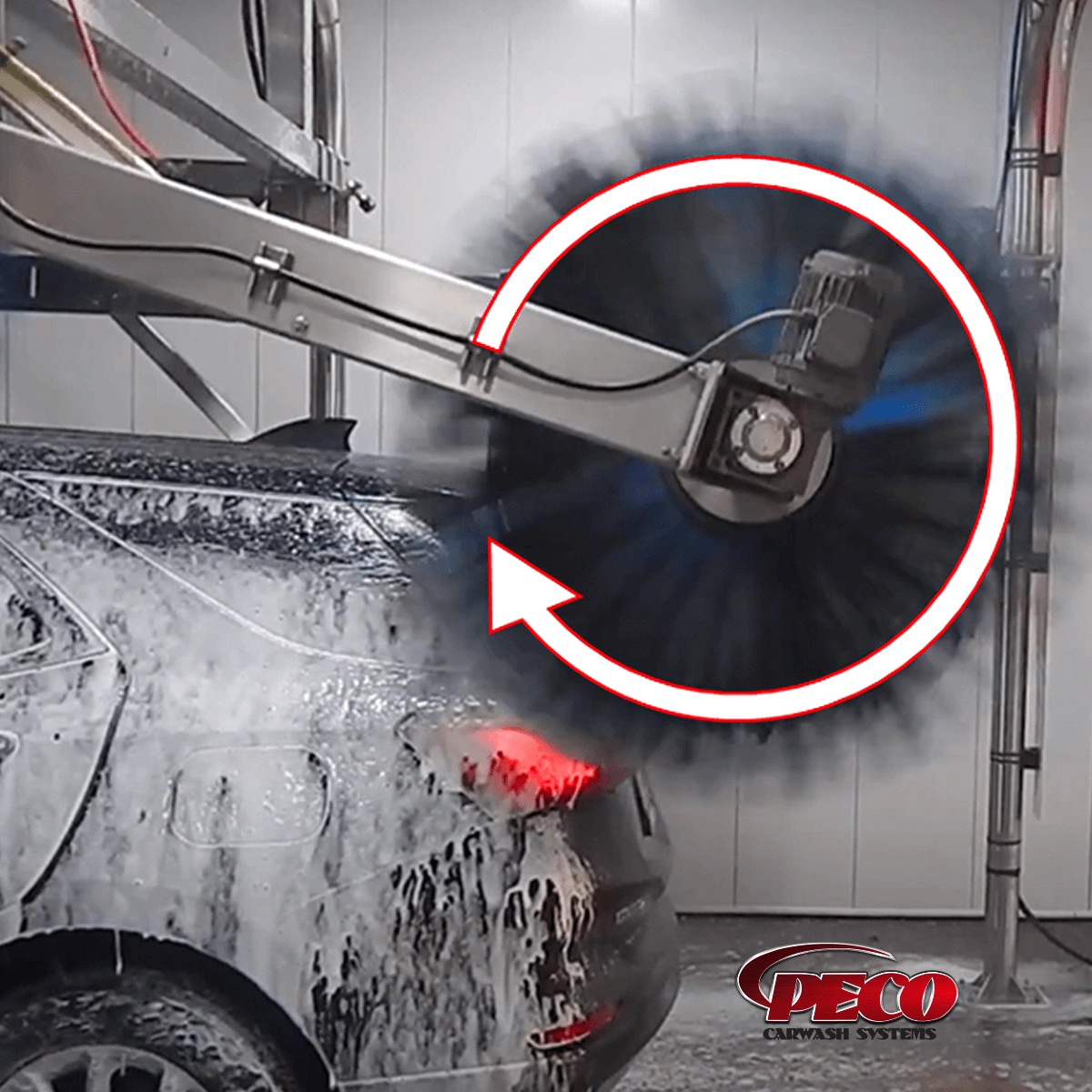
I know a family that owns a carwash chain, and this is actually why a lot of carwashes dont have rotating top mitter thingies (thats a technical term lol):
And instead have these long strippy thingies (another insider term):
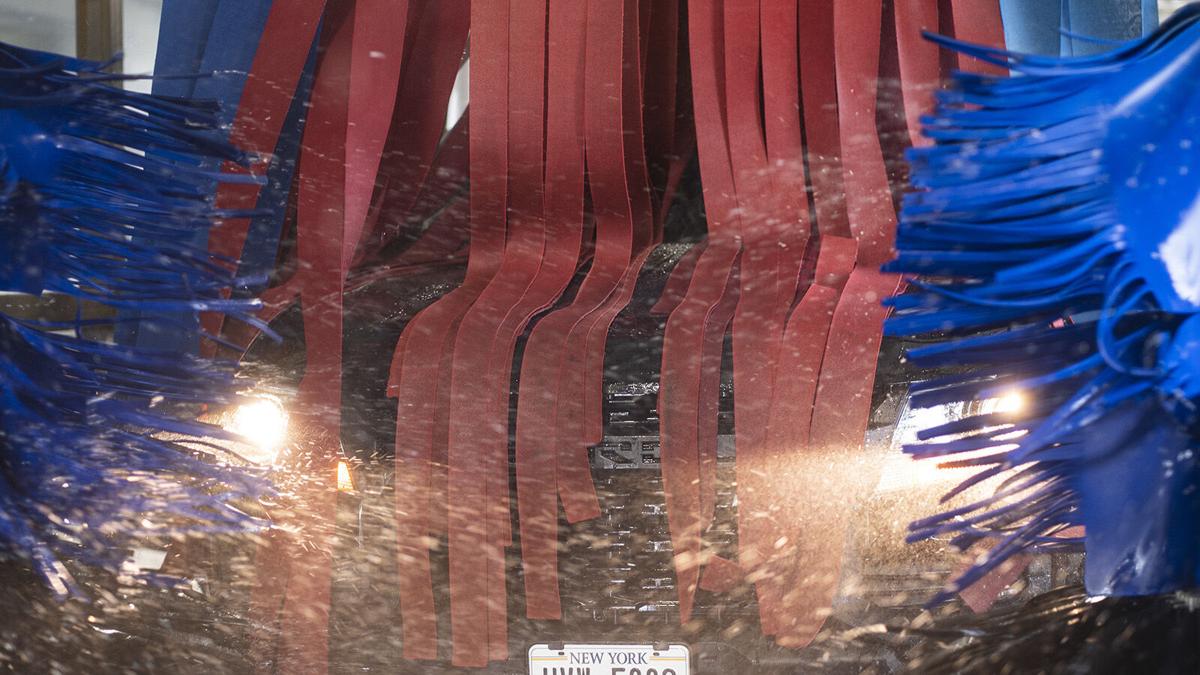
Because as you learned those spinning top things can do a lot of damage. At least the damage was only your wiper blade and not the paint!
I know a family that owns a carwash chain, and this is actually why a lot of carwashes dont have rotating top mitter thingies (thats a technical term lol):
And instead have these long strippy thingies (another insider term):
Because as you learned those spinning top things can do a lot of damage. At least the damage was only your wiper blade and not the paint!
Thread Starter
Member
Joined: Jan 2024
Posts: 138
Likes: 62
From: Melbourne, FL
2024 GLS 580, 2022 Sprinter-based Winnebago View 24D, 2024 Bronco Raptor
I wish I had read the manual before now. I changed the wipers on our '21 GLS without knowing about this. Also got too aggressive with the driver's wiper and now need some touch up paint. Didn't take much pressure either on the edge of the hood.
In any event you were on the right track, while the manual icon looks like the rear wiper button, it's actually the front wiper button. And you don't have to push it all the way to the wash position, just pressing it to the wipe position and holding activated wiper service mode on ours.
In any event you were on the right track, while the manual icon looks like the rear wiper button, it's actually the front wiper button. And you don't have to push it all the way to the wash position, just pressing it to the wipe position and holding activated wiper service mode on ours.
The front wiper button is on the end of the button 1. They refer to it on page 158 with a blue circle with a 1 in it.
The instructions for moving the wiper arms into the replacement position don't refer to the front wiper button 1, instead, they show the rear wiper "Single wipe / washing" icon (a different button 1).
Perhaps my issue was that I was pressing the rear wiper "Single wipe / washing" icon (button 1) all the way down into "washing" position. Maybe there is a way to press it just enough for "Single wipe" while also holding it down for 3 seconds... I'll give it a shot.
Super Member
Joined: Apr 2011
Posts: 541
Likes: 232
2021 GLS580 | 2011 ML350 BlueTec | 2009 Pontiac G8 GXP
I think that it's a bit different in the MY24 with Magic Vision. I've attached the snippets from the manual.
The front wiper button is on the end of the button 1. They refer to it on page 158 with a blue circle with a 1 in it.
The instructions for moving the wiper arms into the replacement position don't refer to the front wiper button 1, instead, they show the rear wiper "Single wipe / washing" icon (a different button 1).
Perhaps my issue was that I was pressing the rear wiper "Single wipe / washing" icon (button 1) all the way down into "washing" position. Maybe there is a way to press it just enough for "Single wipe" while also holding it down for 3 seconds... I'll give it a shot.
The front wiper button is on the end of the button 1. They refer to it on page 158 with a blue circle with a 1 in it.
The instructions for moving the wiper arms into the replacement position don't refer to the front wiper button 1, instead, they show the rear wiper "Single wipe / washing" icon (a different button 1).
Perhaps my issue was that I was pressing the rear wiper "Single wipe / washing" icon (button 1) all the way down into "washing" position. Maybe there is a way to press it just enough for "Single wipe" while also holding it down for 3 seconds... I'll give it a shot.
Last edited by jkaetz; Mar 11, 2024 at 08:23 AM.
MBWorld Fanatic!
Joined: May 2023
Posts: 1,122
Likes: 310
'23 GLS450
No that's the same replacement instructions I have. Like I said, it looks like the rear icon, and I also tried the rear button at first. Then I tried it with the front washer button and it worked as described. You can see they use the same icon on page 158 to describe the front washer. Oh they also use a different icon for the rear washer if you look at the first image you posted. They certainly don't describe it very well though. I'm actually shocked they mention it at all, I figured changing wipers had been deemed a "dealership" visit along with every other consumable.
Super Member
Joined: Apr 2011
Posts: 541
Likes: 232
2021 GLS580 | 2011 ML350 BlueTec | 2009 Pontiac G8 GXP
MBWorld Fanatic!
Joined: May 2023
Posts: 1,122
Likes: 310
'23 GLS450

Super Member
Joined: Apr 2011
Posts: 541
Likes: 232
2021 GLS580 | 2011 ML350 BlueTec | 2009 Pontiac G8 GXP
I certainly hope so, but I can see parallels between auto manufacturers and tech companies. Apple usually starts by removing something that other devices still have only to tout it as a major innovation because of all the reasons (internal battery, headphone jack, external storage, wall charger). Shortly thereafter the rest of the manufactures also remove said thing all while consumers pay more for a lesser product. But it'll have more cameras and AI! 
MBWorld Fanatic!
Joined: May 2023
Posts: 1,122
Likes: 310
'23 GLS450
I certainly hope so, but I can see parallels between auto manufacturers and tech companies. Apple usually starts by removing something that other devices still have only to tout it as a major innovation because of all the reasons (internal battery, headphone jack, external storage, wall charger). Shortly thereafter the rest of the manufactures also remove said thing all while consumers pay more for a lesser product. But it'll have more cameras and AI!
Now that Blackberrys are more or less extinct, everyone is using a phone by touchscreen (no lives lost when you mistype). I'd like to see a car operate by touchscreen!

MBWorld Fanatic!

Joined: Jan 2023
Posts: 3,130
Likes: 1,205
GLE 580
Glad that project is shutdown.
Thread Starter
Member
Joined: Jan 2024
Posts: 138
Likes: 62
From: Melbourne, FL
2024 GLS 580, 2022 Sprinter-based Winnebago View 24D, 2024 Bronco Raptor
No that's the same replacement instructions I have. Like I said, it looks like the rear icon, and I also tried the rear button at first. Then I tried it with the front washer button and it worked as described. You can see they use the same icon on page 158 to describe the front washer. Oh they also use a different icon for the rear washer if you look at the first image you posted. They certainly don't describe it very well though. I'm actually shocked they mention it at all, I figured changing wipers had been deemed a "dealership" visit along with every other consumable.
I am not sure who to contact for manual corrections. But I will reach out to my dealer.

MBWorld Fanatic!

Joined: Oct 2009
Posts: 7,013
Likes: 2,198
From: Colorado
'21 AMG53 wDPP & ARC, 19 GLC300 - Former-03 C240,2 ML BlueTecs,20 GLE450 E-ABC,15 Cayenne D,17 Macan
In a tunnel carwash with my company car.
As I approached that spinning brush, I could see that it had adroitly removed an antenna from a preceding car, and it was flailing away, menacingly welcoming me.
I honked and honked, hoping that an attendant would stop the line, unable to brake because of a following car, one slot behind.
Yes, as I went through, it went Screech Screech Screech, and I was glad that it was not my car.
Damage.
End of story.
MBWorld Fanatic!
Joined: Jun 2015
Posts: 9,138
Likes: 4,626
From: Maryland
2024 S580
A personal experience:
In a tunnel carwash with my company car.
As I approached that spinning brush, I could see that it had adroitly removed an antenna from a preceding car, and it was flailing away, menacingly welcoming me.
I honked and honked, hoping that an attendant would stop the line, unable to brake because of a following car, one slot behind.
Yes, as I went through, it went Screech Screech Screech, and I was glad that it was not my car.
Damage.
End of story.
In a tunnel carwash with my company car.
As I approached that spinning brush, I could see that it had adroitly removed an antenna from a preceding car, and it was flailing away, menacingly welcoming me.
I honked and honked, hoping that an attendant would stop the line, unable to brake because of a following car, one slot behind.
Yes, as I went through, it went Screech Screech Screech, and I was glad that it was not my car.
Damage.
End of story.
Super Member
Joined: Apr 2011
Posts: 541
Likes: 232
2021 GLS580 | 2011 ML350 BlueTec | 2009 Pontiac G8 GXP
Thank you! That worked. I had tried that before, but I did the full-force push and then hold for 3 seconds. I actually needed to do the press until resistance semi-push and hold for 3 seconds (this gesture should not exist IMO). That got the wipers into the correct position and verified that the MY24 GLS manual is incorrect. I also did not see this in any YouTube videos.
I am not sure who to contact for manual corrections. But I will reach out to my dealer.
I am not sure who to contact for manual corrections. But I will reach out to my dealer.


