






Big Audio Upgrade, EQ For Pandora, Streaming Bluetooth for around $100

Thread Starter
MBWorld Fanatic!
Joined: May 2008
Posts: 7,653
Likes: 560
2016 C300
Big Audio Upgrade, EQ For Pandora, Streaming Bluetooth for around $100
As a first-time owner of a 2010 S550 (two W220‘s previously), an early priority was to rehabilitate the muddy, anemic stock sound system in the least invasive way possible. The mod outlined below more than just did the trick. It completely transformed the audio system and fits neatly in the glovebox.
It’s now powerful, with hard hitting bass, no midrange harshness and beautiful clean highs. If I played it for you and told you the car had a full aftermarket amp and speaker upgrade, you wouldn’t doubt it.
The whole shebang was around $100 (including streaming Bluetooth audio) and was a tool-less install that took place entirely in the glove box (aside from the cables out to the device) and required no cutting or soldering, If you can strip a wire and plug stuff in you’re in business. This set up will also work with any car that has an Aux In and a convenient power supply.
Note that you’ll need access to the device in the cabin somewhere, since all control will be on the device itself. No control via COMAND, steering wheel (except for volume) or voice. On the plus side, you’ll add the capacity to apply EQ to Pandora, Rhapsody, MOG, etc.
This write-up presumes that your car has an Aux In audio input and 12v power receptacle in the glove box. I believe it's standard on 2010+ S550s. It also presumes that your music library is on your mobile device. If you have an Apple device, I highly recommend the AudioForge EQ app. It adds another level of control and additional boost. It sounds great and there are no processing artifacts. It also has an automatic clipping control feature that automatically adjusts pre-amp boost on-the-fly to protect your system from overdriving.
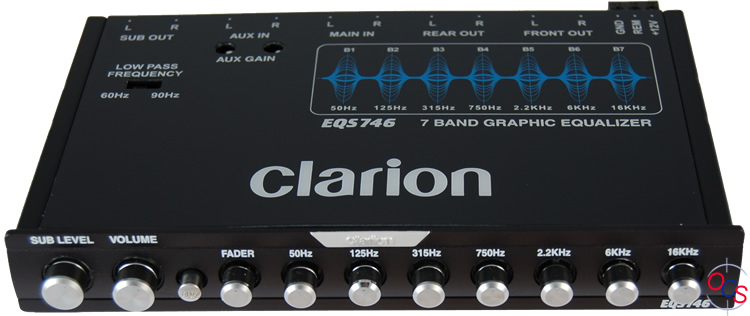
After a bit of research I selected the Clarion EQS746 (Amazon, $49). It’s small enough to fit easily in the S550 glove box, has pre-amp volume control, and plenty of equalization range. It also sounds terrific.
The diagram below outlines the basic power and audio connections. (Rotate the Fader knob on the EQ clockwise to Front when using just the Front inputs. Note that the Subwoofer control is not used in this application)
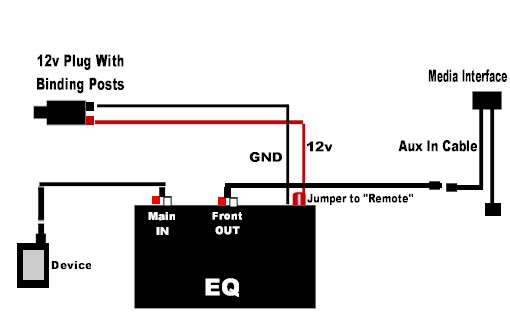
Connect one mini plug-to-stereo RCA cable from the audio device to the Main In on the EQ. Connect the other mini plug-to-stereo RCA cable from the Front output of the EQ to the car's aux in. (You can also add a second device via the Clarion's Aux In input. It's selectable by the Aux button on the front panel)
Note that the Clarion has a remote sensing lead along with 12v power and ground inputs. In this application, you need to run a small jumper cable from the 12v input to the remote input or the unit will not power on.
Note: If you have a radar detector, the 12V plug with binding posts is a handy place to power it from. I have my V1 hardwired from the glove box, up the A Pillar (tucked under the soundproof strip, tucked behind the seam at the A Pillar and headliner, tucked under the front edge of the headliner and mounted on the right side of the rear view mirror with about 3“ of wire exposed)
The next configuration adds a power supply to charge your mobile device.

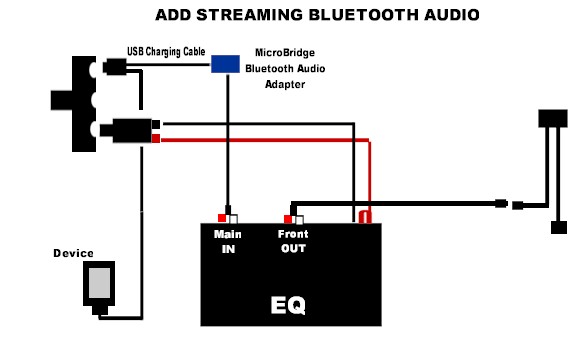
The next optional configuration adds streaming Bluetooth audio. The Micus BluBridge Mini Jack Bluetooth Audio Receiver (Amazon, $36) allows you to pair your Bluetooth audio enabled device wirelessly. Sound quality is excellent (it uses an entirely different full bandwidth Bluetooth protocol than your phone uses), however overall power is reduced somewhat versus a wired connection.
Car Requirements
Media interface cable with Aux In (or any Aux-In)
12v Receptacle in glove box
Parts Supply List (Radio Shack)
(2) Mini plug-to-male stereo RCA adapters
(1) 3 Way 12v Adapter
(1) 12V Plug with binding posts
(1) 12v 2-Port USB charging adapter
(1) USB charging cable for your device
Equipment
Clarion EQS746 Equalizer/Pre-Amp ($59 Amazon)
Optional
Micus BluBridge Mini Jack Bluetooth Audio Receiver (Amazon $39)
AudioForge EQ App for Iphone/Ipod (Itunes Store $5)
ProClip Dash Mount or Console Mount
Setting the EQ is a matter of taste, and the nature of the material in your music library or from your streaming service(s), but some basics apply. The knobs from left to right allow you to boost or reduce specific frequency ranges from low (Bass) to midrange (Mids) to highs (Treble). Start a good reference song playing and start experimenting. You’ll need to play a range of material and tweak the settings in such a way that most of your material sounds really good.
For the S550 and my preferences, I found it necessary to add some boost to the bass, fully reduce the midrange, and add a little boost to the very top highs. My AudioForge EQ app is set up the same way. Overall a ton of bang for the buck and a very easy (and quickly reversible) install. Highly recommended.
It’s now powerful, with hard hitting bass, no midrange harshness and beautiful clean highs. If I played it for you and told you the car had a full aftermarket amp and speaker upgrade, you wouldn’t doubt it.
The whole shebang was around $100 (including streaming Bluetooth audio) and was a tool-less install that took place entirely in the glove box (aside from the cables out to the device) and required no cutting or soldering, If you can strip a wire and plug stuff in you’re in business. This set up will also work with any car that has an Aux In and a convenient power supply.
Note that you’ll need access to the device in the cabin somewhere, since all control will be on the device itself. No control via COMAND, steering wheel (except for volume) or voice. On the plus side, you’ll add the capacity to apply EQ to Pandora, Rhapsody, MOG, etc.
This write-up presumes that your car has an Aux In audio input and 12v power receptacle in the glove box. I believe it's standard on 2010+ S550s. It also presumes that your music library is on your mobile device. If you have an Apple device, I highly recommend the AudioForge EQ app. It adds another level of control and additional boost. It sounds great and there are no processing artifacts. It also has an automatic clipping control feature that automatically adjusts pre-amp boost on-the-fly to protect your system from overdriving.
After a bit of research I selected the Clarion EQS746 (Amazon, $49). It’s small enough to fit easily in the S550 glove box, has pre-amp volume control, and plenty of equalization range. It also sounds terrific.
The diagram below outlines the basic power and audio connections. (Rotate the Fader knob on the EQ clockwise to Front when using just the Front inputs. Note that the Subwoofer control is not used in this application)
Connect one mini plug-to-stereo RCA cable from the audio device to the Main In on the EQ. Connect the other mini plug-to-stereo RCA cable from the Front output of the EQ to the car's aux in. (You can also add a second device via the Clarion's Aux In input. It's selectable by the Aux button on the front panel)
Note that the Clarion has a remote sensing lead along with 12v power and ground inputs. In this application, you need to run a small jumper cable from the 12v input to the remote input or the unit will not power on.
Note: If you have a radar detector, the 12V plug with binding posts is a handy place to power it from. I have my V1 hardwired from the glove box, up the A Pillar (tucked under the soundproof strip, tucked behind the seam at the A Pillar and headliner, tucked under the front edge of the headliner and mounted on the right side of the rear view mirror with about 3“ of wire exposed)
The next configuration adds a power supply to charge your mobile device.
The next optional configuration adds streaming Bluetooth audio. The Micus BluBridge Mini Jack Bluetooth Audio Receiver (Amazon, $36) allows you to pair your Bluetooth audio enabled device wirelessly. Sound quality is excellent (it uses an entirely different full bandwidth Bluetooth protocol than your phone uses), however overall power is reduced somewhat versus a wired connection.
Car Requirements
Media interface cable with Aux In (or any Aux-In)
12v Receptacle in glove box
Parts Supply List (Radio Shack)
(2) Mini plug-to-male stereo RCA adapters
(1) 3 Way 12v Adapter
(1) 12V Plug with binding posts
(1) 12v 2-Port USB charging adapter
(1) USB charging cable for your device
Equipment
Clarion EQS746 Equalizer/Pre-Amp ($59 Amazon)
Optional
Micus BluBridge Mini Jack Bluetooth Audio Receiver (Amazon $39)
AudioForge EQ App for Iphone/Ipod (Itunes Store $5)
ProClip Dash Mount or Console Mount
Setting the EQ is a matter of taste, and the nature of the material in your music library or from your streaming service(s), but some basics apply. The knobs from left to right allow you to boost or reduce specific frequency ranges from low (Bass) to midrange (Mids) to highs (Treble). Start a good reference song playing and start experimenting. You’ll need to play a range of material and tweak the settings in such a way that most of your material sounds really good.
For the S550 and my preferences, I found it necessary to add some boost to the bass, fully reduce the midrange, and add a little boost to the very top highs. My AudioForge EQ app is set up the same way. Overall a ton of bang for the buck and a very easy (and quickly reversible) install. Highly recommended.
Last edited by Mike5215; Sep 12, 2013 at 10:09 PM.
Thread Starter
MBWorld Fanatic!
Joined: May 2008
Posts: 7,653
Likes: 560
2016 C300
Fortunately, the Bose system in the W220 sounded so much better stock than the HK it didn't need an outboard EQ.
Thread Starter
MBWorld Fanatic!
Joined: May 2008
Posts: 7,653
Likes: 560
2016 C300
However, every one of those sources can be accessed on your smart phone. Rip CDs to the device itself, use an internet radio app, download the free Sirius app, add a streaming service like Pandora or MOG, and then you have a full range of entertainment options that all run through the outboard EQ.
The difference in quality...power, clarity, dynamic range...is extraordinary. The stock speakers and amp have so much more to give when they're not throttled back by the factory EQ. Granted you lose the ability to change tracks from the steering wheel, or on the COMAND screen, but for me the trade off was obvious, especially for the price. The EQ was $56 and there was maybe $30 in cables and adapters.
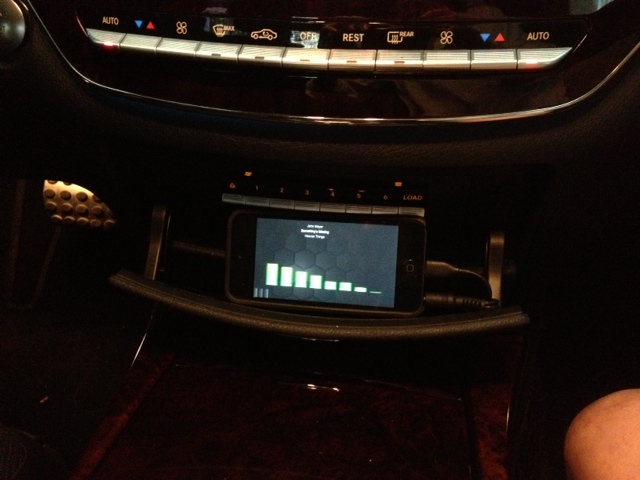
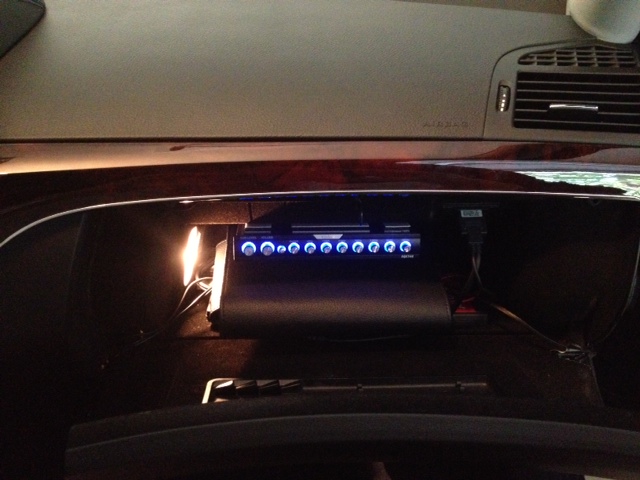
Here's my device (IPod Touch, dedicated) and the Clarion EQ installed. The iPod is friction-fitted between the CD changer buttons and the door using a neoprene case. Snug fit but easily removed.
Thread Starter
MBWorld Fanatic!
Joined: May 2008
Posts: 7,653
Likes: 560
2016 C300
Here's an audio comparison between the stock system and the same system with the EQ and AudioForge app. The samples were recorded by placing an HD camcorder on the center console cover and capturing the live cabin sound. The system sound settings were the same in both samples...Bass +3, Treble +2, fader centered, Logic On.
The "Before" sample was a 356kb/sec MP3 file played through the Media Interface IPod cable.
The "After" sample was of the same MP3 file played through the Aux cable, via the AudioForge EQ app and the Clarion outboard EQ in the glovebox.
Note how the "Before" sample sounds thin and overly bright, all mids and no bottom, while the "After" sounds fuller, cleaner and more powerful.
As a result of my recording method the quality in these samples is somewhat poor, and it's of course affected by your own playback device, but it will give you a relative idea of the difference the mod made. The "After" sound is quite a bit louder in real life...the recording device normalizes the volume.
I suggest a good pair of headphones and volume on full.
The "Before" sample was a 356kb/sec MP3 file played through the Media Interface IPod cable.
The "After" sample was of the same MP3 file played through the Aux cable, via the AudioForge EQ app and the Clarion outboard EQ in the glovebox.
Note how the "Before" sample sounds thin and overly bright, all mids and no bottom, while the "After" sounds fuller, cleaner and more powerful.
As a result of my recording method the quality in these samples is somewhat poor, and it's of course affected by your own playback device, but it will give you a relative idea of the difference the mod made. The "After" sound is quite a bit louder in real life...the recording device normalizes the volume.
I suggest a good pair of headphones and volume on full.
Last edited by Mike5215; Sep 16, 2013 at 07:46 PM.

Newbie
Joined: Sep 2013
Posts: 11
Likes: 0
2003 S55 AMG, 2006 R500, 2006 BMW 325I
Thank you Mike5215. I have an 03 S55 with the Aux input in the glove box that had very low volume. I read your post over the weekend and ordered the same EQ. Just installed it and it made a tremendous difference (thank you)! Before the volume was so low that I couldn't hear PANDORA w/out turning up the volume so loud that I got feedback through the speakers from the engine. This has solved 95% of that problem (thank you again, I can listen to PANDORA again)!!! I recommend this upgrade (very easy to do). This weekend I'm going to add a 12 volt plug in the glove box so I can plug my phone into the one near the shifter. Thanks again for all the detailed info!
Trending Topics

Newbie
Joined: Aug 2013
Posts: 10
Likes: 0
From: Los Angeles, CA.
2007 S550 Iridium Silver / Black Interior
Thank you Mike5215....... I could really hear the difference in the "before" and "after". Unfortunately my 07 S550 doesn't have a "Aux-in" anywhere on the face of the dashboard and I don't have an iPod cable in the glove box. So I'm going to have to figure something else out. I read somewhere on this forum that Mercedes came out with an aftermarket iPod connection kit that is supposedly available through the dealerships. It basically replaces the CD changer, by unplugging the cables for the CD changer and plugging them into this iPod connection kit. That way you can control it from the command center and it charges the iPod too. Then I would be able to plug an iPod touch into it an run the eq app for better sound.
MB World Stories
The Best of Mercedes & AMG

6 Mercedes Models That Did NOT Age Well (But Are Somehow Still Cool)
Verdad Gallardo
Manual Mercedes? 6 Times Sindelfingen Let Drivers Have All The Fun
Verdad Gallardo
Mercedes SLR McLaren 722 S Is Extremely Rare Example Modified by McLaren
Verdad Gallardo
8 Classic Boxy Mercedes Designs That Have Aged Like Fine Wine
Verdad Gallardo
Flawlessly Restored Mercedes 190E Evo II Heads to Auction
Verdad Gallardo
Electric Mercedes C-Class Unveiled: 11 Things You Need to Know
Verdad Gallardo
Mercedes EQS Gets A Major Update: Everything You Need to Know
Verdad Gallardo
5 Underrated Mercedes-Benz Models That Don't Get the Love They Deserve
Verdad Gallardo
Mercedes 300D Has Pushed Well Past 1 Million Miles and It Ain't Stopping
Verdad Gallardo
Newbie
Joined: Sep 2013
Posts: 11
Likes: 0
2003 S55 AMG, 2006 R500, 2006 BMW 325I
Thank you Mike5215. I have an 03 S55 with the Aux input in the glove box that had very low volume. I read your post over the weekend and ordered the same EQ. Just installed it and it made a tremendous difference (thank you)! Before the volume was so low that I couldn't hear PANDORA w/out turning up the volume so loud that I got feedback through the speakers from the engine. This has solved 95% of that problem (thank you again, I can listen to PANDORA again)!!! I recommend this upgrade (very easy to do). This weekend I'm going to add a 12 volt plug in the glove box so I can plug my phone into the one near the shifter. Thanks again for all the detailed info!
Thread Starter
MBWorld Fanatic!
Joined: May 2008
Posts: 7,653
Likes: 560
2016 C300
Thank you Mike5215. I have an 03 S55 with the Aux input in the glove box that had very low volume. I read your post over the weekend and ordered the same EQ. Just installed it and it made a tremendous difference (thank you)! Before the volume was so low that I couldn't hear PANDORA w/out turning up the volume so loud that I got feedback through the speakers from the engine. This has solved 95% of that problem (thank you again, I can listen to PANDORA again)!!! I recommend this upgrade (very easy to do). This weekend I'm going to add a 12 volt plug in the glove box so I can plug my phone into the one near the shifter. Thanks again for all the detailed info!
Thank you Mike5215....... I could really hear the difference in the "before" and "after". Unfortunately my 07 S550 doesn't have a "Aux-in" anywhere on the face of the dashboard and I don't have an iPod cable in the glove box. So I'm going to have to figure something else out. I read somewhere on this forum that Mercedes came out with an aftermarket iPod connection kit that is supposedly available through the dealerships. It basically replaces the CD changer, by unplugging the cables for the CD changer and plugging them into this iPod connection kit. That way you can control it from the command center and it charges the iPod too. Then I would be able to plug an iPod touch into it an run the eq app for better sound.
BTW, DONT UPGRADE THE TOUCH TO IOS 7. The EQ App is flakey on it.
Also, I neglected to mention how I "installed" the EQ on the roof of the glove box: Three strips of Velcro.
For Pandora listeners, consider adding in-car wifi. Pandora chokes back quality quite a bit over 3G/4G versus wifi. Even though any mobile broadband device actually uses the cellular 3G/4G network, Pandora "sees" your device as a regular broadband router and releases the high quality stream to it.
With an upgraded Pandora One account ($36/Year) you can select a high quality stream within the app that gives you a respectable 192kbs bitrate. I picked up a no-contract Verizon OverDrive Pro mobile hotspot for $80, and pay $35 a month for 5GBs of data on a pay-as-you-go plan. (You can listen to the 192kb high quality stream for two hours a day every day and stay within 5GB.)
The Overdrive has an internal battery and a USB charge port. I recommend putting a full charge on it before putting it in the car, and then the charging on the go should keep it topped off. It has an energy saving sleep mode that senses when it's not needed and puts in standby. Once your device has been set up on the Overdrive they'll stay paired up automatically. I just toss mine in the glove box with the other stuff.
Ideally you want a device that uses a fast 4G LTE network, or the playback at 192k will be choppy. If you only have 3G where you live but you have solid coverage most of the time you'll be fine. Once you get the sound system optimized you'll want the best possible source material.
Last edited by Mike5215; Sep 19, 2013 at 09:59 PM.
Thread Starter
MBWorld Fanatic!
Joined: May 2008
Posts: 7,653
Likes: 560
2016 C300
Update on AudioForge Equalizer App and IOS 7:
I contacted the developer regarding the buggy performance of the app after the upgrade to Apple's new operating system (7). There is now a free upgrade for the app written exclusively for 7. (Not because I contacted the guy...they released the update a couple of days after 7 debuted and I just missed it) It has an entirely different look and feel (not sure I like it) however it still sounds terrific.
Per the developer, landscape (horizontal) mode is not enabled. The next update will enable landscape mode for the EQ curve screen, however the cool real-time spectrum analyzer display won't be available until a subsequent update due to a delay in coding Apple's new gesture controls.
New features include one-click addition of your entire iTunes library, and an adjustable cross fader, which automatically fades out the last few seconds of the current song playing, while starting the next song a few seconds early and fading it in. I think it's a great add and gives the impression that you're listening to your own personal radio station. For those of us who grew up getting our music from FM radio and live DJs, it's a cool time warp.
IOS7's new UI design scheme looks like a child's toy to me, but the upgrade does get you the free "ITunes Radio" feature integrated into your Music Player. ITunes radio is a brand new Pandora-like streaming music service, with preset genre and artist stations. Because the Music Genome project that is at the heart of Pandora and makes it possible for Pandora to tailor music it plays based on your likes and dislikes isn't available to anyone else, there's no way to create your own stations based on "seeds".
The sound quality is very good. Not as good as your local files (presuming they were encoded above 128k) but better than Sirius/XM by a mile, and on par or better than Pandora, Rhapsody and MOG. Playback is only available over WiFi, which I have in the car, but it's choppy. When it does play it sounds good and the selections are spot-on. I love the Classic Prog Rock station. Heard some great old Rush, Emerson Lake and Palmer and Yes and never found it necessary to skip a track.
The key advantage to ITunes Radio is that it plays through the Apple Music Player, which means you can apply Apple's internal preset EQs to it along with the rest of your local library. (Settings>Music>Equalizer).
An existing feature many users are unaware of is the ability to apply specific EQ settings to specific individual songs. Sync your device with iTunes, pull up your song library and right click on a song. In the sub menu, select "Info". Under the Equalizer tab, select the preset you want for that song. You can do this for a bunch of songs at once (select the songs first then bring up the "Info' sub menu.) Be sure to re-sync so the changes take effect on your portable device.
For example, if you have a master EQ setting that works for the majority of the material in your library, use "Select All" and apply the master preset. Then go back in and assign specific presets to songs that don't sound great under the master EQ. If you find your jazz material is too bass heavy, preset "bass reducer" on just those songs. I've found the best sounding Apple EQs are either "R&B" or "Rock". "Rock" is punchier but it's also a little brighter. "R&B" still has some bottom end to it but tightens up the mids more.
The presets you select in this manner will temporarily override the internal EQ setting in the Apple Music Player.
The new ITunes Radio also features one-click ordering (which is why I'm guessing the service is free) to instantly add songs you hear and like to your local library.
Finally, a minor tweak to the Clarion. I use a direct wired connection from my device, but occasionally I'll have my kids in the back seat and they want to listen to their own stuff. The Clarion has an "Aux In" of its own controlled by a button on the front panel. I connected the BT adapter to that input so when the kids want to play their stuff, I switch to Aux and have them connect via BlueTooth for as long as I can stand listening to their "music".
-Happy Listening!
I contacted the developer regarding the buggy performance of the app after the upgrade to Apple's new operating system (7). There is now a free upgrade for the app written exclusively for 7. (Not because I contacted the guy...they released the update a couple of days after 7 debuted and I just missed it) It has an entirely different look and feel (not sure I like it) however it still sounds terrific.
Per the developer, landscape (horizontal) mode is not enabled. The next update will enable landscape mode for the EQ curve screen, however the cool real-time spectrum analyzer display won't be available until a subsequent update due to a delay in coding Apple's new gesture controls.
New features include one-click addition of your entire iTunes library, and an adjustable cross fader, which automatically fades out the last few seconds of the current song playing, while starting the next song a few seconds early and fading it in. I think it's a great add and gives the impression that you're listening to your own personal radio station. For those of us who grew up getting our music from FM radio and live DJs, it's a cool time warp.
IOS7's new UI design scheme looks like a child's toy to me, but the upgrade does get you the free "ITunes Radio" feature integrated into your Music Player. ITunes radio is a brand new Pandora-like streaming music service, with preset genre and artist stations. Because the Music Genome project that is at the heart of Pandora and makes it possible for Pandora to tailor music it plays based on your likes and dislikes isn't available to anyone else, there's no way to create your own stations based on "seeds".
The sound quality is very good. Not as good as your local files (presuming they were encoded above 128k) but better than Sirius/XM by a mile, and on par or better than Pandora, Rhapsody and MOG. Playback is only available over WiFi, which I have in the car, but it's choppy. When it does play it sounds good and the selections are spot-on. I love the Classic Prog Rock station. Heard some great old Rush, Emerson Lake and Palmer and Yes and never found it necessary to skip a track.
The key advantage to ITunes Radio is that it plays through the Apple Music Player, which means you can apply Apple's internal preset EQs to it along with the rest of your local library. (Settings>Music>Equalizer).
An existing feature many users are unaware of is the ability to apply specific EQ settings to specific individual songs. Sync your device with iTunes, pull up your song library and right click on a song. In the sub menu, select "Info". Under the Equalizer tab, select the preset you want for that song. You can do this for a bunch of songs at once (select the songs first then bring up the "Info' sub menu.) Be sure to re-sync so the changes take effect on your portable device.
For example, if you have a master EQ setting that works for the majority of the material in your library, use "Select All" and apply the master preset. Then go back in and assign specific presets to songs that don't sound great under the master EQ. If you find your jazz material is too bass heavy, preset "bass reducer" on just those songs. I've found the best sounding Apple EQs are either "R&B" or "Rock". "Rock" is punchier but it's also a little brighter. "R&B" still has some bottom end to it but tightens up the mids more.
The presets you select in this manner will temporarily override the internal EQ setting in the Apple Music Player.
The new ITunes Radio also features one-click ordering (which is why I'm guessing the service is free) to instantly add songs you hear and like to your local library.
Finally, a minor tweak to the Clarion. I use a direct wired connection from my device, but occasionally I'll have my kids in the back seat and they want to listen to their own stuff. The Clarion has an "Aux In" of its own controlled by a button on the front panel. I connected the BT adapter to that input so when the kids want to play their stuff, I switch to Aux and have them connect via BlueTooth for as long as I can stand listening to their "music".
-Happy Listening!
Last edited by Mike5215; Sep 25, 2013 at 09:59 PM. Reason: iTunes radio does not play over 3G. WiFi only.

Member
Joined: Mar 2009
Posts: 219
Likes: 23
From: Seattle, WA
W222 S63 AMG
Great mod, but if you're like me and and you don't have AUX in because you have the iPod adapter you can still add Bluetooth Streaming Audio through the Musiclink ML-D100 for $40.
https://mbworld.org/forums/s-class-w...-ipod-kit.html
https://mbworld.org/forums/s-class-w...-ipod-kit.html
Thread Starter
MBWorld Fanatic!
Joined: May 2008
Posts: 7,653
Likes: 560
2016 C300
Great mod, but if you're like me and and you don't have AUX in because you have the iPod adapter you can still add Bluetooth Streaming Audio through the Musiclink ML-D100 for $40.
https://mbworld.org/forums/s-class-w...-ipod-kit.html
https://mbworld.org/forums/s-class-w...-ipod-kit.html
I believe that if your car has a female IPod receptacle in the glove box, you can buy a "Y" ipod cable from MB that splits into two cables...a standard female 30 pin (IPod) and a 3.5mm female mini-jack (Aux). Plugging that cable into the glovebox receptacle should cause an "Aux" option to show up amongst the choices for sources in the COMAND Audio sub menu
Last edited by Mike5215; Sep 24, 2013 at 07:31 PM.

Member
Joined: Jan 2011
Posts: 148
Likes: 0
From: California
'08 Designo S550, R32 Nissan Skyline
Just ordered the EQ and bluetooth receiver!! Since I have a 2008, I don't have the 12v so off to the stereo shop to have them install one. Can't wait to hopefully breathe some life into this lackluster sound system without having to redo the entire setup like I normally do with all my other cars.
Thread Starter
MBWorld Fanatic!
Joined: May 2008
Posts: 7,653
Likes: 560
2016 C300
Just ordered the EQ and bluetooth receiver!! Since I have a 2008, I don't have the 12v so off to the stereo shop to have them install one. Can't wait to hopefully breathe some life into this lackluster sound system without having to redo the entire setup like I normally do with all my other cars.
If the volume isn't sufficient for you thru the BlueTooth adapter try running right from the device's headphone jack to the EQ. It leaves you an extra wire to deal with in the cabin but it's a little hotter than the BT's output.
If you have an Apple device, grab that EQ app for $2.99. The combo is amazing. I'm not sure how everyone else is setting up the Clarion, but I've got the mids fully dialed out, a little push in the mid bass to pick up the kick drum, and another slight push at the very highs to bring up the snare and cymbals.
On the EQ app, exactly the same curve...dragged the mids into the basement and a little help for the highs and lows. On the COMAND, I have Bass and Treble splitting the difference between zero (midpoint) and full, the fader at -3 and Logic on.
That's seemed to hold up during a solid week of listening without making any further adjustments. Good luck!
Member
Joined: Jan 2011
Posts: 148
Likes: 0
From: California
'08 Designo S550, R32 Nissan Skyline
I'm already used to having the cord coming out of the box. I have an iPhone and keep it sitting in the cup holder so if I get feedback or anything from the BT, it won't be that big of a deal keeping it as is. I use Spotify for my music, and chose the setting to download the songs at 320kbps so hopefully it should come out pretty good. Since my songs aren't played through the default music player, would the EQ on the phone even help?
Thread Starter
MBWorld Fanatic!
Joined: May 2008
Posts: 7,653
Likes: 560
2016 C300
I'm already used to having the cord coming out of the box. I have an iPhone and keep it sitting in the cup holder so if I get feedback or anything from the BT, it won't be that big of a deal keeping it as is. I use Spotify for my music, and chose the setting to download the songs at 320kbps so hopefully it should come out pretty good. Since my songs aren't played through the default music player, would the EQ on the phone even help?
But at 320Kbps those tracks should still sound great using just the Clarion and the COMAND sound controls.
For the IPhone, have you looked at any of the vehicle-specific snap-in mounts by Proclips? They make a couple of mounts for the 07-09 S550, one for the console and another for the dash:
http://www.proclipusa.com/dashboard-mounts/vehicle/mercedes-benz/s-class/2008.cmsv Two part system...a vehicle specific mount and then a device-specific cradle. I like them because they snap in to the dash or console in about ten seconds and they come out clean.
Makes access easier when changing songs and if you get the cradle with the integrated charging port it cleans up the install a bit as well.
Last edited by Mike5215; Sep 26, 2013 at 11:39 AM.

MBWorld Fanatic!
Joined: Apr 2003
Posts: 1,464
Likes: 9
From: SoCal OC
S, GL, Escalade ESV, my shoes
Thread Starter
MBWorld Fanatic!
Joined: May 2008
Posts: 7,653
Likes: 560
2016 C300
Awesome! Is your Pandora over 3G/4G or WiFi? There's a big step up in quality with a Pandora One account and the high-quality (192kb) stream over WiFi.
Member
Joined: Jan 2011
Posts: 148
Likes: 0
From: California
'08 Designo S550, R32 Nissan Skyline
Yep, got mine and in working as well. I haven't quite gotten the EQ settings to where I want yet but the amount the speakers have come to life is amazing for such a cheap add on.
Thread Starter
MBWorld Fanatic!
Joined: May 2008
Posts: 7,653
Likes: 560
2016 C300
Since streaming services like Spotify "homogenize" the music, you should ultimately be able to find the sweet spot on the Clarion that holds up well. What problem(s) are you having?
One unexpected problem is that the speakers are playing so loudly and with so much more punch the doors and parcel shelf are starting to rattle. I may have to Dynamat
 ...or turn it down, which ain't happening.
Last edited by Mike5215; Oct 18, 2013 at 06:08 PM.

MBWorld Fanatic!


Joined: Mar 2011
Posts: 1,315
Likes: 4
E55, SL63, ML550
Great write up. I did this eq install on my E55. Great bump in sound quality however now I have a very high pitch constant whine from front tweeter speakers. It's there anytime the eq is plugged in even if the phone is not plugged in. First I thought it was from the power source I used since I wired in with my wideband, so I rewired it to have a new source frm the fuse box ground also. Whats going on? Did I get a bad eq?


