



2012 Engineering Menu / Enabling Backup Camera

Newbie
Joined: Mar 2013
Posts: 4
Likes: 0
C180

Senior Member
Joined: Apr 2013
Posts: 274
Likes: 0
From: Los Angeles, CA
2011 C300 Sport 4MATIC
The dealer had two identical '11 C300 4MATIC Sport's on his lot. Fully loaded, sport package, MM, Nav, rear window shade, except the lower mileage one, only by 400 miles, had the factory rear camera!! SOLD !!!!!!!!!!!! Only one on the internet at the time I could fine that had the camera. It's not as cool as my '09 Acura TL, nevertheless it's there and works! 

MBWorld Fanatic!
Joined: Apr 2013
Posts: 1,130
Likes: 101
From: Belgium
W205

Newbie
Joined: Mar 2010
Posts: 5
Likes: 0
From: Charlotte NC
2011 C300
I have a 2011 C300 in Charlotte NC. My car has COMAND-APS. I can access the Engineering screens but cannot find the option to enable the backup/reversing camera. This is annoying since I have bought a backup/reversing camera - duh.
I have been a bit reluctant to just go poking around at random inside these menus for fear of messing something up.
Can anyone please tell me:
- If the backup/reverse camera can be enabled on my car
- How to do this, which screen/menu
Thanks in advance.
I have been a bit reluctant to just go poking around at random inside these menus for fear of messing something up.
Can anyone please tell me:
- If the backup/reverse camera can be enabled on my car
- How to do this, which screen/menu
Thanks in advance.
Last edited by rederikus; Oct 31, 2013 at 11:44 AM. Reason: Added "My car has COMAND-APS"
MBWorld Fanatic!
Joined: Apr 2013
Posts: 1,130
Likes: 101
From: Belgium
W205
again, unless you have a COMAND (NTG4 or NTG4.5) or the APS50 unit you can not do this. the audio 20 unit doesn't have a video aux port.
if you want more help try to mention what type you have
if you want more help try to mention what type you have
Newbie
Joined: Mar 2010
Posts: 5
Likes: 0
From: Charlotte NC
2011 C300
It was there, of course and just for reference here is where to find the Rearview camera menu item on a 2011 C300.
Press <Hangup><1><#> together for about 10 seconds with COMAND enabled. This will bring up the Engineering menu.
Scroll down to and select:
7. HW Setting
7.7 HU Parameter
Go down 3 screens (1/4), (2/4), (3/4)
(17) Rearview camera.
I cannot enable this yet but I'll try again when I connect up the camera.
Press <Hangup><1><#> together for about 10 seconds with COMAND enabled. This will bring up the Engineering menu.
Scroll down to and select:
7. HW Setting
7.7 HU Parameter
Go down 3 screens (1/4), (2/4), (3/4)
(17) Rearview camera.
I cannot enable this yet but I'll try again when I connect up the camera.
MB World Stories
The Best of Mercedes & AMG

6 Mercedes Models That Did NOT Age Well (But Are Somehow Still Cool)
Verdad Gallardo
Manual Mercedes? 6 Times Sindelfingen Let Drivers Have All The Fun
Verdad Gallardo
Mercedes SLR McLaren 722 S Is Extremely Rare Example Modified by McLaren
Verdad Gallardo
8 Classic Boxy Mercedes Designs That Have Aged Like Fine Wine
Verdad Gallardo
Flawlessly Restored Mercedes 190E Evo II Heads to Auction
Verdad Gallardo
Electric Mercedes C-Class Unveiled: 11 Things You Need to Know
Verdad Gallardo
Mercedes EQS Gets A Major Update: Everything You Need to Know
Verdad Gallardo
5 Underrated Mercedes-Benz Models That Don't Get the Love They Deserve
Verdad Gallardo
Mercedes 300D Has Pushed Well Past 1 Million Miles and It Ain't Stopping
Verdad Gallardo
Newbie
Joined: Mar 2010
Posts: 5
Likes: 0
From: Charlotte NC
2011 C300
In fact I cannot enable it. It always remains grayed out. Earlier you mentioned "unless you have a COMAND (NTG4 or NTG4.5) or the APS50" it won't work. I had an Audio 20 in my last Merc, a CLK. My C300 has a CD/DVD changer. Is this an upgraded Audio 20? I am not really sure what I have in this car as I have owned it for less than a week. I may have to put the VIN into the MB Club's VIN decoder unless anyone here can tell me.
You seem pretty certain that my car has no video in. Why do you say this please?
You seem pretty certain that my car has no video in. Why do you say this please?
Newbie
Joined: Mar 2010
Posts: 5
Likes: 0
From: Charlotte NC
2011 C300
I have not turned the camera (obviously it is not yet connected) and when I select "R" the screen goes black, as it should, and the "Check entire surroundings!" message is shown. This is good but, does my car have the FAKRA connector? I'll just have to take it to pieces and see.
More later and thanks for your help.

Newbie
Joined: Dec 2012
Posts: 6
Likes: 0
E class
Hi, this is the back of my Audio 20 unit with Becker map pilot and small screen (5.8 inch) but its written NTG 4.5.
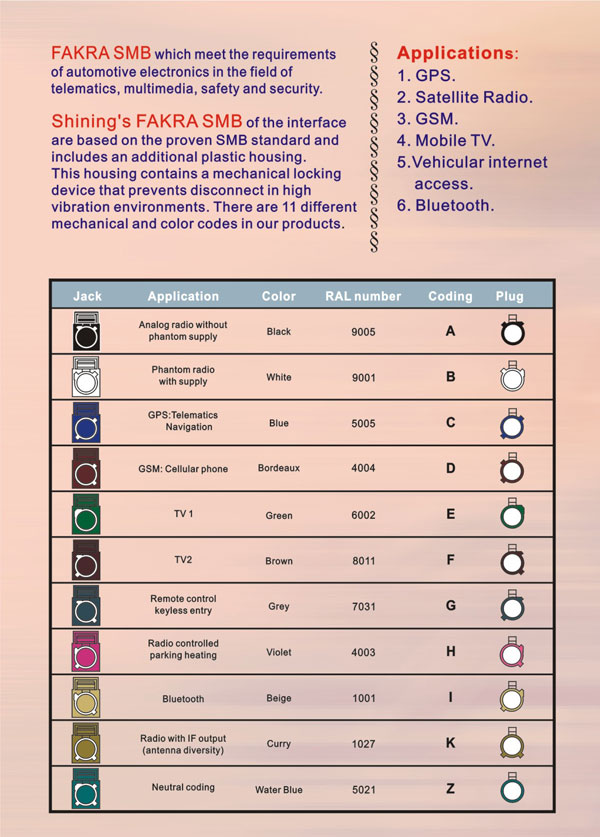
I still have no solution to add a reverse camera, i don't know where to plug the camera and how to activate the option. The green port fakra is already busy.

I still have no solution to add a reverse camera, i don't know where to plug the camera and how to activate the option. The green port fakra is already busy.
Last edited by tomeya; Nov 14, 2013 at 06:41 AM.
Newbie
Joined: Mar 2010
Posts: 5
Likes: 0
From: Charlotte NC
2011 C300
Hi, this is the back of my Audio 20 unit with Becker map pilot and small screen (5.8 inch) but its written NTG 4.5.
I still have no solution to add a reverse camera, i don't know where to plug the camera and how to activate the option. The green port fakra is already busy.
I still have no solution to add a reverse camera, i don't know where to plug the camera and how to activate the option. The green port fakra is already busy.
If you are not using the video part of this plug which, you probably are not then, you can disconnect the SMB/FAKRA connector that is currently plugged in and then connect your backup camera.
Obviously when you do this you will lose the "multimedia" functionality. This really means that the little plug in the glove box now has no video. At least that is the way I now understand the workings of this connector having waded through a large number of posts on the subject.

Junior Member
Joined: Nov 2013
Posts: 18
Likes: 0
From: South Florida
2013 C250 - Lunar Blue
Hi all,
I have a 2013 C250 with the basic Audio 20. I just pulled out my head unit and I have NTG4.5, and nothing plugged into the green port on the back of the unit. From what I have been able to find, it sounds like I can plug a camera into this plug (with the fakra adapter).
Does anyone know where to go in the engineering menu to find the option to turn on the camera when in reverse? I can get into the menu using the standard: ( "end call" + 1 + # ) but I am do not know where to go from there
Thanks!!
Gus
I have a 2013 C250 with the basic Audio 20. I just pulled out my head unit and I have NTG4.5, and nothing plugged into the green port on the back of the unit. From what I have been able to find, it sounds like I can plug a camera into this plug (with the fakra adapter).
Does anyone know where to go in the engineering menu to find the option to turn on the camera when in reverse? I can get into the menu using the standard: ( "end call" + 1 + # ) but I am do not know where to go from there
Thanks!!
Gus
Newbie
Joined: Dec 2012
Posts: 6
Likes: 0
E class
Almost certainly this is being used by, as DOA says, by the multimedia pack. This is the little plug in the glove compartment into which you can plug short adapter cables to convert to USB, iPhone, etc.
If you are not using the video part of this plug which, you probably are not then, you can disconnect the SMB/FAKRA connector that is currently plugged in and then connect your backup camera.
Obviously when you do this you will lose the "multimedia" functionality. This really means that the little plug in the glove box now has no video. At least that is the way I now understand the workings of this connector having waded through a large number of posts on the subject.
If you are not using the video part of this plug which, you probably are not then, you can disconnect the SMB/FAKRA connector that is currently plugged in and then connect your backup camera.
Obviously when you do this you will lose the "multimedia" functionality. This really means that the little plug in the glove box now has no video. At least that is the way I now understand the workings of this connector having waded through a large number of posts on the subject.




Junior Member
Joined: Jan 2011
Posts: 47
Likes: 1
W212
Very simple to find out whether your car headunit have the Camera input (green Fakra) at the back of the HU or not :
+ Only Comand (ntg4) or Comand Online (ntg4.5 or 4.7) unit have backup camera input => you will see the memory card slot at the front.
- PCMCIA : NTG4
- SD card : NTG4.5 or 4.7
+ Without the memory card slot at the front of HU then your HU is Audio20 - there is no camera input at the back of the unit => the only way you can add the camera is install the interface box.
+ Only Comand (ntg4) or Comand Online (ntg4.5 or 4.7) unit have backup camera input => you will see the memory card slot at the front.
- PCMCIA : NTG4
- SD card : NTG4.5 or 4.7
+ Without the memory card slot at the front of HU then your HU is Audio20 - there is no camera input at the back of the unit => the only way you can add the camera is install the interface box.
Last edited by kman2k; Apr 23, 2014 at 01:04 PM.

Newbie
Joined: Jan 2010
Posts: 8
Likes: 0
From: UK
12 ML350 BT, 57 w211 E CLass estate, 59 CLC 280 Sport
Reversing cam activation with comand online?
Hi, I have installed mb original camera on my 2012 ML350 using mb retrofit cableform connected to the canbus, power and green connector on the back of the comand unit. The green connector has two inputs, the first is used for the media interface and the second for reversing camera. Had to disassemble both the green media int and rev cam connectors to double up in one of them. Power is confirmed at the camera end. However, am unable to get the camera enabled using the comand engineering menu. Have found the correct page and entry area which offers the choice of 4 different camera options, none of which works. The mb wis says the camera needs to be coded using star system (canbus I presume) I am fast coming to the conclusion that a trip to the dealer and the loss of mega bucks will be required to make this work unless anyone here knows better?
Last edited by phill993; Apr 27, 2014 at 04:21 PM. Reason: missed out model ref

Newbie
Joined: Feb 2015
Posts: 2
Likes: 0
W204
 .
.
Junior Member

Joined: Jan 2015
Posts: 51
Likes: 6
From: Melbourne, Australia
S211 E55 AMG, W205 C250
hey guys
2011 C300 with NT4.5 (memory card slot in front). Have plugged in FAKRA cable adapter, installed review camera, confirmed power to camera and enabled in engineering menu. When I shift to 'R' I get a black screen with 'check your surroundings' but no image. Tried every camera option. No dice. Any ideas?
2011 C300 with NT4.5 (memory card slot in front). Have plugged in FAKRA cable adapter, installed review camera, confirmed power to camera and enabled in engineering menu. When I shift to 'R' I get a black screen with 'check your surroundings' but no image. Tried every camera option. No dice. Any ideas?
Junior Member
Joined: Jan 2015
Posts: 51
Likes: 6
From: Melbourne, Australia
S211 E55 AMG, W205 C250
Ok fixed it.
I had the camera plugged into the night vision FAKRA port as that was the only free port on the back of my headunit - so just assumed it was the right one.
On mine, the camera/aux media port is shared, sort of like a side by side shotgun - and you can't plug two separate cables in - you have to 'unpin' the cable on your aftermarket FAKRA and plug it into the spare hole in the stock double FAKRA connector.
I got one of the 170 degree ebay cameras. The depth of view isn't great, and because it's offset to one side, you get a pretty bad representation to the rear of the car. I almost want to switch it off because I'm sure my missus will back into something and then blame the camera......anyone else have similar thoughts?
I had the camera plugged into the night vision FAKRA port as that was the only free port on the back of my headunit - so just assumed it was the right one.
On mine, the camera/aux media port is shared, sort of like a side by side shotgun - and you can't plug two separate cables in - you have to 'unpin' the cable on your aftermarket FAKRA and plug it into the spare hole in the stock double FAKRA connector.
I got one of the 170 degree ebay cameras. The depth of view isn't great, and because it's offset to one side, you get a pretty bad representation to the rear of the car. I almost want to switch it off because I'm sure my missus will back into something and then blame the camera......anyone else have similar thoughts?


Newbie
Joined: Nov 2015
Posts: 1
Likes: 0
2012 Mercedes Benz c250
Hi
Thanks Glyn! The C240 was a major lemon (you might remember my thread with the huge list of problems?) well, now the transmission was acting up! So I decided enough was enough. Got a really good deal on it.
Update to the thread: I was able to find the Reverse Camera line in the engineering menu (it is now down another page). It doesn't have a simple "enable" option now, rather it has a bunch of options where are completely foreign to me - guess I'll have to try them until I find the right one.
Also, I found the option to enable the "Browser". Now there is a full web browser activated in the COMAND unit, but I cannot get it to connect. It wants to use my cell phone to get data but says that my phone (iPhone 4) doesn't support it.
If anyone has any suggestions I'll give it a try and report back.
EDIT: So, upon further research, the "COMAND online" feature as it is known in Europe (where it is enabled) requires a phone that supports Bluetooth DUN. No iPhone or Android supports this - only Blackberry and a few old phones. It is an outdated standard that Mercedes somehow decided to use :O I assume this is the reason why MBUSA disables this mostly useless option in America.
Update to the thread: I was able to find the Reverse Camera line in the engineering menu (it is now down another page). It doesn't have a simple "enable" option now, rather it has a bunch of options where are completely foreign to me - guess I'll have to try them until I find the right one.
Also, I found the option to enable the "Browser". Now there is a full web browser activated in the COMAND unit, but I cannot get it to connect. It wants to use my cell phone to get data but says that my phone (iPhone 4) doesn't support it.
If anyone has any suggestions I'll give it a try and report back.
EDIT: So, upon further research, the "COMAND online" feature as it is known in Europe (where it is enabled) requires a phone that supports Bluetooth DUN. No iPhone or Android supports this - only Blackberry and a few old phones. It is an outdated standard that Mercedes somehow decided to use :O I assume this is the reason why MBUSA disables this mostly useless option in America.


