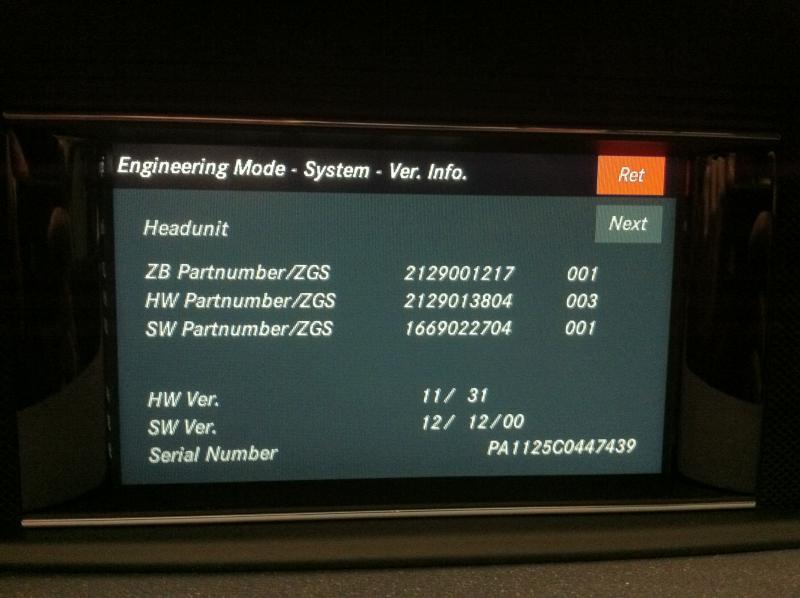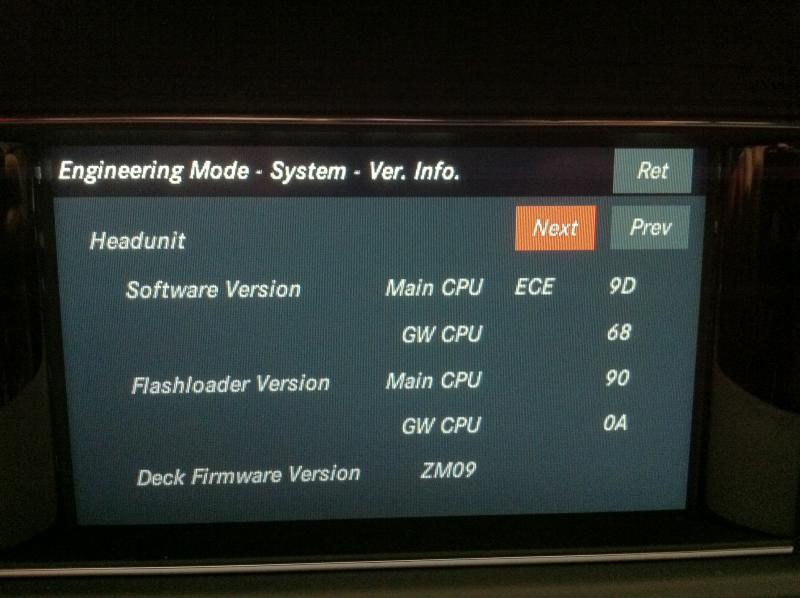


2012 Engineering Menu / Enabling Backup Camera

Thread Starter
MBWorld Fanatic!
Joined: Nov 2007
Posts: 2,078
Likes: 4
From: NYC
2012 C300 4Matic
2012 Engineering Menu / Enabling Backup Camera
Hi All,
Was hoping we could start a thread regarding the changes to the 2012 COMAND unit.
The "Hangup / # / 1" trick still works in the 2012 unit.
I don't see an option to enable the reverse camera though.
I also see that there are a bunch of internet settings.
How do we enable the reverse camera? I know it's doable - it is an optional add on for the initial launch models.
...and how do we enable the web browser?
Was hoping we could start a thread regarding the changes to the 2012 COMAND unit.
The "Hangup / # / 1" trick still works in the 2012 unit.
I don't see an option to enable the reverse camera though.
I also see that there are a bunch of internet settings.
How do we enable the reverse camera? I know it's doable - it is an optional add on for the initial launch models.
...and how do we enable the web browser?
Last edited by acr2001; Oct 2, 2011 at 06:51 PM.
Thread Starter
MBWorld Fanatic!
Joined: Nov 2007
Posts: 2,078
Likes: 4
From: NYC
2012 C300 4Matic
Thanks Glyn! The C240 was a major lemon (you might remember my thread with the huge list of problems?) well, now the transmission was acting up! So I decided enough was enough. Got a really good deal on it.
Update to the thread: I was able to find the Reverse Camera line in the engineering menu (it is now down another page). It doesn't have a simple "enable" option now, rather it has a bunch of options where are completely foreign to me - guess I'll have to try them until I find the right one.
Also, I found the option to enable the "Browser". Now there is a full web browser activated in the COMAND unit, but I cannot get it to connect. It wants to use my cell phone to get data but says that my phone (iPhone 4) doesn't support it.
If anyone has any suggestions I'll give it a try and report back.
EDIT: So, upon further research, the "COMAND online" feature as it is known in Europe (where it is enabled) requires a phone that supports Bluetooth DUN. No iPhone or Android supports this - only Blackberry and a few old phones. It is an outdated standard that Mercedes somehow decided to use :O I assume this is the reason why MBUSA disables this mostly useless option in America.
Update to the thread: I was able to find the Reverse Camera line in the engineering menu (it is now down another page). It doesn't have a simple "enable" option now, rather it has a bunch of options where are completely foreign to me - guess I'll have to try them until I find the right one.
Also, I found the option to enable the "Browser". Now there is a full web browser activated in the COMAND unit, but I cannot get it to connect. It wants to use my cell phone to get data but says that my phone (iPhone 4) doesn't support it.
If anyone has any suggestions I'll give it a try and report back.
EDIT: So, upon further research, the "COMAND online" feature as it is known in Europe (where it is enabled) requires a phone that supports Bluetooth DUN. No iPhone or Android supports this - only Blackberry and a few old phones. It is an outdated standard that Mercedes somehow decided to use :O I assume this is the reason why MBUSA disables this mostly useless option in America.
Last edited by acr2001; Oct 2, 2011 at 09:22 PM.
Thread Starter
MBWorld Fanatic!
Joined: Nov 2007
Posts: 2,078
Likes: 4
From: NYC
2012 C300 4Matic
Maybe I'm beating an already dead horse?
https://mbworld.org/forums/c-class-w...tethering.html
Some good info here.
https://mbworld.org/forums/c-class-w...tethering.html
Some good info here.

Member
Joined: Aug 2011
Posts: 216
Likes: 3
From: Brunei Darussalam
GLC250 Coupe
Hi. I'm pretty sure its programmable.. I've done so in my new W204. Just waiting on someone to come up with instructions to open up the dash unit..... 
You can also have options to enable bluetooth audio, aux, and web browsing..
You can also have options to enable bluetooth audio, aux, and web browsing..

Junior Member
Joined: Mar 2009
Posts: 55
Likes: 0
2009 C300 4Matic Sport...2012 C350 4Matic
Thanks Glyn! The C240 was a major lemon (you might remember my thread with the huge list of problems?) well, now the transmission was acting up! So I decided enough was enough. Got a really good deal on it.
Update to the thread: I was able to find the Reverse Camera line in the engineering menu (it is now down another page). It doesn't have a simple "enable" option now, rather it has a bunch of options where are completely foreign to me - guess I'll have to try them until I find the right one.
Also, I found the option to enable the "Browser". Now there is a full web browser activated in the COMAND unit, but I cannot get it to connect. It wants to use my cell phone to get data but says that my phone (iPhone 4) doesn't support it.
If anyone has any suggestions I'll give it a try and report back.
EDIT: So, upon further research, the "COMAND online" feature as it is known in Europe (where it is enabled) requires a phone that supports Bluetooth DUN. No iPhone or Android supports this - only Blackberry and a few old phones. It is an outdated standard that Mercedes somehow decided to use :O I assume this is the reason why MBUSA disables this mostly useless option in America.
Update to the thread: I was able to find the Reverse Camera line in the engineering menu (it is now down another page). It doesn't have a simple "enable" option now, rather it has a bunch of options where are completely foreign to me - guess I'll have to try them until I find the right one.
Also, I found the option to enable the "Browser". Now there is a full web browser activated in the COMAND unit, but I cannot get it to connect. It wants to use my cell phone to get data but says that my phone (iPhone 4) doesn't support it.
If anyone has any suggestions I'll give it a try and report back.
EDIT: So, upon further research, the "COMAND online" feature as it is known in Europe (where it is enabled) requires a phone that supports Bluetooth DUN. No iPhone or Android supports this - only Blackberry and a few old phones. It is an outdated standard that Mercedes somehow decided to use :O I assume this is the reason why MBUSA disables this mostly useless option in America.
Thanks much!

Junior Member
Joined: Jun 2012
Posts: 63
Likes: 0
2012 C300 4Matic
I would also like to get browser enabled. Have you had any luck?
Trending Topics
Junior Member
Joined: Mar 2009
Posts: 55
Likes: 0
2009 C300 4Matic Sport...2012 C350 4Matic
MB World Stories
The Best of Mercedes & AMG

Manual Mercedes? 6 Times Sindelfingen Let Drivers Have All The Fun
Verdad Gallardo
Mercedes SLR McLaren 722 S Is Extremely Rare Example Modified by McLaren
Verdad Gallardo
8 Classic Boxy Mercedes Designs That Have Aged Like Fine Wine
Verdad Gallardo
Flawlessly Restored Mercedes 190E Evo II Heads to Auction
Verdad Gallardo
Electric Mercedes C-Class Unveiled: 11 Things You Need to Know
Verdad Gallardo
Mercedes EQS Gets A Major Update: Everything You Need to Know
Verdad Gallardo
5 Underrated Mercedes-Benz Models That Don't Get the Love They Deserve
Verdad Gallardo
Mercedes 300D Has Pushed Well Past 1 Million Miles and It Ain't Stopping
Verdad Gallardo
10 Most Reliable Mercedes-Benz Models You Can Buy Used
Verdad Gallardo
Junior Member
Joined: Jun 2012
Posts: 63
Likes: 0
2012 C300 4Matic
I was able to enable the browser. I can post pictures if someone needs it but its not that hard. The browser its self is not that great or fast but I guess its a cool feature to show off
1. Enter engineering menu by holding Hangup / # / 1 for about 10 seconds.
2. Go into HW Setup and find HU parametres.
3. There are 11 pages here and I have enabled 3 things. Browser ON and two Telephone settings to on I think they where on page 7. Telefone SAP module and Telephone RFP.
After you do these just turn of your radio and turn it back on and a browser icon should show up beside System.
Than you just need to set your provider in the settings of the browser. If your phone is through T-Mobile than pick T-Mobile.
If anyone finds any other cool tricks or settings please post.
I saw a digital manual and I turned it on but don't see it show up any where.
1. Enter engineering menu by holding Hangup / # / 1 for about 10 seconds.
2. Go into HW Setup and find HU parametres.
3. There are 11 pages here and I have enabled 3 things. Browser ON and two Telephone settings to on I think they where on page 7. Telefone SAP module and Telephone RFP.
After you do these just turn of your radio and turn it back on and a browser icon should show up beside System.
Than you just need to set your provider in the settings of the browser. If your phone is through T-Mobile than pick T-Mobile.
If anyone finds any other cool tricks or settings please post.
I saw a digital manual and I turned it on but don't see it show up any where.
Junior Member
Joined: Mar 2009
Posts: 55
Likes: 0
2009 C300 4Matic Sport...2012 C350 4Matic
I was able to enable the browser. I can post pictures if someone needs it but its not that hard. The browser its self is not that great or fast but I guess its a cool feature to show off
1. Enter engineering menu by holding Hangup / # / 1 for about 10 seconds.
2. Go into HW Setup and find HU parametres.
3. There are 11 pages here and I have enabled 3 things. Browser ON and two Telephone settings to on I think they where on page 7. Telefone SAP module and Telephone RFP.
After you do these just turn of your radio and turn it back on and a browser icon should show up beside System.
Than you just need to set your provider in the settings of the browser. If your phone is through T-Mobile than pick T-Mobile.
If anyone finds any other cool tricks or settings please post.
I saw a digital manual and I turned it on but don't see it show up any where.
1. Enter engineering menu by holding Hangup / # / 1 for about 10 seconds.
2. Go into HW Setup and find HU parametres.
3. There are 11 pages here and I have enabled 3 things. Browser ON and two Telephone settings to on I think they where on page 7. Telefone SAP module and Telephone RFP.
After you do these just turn of your radio and turn it back on and a browser icon should show up beside System.
Than you just need to set your provider in the settings of the browser. If your phone is through T-Mobile than pick T-Mobile.
If anyone finds any other cool tricks or settings please post.
I saw a digital manual and I turned it on but don't see it show up any where.
-Dennis
Thread Starter
MBWorld Fanatic!
Joined: Nov 2007
Posts: 2,078
Likes: 4
From: NYC
2012 C300 4Matic
If your an owner of a US car, the Sirius weather info is available out of the box - no option needs to be changed. Are you talking about something else?
Junior Member
Joined: Mar 2009
Posts: 55
Likes: 0
2009 C300 4Matic Sport...2012 C350 4Matic
In Canada, Sirius weather is turned off. The "WA" options turned on the weather but for some reason, it will only show weather in US cities.
Thread Starter
MBWorld Fanatic!
Joined: Nov 2007
Posts: 2,078
Likes: 4
From: NYC
2012 C300 4Matic
Member
Joined: Nov 2001
Posts: 106
Likes: 2
From: Philly Area
I was able to enable the browser. I can post pictures if someone needs it but its not that hard. The browser its self is not that great or fast but I guess its a cool feature to show off
1. Enter engineering menu by holding Hangup / # / 1 for about 10 seconds.
2. Go into HW Setup and find HU parametres.
3. There are 11 pages here and I have enabled 3 things. Browser ON and two Telephone settings to on I think they where on page 7. Telefone SAP module and Telephone RFP.
After you do these just turn of your radio and turn it back on and a browser icon should show up beside System.
Than you just need to set your provider in the settings of the browser. If your phone is through T-Mobile than pick T-Mobile.
If anyone finds any other cool tricks or settings please post.
I saw a digital manual and I turned it on but don't see it show up any where.
1. Enter engineering menu by holding Hangup / # / 1 for about 10 seconds.
2. Go into HW Setup and find HU parametres.
3. There are 11 pages here and I have enabled 3 things. Browser ON and two Telephone settings to on I think they where on page 7. Telefone SAP module and Telephone RFP.
After you do these just turn of your radio and turn it back on and a browser icon should show up beside System.
Than you just need to set your provider in the settings of the browser. If your phone is through T-Mobile than pick T-Mobile.
If anyone finds any other cool tricks or settings please post.
I saw a digital manual and I turned it on but don't see it show up any where.
If you have any suggestions for manually inputting, please post.

Newbie
Joined: Dec 2012
Posts: 6
Likes: 0
E class
Thanks Glyn! The C240 was a major lemon (you might remember my thread with the huge list of problems?) well, now the transmission was acting up! So I decided enough was enough. Got a really good deal on it.
Update to the thread: I was able to find the Reverse Camera line in the engineering menu (it is now down another page). It doesn't have a simple "enable" option now, rather it has a bunch of options where are completely foreign to me - guess I'll have to try them until I find the right one.
Also, I found the option to enable the "Browser". Now there is a full web browser activated in the COMAND unit, but I cannot get it to connect. It wants to use my cell phone to get data but says that my phone (iPhone 4) doesn't support it.
If anyone has any suggestions I'll give it a try and report back.
EDIT: So, upon further research, the "COMAND online" feature as it is known in Europe (where it is enabled) requires a phone that supports Bluetooth DUN. No iPhone or Android supports this - only Blackberry and a few old phones. It is an outdated standard that Mercedes somehow decided to use :O I assume this is the reason why MBUSA disables this mostly useless option in America.
Update to the thread: I was able to find the Reverse Camera line in the engineering menu (it is now down another page). It doesn't have a simple "enable" option now, rather it has a bunch of options where are completely foreign to me - guess I'll have to try them until I find the right one.
Also, I found the option to enable the "Browser". Now there is a full web browser activated in the COMAND unit, but I cannot get it to connect. It wants to use my cell phone to get data but says that my phone (iPhone 4) doesn't support it.
If anyone has any suggestions I'll give it a try and report back.
EDIT: So, upon further research, the "COMAND online" feature as it is known in Europe (where it is enabled) requires a phone that supports Bluetooth DUN. No iPhone or Android supports this - only Blackberry and a few old phones. It is an outdated standard that Mercedes somehow decided to use :O I assume this is the reason why MBUSA disables this mostly useless option in America.
Hi, can you tell me how did you activate the reverse Camera ? I have a E class Model 2012, just bought it this week... I can't find the option in the engineering mode. I have Audio 20, not COMAND; small screen & Becker Nav pilot. However, there is no selection in the engineering menu (accessed by holding in hang-up, 1 and # simultaneously for 10 seconds).
I have the same engineering mode as this one :

Member
Joined: Jul 2012
Posts: 172
Likes: 1
From: markham, ON, Canada
2014 ML 350 BT

Newbie
Joined: Mar 2013
Posts: 4
Likes: 0
C180
Hi, can you tell me how did you activate the reverse Camera ? I have a E class Model 2012, just bought it this week... I can't find the option in the engineering mode. I have Audio 20, not COMAND; small screen & Becker Nav pilot. However, there is no selection in the engineering menu (accessed by holding in hang-up, 1 and # simultaneously for 10 seconds).
I have the same engineering mode as this one :
http://www.youtube.com/watch?v=KzWqBeg3FRc
Thx
I have the same engineering mode as this one :
http://www.youtube.com/watch?v=KzWqBeg3FRc
Thx

Newbie
Joined: Mar 2013
Posts: 4
Likes: 0
C180
I read somewhere that firmware update might be required...
Newbie
Joined: Dec 2012
Posts: 6
Likes: 0
E class
I also heard about a second menu:
"Press End call + 1 + # buttons all at the same time for 10 seconds and the screen gets you in the engineering mode.
While in that screen press: End call + 4 + # buttons at the same time for 10 seconds and a second screen is available"
It doesnt work for me ..
"Press End call + 1 + # buttons all at the same time for 10 seconds and the screen gets you in the engineering mode.
While in that screen press: End call + 4 + # buttons at the same time for 10 seconds and a second screen is available"
It doesnt work for me ..
Newbie
Joined: Dec 2012
Posts: 6
Likes: 0
E class
Hi! I have the same screen as shown on the video you posted, but my car is a w204. My unit came without Navi, browser and weather options. All blocked from factory. I've been trying to enter the eng menu to enable it but it seems the sw version we have is different from the one the guys on this thread have...
I read somewhere that firmware update might be required...
I read somewhere that firmware update might be required...
We don't have the same version