

Kush Desai
Member
close
Jun 30, 2025
- Join DateDec 2019
- LocationRogers, AR
- Posts:178
-
iTrader Positive Feedback0
-
iTrader Feedback Score(0)
- Vehicle(s) I drive2016 C300 4Matic
-
Likes:190
-
Liked:38 Times in 29 Posts
Hey all,
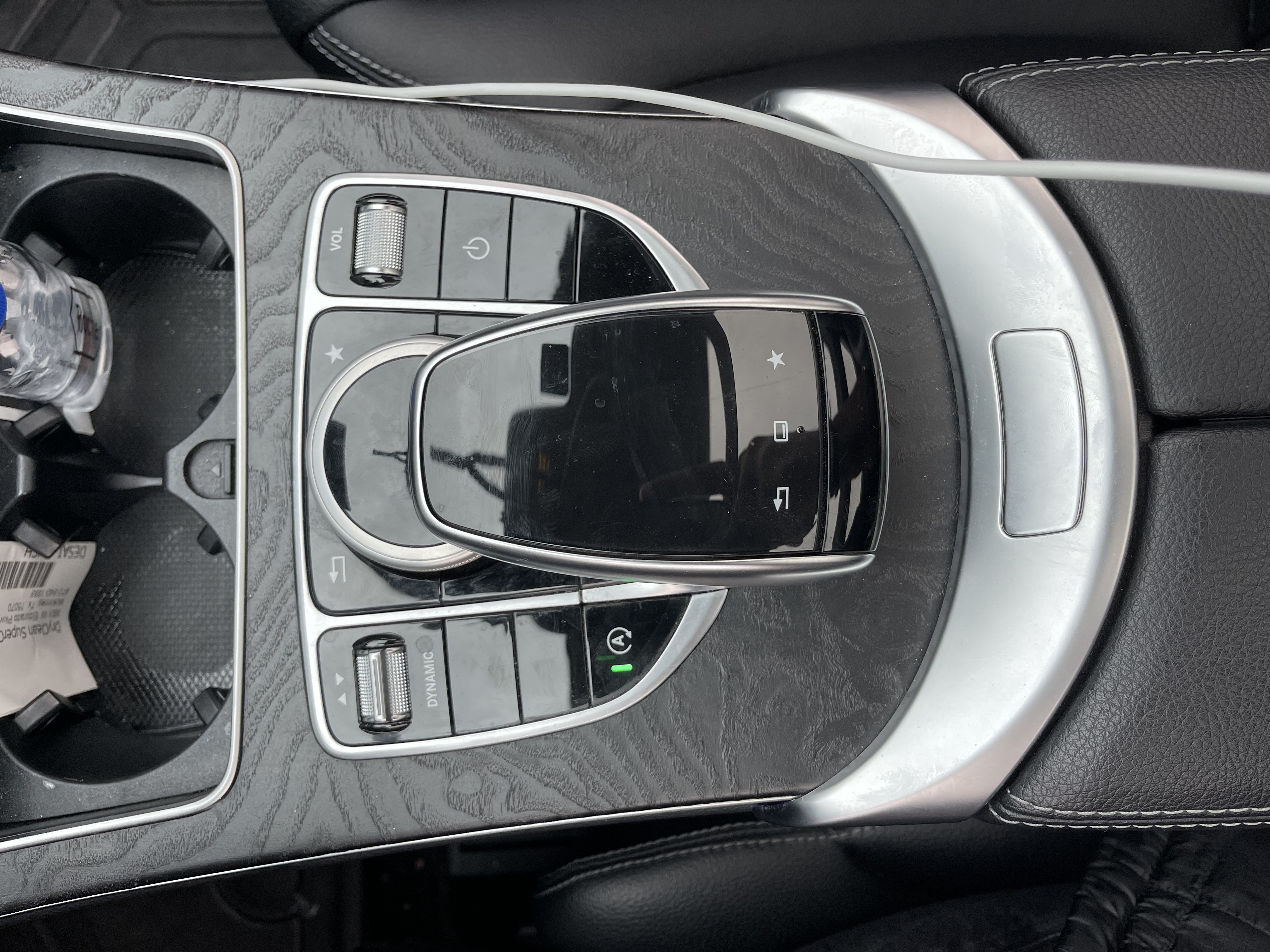
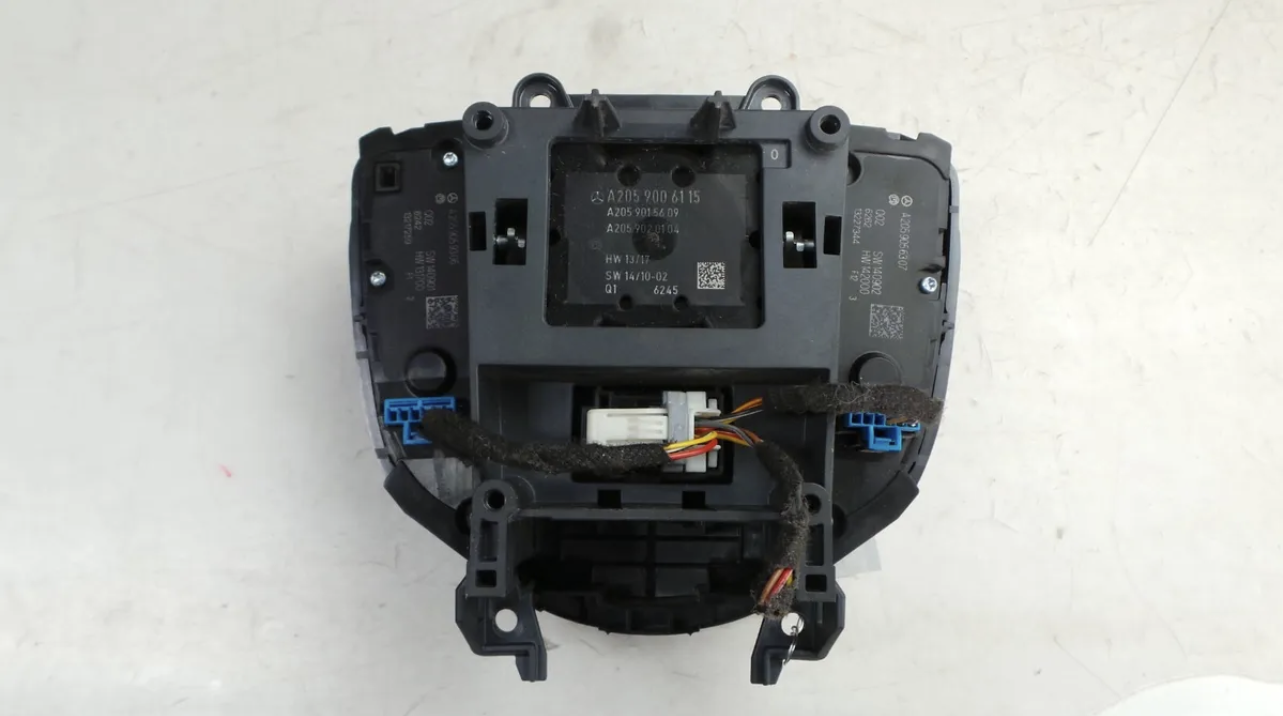
I was wondering if anyone's ever done this before or know if it's possible to do. I was wanting to replace my Center Comand Knob for the "flat" look. I have attached pictures so yall can see what I'm talking about.
My charging cable ALWAYS gets caught between the knob and that trackpad, which is 1 of the biggest reasons I want to replace it. But I also just like that flat look. As like many of you, I NEVER use that trackpad and never really found a reason to really use it.
As you can see, all the buttons I currently have would be the same for the replacement controller. I'm also assuming all the connectors would just be a simple remove/replace?
I know there are tons of knowledgeable folks on this forum! So would this be something that's possible to do? Would it be a simple plug n play or would there be coding/programming involved :/
TIA!
I was wondering if anyone's ever done this before or know if it's possible to do. I was wanting to replace my Center Comand Knob for the "flat" look. I have attached pictures so yall can see what I'm talking about.
My charging cable ALWAYS gets caught between the knob and that trackpad, which is 1 of the biggest reasons I want to replace it. But I also just like that flat look. As like many of you, I NEVER use that trackpad and never really found a reason to really use it.
As you can see, all the buttons I currently have would be the same for the replacement controller. I'm also assuming all the connectors would just be a simple remove/replace?
I know there are tons of knowledgeable folks on this forum! So would this be something that's possible to do? Would it be a simple plug n play or would there be coding/programming involved :/
TIA!



MaverickC43
MBWorld Fanatic!
close


Oct 25, 2025
- Join DateMay 2021
- LocationPlainfield IL
- Posts:1,317
-
iTrader Positive Feedback0
-
iTrader Feedback Score(0)
- Vehicle(s) I driveAmg C43
-
Likes:210
-
Liked:200 Times in 177 Posts
I will look at mine tomorrow but it should just pull off. If u don’t use it then just get it out of there
Cosworth2000
MBWorld Fanatic!
close


Dec 31, 2025
- Join DateJun 2012
- LocationToronto
- Posts:1,229
-
iTrader Positive Feedback0
-
iTrader Feedback Score(0)
- Vehicle(s) I drive2022 E53 AMG
-
Likes:111
-
Liked:188 Times in 159 Posts
Following.

MBWorld God!
W205C43PFL
MBWorld God!
close
Yesterday
- Join DateDec 2019
- Posts:31,626
-
iTrader Positive Feedback0
-
iTrader Feedback Score(0)
-
Likes:407
-
Liked:6,155 Times in 5,344 Posts
Quote:
I was wondering if anyone's ever done this before or know if it's possible to do. I was wanting to replace my Center Comand Knob for the "flat" look. I have attached pictures so yall can see what I'm talking about.
My charging cable ALWAYS gets caught between the knob and that trackpad, which is 1 of the biggest reasons I want to replace it. But I also just like that flat look. As like many of you, I NEVER use that trackpad and never really found a reason to really use it.
As you can see, all the buttons I currently have would be the same for the replacement controller. I'm also assuming all the connectors would just be a simple remove/replace?
I know there are tons of knowledgeable folks on this forum! So would this be something that's possible to do? Would it be a simple plug n play or would there be coding/programming involved :/
TIA!
Curious but is that "flat look" basically the standard one, I thought that touchpad was actually part of a package or otherwise an option/upgrade. not in Canada but I seen C 300 and C 43 without that knob. Another suggestion, in case you never use the touchpad but for some reason one day you want to use it (better have it when needed and need it and not have it that kind of thing) you could consider changing it to the facelift GLC trackpad one I think? Originally Posted by Kush Desai
Hey all,I was wondering if anyone's ever done this before or know if it's possible to do. I was wanting to replace my Center Comand Knob for the "flat" look. I have attached pictures so yall can see what I'm talking about.
My charging cable ALWAYS gets caught between the knob and that trackpad, which is 1 of the biggest reasons I want to replace it. But I also just like that flat look. As like many of you, I NEVER use that trackpad and never really found a reason to really use it.
As you can see, all the buttons I currently have would be the same for the replacement controller. I'm also assuming all the connectors would just be a simple remove/replace?
I know there are tons of knowledgeable folks on this forum! So would this be something that's possible to do? Would it be a simple plug n play or would there be coding/programming involved :/
TIA!
Sorry I wasn't able to answer if there is coding/programming needed though, that said, on W213 specifically that touchpad is known to crack so it is a common replacement and I don't hear anyone mention that it needs to be programmed, that touchpad thing too is a separate piece from what I gathered.
Kush Desai
Member
close
Jun 30, 2025
- Join DateDec 2019
- LocationRogers, AR
- Posts:178
-
iTrader Positive Feedback0
-
iTrader Feedback Score(0)
- Vehicle(s) I drive2016 C300 4Matic
-
Likes:190
-
Liked:38 Times in 29 Posts
From the years of having the car, I don't remember the last time I've used that trackpad. More recently, I've been using the wired connection method for my Carplay as the wireless method is causing connection issues with my phone after the car is off/locked. But the cable gets caught between the trackpad and the knob, which sometimes accessing the phone gets disconnected. overall just an annoyance really.
I'm just not sure if I could completely remove that trackpad and install that "Flat" option. Personally, I like that look better. Just havent read about anyone ever trying it or doing it :/
If I remember correctly, the "Flat" trackpad was part of the facelift. I don't see the trackpad I have, on anything newer than a 2018 C-Class. I don't think it was a "option" or part of a package to get the trackpad over having the flat look.
I'm just not sure if I could completely remove that trackpad and install that "Flat" option. Personally, I like that look better. Just havent read about anyone ever trying it or doing it :/
If I remember correctly, the "Flat" trackpad was part of the facelift. I don't see the trackpad I have, on anything newer than a 2018 C-Class. I don't think it was a "option" or part of a package to get the trackpad over having the flat look.
MBWorld God!
W205C43PFL
MBWorld God!
close
Yesterday
- Join DateDec 2019
- Posts:31,626
-
iTrader Positive Feedback0
-
iTrader Feedback Score(0)
-
Likes:407
-
Liked:6,155 Times in 5,344 Posts
Quote:
I'm just not sure if I could completely remove that trackpad and install that "Flat" option. Personally, I like that look better. Just havent read about anyone ever trying it or doing it :/
If I remember correctly, the "Flat" trackpad was part of the facelift. I don't see the trackpad I have, on anything newer than a 2018 C-Class. I don't think it was a "option" or part of a package to get the trackpad over having the flat look.
I think MB called it the touchpad until they replaced it with the computer like trackpad that first appeared on the A-Class, as for the picture you showed that is not the one you have, nor the A-Class trackpad, that specific one you pictured is actually a lower trim standard option, it is rare but there are W205 with it as some options are missing, I think it was Audio 20, you have COMAND.Originally Posted by Kush Desai
From the years of having the car, I don't remember the last time I've used that trackpad. More recently, I've been using the wired connection method for my Carplay as the wireless method is causing connection issues with my phone after the car is off/locked. But the cable gets caught between the trackpad and the knob, which sometimes accessing the phone gets disconnected. overall just an annoyance really.I'm just not sure if I could completely remove that trackpad and install that "Flat" option. Personally, I like that look better. Just havent read about anyone ever trying it or doing it :/
If I remember correctly, the "Flat" trackpad was part of the facelift. I don't see the trackpad I have, on anything newer than a 2018 C-Class. I don't think it was a "option" or part of a package to get the trackpad over having the flat look.
The trackpad on the GLC facelift with the complete flat look from the A-Class was part of the MBUX system. For reference, your vehicle has NTG 5.0, facelift W205 has NTG 5.1? 5.5? IIRC. The GLC facelift had MBUX (NTG 6.0)
I am sorry that I am not able to confirm if the fitment will work though, which was your original question. Hopefully someone else is able to help you out.
Kush Desai
Member
close
Jun 30, 2025
- Join DateDec 2019
- LocationRogers, AR
- Posts:178
-
iTrader Positive Feedback0
-
iTrader Feedback Score(0)
- Vehicle(s) I drive2016 C300 4Matic
-
Likes:190
-
Liked:38 Times in 29 Posts
Quote:
The trackpad on the GLC facelift with the complete flat look from the A-Class was part of the MBUX system. For reference, your vehicle has NTG 5.0, facelift W205 has NTG 5.1? 5.5? IIRC. The GLC facelift had MBUX (NTG 6.0)
I am sorry that I am not able to confirm if the fitment will work though, which was your original question. Hopefully someone else is able to help you out.
Nah man! That was actually super informative tbh! I didn't know it was part of an upgrade option. But thank youOriginally Posted by W205C43PFL
I think MB called it the touchpad until they replaced it with the computer like trackpad that first appeared on the A-Class, as for the picture you showed that is not the one you have, nor the A-Class trackpad, that specific one you pictured is actually a lower trim standard option, it is rare but there are W205 with it as some options are missing, I think it was Audio 20, you have COMAND.The trackpad on the GLC facelift with the complete flat look from the A-Class was part of the MBUX system. For reference, your vehicle has NTG 5.0, facelift W205 has NTG 5.1? 5.5? IIRC. The GLC facelift had MBUX (NTG 6.0)
I am sorry that I am not able to confirm if the fitment will work though, which was your original question. Hopefully someone else is able to help you out.
MBWorld God!
W205C43PFL
MBWorld God!
close
Yesterday
- Join DateDec 2019
- Posts:31,626
-
iTrader Positive Feedback0
-
iTrader Feedback Score(0)
-
Likes:407
-
Liked:6,155 Times in 5,344 Posts
Quote:
Although I wasn't able to help, I was glad you found the information at least somewhat helpful. I was able to confirm that the touchpad was part of the (PO2) Premium 2 Package. Let me just paste my findings.Originally Posted by Kush Desai
Nah man! That was actually super informative tbh! I didn't know it was part of an upgrade option. But thank you
P02 – Premium 2 Package $4,500
Requires Rearview Camera (218) or Parking Assist Package (996). Requires Heated Seats (873) or Heated/Ventilated Seats (401).* Not with (P01) Premium 1 Package or (P03) Premium 3 Package.
PO2- Premium 2 Package:
Includes all (P01) Premium 1 Package features except Rearview Camera plus:
531 – COMAND Navigation and Voice Control
502 – Navigation Map Updates included for 3 years
5 years Traffic and Weather Services (provided by SiriusXM®)
8.4” High-Resolution Screen
448 - Touchpad
P17 – Hands-Free Access
500 – Power Folding Mirrors
877 – Ambient Lighting
881 – Electronic Trunk Closer
I bolded option 448 - Touchpad.
Kush Desai
Member
close
Jun 30, 2025
- Join DateDec 2019
- LocationRogers, AR
- Posts:178
-
iTrader Positive Feedback0
-
iTrader Feedback Score(0)
- Vehicle(s) I drive2016 C300 4Matic
-
Likes:190
-
Liked:38 Times in 29 Posts
Quote:
P02 – Premium 2 Package $4,500
Requires Rearview Camera (218) or Parking Assist Package (996). Requires Heated Seats (873) or Heated/Ventilated Seats (401).* Not with (P01) Premium 1 Package or (P03) Premium 3 Package.
PO2- Premium 2 Package:
Includes all (P01) Premium 1 Package features except Rearview Camera plus:
531 – COMAND Navigation and Voice Control
502 – Navigation Map Updates included for 3 years
5 years Traffic and Weather Services (provided by SiriusXM®)
8.4” High-Resolution Screen
448 - Touchpad
P17 – Hands-Free Access
500 – Power Folding Mirrors
877 – Ambient Lighting
881 – Electronic Trunk Closer
I bolded option 448 - Touchpad.
Here's something odd though, from your list, I have everything except 877 – Ambient Lighting and 881 – Electronic Trunk Closer. However, I did add the ambient lighting myself though.Originally Posted by W205C43PFL
Although I wasn't able to help, I was glad you found the information at least somewhat helpful. I was able to confirm that the touchpad was part of the (PO2) Premium 2 Package. Let me just paste my findings.P02 – Premium 2 Package $4,500
Requires Rearview Camera (218) or Parking Assist Package (996). Requires Heated Seats (873) or Heated/Ventilated Seats (401).* Not with (P01) Premium 1 Package or (P03) Premium 3 Package.
PO2- Premium 2 Package:
Includes all (P01) Premium 1 Package features except Rearview Camera plus:
531 – COMAND Navigation and Voice Control
502 – Navigation Map Updates included for 3 years
5 years Traffic and Weather Services (provided by SiriusXM®)
8.4” High-Resolution Screen
448 - Touchpad
P17 – Hands-Free Access
500 – Power Folding Mirrors
877 – Ambient Lighting
881 – Electronic Trunk Closer
I bolded option 448 - Touchpad.
MBWorld God!
W205C43PFL
MBWorld God!
close
Yesterday
- Join DateDec 2019
- Posts:31,626
-
iTrader Positive Feedback0
-
iTrader Feedback Score(0)
-
Likes:407
-
Liked:6,155 Times in 5,344 Posts
Quote:
I was looking at the 2017 options, is yours 2016 or is the signature outdated and you have an newer model, if so I am sorry for the wrong model year information provided. Originally Posted by Kush Desai
Here's something odd though, from your list, I have everything except 877 – Ambient Lighting and 881 – Electronic Trunk Closer. However, I did add the ambient lighting myself though.
Kush Desai
Member
close
Jun 30, 2025
- Join DateDec 2019
- LocationRogers, AR
- Posts:178
-
iTrader Positive Feedback0
-
iTrader Feedback Score(0)
- Vehicle(s) I drive2016 C300 4Matic
-
Likes:190
-
Liked:38 Times in 29 Posts
no no, I have the 2016 still. My signature is up to date
MBWorld God!
W205C43PFL
MBWorld God!
close
Yesterday
- Join DateDec 2019
- Posts:31,626
-
iTrader Positive Feedback0
-
iTrader Feedback Score(0)
-
Likes:407
-
Liked:6,155 Times in 5,344 Posts
Quote:
I see let me see if I can find more information on the 2016. Originally Posted by Kush Desai
no no, I have the 2016 still. My signature is up to date
MBWorld God!
W205C43PFL
MBWorld God!
close
Yesterday
- Join DateDec 2019
- Posts:31,626
-
iTrader Positive Feedback0
-
iTrader Feedback Score(0)
-
Likes:407
-
Liked:6,155 Times in 5,344 Posts
Quote:
Looks like 2016 the touchpad was standard on sedans and it was made optional starting 2017. Originally Posted by Kush Desai
no no, I have the 2016 still. My signature is up to date
Kush Desai
Member
close
Jun 30, 2025
- Join DateDec 2019
- LocationRogers, AR
- Posts:178
-
iTrader Positive Feedback0
-
iTrader Feedback Score(0)
- Vehicle(s) I drive2016 C300 4Matic
-
Likes:190
-
Liked:38 Times in 29 Posts
Any idea on what the part number for the trackpad assembly is? and the part number for the flat/non-trackpad assembly?
I really want to see if they are interchangeable
I really want to see if they are interchangeable
MBWorld God!
W205C43PFL
MBWorld God!
close
Yesterday
- Join DateDec 2019
- Posts:31,626
-
iTrader Positive Feedback0
-
iTrader Feedback Score(0)
-
Likes:407
-
Liked:6,155 Times in 5,344 Posts
Quote:
I really want to see if they are interchangeable
not 100% sure but the non touchpad one should be : A2059006115 while the touchpad one should be: A2059005915Originally Posted by Kush Desai
Any idea on what the part number for the trackpad assembly is? and the part number for the flat/non-trackpad assembly?I really want to see if they are interchangeable
MBWorld God!
W205C43PFL
MBWorld God!
close
Yesterday
- Join DateDec 2019
- Posts:31,626
-
iTrader Positive Feedback0
-
iTrader Feedback Score(0)
-
Likes:407
-
Liked:6,155 Times in 5,344 Posts
Are you using a custom aftermarket android screen by any chance? Asking because I don't recall the 2016 having smartphone integration (Android Auto and Apple CarPlay)
Perhaps try one of those plug in adapters (it is basically a mini computer runs Android and able to let you use wireless Android Auto or CarPlay), hopefully that version of wireless will be more reliable compared to the other wireless one you hated.
Perhaps try one of those plug in adapters (it is basically a mini computer runs Android and able to let you use wireless Android Auto or CarPlay), hopefully that version of wireless will be more reliable compared to the other wireless one you hated.
Kush Desai
Member
close
Jun 30, 2025
- Join DateDec 2019
- LocationRogers, AR
- Posts:178
-
iTrader Positive Feedback0
-
iTrader Feedback Score(0)
- Vehicle(s) I drive2016 C300 4Matic
-
Likes:190
-
Liked:38 Times in 29 Posts
Quote:
Perhaps try one of those plug in adapters (it is basically a mini computer runs Android and able to let you use wireless Android Auto or CarPlay), hopefully that version of wireless will be more reliable compared to the other wireless one you hated.
Nope! I'm using the OEM Screen but just added the RoadTop CarPlay module to it to get the integration. Using the Wireless connection, whenever i have my car off and locked in the garage, it'll randomly connect to the carplay module while I'm inside the house. So if I'm on a call or facetime, it'll randomly switch audio outputs from the phone to the car. Just was super annoying so decided to fully use the wired method. No issues at all with that.Originally Posted by W205C43PFL
Are you using a custom aftermarket android screen by any chance? Asking because I don't recall the 2016 having smartphone integration (Android Auto and Apple CarPlay)Perhaps try one of those plug in adapters (it is basically a mini computer runs Android and able to let you use wireless Android Auto or CarPlay), hopefully that version of wireless will be more reliable compared to the other wireless one you hated.
Kush Desai
Member
close
Jun 30, 2025
- Join DateDec 2019
- LocationRogers, AR
- Posts:178
-
iTrader Positive Feedback0
-
iTrader Feedback Score(0)
- Vehicle(s) I drive2016 C300 4Matic
-
Likes:190
-
Liked:38 Times in 29 Posts
So based on looking at both connection points, I assume they should be interchangeable. All the cables/connections are the same. But the question still arises as to if programming/coding is still needed.
MBWorld God!
W205C43PFL
MBWorld God!
close
Yesterday
- Join DateDec 2019
- Posts:31,626
-
iTrader Positive Feedback0
-
iTrader Feedback Score(0)
-
Likes:407
-
Liked:6,155 Times in 5,344 Posts
Quote:
If it isn't too much hassle I said give it a shot and see, fingers crossed it is plug and play. Originally Posted by Kush Desai
So based on looking at both connection points, I assume they should be interchangeable. All the cables/connections are the same. But the question still arises as to if programming/coding is still needed.
MBWorld God!
W205C43PFL
MBWorld God!
close
Yesterday
- Join DateDec 2019
- Posts:31,626
-
iTrader Positive Feedback0
-
iTrader Feedback Score(0)
-
Likes:407
-
Liked:6,155 Times in 5,344 Posts
Quote:
I see, that explains it. I wonder if another module might not have this issue but ya like you said wire is still the way to go.Originally Posted by Kush Desai
Nope! I'm using the OEM Screen but just added the RoadTop CarPlay module to it to get the integration. Using the Wireless connection, whenever i have my car off and locked in the garage, it'll randomly connect to the carplay module while I'm inside the house. So if I'm on a call or facetime, it'll randomly switch audio outputs from the phone to the car. Just was super annoying so decided to fully use the wired method. No issues at all with that.


Yes. They are interchangeable. I have done it on my car, and it's a world of difference getting rid of the awful touch pad. No programming or coding needed.
Kush Desai
Member
close
Jun 30, 2025
- Join DateDec 2019
- LocationRogers, AR
- Posts:178
-
iTrader Positive Feedback0
-
iTrader Feedback Score(0)
- Vehicle(s) I drive2016 C300 4Matic
-
Likes:190
-
Liked:38 Times in 29 Posts
Glad to know someone else shared the same annoyance!!!
Thanks for letting me know. Will def go ahead and order the new Flat Controller.
Thanks for letting me know. Will def go ahead and order the new Flat Controller.
Kush Desai
Member
close
Jun 30, 2025
- Join DateDec 2019
- LocationRogers, AR
- Posts:178
-
iTrader Positive Feedback0
-
iTrader Feedback Score(0)
- Vehicle(s) I drive2016 C300 4Matic
-
Likes:190
-
Liked:38 Times in 29 Posts
Quote:
Quick question though, is it just removeable by removing the screws from the backside? Does it just get removed from the top end after the screws are removed?Originally Posted by Holmes5518
Yes. They are interchangeable. I have done it on my car, and it's a world of difference getting rid of the awful touch pad. No programming or coding needed.

Quote:
Thanks for letting me know. Will def go ahead and order the new Flat Controller.
Please give us an update on how the install went.Originally Posted by Kush Desai
Glad to know someone else shared the same annoyance!!!Thanks for letting me know. Will def go ahead and order the new Flat Controller.
It's really obvious and self explanatory when you have the center console trim out. It's s few t20 screws and it comes right out.
Quote:
Originally Posted by Kush Desai
Quick question though, is it just removeable by removing the screws from the backside? Does it just get removed from the top end after the screws are removed?


