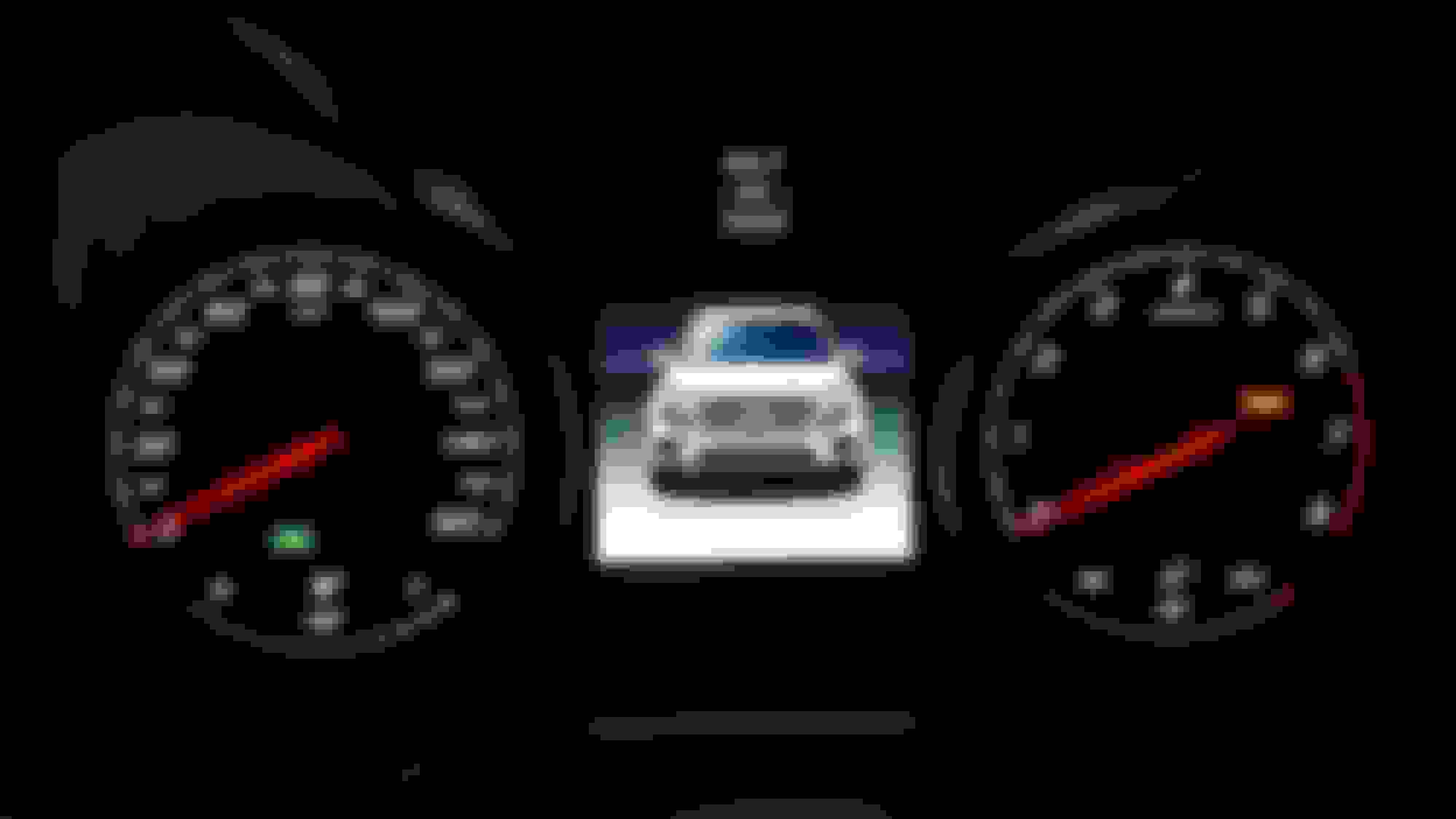
When I used to enter the vehicle, I used to see in the screen between the gauges a picture of the GLC along with if I remember correctly, the current odometer reading. For awhile now, the only thing I see when entering and exiting is the "Don't forget your key" message. Has anyone else noticed this? It doesn't make sense for it to remind me to not forget my key if I am unlocking and entering the vehicle (I must have the key, otherwise it wouldn't open!). I would expect to only see that reminder once I turn it off and open the door to exit.
Has anyone else observed this? If so, how do I get that GLC picture to return?
When I used to enter the vehicle, I used to see in the screen between the gauges a picture of the GLC along with if I remember correctly, the current odometer reading. For awhile now, the only thing I see when entering and exiting is the "Don't forget your key" message. Has anyone else noticed this? It doesn't make sense for it to remind me to not forget my key if I am unlocking and entering the vehicle (I must have the key, otherwise it wouldn't open!). I would expect to only see that reminder once I turn it off and open the door to exit.
Has anyone else observed this? If so, how do I get that GLC picture to return?
when i get in i see the odometer then i believe i see "Don't forget your key" a little bit after i close the door
i never saw the vehicle when i got in... that would be a nice graphic i agree as the don't forget your key is silly. one would think the vehicle would know whether we were getting in our out.
when i get in i see the odometer then i believe i see "Don't forget your key" a little bit after i close the door
i never saw the vehicle when i got in... that would be a nice graphic i agree as the don't forget your key is silly. one would think the vehicle would know whether we were getting in our out.
I agree, it doesn't make sense to remind when entering to not forget your key when you obviously have it to unlock the door with the key present in the first place. I've definitely seen the picture. It's a front graphic of the GLC with I believe odometer and trip odometer displayed.
II just don't know what I do to see it. 99% of the time I just see the key reminder, but I know that graphic is there.
I see this graphic every time I sit in to the car.
It even flashes it's headlights!
I sometimes get the reminder to not forget keys when I switch off engine.
I see this graphic every time I sit in to the car.
It even flashes it's headlights!
I sometimes get the reminder to not forget keys when I switch off engine.
This is so perplexing! Why is it that many people never or like me, rarely see it, and you see it every time? What is the difference between the vehicles?
Maybe because you are not using the key to open the door and instead using the keyless go? Try unlocking the car with the fob then looking for the picture. I am pretty sure that is what it is.
Maybe because you are not using the key to open the door and instead using the keyless go? Try unlocking the car with the fob then looking for the picture. I am pretty sure that is what it is.
It's possible, since I rarely use the fob to open the doors. I'll give it a try tomorrow!
Maybe because you are not using the key to open the door and instead using the keyless go? Try unlocking the car with the fob then looking for the picture. I am pretty sure that is what it is.
Just tried this and still got the "don't forget your key" info. Makes no sense.
maybe depends on which screen is on when you turn off the car?
i keep it on radio and and never see the vehicle graphic
had a loaner GLC today does the same thing
I've had it on different screens without seeing it. Although the screen I primarily have it on is the digital speedometer (which I would assume most people keep it on).
Quote:
Originally Posted by Chrisk03
Just tried this and still got the "don't forget your key" info. Makes no sense.
+1 I tried just using the fob as well and still got the "don't forget your key" as well.
Apologies for reviving this thread, but after several months of only seeing the key/remote icon, the picture came back once last night and blinked its headlights! I have no idea what I did differently. I'm still wondering why I don't see this when entering the car before starting the engine. Anyone have any ideas?
Like I've said in another thread -- my first MB -- love it, but I swear this car has a mind of its own. Random things!
Quote:
Originally Posted by Roowah
Apologies for reviving this thread, but after several months of only seeing the key/remote icon, the picture came back once last night and blinked its headlights! I have no idea what I did differently. I'm still wondering why I don't see this when entering the car before starting the engine. Anyone have any ideas?
I was able to duplicate this on my 2018 GLC43 with Keyless Go.
You need to go to the “Accessory mode” by pushing the “Start/Stop” button once –ONLY when the Multifunction display turns off.
It takes approximately 30 seconds for the multifunction display to go out, it will take longer if you have the door open. Or just let the accessory mode timeout (takes an even longer time).
This resets your gauges at the same time this picture of your GLC shows up and flashes it headlights at you. This turns on your accessory power.
I just tried it but didn't work on my 18 GLC 300. I may have done something wrong. Would you be able to describe in more detail what the procedure is that worked for you? I would like to see this screen as would many others I am sure. Thanks.
Just reread your post and got it to work. I got in car and didn't touch anything and waited for screen to go off. Then I pressed button once and got the graphic of car with flashing lights. very cool but that was it. after pressing button again to turn off car I opened door and closed it again as if I was getting in and no graphic - back to don't forget key. tried locking and unlocking but still no graphic.
Just reread your post and got it to work. I got in car and didn't touch anything and waited for screen to go off. Then I pressed button once and got the graphic of car with flashing lights. very cool but that was it. after pressing button again to turn off car I opened door and closed it again as if I was getting in and no graphic - back to don't forget key. tried locking and unlocking but still no graphic.
Pressing the button once should take you ACC mode, 2nd time should be "Ignition on" (warning lights).
Yes, not very exciting, I just like figuring these things out.
ok - that was cool to see - I guess what I was hoping for was that after doing that, the graphic would now appear every time I enter or exit the vehicle, which it does not look like it does. Could be wrong but I tried multiple setting and combos to see if it would reappear, but it didn't - except if I let the display go off again and then press the start button once.
I was able to duplicate this on my 2018 GLC43 with Keyless Go.
You need to go to the “Accessory mode” by pushing the “Start/Stop” button once –ONLY when the Multifunction display turns off.
It takes approximately 30 seconds for the multifunction display to go out, it will take longer if you have the door open. Or just let the accessory mode timeout (takes an even longer time).
This resets your gauges at the same time this picture of your GLC shows up and flashes it headlights at you. This turns on your accessory power.
Mystery solved!
Brilliant! Thank you for solving the mystery! You're absolutely right, and I can duplicate it. I'm still mystified on why they make it so difficult to see that picture, and not have it as part of the normal start up screen. I'd rather see that every time than the "Don't forget your key" message!
Brilliant! Thank you for solving the mystery! You're absolutely right, and I can duplicate it. I'm still mystified on why they make it so difficult to see that picture, and not have it as part of the normal start up screen. I'd rather see that every time than the "Don't forget your key" message!
Yeah, one of those things that make you go hmmmm...seeing the "don't forget your key" every friggin time is pretty annoying. That and why your car shuts off when entering after remote start.
I have only seen it once...after starting my car after it went through car wash. Maybe something to do with the fob (being in the car). But not sure if they leave the engine on when going down the conveyor belt.
hi... reviving and old thread - has anyone found a solution to this?
Chip4 solved the mystery earlier in this thread. If you enter the vehicle and wait until the display between the gauges time off, then without pressing the brake press the Start/Stop button once, you'll see the animation. I've repeated this successfully!
Chip4 solved the mystery earlier in this thread. If you enter the vehicle and wait until the display between the gauges time off, then without pressing the brake press the Start/Stop button once, you'll see the animation. I've repeated this successfully!
yes, thanks, i will give that a try, but does that bring it back permanently? i assume that when you step into the car it should show the graphic and when you leave it should remind you Dont Forget Your Key, isnt that the way it supposed to work?
yes, thanks, i will give that a try, but does that bring it back permanently? i assume that when you step into the car it should show the graphic and when you leave it should remind you Dont Forget Your Key, isnt that the way it supposed to work?
Well, depends what you mean by permanently. What it should do is show the graphic when you step into the car, and remind you to not forget your keys when leaving, but it doesn't seem MB programmed it as such. Makes no sense to me why they would show the key reminder when entering and exiting but essentially hide the graphic for the infrequent times you get into your car and wait a period of time before the screen times out, and you just push the start button once so only the accessories turn on. I don't believe there's a way to change it.
Well, depends what you mean by permanently. What it should do is show the graphic when you step into the car, and remind you to not forget your keys when leaving, but it doesn't seem MB programmed it as such. Makes no sense to me why they would show the key reminder when entering and exiting but essentially hide the graphic for the infrequent times you get into your car and wait a period of time before the screen times out, and you just push the start button once so only the accessories turn on. I don't believe there's a way to change it.
you actually think this was done deliberately? i assumed it was supposed to work with the picture and it just doesn't work properly. has anyone seen a vehicle that shows the startup picture when you enter? among loaners i have had (3 or 4 maybe) they have all shown dont forget your key when entering so perhaps you are correct...
Slideshow: A one-of-one U.S.-spec Mercedes-Benz SLR McLaren Roadster became even rarer after a factory-backed transformation at McLaren's headquarters.