When you click on links to various merchants on this site and make a purchase, this can result in this site earning a commission. Affiliate programs and affiliations include, but are not limited to, the eBay Partner Network.
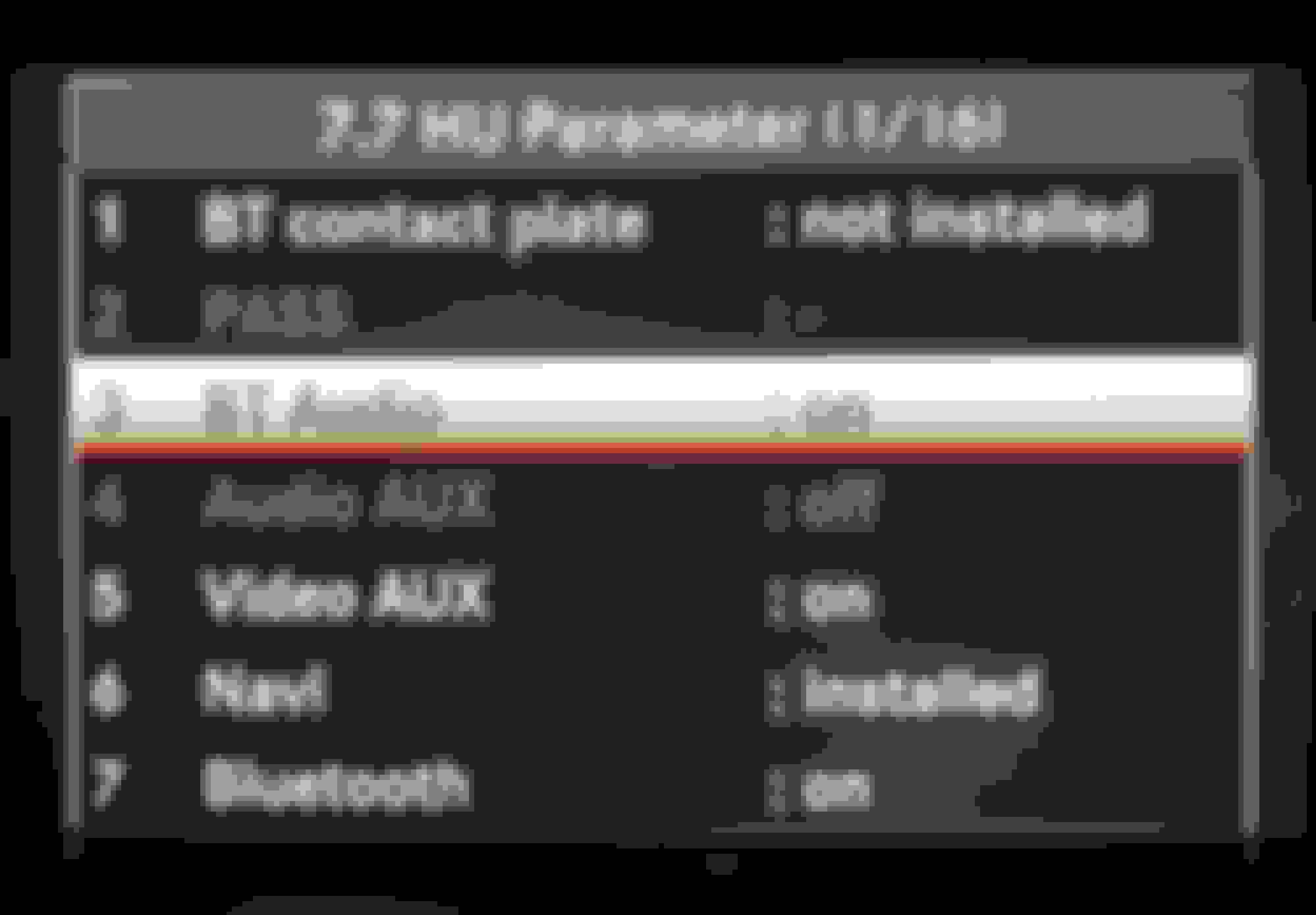
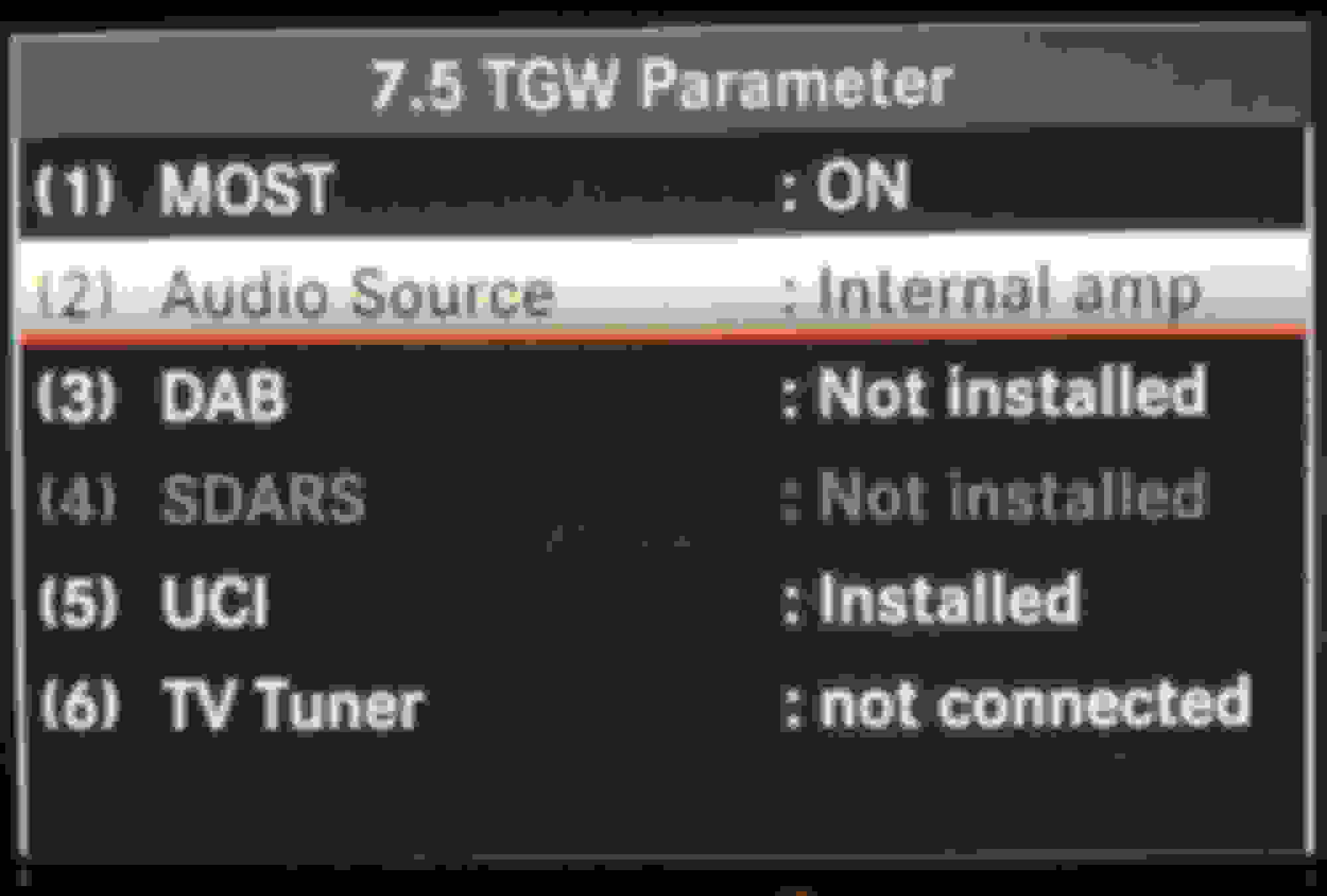
I had the same problem, GL450 with NTG 4.7 with H/K System, enabled AUX in engineering mode and lost sound, Satellite radio and Media Interface, it's taken me a few days but finally figured it out. If you enable AUX in 7.7 HU Parameters , then UCI in 7.5 TGW will show not installed and grayed out which is Media Interface, correct settings for me to get sound, satellite radio and media interface back was as follows:
7.7 HU Parameters - AUX - Not Installed
then go to:
7.5 TGW Parameter
Most - ON
Audio Source - External Amp
DAB - not installed
SDARS - installed (this is satellite radio)
UCI - installed (this is Media Interface)
TV Tuner - not installed
then perform a 9.1 System Reset
In my menu NTG Menu then I had both Media Interface and AUX after this, my MI cable connector has both a 3.5mm input cable and Ipod cable, if connect to the 3.5mm I select AUX in my menu, if I want to use my IPOD I select Media Interface.
Hope this helps, save time for some.
Thank you for posting this, it really help me get my satellite radio back without having to go to the dealership.
Hi
you made a great job!
Do you know if exist a method (in the engineering menu) to restore the default navigation maps? I've no any DVD or SD with original maps.
Thank you lots!
Hi
you made a great job!
Do you know if exist a method (in the engineering menu) to restore the default navigation maps? I've no any DVD or SD with original maps.
Thank you lots!
no.
take the advice given to you in the fb group. You messed up your COMAND unit. Gotta deal with the consequences. Next time, just use f’ing Waze like the rest of the world. 😁
Hi, Thanks for the information on engineering mode. It is very useful.
I am trying to enable Audio AUX input. From what I understood, the only thing I have change is change Audio Source - External Amp. and restart?
Currently my 7.7 HU Parameters - AUX - Not Installed and grey out. Will this fix the aux input?
I have attached the current setting here.
Hi, Thanks for the information on engineering mode. It is very useful.
I am trying to enable Audio AUX input. From what I understood, the only thing I have change is change Audio Source - External Amp. and restart?
Currently my 7.7 HU Parameters - AUX - Not Installed and grey out. Will this fix the aux input?
I have attached the current setting here.
Hope you can help.
Sudath
what are you trying to do with the aux input? Need more info
Do NOT go into engineering mode and mess around. You can VERY easily brick you COMAND headunit. Trust me, I bricked mine trying to do the exact thing you are trying to do and it cost me an insane amount of money and headaches. $1000 to be reconfigured by a Mercedes engineer and took me 2 months to even find a guy that could do it. He worked for the factory. The dealer couldn’t even fix it TJ get wanted to sell me a new headunit for like $3000-4000. Just run the aux cable from the Joyauto CarPlay box to your center console and use the proper adapter...possibly a usb to analog or the MMI adapter. You’ve been warned...
No more sounds after following instruction from youtube to add the Auxilliary.
Originally Posted by cguerrero;8091938i
I had the same problem, GL450 with NTG 4.7 with H/K System, enabled AUX in engineering mode and lost sound, Satellite radio and Media Interface, it's taken me a few days but finally figured it out. If you enable AUX in 7.7 HU Parameters , then UCI in 7.5 TGW will show not installed and grayed out which is Media Interface, correct settings for me to get sound, satellite radio and media interface back was as follows:
7.7 HU Parameters - AUX - Not Installed
then go to:
7.5 TGW Parameter
Most - ON
Audio Source - External Amp
DAB - not installed
SDARS - installed (this is satellite radio)
UCI - installed (this is Media Interface)
TV Tuner - not installed
then perform a 9.1 System Reset
In my menu NTG Menu then I had both Media Interface and AUX after this, my MI cable connector has both a 3.5mm input cable and Ipod cable, if connect to the 3.5mm I select AUX in my menu, if I want to use my IPOD I select Media Interface.
Hope this helps, save time for some.
Hi i got the same problem no sounds to all but all works on the monitor. It happens when i followed from youtube about how to add an Aux to audio. After following and open the engineering mode all sounds are gone. I got ML 350 2012 model. Please could someone help me to fix this. Thanks
Can I resurrect this thread and ask if there is anything in the engineering menus to fix my TV split screen.
The TV fades as it should in motion but when I switch to split screen for the passenger that side defaults to "Mercedes APPS" whilst the driver sees the warning display.
Thanks
Hi everyone!
I am one of the lucky ones by owning a brand new MY13 ML350 4Matic (W166). After reading some comments about COMAND ONLINE, I've decided to discover it myself. I was able to get into the engineering mode by "end call + 1 + #" key combination pressed for about 10 sec. There is also another secret menu after entering the engineering mode as mentioned in some threads in this forum. I managed to enter the second menu with the key combination "end call + 4 + #" after entering the engineering menu. I prepared an instruction with screens from COMAND ONLINE in the attachment for those who wants to bring some cool features on to their COMAND system. I must warn though, you can mess up with your settings. So, don't change anything if you are not sure what you are doing.
Good Luck
Thanks for your detailed information. Please how do I add 360 degree camera screen from the engineering mode?
Can I resurrect this thread and ask if there is anything in the engineering menus to fix my TV split screen.
The TV fades as it should in motion but when I switch to split screen for the passenger that side defaults to "Mercedes APPS" whilst the driver sees the warning display.
Thanks
Dear all
I have x166 and missed up the settings.. Unfortunately the sound had gone completely when I select Aux Audio or Aux video, although my amplifier settings is set to External and Aux enabled and Most is ON.
Any clue how to reset entire menu to default or solve this problem
Dear all
I have x166 and missed up the settings.. Unfortunately the sound had gone completely when I select Aux Audio or Aux video, although my amplifier settings is set to External and Aux enabled and Most is ON.
Any clue how to reset entire menu to default or solve this problem
There's no reset in COMAND. Has to be done by dealer SW. Most of these options, even though they seem like simple on/off switches unleash a lot of behind the scene other options that are toggled. It's like a script.
You need to explain exactly which options you futz'ed with in engineering mode.
Rule # 1 -- don't futz with engineering mode Rule # 2 -- if you futz with engineering mode by not listening to rule #1, document EVERYTHING you futz with.
I had the same problem, GL450 with NTG 4.7 with H/K System, enabled AUX in engineering mode and lost sound, Satellite radio and Media Interface, it's taken me a few days but finally figured it out. If you enable AUX in 7.7 HU Parameters , then UCI in 7.5 TGW will show not installed and grayed out which is Media Interface, correct settings for me to get sound, satellite radio and media interface back was as follows:
7.7 HU Parameters - AUX - Not Installed
then go to:
7.5 TGW Parameter
Most - ON
Audio Source - External Amp
DAB - not installed
SDARS - installed (this is satellite radio)
UCI - installed (this is Media Interface)
TV Tuner - not installed
then perform a 9.1 System Reset
In my menu NTG Menu then I had both Media Interface and AUX after this, my MI cable connector has both a 3.5mm input cable and Ipod cable, if connect to the 3.5mm I select AUX in my menu, if I want to use my IPOD I select Media Interface.
Hope this helps, save time for some.
Great
Helped a lot, lost almost 200 $ checking several fuses and removed entire passanger seat to check batteries compartment fuses.
I were always concerned with Aux On thoughts it should brought the Aux sound, turned out when UCI enabled, Aux enabled Automatically.
Last edited by Tofe1979; Nov 10, 2021 at 05:23 AM.
Hi i got the same problem no sounds to all but all works on the monitor. It happens when i followed from youtube about how to add an Aux to audio. After following and open the engineering mode all sounds are gone. I got ML 350 2012 model. Please could someone help me to fix this. Thanks
Follow this and your problems will be solved Keep me posted if further help needed
Hi all. My old radio died. I had to get used one and had an independent mechanic program the radio etc. I figured out all the other configurations except for the one that lets me access the massage seat from the convenience button next to the knob. When I press the massage button my screen goes blank. Any ideas on configuration for that ?
Do you have a working version of Vediamo and know how to find the correct .CBF to communicate with your COMAND unit? If so its pretty easy to walk you through it, if not let me know when you get the hardware and software.
I do have vediamo and the c4 , is it possible to get some instructions on how to find the .CBF and get ir right? Thank you
Mercedes SLR McLaren 722 S Is Extremely Rare Example Modified by McLaren
Slideshow: A one-of-one U.S.-spec Mercedes-Benz SLR McLaren Roadster became even rarer after a factory-backed transformation at McLaren's headquarters.