


It's convenient to have a dedicated mobile WiFi hotspot in the car. Speeds are so much better than a cell connection, and it's nice on trips if the kids want to play on their Ipads or whatever. I like having a broadband connection so I can listen to premium streaming music at the highest resolution, rather than the choked back cellular connection stream.
I've installed the Mercedes recommended AutoNet mobile router in a previous car and it's junk. Horrible connectivity on those rare occasions it would actually connect.
Instead, I picked up a Verizon MiFi 4G LTE Jetpack (free after $50 rebate) and a 5gb data plan. I used it for awhile as a portable device plugged into the car's 12v receptacle but it tends to go into sleep mode to conserve power when the car is off, and it's a pain having to wake it up whenever I wanted to use it.
This mod involves hardwiring the device to a "hot" (always on) 12v power source and hiding the unit. It remains in a fully awake, fully operational state and devices automatically pair right up whenever they're in the car. 4G LTE is quick enough to support high quality music streaming and web access for multiple passengers.
Parts are the JetPack, a 12v receptacle from Radio Shack with inline fuse, and a USB cigarette lighter charger .
First, remove the left dash end panel by gently prying it open along the front edge and then pulling it toward you until it disengages. The clips are fairly strong so some effort is required.
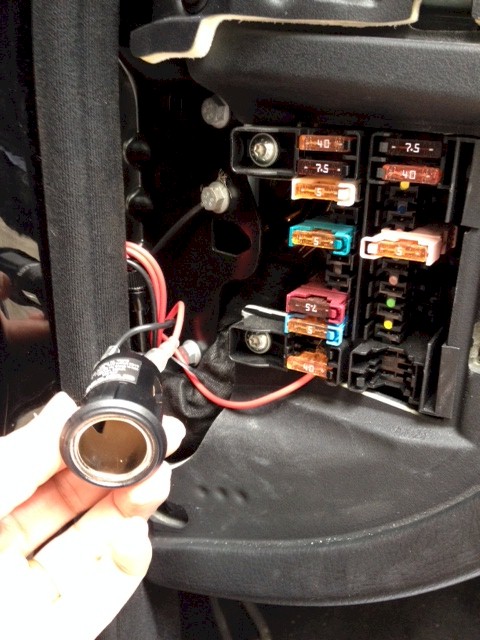
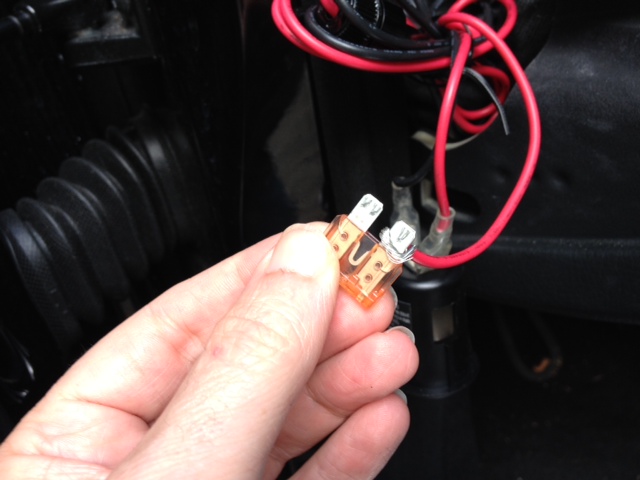
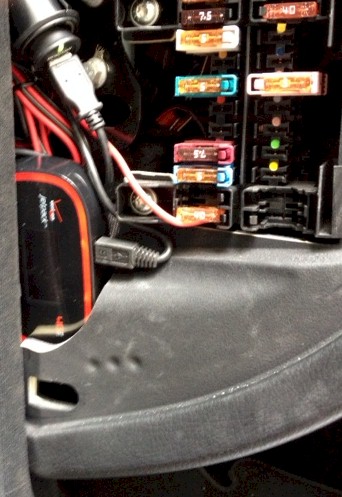
Here's the panel opened up. I've connected the hot (red) lead on the receptacle to the 40 amp fuse in the block, which I identified as always hot using a voltage meter. Here's a close up of the red lead wrapped around the blade of the fuse before the fuse is reinserted. Note that the red lead has an inline fuse (not shown). To avoid the risk of a short and/or fire, do not make this connection directly without an inline fuse.
Example:

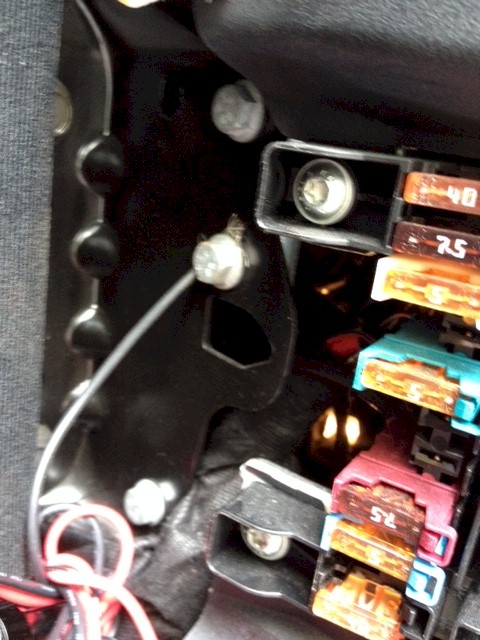
The black ground lead is placed under this bolt and tightened down.
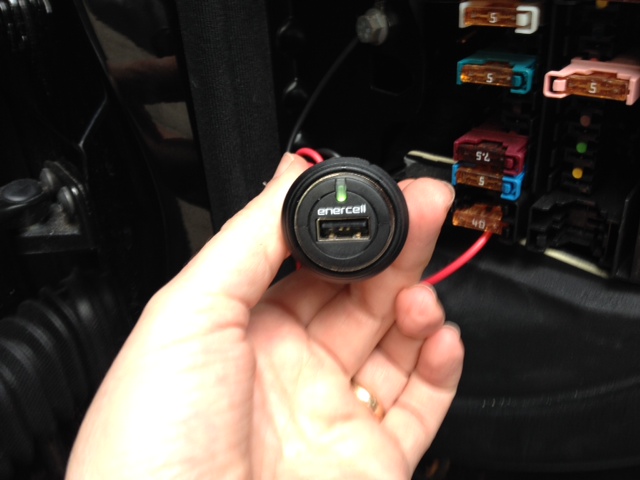
The USB charger is plugged in and showing power.
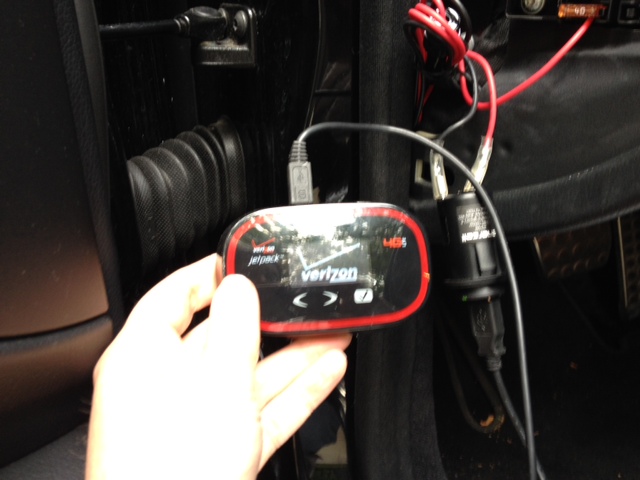
Here's the hotspot connected and ready to be tucked away.
Installed and ready for the panel to be replaced.
I've installed the Mercedes recommended AutoNet mobile router in a previous car and it's junk. Horrible connectivity on those rare occasions it would actually connect.
Instead, I picked up a Verizon MiFi 4G LTE Jetpack (free after $50 rebate) and a 5gb data plan. I used it for awhile as a portable device plugged into the car's 12v receptacle but it tends to go into sleep mode to conserve power when the car is off, and it's a pain having to wake it up whenever I wanted to use it.
This mod involves hardwiring the device to a "hot" (always on) 12v power source and hiding the unit. It remains in a fully awake, fully operational state and devices automatically pair right up whenever they're in the car. 4G LTE is quick enough to support high quality music streaming and web access for multiple passengers.
Parts are the JetPack, a 12v receptacle from Radio Shack with inline fuse, and a USB cigarette lighter charger .
First, remove the left dash end panel by gently prying it open along the front edge and then pulling it toward you until it disengages. The clips are fairly strong so some effort is required.
Here's the panel opened up. I've connected the hot (red) lead on the receptacle to the 40 amp fuse in the block, which I identified as always hot using a voltage meter. Here's a close up of the red lead wrapped around the blade of the fuse before the fuse is reinserted. Note that the red lead has an inline fuse (not shown). To avoid the risk of a short and/or fire, do not make this connection directly without an inline fuse.
Example:
The black ground lead is placed under this bolt and tightened down.
The USB charger is plugged in and showing power.
Here's the hotspot connected and ready to be tucked away.
Installed and ready for the panel to be replaced.
Last step was to reconfigure the hotspot to display a custom network name...
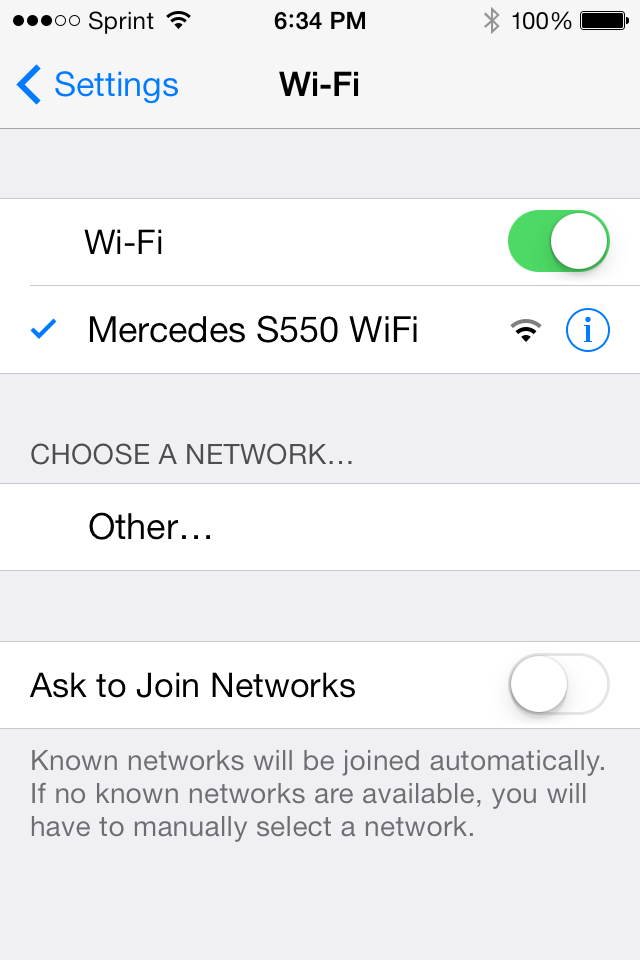
You'll also want to reconfigure the hotspot to change the default password to something you'll remember. To reconfigure the hotspot, do so before it's tucked away.
1) Using a laptop or tablet in the car, log on to the car's WiFi network.
2) Open a browser.
3) Type 192.168.1.1 in the URL field hit enter.
4) Enter the Admin password for the hotspot.
5) Change the password and the network ID to whatever you'd like guests to see when they log on.
6) Save your changes and exit.
Moving forward, you can administer the hotspot without removing it from its hiding place directly from your computer or tablet by logging in using 192.168.1.1
You'll also want to reconfigure the hotspot to change the default password to something you'll remember. To reconfigure the hotspot, do so before it's tucked away.
1) Using a laptop or tablet in the car, log on to the car's WiFi network.
2) Open a browser.
3) Type 192.168.1.1 in the URL field hit enter.
4) Enter the Admin password for the hotspot.
5) Change the password and the network ID to whatever you'd like guests to see when they log on.
6) Save your changes and exit.
Moving forward, you can administer the hotspot without removing it from its hiding place directly from your computer or tablet by logging in using 192.168.1.1

It looks like you have the red wire hooked under the 40 amp fuse. Please make sure the USB outlet has a fuse otherwise if you have a short, the USB charger and modem could catch fire before the 40 amp fuse blows. It would also be a bit safer to use a fuse tap so the wire cannot slip off the blade fuse. Fuse taps are sold at any auto parts store and are fused independently. You may know all this but your pictures gave me pause.
Good catch. The 12v receptacle has an inline fuse protecting the charger and the device.(It's tucked away in the photo.) I edited the post to indicate the need for an inline fuse.

Member
Great write up mike . One question thoug do the 5Gb do the job . Lets say if your kids are streaming netflex . It must eat through your data plan like crazy ..

BenzV12
MBWorld Fanatic!
close


Today
- Join DateDec 2011
- Posts:4,372
-
iTrader Positive Feedback0
-
iTrader Feedback Score(0)
- Vehicle(s) I driveW212 FL
-
Likes:1,397
-
Liked:945 Times in 685 Posts
Excellent job ,great write up .I appreciate this , I might sound picky but 5 gb would not be enough if you watch online movies,downloading some stuffs lol 


Diesel Benz
MBWorld Fanatic!
close

Today
- Join DateDec 2006
- LocationEurope
- Posts:6,497
-
iTrader Positive Feedback0
-
iTrader Feedback Score(0)
- Vehicle(s) I drive223.168 & 213.012 & 906.633 & 214.005
-
Likes:906
-
Liked:335 Times in 281 Posts
The wiring could be safer. Why not purchase one of these fuse carriers from the dealer, plug the carrier to a slot at the fuse box and you have an original like fused power source.

Quote:
So #150 is clearly a fuse, #100 is the carrier. What is #200? Is the carrier intended to connect to an unused slot in the fuse block? Couldn't figure out from the diagram how the part integrates with the fuse block.Originally Posted by Diesel Benz
The wiring could be safer. Why not purchase one of these fuse carriers from the dealer, plug the carrier to a slot at the fuse box and you have an original like fused power source.
MB World Stories
The Best of Mercedes & AMG
Explore

Manual Mercedes? 6 Times Sindelfingen Let Drivers Have All The Fun
Verdad Gallardo
Mercedes SLR McLaren 722 S Is Extremely Rare Example Modified by McLaren
Verdad Gallardo
8 Classic Boxy Mercedes Designs That Have Aged Like Fine Wine
Verdad Gallardo
Flawlessly Restored Mercedes 190E Evo II Heads to Auction
Verdad Gallardo
Electric Mercedes C-Class Unveiled: 11 Things You Need to Know
Verdad Gallardo
Mercedes EQS Gets A Major Update: Everything You Need to Know
Verdad Gallardo
5 Underrated Mercedes-Benz Models That Don't Get the Love They Deserve
Verdad Gallardo
Mercedes 300D Has Pushed Well Past 1 Million Miles and It Ain't Stopping
Verdad Gallardo
10 Most Reliable Mercedes-Benz Models You Can Buy Used
Verdad Gallardo
Quote:
Sorry, should have clarified. None of the kids iPads have data plans, so if they want to use them at all in the car they need WiFi in some form. They're not streaming movies, mostly playing around on Facebook and watching little YouTube videos, or listening to Pandora to block out whatever music I'm listening to.Originally Posted by BenzV12
Excellent job ,great write up .I appreciate this , I might sound picky but 5 gb would not be enough if you watch online movies,downloading some stuffs lol
The plan from Verizon is a flat $50 for 5GB, then $10 for each additional GB. If you were a heavy user of data you'd definitely want a bigger plan. (We've never gone over the 5GB ourselves).
Diesel Benz
MBWorld Fanatic!
close
Today
- Join DateDec 2006
- LocationEurope
- Posts:6,497
-
iTrader Positive Feedback0
-
iTrader Feedback Score(0)
- Vehicle(s) I drive223.168 & 213.012 & 906.633 & 214.005
-
Likes:906
-
Liked:335 Times in 281 Posts
Quote:
#200 is the connector part that is crimped on the wire and inserted to the fuse holder. The fuse holder just snaps to the fuse box, no tools needed. You already have a few of these if you look close. Originally Posted by Mike5215
So #150 is clearly a fuse, #100 is the carrier. What is #200? Is the carrier intended to connect to an unused slot in the fuse block? Couldn't figure out from the diagram how the part integrates with the fuse block.
These are mechanically coded, a correct carrier part is needed depending on the slot it is inserted. The fuse holder colour matches the mechanical coding. Usually the fuse box has a colour spot indicating which fuse holder fits into which slot.
Quote:
Hah. I'm like whatever the opposite of an engineer is. I'm more a hook the thing up and then park the car way down the driveway in case it catches fire overnight kind of guy.Originally Posted by vantage78
Mike, very sweet mod; nice job! Engineer by trade?

(It didn't BTW. I was concerned about how warm the MiFi might get in an enclosed space but it was barely warm after 24 hours.)

Senior Member
Thanks for posting this info Mike. This is the kind of stuff that makes this forum great!

Newbie
Nice Mike! Actually have an open tab looking at AT&T's hotspot hardware!! Good show!

Senior Member
Quote:
(It didn't BTW. I was concerned about how warm the MiFi might get in an enclosed space but it was barely warm after 24 hours.)
LOL. Originally Posted by Mike5215
Hah. I'm like whatever the opposite of an engineer is. I'm more a hook the thing up and then park the car way down the driveway in case it catches fire overnight kind of guy.(It didn't BTW. I was concerned about how warm the MiFi might get in an enclosed space but it was barely warm after 24 hours.)
For your next project, can you figure out a plug and play streaming video via bluetooth solution?
I would love to stream video from my iPhone5s via the Tune2Air to the rear entertainment screens and/or the front monitor!
Quote:
Look at Verizon's 4G LTE coverage map vs AT&T for your area. If you can get it, it's a good deal faster.Originally Posted by WR_C300_4matic
Nice Mike! Actually have an open tab looking at AT&T's hotspot hardware!! Good show!
Quote:
For your next project, can you figure out a plug and play streaming video via bluetooth solution? I would love to stream video from my iPhone5s via the Tune2Air to the rear entertainment screens and/or the front monitor!
No way. Your car is already too cool as it is. Originally Posted by vantage78
LOL. For your next project, can you figure out a plug and play streaming video via bluetooth solution?
I would love to stream video from my iPhone5s via the Tune2Air to the rear entertainment screens and/or the front monitor!

MBW Editor
It seems as though it was only yesterday when it was a big deal to have a cell phone, let alone mobile Internet. Now that we live in the smartphone age, being connected to rest of the world is as normal as breathing, and sometimes it can feel just as necessary.
While nearly all of us are connected to the world via our computers and mobile phones, soon our cars will act as the third prong to the rest of the world. 4G connectivity is now trickling its way into the automotive marketplace, but if that trickle is too slow for you, forum member “Mike5215″ has a solution that might just blow your mind.
More on the blog.
Our Q7 has its own SIM card and 3G service with a mobile hotspot.Everything on it is web based.


