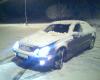
So on my 2007 S600 I've never been able to get the Night View Assist to work. Basically you hit the button and nothing at all happens, no error message, no flicker on the screen, just nothing happens. I have swapped out the camera, the cords connecting the camera to the Night View module, the cord from the module to the back of the instrumet cluster, and the module itself. Nothing has worked. I have scanned with Star and with my own Snap-On tool and tried to turn on Night View but again nothing happens and there is no error message. Is there something I'm missing? Would this happen if one or both of the IR bulbs in the headlight died?
As a matter of reference, control unit = f62 @ front SAM (engine compartment). Try updating IC software per attached bulletin.
That's probably on point. Any fault on the camera side would trigger an error message on the cluster. If the screen is just black, then it's a video processing issue in the instrument cluster. Update the software per konig's PDF or try a new cluster.
if you have good diagnostics see if there any comms with the NSA module, the other idea would be to put on high beam and count how many headlight bulbs you have lit up on each side, NSA means the inner bulbs are IR ones that only work with the screen meaning high beam is pathetic. Caveat - as I only have one with NSA I get the high beam on the two outer bulbs, I don't know if you should get 4 it certainly needs it.
NSA is just a toy that and far more dangerous than having 4 decent lights. Maybe a previous owner went back to the basic set up looking for an improvement?
Thanks for the input guys. After reading the bulletin I noticed it says the speed display will be shown at the bottom edge. This isn't the case for me, there is no change at all when the NV button is pressed. I can try and update it but after reading that it doesn't seem to be the issue.
Look at the actual switch then if you're getting no response what so ever. You should be getting something, either an error message or a blank screen with speed on the bottom. Hooking it up to star should point things out.
I've thought about the switch being the issue but I've also tried to actuate Night View from Star and from my Snap-On tool and same thing, no error message at all, nothing happens. Can anyone confirm Night View ever does actually display an error on the screen or are we assuming it does?
I've thought about the switch being the issue but I've also tried to actuate Night View from Star and from my Snap-On tool and same thing, no error message at all, nothing happens. Can anyone confirm Night View ever does actually display an error on the screen or are we assuming it does?
The error message is "night view assist inoperative". You have to power cycle the entire car to get that to go away as it creates a discrepancy in video clock cycles that the video processor in the instrument cluster can't handle. That's if the video coming from the night view assist control module is trash. The system itself is more complicated. Check the attachment for actual functionality of the system. There are a lot of dependencies, but it all starts with the switch.
So on my 2007 S600 I've never been able to get the Night View Assist to work. Basically you hit the button and nothing at all happens, no error message, no flicker on the screen, just nothing happens. I have swapped out the camera, the cords connecting the camera to the Night View module, the cord from the module to the back of the instrumet cluster, and the module itself. Nothing has worked. I have scanned with Star and with my own Snap-On tool and tried to turn on Night View but again nothing happens and there is no error message. Is there something I'm missing? Would this happen if one or both of the IR bulbs in the headlight died?
I would use Star/Xentry to determine if the car is coded for Night View Assist. There are also some test I believe you can perform as well using Star/Xentry.
On my 2007 S600 I sometimes get that "Night View Assist Inoperative" and then it would randomly work again. I also chalked it up to something getting hot as it seemed to happen when I idled for a long time or did work with the hood up?
On my 2007 S600 I sometimes get that "Night View Assist Inoperative" and then it would randomly work again. I also chalked it up to something getting hot as it seemed to happen when I idled for a long time or did work with the hood up?
That points towards communication issues between the night view assist computer and the instrument cluster.
I don't believe it's true that Night View doesn't work during the day. I also have a 07 CL550 and it works all the time and I've never received any kind of error.
I don't believe it's true that Night View doesn't work during the day. I also have a 07 CL550 and it works all the time and I've never received any kind of error.
It doesn't work during the day. It works during semi dark conditions without the IR headlamps activated and full darkness with IR headlamps activated. It actually grabs lux values from the light sensor. Also gives an error message.
When I get a chance I can send a pic with it working during the day on my CL, not sure if there is any difference between the models but it definitely always works. Also after clearing fault codes I finally got an error while scanning with STAR. It says the car requires calibration. I'm happy to finally get a fault but this looks like a dealer-only situation. I'm not wanting to spend $300-400 just to get this feature to work. Anyone know of a work-around for calibration? I do have access to STAR.
When I get a chance I can send a pic with it working during the day on my CL, not sure if there is any difference between the models but it definitely always works. Also after clearing fault codes I finally got an error while scanning with STAR. It says the car requires calibration. I'm happy to finally get a fault but this looks like a dealer-only situation. I'm not wanting to spend $300-400 just to get this feature to work. Anyone know of a work-around for calibration? I do have access to STAR.
What you call day may qualify as semi dark for the lux sensor. It works in my garage with very bright LED lighting so the sensor may be acting weird. There are different versions of the camera and control module.
The calibration procedure is described in SDS seeing how you have access to it. As far as I recall it involves holding a printout at a certain distance from the camera etc.
You need to print out the calibration template and align it in front of the camera. The template looks something like this: https://mbworld.org/forums/e-class-c...ation-diy.html There are docs that describe what you have to do in larger detail than that screenshot.
You don't need any special tools...just an accurate way of measuring height. In this case they're using the headlamp aimer just to measure height and attach the template to it.
It's all about aligning the video feed from the camera with the display in the instrument cluster. The resolution of the camera is slightly larger than what the display can show hence the need for "calibration".
Thank you for that, that is what I'm looking for. I'll see if I can figure this out on my own.
No problem. I am sure the dealer is selling the aim template for 300$ or something . If you google around you'll find many different ones that people made that are supposed to work.
If you have flashed/replaced/updated the software on your CGW, it will erase the NSA calibration data and it will not function until the calibration is performed. However, in this state, when you interrogate the NSA module, it will inform you via Fault Code that calibration has not been carried out and when actuated the IC will display Night Vision Assist Inoperative. If you are not see that message, it sounds like a CGW coding error and it should be SCN coded to correct it.
When calibration is performed, it cannot be performed outside in sunlight and should be done in a shop without excessive lighting. Ensure the template is straight and level and measure it from the ground up to the center of the template. Depending on if your MUX is wireless or not, you can roll down the driver window with your diagnostic tool in the driver seat and navigate through the calibration process, observing the cluster while doing so. If it determines the calibration devices is not positioned properly, it will abort the process.
Slideshow: A one-of-one U.S.-spec Mercedes-Benz SLR McLaren Roadster became even rarer after a factory-backed transformation at McLaren's headquarters.


















 . If you google around you'll find many different ones that people made that are supposed to work.