When you click on links to various merchants on this site and make a purchase, this can result in this site earning a commission. Affiliate programs and affiliations include, but are not limited to, the eBay Partner Network.
I thought I would post a picture of what your cluster will look like after you add "fuel remaining".
On my C4 Xentry, just as in previous posts, you have to activate it in Variantenkodierung Werkseinstellunhen.
But you have to reset the cluster by hitting F1 till you get to
- Actuations
- Complete index of actuations
-Steuergeraet Resetten ( PowerON-Modus) (FN_Reset_SG_Power_ON)
Hit F3 and confirm again with F3.
your cluster will reset. It takes time as the clock goes to 12 and back to actual time. So wait for this to finish.
I thought I would post a picture of what your cluster will look like after you add "fuel remaining".
On my C4 Xentry, just as in previous posts, you have to activate it in Variantenkodierung Werkseinstellunhen.
But you have to reset the cluster by hitting F1 till you get to
- Actuations
- Complete index of actuations
-Steuergeraet Resetten ( PowerON-Modus) (FN_Reset_SG_Power_ON)
Hit F3 and confirm again with F3.
your cluster will reset. It takes time as the clock goes to 12 and back to actual time. So wait for this to finish.
I actually think this is one of the more useful things to display in the cluster! When I did it a couple years ago I still find myself sitting on this screen the most. I'd much rather want to know fuel remaining than looking at the bar indicator in the cluster.
It is indeed one of the most useful features that the cluster can display. It’s very accurate too. If you ever get to see 0/0 on there you literally have an empty tank and only what’s left inside the fuel feeder bowl is what is left. After that you’re running on fumes only
is it possible to remove the rear seat belt indicator? and to set the default display to show the digital speedo instead or odometer reading? for w204 c63
Trying to activate both rear inner fog lights on my W211. I thought it was in rear sam, development data... varian coding but i get to this and it doesn't look like Im on the right track. Help?
Does anyone know how to enable time and date menu?
It's posted already in this thread. You gotta read through it to find it. I did a couple years ago to our w211 using this very same thread. Did this and the fuel remaining. Nice little touches in the cluster.
It's posted already in this thread. You gotta read through it to find it. I did a couple years ago to our w211 using this very same thread. Did this and the fuel remaining. Nice little touches in the cluster.
-Nigel
Thank you for the answer! I did fuel remaining, it's really useful, but I would like to have a date too, I tried couple of times, but I'm unable to find Time and Date "menu".
I may have missed it in these 62 pages, but if I remember correctly someone noted the steps in Star to enable the backup camera on the NTG2.5 (I have a w211 E63). Going to someone today that has Star access and trying to be a little prepared. Any tips would be great and thankful.
On our 2009 w211 I was never able to turn off the seat belt chime. From what I was told you are not able to. I looked in every setting did the above with certain things in STAR but when you unbuckle it in a parking lot going X mph it still beeps at you. Kind of annoying. I normally take my seat belt off when I pull into a parking garage, it's easier to maneuver without being constrained.
I may have missed it in these 62 pages, but if I remember correctly someone noted the steps in Star to enable the backup camera on the NTG2.5 (I have a w211 E63). Going to someone today that has Star access and trying to be a little prepared. Any tips would be great and thankful.
All the best!
posting again for any menu help you can provide. tried Star both with and without developer mode and we cannot find the menu options to turn on the backup camera of NTG2.5.
posting again for any menu help you can provide. tried Star both with and without developer mode and we cannot find the menu options to turn on the backup camera of NTG2.5.
thank you all
please provide your VIN. I'll try in simulation mode..
On our 2009 w211 I was never able to turn off the seat belt chime. From what I was told you are not able to. I looked in every setting did the above with certain things in STAR but when you unbuckle it in a parking lot going X mph it still beeps at you. Kind of annoying. I normally take my seat belt off when I pull into a parking garage, it's easier to maneuver without being constrained.
-Nigel
you talk to the wrong people then. I did this hundreds of times in any 2002-2009
posting again for any menu help you can provide. tried Star both with and without developer mode and we cannot find the menu options to turn on the backup camera of NTG2.5.
thank you all
Not working because your Chinese crap is not set up properly. No need to go through simulation either because simulation and live version uses different system.
On our 2009 w211 I was never able to turn off the seat belt chime. From what I was told you are not able to. I looked in every setting did the above with certain things in STAR but when you unbuckle it in a parking lot going X mph it still beeps at you. Kind of annoying. I normally take my seat belt off when I pull into a parking garage, it's easier to maneuver without being constrained.
-Nigel
very easy
developper mode
special functions (you need to have a pass if its not a quality system)
>disable seat belt warning for gulf states)
thank you for trying; I greatly appreciate it! My vin is WDBUF77X89B375209
I looked in WIS first. Appears that the backup camera is referenced as RFK but nothing in xentry came up for me in simulation mode. However SLK forum seems to suggest accessing it via head unit. Here's a pic of instructions
should add this too. The is called HSVL and I saw that in xentry somewhere...
More updates. There is in command REAR SCREEN coding so set that to present.
Quick tests > command or audio> F3 > control unit Adaptations > read coding and change if necessary > rear screen
Hope this is the solution. If not pm the member that offered help privately
Last edited by GoodByeHonda; Nov 14, 2020 at 09:32 PM.
I looked in WIS first. Appears that the backup camera is referenced as RFK but nothing in xentry came up for me in simulation mode. However SLK forum seems to suggest accessing it via head unit. Here's a pic of instructions
should add this too. The is called HSVL and I saw that in xentry somewhere...
I looked in WIS first. Appears that the backup camera is referenced as RFK but nothing in xentry came up for me in simulation mode. However SLK forum seems to suggest accessing it via head unit. Here's a pic of instructions
should add this too. The is called HSVL and I saw that in xentry somewhere...
More updates. There is in command REAR SCREEN coding so set that to present.
Quick tests > command or audio> F3 > control unit Adaptations > read coding and change if necessary > rear screen
Hope this is the solution. If not pm the member that offered help privately
thank you very much for the help and tips! Know it’s greatly appreciated. I’ll try again soon when I get access to Star again. I just dropped my car off today for a custom dyno tune.
On our 2009 w211 I was never able to turn off the seat belt chime. From what I was told you are not able to. I looked in every setting did the above with certain things in STAR but when you unbuckle it in a parking lot going X mph it still beeps at you. Kind of annoying. I normally take my seat belt off when I pull into a parking garage, it's easier to maneuver without being constrained.
-Nigel
Here's what you do. With this setup, when you start the car, the warning will still come on but as soon as you start driving you won't get the annoying chime and the red IC light.
In instrument cluster, go to :
diagnosis to plant specifications> control unit >Adaptations then variant coding >Variantenkodierung Werkseinstellungen
you have to switch 3 things:
VORZEITIGER ABBRUCH GURTWARNUNG select vorzeit.Abbruch
Gurtwarnung select abKI15G
NCAP Gurtwarnung select nach Konfiguration
This works on my W211
Oh, you need to reset the Instrument Cluster for the changes to take effect. I posted this not long ago
in Instrument cluster, go to actuation, complete index, Steurgeraet Resetten ...
Last edited by GoodByeHonda; Nov 15, 2020 at 05:37 PM.
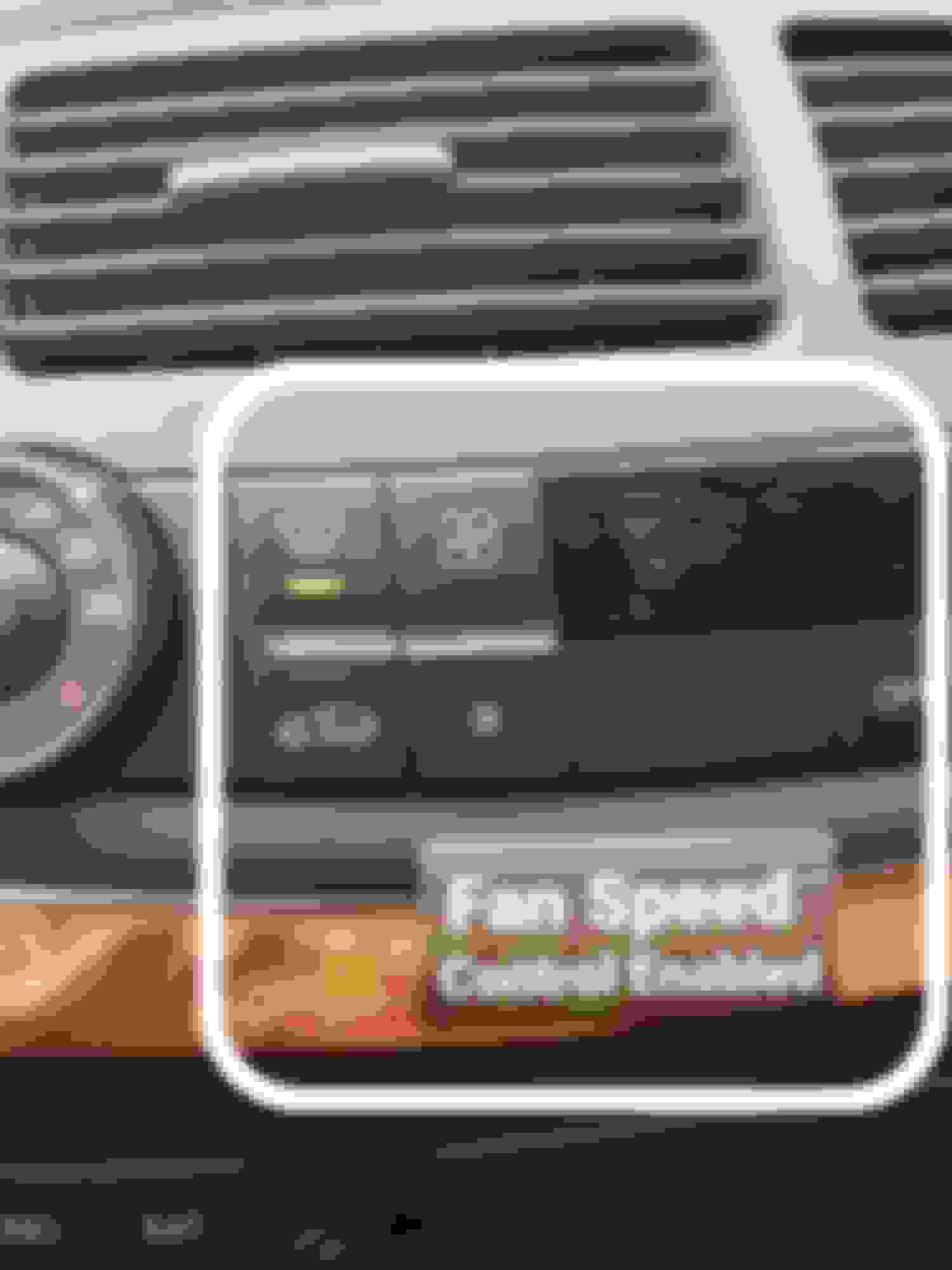
Another useful feature is being able to control the fan speed in Defrost mode. With this setup, when you select Defrost button, you won't see the fan level bars BUT as soon as you want to decrease the flow, pressing on the fan speed will bring the display on and of course you'll be able to lower the blower speed. To achieve this:
Control Units>Air conditioning>C-AAC -Convienience automatic...>Development data> Control unit Adaptations>Variant coding > Variantencodierung>
And set:
DEFROST Logic to alt
No need to reset anything.
I also wanted to see the fan speed bars in AUTO mode. While you are there,
Set Grundeinstellung:Geblasebalken im Auto-Modus to an (Serie)
Can anyone point me to a good resource for understanding how to set up and use Xentry? I've played around with it a little bit so far, but having trouble with the resources I have found so far. Main focus at the moment is disabling the Airmatic error messages after deleting Airmatic, but some of the other features would also be useful.
Is it possible to change service interval? Its a cls55, only used during summer. Service 12 months or 15000 km, would like it to be only 15000km, not by time, or maybe make it 24 months. Thanks.
Mercedes SLR McLaren 722 S Is Extremely Rare Example Modified by McLaren
Slideshow: A one-of-one U.S.-spec Mercedes-Benz SLR McLaren Roadster became even rarer after a factory-backed transformation at McLaren's headquarters.