



How to Play Music from Cd Changer on COMAND?

Thread Starter
Junior Member
Joined: May 2011
Posts: 19
Likes: 0
From: Serbia
2006 Mercedes C220 CDI Sport Edition
How to Play Music from Cd Changer on COMAND?
Hello guys,
I just managed to setup MP3 CD Changer on my W203 C220 Sport Edition. Now i have problem because i don't know how to select CD Changer and play music from it.
This is comand i own:
Attachment 449681
And there is no CDC button and also when i select AUDIO button from controls there are only RADIO, AUX and CD (cd is for comand unit only)
I tried to search forum but no luck...
Please help
Ivan
I just managed to setup MP3 CD Changer on my W203 C220 Sport Edition. Now i have problem because i don't know how to select CD Changer and play music from it.
This is comand i own:
Attachment 449681
And there is no CDC button and also when i select AUDIO button from controls there are only RADIO, AUX and CD (cd is for comand unit only)
I tried to search forum but no luck...
Please help
Ivan
Super Moderator

Joined: Jun 2008
Posts: 19,942
Likes: 192
From: Llandudno, Cape Town, South Africa
late 2009 CLK 350 Coupe Elegance, '65 Jaguar S Type wires
Ivan - my Comand has a CDC button but otherwise looks the same as yours.
I don't know whether this will work on yours as Benz has made minor changes to Comand many times. Some older units required you to punch the CD button (which I presume you have) twice in quick succession.
Try that & let us know.
I don't know whether this will work on yours as Benz has made minor changes to Comand many times. Some older units required you to punch the CD button (which I presume you have) twice in quick succession.
Try that & let us know.
Thread Starter
Junior Member
Joined: May 2011
Posts: 19
Likes: 0
From: Serbia
2006 Mercedes C220 CDI Sport Edition
Thanks for your reply. Here is image of the COMAND unit of the guy who sold me the changer (My unit is exactly the same)
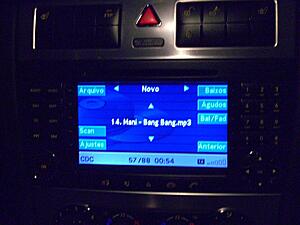
On the left side i have:
AUDIO
VIDEO
NAV
MAP
TEL
SERV
In the AUDIO i have RADIO, AUX and CD (which commands the CD of the central unit)

On the left side i have:
AUDIO
VIDEO
NAV
MAP
TEL
SERV
In the AUDIO i have RADIO, AUX and CD (which commands the CD of the central unit)
Super Moderator
Joined: Jun 2008
Posts: 19,942
Likes: 192
From: Llandudno, Cape Town, South Africa
late 2009 CLK 350 Coupe Elegance, '65 Jaguar S Type wires
I'm searching my files for you for the correct Comand manual - What you have there looks the same as my CLK. But I have a soft key.
Then you should have a CDC soft key on screen.
Then you should have a CDC soft key on screen.
Super Moderator
Joined: Jun 2008
Posts: 19,942
Likes: 192
From: Llandudno, Cape Town, South Africa
late 2009 CLK 350 Coupe Elegance, '65 Jaguar S Type wires
Sorry for the delay. I can't find electronic copy of Comand manual so I have pulled out my hard copy - page 57. Your exact unit.
You will have a soft button if the CD changer is correctly connected to Comand.
You should have soft keys displayed for:
RADIO
CD
CDC
AUX
You will have to troubleshoot why your Comand is not seeing the glovebox CD changer. First thing to ensure is that the CDC is receiving power.
Good luck!
You will have a soft button if the CD changer is correctly connected to Comand.
You should have soft keys displayed for:
RADIO
CD
CDC
AUX
You will have to troubleshoot why your Comand is not seeing the glovebox CD changer. First thing to ensure is that the CDC is receiving power.
Good luck!
Last edited by Glyn M Ruck; Jun 29, 2012 at 05:08 PM.
Thread Starter
Junior Member
Joined: May 2011
Posts: 19
Likes: 0
From: Serbia
2006 Mercedes C220 CDI Sport Edition
Yes, changer is fully working. I ejected magazine with CD-s and insert it few times and it works just fine.
I also tried to disconnect the battery but problem is still here...
I also tried to disconnect the battery but problem is still here...
Super Moderator
Joined: Jun 2008
Posts: 19,942
Likes: 192
From: Llandudno, Cape Town, South Africa
late 2009 CLK 350 Coupe Elegance, '65 Jaguar S Type wires
Lets step back here.
This changer you were sold. Is it new? If not does it come from a mid 2005 onward facelift C Class car.
The reason I ask is that at the facelift (your car) Benz changed the networking from d2b to MOST.
A pre facelift CD changer will not talk to the MOST ring. The CD changers look the same
This changer you were sold. Is it new? If not does it come from a mid 2005 onward facelift C Class car.
The reason I ask is that at the facelift (your car) Benz changed the networking from d2b to MOST.
A pre facelift CD changer will not talk to the MOST ring. The CD changers look the same
Trending Topics
Thread Starter
Junior Member
Joined: May 2011
Posts: 19
Likes: 0
From: Serbia
2006 Mercedes C220 CDI Sport Edition
It is used changer. It was used in W203 avantgarde sport edition from 2006
My 203 is sport edition from 2006 as well.
I tried numerous combination and buttons, but still it's not working. Changer work just fine, but there is no sotf CDC button in the menu at all...
My 203 is sport edition from 2006 as well.
I tried numerous combination and buttons, but still it's not working. Changer work just fine, but there is no sotf CDC button in the menu at all...
MB World Stories
The Best of Mercedes & AMG

Manual Mercedes? 6 Times Sindelfingen Let Drivers Have All The Fun
Verdad Gallardo
Mercedes SLR McLaren 722 S Is Extremely Rare Example Modified by McLaren
Verdad Gallardo
8 Classic Boxy Mercedes Designs That Have Aged Like Fine Wine
Verdad Gallardo
Flawlessly Restored Mercedes 190E Evo II Heads to Auction
Verdad Gallardo
Electric Mercedes C-Class Unveiled: 11 Things You Need to Know
Verdad Gallardo
Mercedes EQS Gets A Major Update: Everything You Need to Know
Verdad Gallardo
5 Underrated Mercedes-Benz Models That Don't Get the Love They Deserve
Verdad Gallardo
Mercedes 300D Has Pushed Well Past 1 Million Miles and It Ain't Stopping
Verdad Gallardo
10 Most Reliable Mercedes-Benz Models You Can Buy Used
Verdad Gallardo
Super Moderator
Joined: Jun 2008
Posts: 19,942
Likes: 192
From: Llandudno, Cape Town, South Africa
late 2009 CLK 350 Coupe Elegance, '65 Jaguar S Type wires
Good - then you have the right changer.
Check all connections.
I'll do some more research. Maybe it has to be set up with Star?
Check all connections.
I'll do some more research. Maybe it has to be set up with Star?

Thread Starter
Junior Member
Joined: May 2011
Posts: 19
Likes: 0
From: Serbia
2006 Mercedes C220 CDI Sport Edition
Yes this is comand i own 
I just talked with the guy who sold me the unit, who is actually employee in the Benz Service. He told me that STAR diagnostic should activate this option in ECU.
I guess i should contact few services first thing in the morning
I just talked with the guy who sold me the unit, who is actually employee in the Benz Service. He told me that STAR diagnostic should activate this option in ECU.
I guess i should contact few services first thing in the morning

MBWorld Fanatic!


Joined: Jan 2005
Posts: 2,848
Likes: 15
From: Orange County
2005 C Wagon (No snickering please!)
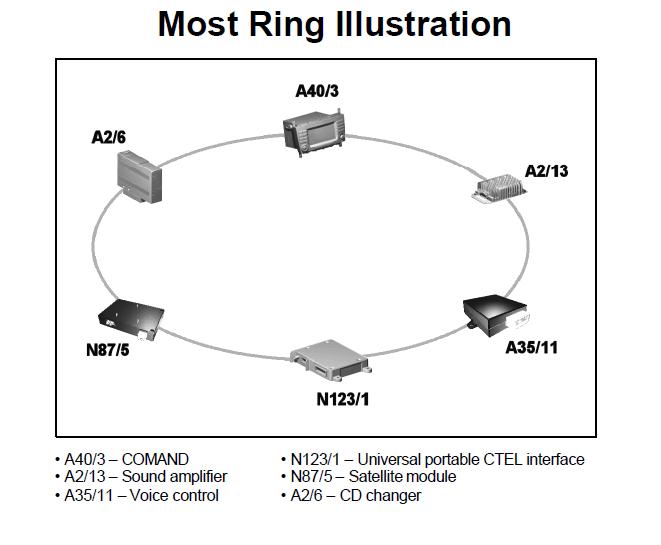
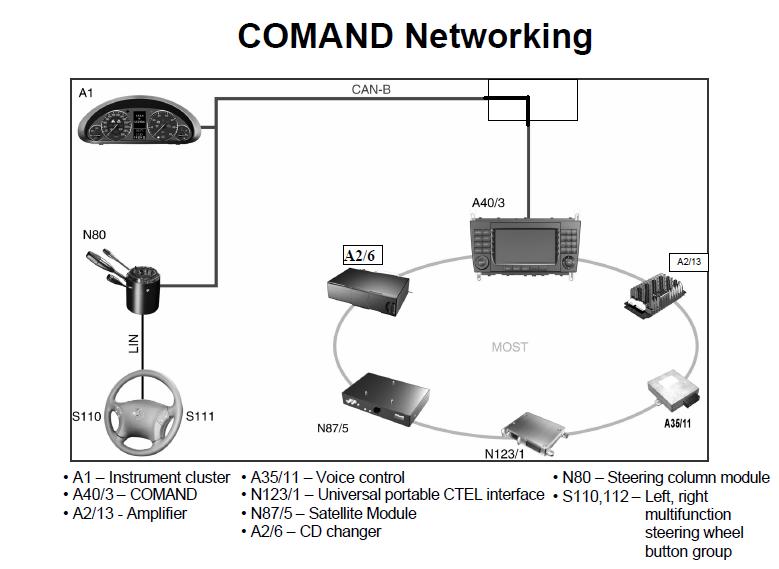
The MOST ring must be connected in a ring so the light from the head unit arrives back at the head unit. The devices in your car should be connected as shown in Glyn's post number 7. If one or even all devices are not on your car, they must be bypassed so the emmitter on the head unit shines its light in and out of the devices on the ring.
Be careful with the cables, they are made of glass and very fragile. Keep a large radius when connecting. Make sure outputs are connected to inputs. If an output is connected to an output there will be a light saber fight, but no music will come out.
The MOST ring should be connected in the order shown so the devices can chime in when polled by the head unit.
The reason you cannot select the changer is because you need to do a bit of "version coding" with STAR diagnostics to tell the head unit to be on the look out for a changer. The engine control unit (ECU) does not care what music you listen to, which is a good thing because if the engine saw you listening to Mani Bang Bang, it would drive you someplace to get some MAN'S music. You program the Head Unit through the CANbus.
Good luck!
Be careful with the cables, they are made of glass and very fragile. Keep a large radius when connecting. Make sure outputs are connected to inputs. If an output is connected to an output there will be a light saber fight, but no music will come out.
The MOST ring should be connected in the order shown so the devices can chime in when polled by the head unit.
The reason you cannot select the changer is because you need to do a bit of "version coding" with STAR diagnostics to tell the head unit to be on the look out for a changer. The engine control unit (ECU) does not care what music you listen to, which is a good thing because if the engine saw you listening to Mani Bang Bang, it would drive you someplace to get some MAN'S music. You program the Head Unit through the CANbus.
Good luck!
Last edited by Moviela; Jun 29, 2012 at 09:28 PM.
Super Moderator
Joined: Jun 2008
Posts: 19,942
Likes: 192
From: Llandudno, Cape Town, South Africa
late 2009 CLK 350 Coupe Elegance, '65 Jaguar S Type wires
Thanks Movie - I thought that might be the case. I have to admit diving into this thread so I could learn for the Wiki & no one else seemed interested.
Great!
Great!
Thread Starter
Junior Member
Joined: May 2011
Posts: 19
Likes: 0
From: Serbia
2006 Mercedes C220 CDI Sport Edition
Thanks for your reply Moviela.
The changer is correctly connected, but i guess star will help as soon i find service that will be able to help me
Thanks to both of you guys, you are great
P.S. Bang Bang is song listen by the previous changer owner
The changer is correctly connected, but i guess star will help as soon i find service that will be able to help me
Thanks to both of you guys, you are great
P.S. Bang Bang is song listen by the previous changer owner
Last edited by rappin; Jun 30, 2012 at 03:21 AM. Reason: forgot something
Thread Starter
Junior Member
Joined: May 2011
Posts: 19
Likes: 0
From: Serbia
2006 Mercedes C220 CDI Sport Edition
Hello again
I just got back from vacation and i still didn't fix problem with my cd changer
I just speak with the Official Mercedes Service in Serbia and they are not 100% sure how to activate changer thru Star Diagnostics (yes they only official service )
Is there any Star Diagnostics step-by-step guide on how to activate changer that i can take with me in service and show them how to do their jobs?
Thanks in advance
I just got back from vacation and i still didn't fix problem with my cd changer
I just speak with the Official Mercedes Service in Serbia and they are not 100% sure how to activate changer thru Star Diagnostics (yes they only official service
)Is there any Star Diagnostics step-by-step guide on how to activate changer that i can take with me in service and show them how to do their jobs?
Thanks in advance
Thread Starter
Junior Member
Joined: May 2011
Posts: 19
Likes: 0
From: Serbia
2006 Mercedes C220 CDI Sport Edition
I got reply from the friend who sold me Changer. In case anyone need the guide in future here is the album of step-by-step how to enable CDC for W203
http://imgur.com/a/cHYQP
Thanks to everybody for help. The audio quality is amazing and i am more than happy with my new cdc
http://imgur.com/a/cHYQP
Thanks to everybody for help. The audio quality is amazing and i am more than happy with my new cdc

Newbie
Joined: Mar 2018
Posts: 5
Likes: 0
w203
I got reply from the friend who sold me Changer. In case anyone need the guide in future here is the album of step-by-step how to enable CDC for W203
http://imgur.com/a/cHYQP
Thanks to everybody for help. The audio quality is amazing and i am more than happy with my new cdc
http://imgur.com/a/cHYQP
Thanks to everybody for help. The audio quality is amazing and i am more than happy with my new cdc
I have the same problem like Ivan.
I have a 2006 W203 facelift sport edition.
My car was not equipped with NTG 2 navigation (like the one Ivan posted in the previous post) it was equipped with AUDIO 20 (the big unit without display with only Radio and CD). I purchased one from a guy and installed on my car. The guy sent me the unit with the CD changer as a gift (my luck).
The problem is that I tried using Star to add the CD changer. In the configuration on the laptop there is CD changer as component 3 but on the unit in the car the soft button with CDC did not appear.
Tomorrow I will go to the service and take pictures step by step to the computer when I will try to put again the CDC using STAR. In the mean time do you guys have any advices for me?
The unit and the CDC is from a car similar to mine.
THX
Cezar


