



*DIY Rear Camera install w/Pics - Centered Location
Senior Member
Joined: Mar 2006
Posts: 308
Likes: 0
From: Missouri
E500(Sold), SL500(Sold), C350(Sold), ML350, SL65
Hey I hook mind all up and the VIM work just find but the rear camera I just get a dark screen saying checking surrounding...did anyone else ran acroos this....thx 4 any help
Thread Starter
Member
Joined: Aug 2006
Posts: 193
Likes: 4
From: Honolulu, Hawaii USA
'06 E55, W204 C350, '04 Carrera C4S, '02 ML55 (Wife's)
Sorry dude no... That sucks! maybe bad camera? Before I seated all of my components I checked the camera and system then stuffed it back together...
Senior Member
Joined: Mar 2006
Posts: 308
Likes: 0
From: Missouri
E500(Sold), SL500(Sold), C350(Sold), ML350, SL65
Well I will check back with the TJ @ midcityeng to see if they have any idea or send it back to them..I will also try getting another RCA Ext. tomorrow maybe it bad..thx
Super Member
Joined: May 2007
Posts: 924
Likes: 0
09 c300 4matic
wow ... nice job.
Vadar ... you wont happen to be stopping by Alaska anytime soon for any reason would you? lol im going to hawaii in January but i cant bring my car.
Would love for you to help me if i got this.
Vadar ... you wont happen to be stopping by Alaska anytime soon for any reason would you? lol im going to hawaii in January but i cant bring my car.
Would love for you to help me if i got this.
Thread Starter
Member
Joined: Aug 2006
Posts: 193
Likes: 4
From: Honolulu, Hawaii USA
'06 E55, W204 C350, '04 Carrera C4S, '02 ML55 (Wife's)
geeaccord..... Good luck and they should take care of ya!
phranksmbz..... The closest I am to Alaska is watching ‘Deadliest Catch’ on the Discovery Channel!
But when you’re in Hawaii send me a PM and I’ll make sure you get to see the best places! To see & eat!
phranksmbz..... The closest I am to Alaska is watching ‘Deadliest Catch’ on the Discovery Channel!
But when you’re in Hawaii send me a PM and I’ll make sure you get to see the best places! To see & eat!
Senior Member
Joined: Mar 2006
Posts: 308
Likes: 0
From: Missouri
E500(Sold), SL500(Sold), C350(Sold), ML350, SL65

Well I got some time today to back track the hook-up and found the prob,,the plug 4 the ground wire wasn't connect with the prong in the cap..all good now...wife happy now

Newbie
Joined: Mar 2008
Posts: 6
Likes: 0
EVO IX MR + C350
Hi, I just got off the phone w/ TJ regarding connecting the power source for the camera. Originally I have my power wire (red+purple) tapped into the Reverse light wire, the same method mentioned above.
However after 2 months, it blew out my audio's fuses twice! And now my C350 doesn't have audio/nav/phone... And TJ just told me to connect the (red+purple) wire to any ignition source, and not to the reverse because the module is already supplying power to the camera.
So.....can you tell what's correct?
However after 2 months, it blew out my audio's fuses twice! And now my C350 doesn't have audio/nav/phone...
And TJ just told me to connect the (red+purple) wire to any ignition source, and not to the reverse because the module is already supplying power to the camera. So.....can you tell what's correct?
MB World Stories
The Best of Mercedes & AMG

Manual Mercedes? 6 Times Sindelfingen Let Drivers Have All The Fun
Verdad Gallardo
Mercedes SLR McLaren 722 S Is Extremely Rare Example Modified by McLaren
Verdad Gallardo
8 Classic Boxy Mercedes Designs That Have Aged Like Fine Wine
Verdad Gallardo
Flawlessly Restored Mercedes 190E Evo II Heads to Auction
Verdad Gallardo
Electric Mercedes C-Class Unveiled: 11 Things You Need to Know
Verdad Gallardo
Mercedes EQS Gets A Major Update: Everything You Need to Know
Verdad Gallardo
5 Underrated Mercedes-Benz Models That Don't Get the Love They Deserve
Verdad Gallardo
Mercedes 300D Has Pushed Well Past 1 Million Miles and It Ain't Stopping
Verdad Gallardo
10 Most Reliable Mercedes-Benz Models You Can Buy Used
Verdad Gallardo
PREMIUM SPONSOR
Joined: Mar 2007
Posts: 615
Likes: 3
From: Chicago, IL
ML350, Lotus Elise
Hi, I just got off the phone w/ TJ regarding connecting the power source for the camera. Originally I have my power wire (red+purple) tapped into the Reverse light wire, the same method mentioned above.
However after 2 months, it blew out my audio's fuses twice! And now my C350 doesn't have audio/nav/phone... And TJ just told me to connect the (red+purple) wire to any ignition source, and not to the reverse because the module is already supplying power to the camera.
So.....can you tell what's correct?
However after 2 months, it blew out my audio's fuses twice! And now my C350 doesn't have audio/nav/phone...
And TJ just told me to connect the (red+purple) wire to any ignition source, and not to the reverse because the module is already supplying power to the camera. So.....can you tell what's correct?
post back which fuses it was and ill get you stepped through a resolution.
Thread Starter
Member
Joined: Aug 2006
Posts: 193
Likes: 4
From: Honolulu, Hawaii USA
'06 E55, W204 C350, '04 Carrera C4S, '02 ML55 (Wife's)
 mcwoowoo... It dosen't make sense?
This does not make logical sense … to me at least. The only physical connection to the Radio unit from the camera is the RCA cable. I also talked to TJ and he stated it was just a choice because the wiring harness is closer to the RCA output from the camer kit. MidCity wires theirs to the cigarette lighter (they do this all the time!). I chose to wire it to the rear for ease of installation, TJ also stated this was fine.
You say, ‘the module is already supplying power to the camera…’ then we wouldn’t need to hook up the red wire just the trigger (purple)….. But we do have to hook up the RED wire.
After two (2) months your fuse blew out…. That sucks! But I would suspect your wires behind the head unit? Frayed or grounded? Is any of the VIM connections/wires pinched or grounding? Those would be more likely to me for blown fuses. I don’t believe the RCA cable has enough current or grounding ability to blow fuses IMHO.
Let us know in two (2) more months if you keep blowing fuses….. Ohh… BTW this post was more about the Mounting Location … You think you were able to describe accurately your conditions/systems without disassembly? I’m sure MidCity will help you figure this out. It looks more like installation error though… Good luck
… to me at least. The only physical connection to the Radio unit from the camera is the RCA cable. I also talked to TJ and he stated it was just a choice because the wiring harness is closer to the RCA output from the camer kit. MidCity wires theirs to the cigarette lighter (they do this all the time!). I chose to wire it to the rear for ease of installation, TJ also stated this was fine.You say, ‘the module is already supplying power to the camera…’ then we wouldn’t need to hook up the red wire just the trigger (purple)….. But we do have to hook up the RED wire.
After two (2) months your fuse blew out…. That sucks! But I would suspect your wires behind the head unit? Frayed or grounded? Is any of the VIM connections/wires pinched or grounding? Those would be more likely to me for blown fuses. I don’t believe the RCA cable has enough current or grounding ability to blow fuses IMHO.
Let us know in two (2) more months if you keep blowing fuses….. Ohh… BTW this post was more about the Mounting Location … You think you were able to describe accurately your conditions/systems without disassembly? I’m sure MidCity will help you figure this out. It looks more like installation error though… Good luck
Last edited by VaderSS; Oct 15, 2008 at 06:07 PM.
Newbie
Joined: Mar 2008
Posts: 6
Likes: 0
EVO IX MR + C350
Thanks for the quick input.
Right now, I don't know exactly which fuse blew out. The first time when it blew out (yesterday morning) I took the car back to the dealer and they replaced the fuse for me. The whole day yesterday was fine and nothing happended, everything works just as normal. And today it happened again.
I was gonna checked the wiring behind the command unit, but since the whole thing is out of power, the monitor lid wouldn't open and it's blocking the top part of the center air vent, so I can't pop it out... So..I'm pretty much locked out from it until I get the dealership to replace the fuse for me next Tueday (10/21) ....
I will go check the fuses and let you guys know which one blew out...
thanks again..
Right now, I don't know exactly which fuse blew out. The first time when it blew out (yesterday morning) I took the car back to the dealer and they replaced the fuse for me. The whole day yesterday was fine and nothing happended, everything works just as normal. And today it happened again.
I was gonna checked the wiring behind the command unit, but since the whole thing is out of power, the monitor lid wouldn't open and it's blocking the top part of the center air vent, so I can't pop it out... So..I'm pretty much locked out from it until I get the dealership to replace the fuse for me next Tueday (10/21) ....
I will go check the fuses and let you guys know which one blew out...
thanks again..
Newbie
Joined: Mar 2008
Posts: 6
Likes: 0
EVO IX MR + C350
btw, i'm sorry about jacking your thread.
I mounted the camera on the side and routed the RCA cable through the side of the seat and then tuck into the wiring rail in the floor. and it's a real ***** getting the wire through....lolz should've thought about routing the upwards
=)
I mounted the camera on the side and routed the RCA cable through the side of the seat and then tuck into the wiring rail in the floor. and it's a real ***** getting the wire through....lolz should've thought about routing the upwards
=)
Thread Starter
Member
Joined: Aug 2006
Posts: 193
Likes: 4
From: Honolulu, Hawaii USA
'06 E55, W204 C350, '04 Carrera C4S, '02 ML55 (Wife's)

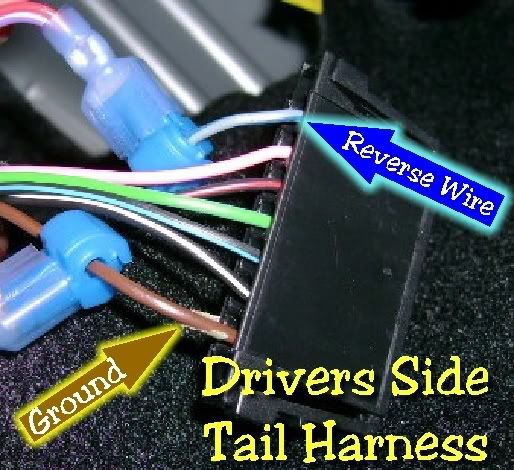
This may be a problem, might not be the problem… But I found this where you posted 2 months ago;
*DIY* I've Unleashed a Cyclops!https://mbworld.org/forums/showthread.php?t=254208
This is not correct even according to the Camera wiring diagram… Again good luck & hope it gets fixed soon!
*DIY* I've Unleashed a Cyclops!https://mbworld.org/forums/showthread.php?t=254208
I have the same kit and I'm about the install it. Can I ask you a question about wiring? The camera has 3 wires, Black, Red, Purple. I was told that I should twist the Black + Purple and connect it to a GROUND point. The Red should be tapped into the REVERSE light. Is this correct?
PREMIUM SPONSOR
Joined: Mar 2007
Posts: 615
Likes: 3
From: Chicago, IL
ML350, Lotus Elise
Thanks for the quick input.
Right now, I don't know exactly which fuse blew out. The first time when it blew out (yesterday morning) I took the car back to the dealer and they replaced the fuse for me. The whole day yesterday was fine and nothing happended, everything works just as normal. And today it happened again.
I was gonna checked the wiring behind the command unit, but since the whole thing is out of power, the monitor lid wouldn't open and it's blocking the top part of the center air vent, so I can't pop it out... So..I'm pretty much locked out from it until I get the dealership to replace the fuse for me next Tueday (10/21) ....
I will go check the fuses and let you guys know which one blew out...
thanks again..
Right now, I don't know exactly which fuse blew out. The first time when it blew out (yesterday morning) I took the car back to the dealer and they replaced the fuse for me. The whole day yesterday was fine and nothing happended, everything works just as normal. And today it happened again.
I was gonna checked the wiring behind the command unit, but since the whole thing is out of power, the monitor lid wouldn't open and it's blocking the top part of the center air vent, so I can't pop it out... So..I'm pretty much locked out from it until I get the dealership to replace the fuse for me next Tueday (10/21) ....
I will go check the fuses and let you guys know which one blew out...
thanks again..
Newbie
Joined: Mar 2008
Posts: 6
Likes: 0
EVO IX MR + C350
This may be a problem, might not be the problem… But I found this where you posted 2 months ago;
*DIY* I've Unleashed a Cyclops!https://mbworld.org/forums/showthread.php?t=254208
This is not correct even according to the Camera wiring diagram… Again good luck & hope it gets fixed soon!
*DIY* I've Unleashed a Cyclops!https://mbworld.org/forums/showthread.php?t=254208
This is not correct even according to the Camera wiring diagram… Again good luck & hope it gets fixed soon!
yep, that was my original question. The camera's wire came with RED+PURPLE twisted together and BLACK alone. I called TJ once and he told me to put BLACK and PURPLE to GROUND and RED to POWER. The reason I even ask was because, on the camera's manual there is a fuse in the line between the RED(or purple, i forgot) and power source. The kit does come with any in-line fuse. That's where I got cofused mostly. So finally, I decided to just go with the RED/PURPLE to power and BLACK to GROUND. Everything worked just fine.... until now.

MBWorld Fanatic!
Joined: Feb 2004
Posts: 3,986
Likes: 6
From: SEATTLE WASHINGTON USA
'08 C300 Lux Barolo Red Beige Leather P2 MM 18" wheels '84 944
Camera still doesn't work
After driving around for a week with the radio unit sticking an inch out of the dash and no vent unit, I decided I have to conquer this project or else.
So today I spent nearly three hours trying to find a spot for the VIM and the plug unit to hide so I could get the damned thing back together, even though the camera feature doesn't work. Right now, the radio is only 1/4 inch short of seating but it's hitting something solid preventing any further movement.
A question for those who have made it work. Just how is the VIM positioned and where is the plug and which way is it pointing? I tried laying the VIM down with it's white plug to the left and the harness plug underneath and forward after trimming the bottom edge of the insulation but something is still blocking the last 1/4 inch.
Before I call and make a reservation for a room at the State Mental Hospital I'd like to give it another try but I need some new ideas.
Then the question why the screen does nothing when shifting into reverse can be addressed.
I believe this is now the hands down winner, Most Frustrating Car Project Ever, and I've had some doozies.
So today I spent nearly three hours trying to find a spot for the VIM and the plug unit to hide so I could get the damned thing back together, even though the camera feature doesn't work. Right now, the radio is only 1/4 inch short of seating but it's hitting something solid preventing any further movement.
A question for those who have made it work. Just how is the VIM positioned and where is the plug and which way is it pointing? I tried laying the VIM down with it's white plug to the left and the harness plug underneath and forward after trimming the bottom edge of the insulation but something is still blocking the last 1/4 inch.
Before I call and make a reservation for a room at the State Mental Hospital I'd like to give it another try but I need some new ideas.
Then the question why the screen does nothing when shifting into reverse can be addressed.
I believe this is now the hands down winner, Most Frustrating Car Project Ever, and I've had some doozies.

Senior Member
Joined: Sep 2007
Posts: 402
Likes: 3
From: Jet City, USA
'08 W204.081; M 272.948 KE30; Colour Code#792
Poor RLE... I really do hope you don't have to check yourself into the mental hospital. Your Doctor should be the one checking you in. 
I hope these pics help.
I made sure the hooks were at the fullest upright position.
I made sure the power wire stayed on the side edge that it is plugged in. I also made sure there weren't any wires underneath the COMAND unit
I positioned the VIM + T Harness as shown. plug going into the VIM Module is on the left side.
I hope these pics help.
I made sure the hooks were at the fullest upright position.
I made sure the power wire stayed on the side edge that it is plugged in. I also made sure there weren't any wires underneath the COMAND unit
I positioned the VIM + T Harness as shown. plug going into the VIM Module is on the left side.
MBWorld Fanatic!
Joined: Feb 2004
Posts: 3,986
Likes: 6
From: SEATTLE WASHINGTON USA
'08 C300 Lux Barolo Red Beige Leather P2 MM 18" wheels '84 944
Getting it in
Poor RLE... I really do hope you don't have to check yourself into the mental hospital. Your Doctor should be the one checking you in.
I hope these pics help.
I made sure the hooks were at the fullest upright position.
I made sure the power wire stayed on the side edge that it is plugged in. I also made sure there weren't any wires underneath the COMAND unit
I positioned the VIM + T Harness as shown. plug going into the VIM Module is on the left side.
I hope these pics help.
I made sure the hooks were at the fullest upright position.
I made sure the power wire stayed on the side edge that it is plugged in. I also made sure there weren't any wires underneath the COMAND unit
I positioned the VIM + T Harness as shown. plug going into the VIM Module is on the left side.
Senior Member
Joined: Sep 2007
Posts: 402
Likes: 3
From: Jet City, USA
'08 W204.081; M 272.948 KE30; Colour Code#792
Well... the pic I posted was just prior to jamming the harness / module in. I tried to map out where I placed them with the boxes. Sorry... I'd take a pic of it right now, but I'd rather not pull out my COMAND unit ever again.
In my first pic, the arrows are jetting out from the "hooks." Sorry, can't describe it any better. Just make sure they are in the up position when you reseat your COMAND. Otherwise it won't seat the last 1/4 inch.
And yes, as mentioned in a previous thread, your T-Harness is your rate limiting step. Nothing else really stops the COMAND from reseating apart from the stupid T-Harness.
In my first pic, the arrows are jetting out from the "hooks." Sorry, can't describe it any better. Just make sure they are in the up position when you reseat your COMAND. Otherwise it won't seat the last 1/4 inch.
And yes, as mentioned in a previous thread, your T-Harness is your rate limiting step. Nothing else really stops the COMAND from reseating apart from the stupid T-Harness.
MBWorld Fanatic!
Joined: Feb 2004
Posts: 3,986
Likes: 6
From: SEATTLE WASHINGTON USA
'08 C300 Lux Barolo Red Beige Leather P2 MM 18" wheels '84 944
Hooks
Well... the pic I posted was just prior to jamming the harness / module in. I tried to map out where I placed them with the boxes. Sorry... I'd take a pic of it right now, but I'd rather not pull out my COMAND unit ever again.
In my first pic, the arrows are jetting out from the "hooks." Sorry, can't describe it any better. Just make sure they are in the up position when you reseat your COMAND. Otherwise it won't seat the last 1/4 inch.
And yes, as mentioned in a previous thread, your T-Harness is your rate limiting step. Nothing else really stops the COMAND from reseating apart from the stupid T-Harness.
In my first pic, the arrows are jetting out from the "hooks." Sorry, can't describe it any better. Just make sure they are in the up position when you reseat your COMAND. Otherwise it won't seat the last 1/4 inch.
And yes, as mentioned in a previous thread, your T-Harness is your rate limiting step. Nothing else really stops the COMAND from reseating apart from the stupid T-Harness.

Senior Member
Joined: Sep 2007
Posts: 251
Likes: 0
2008 C300 Sport
Thanks
Last edited by mb_horseshoe; Oct 22, 2008 at 12:47 AM.
MBWorld Fanatic!
Joined: Feb 2004
Posts: 3,986
Likes: 6
From: SEATTLE WASHINGTON USA
'08 C300 Lux Barolo Red Beige Leather P2 MM 18" wheels '84 944
CALL CNN..IT'S IN but not active
Well... the pic I posted was just prior to jamming the harness / module in. I tried to map out where I placed them with the boxes. Sorry... I'd take a pic of it right now, but I'd rather not pull out my COMAND unit ever again.
In my first pic, the arrows are jetting out from the "hooks." Sorry, can't describe it any better. Just make sure they are in the up position when you reseat your COMAND. Otherwise it won't seat the last 1/4 inch.
And yes, as mentioned in a previous thread, your T-Harness is your rate limiting step. Nothing else really stops the COMAND from reseating apart from the stupid T-Harness.
In my first pic, the arrows are jetting out from the "hooks." Sorry, can't describe it any better. Just make sure they are in the up position when you reseat your COMAND. Otherwise it won't seat the last 1/4 inch.
And yes, as mentioned in a previous thread, your T-Harness is your rate limiting step. Nothing else really stops the COMAND from reseating apart from the stupid T-Harness.
So, the installation is complete and the next question is, why doesn't it work?
I think I'll stop in and talk to my MB Service Manager tomorrow and pick his brain a bit in re: why no screen change. I'd also like to find a virgin W204 and slip in to turn it's rearview camera option on since turning it off is just as easy. This would prove something, perhaps.
More to follow.
Senior Member
Joined: Sep 2007
Posts: 402
Likes: 3
From: Jet City, USA
'08 W204.081; M 272.948 KE30; Colour Code#792
Ahhhhh... Nothing like going a little apeshiet to make things work, huh? Glad to hear it finally fitting in. 
But alas... not the time to rejoice yet as I have a feeling the COMAND unit will be coming out again in the near future. So long as you don't touch the T Harness when COMAND is removed now, you should have no more problems with reseating it.
But alas... not the time to rejoice yet as I have a feeling the COMAND unit will be coming out again in the near future. So long as you don't touch the T Harness when COMAND is removed now, you should have no more problems with reseating it.
PREMIUM SPONSOR
Joined: Mar 2007
Posts: 615
Likes: 3
From: Chicago, IL
ML350, Lotus Elise
All that hook talk motivated me to go out to the garage (10PM) and give the thing the evil eye once more. I verified that the screw "hooks" were elevated (they were) and gave it a mighty shove. And whattayouknow it slid in that last 1/4 inch. I figure driving around all afternoon on some not-so-smooth streets jostled things around a little under there, thus creating a tad more space.
So, the installation is complete and the next question is, why doesn't it work?
I think I'll stop in and talk to my MB Service Manager tomorrow and pick his brain a bit in re: why no screen change. I'd also like to find a virgin W204 and slip in to turn it's rearview camera option on since turning it off is just as easy. This would prove something, perhaps.
More to follow.
So, the installation is complete and the next question is, why doesn't it work?
I think I'll stop in and talk to my MB Service Manager tomorrow and pick his brain a bit in re: why no screen change. I'd also like to find a virgin W204 and slip in to turn it's rearview camera option on since turning it off is just as easy. This would prove something, perhaps.
More to follow.


