




First problem with 2010 car, nav displays wrong location!!

Thread Starter
Member
Joined: Apr 2004
Posts: 202
Likes: 0
mercedes
First problem with 2010 car, nav displays wrong location!!
Hey guys,
Picked up my 2010 C300 4matic on saturday, was working fine. Just drove 40 miles to my office, the entire way the navigation was confused and did not display the location of the car correctly at all (car was on for over an hour). Showed me driving through lakes and other water! When I left my home my street was still off and from there it never recovered! (i was just looking at location, and did not put in a destination address for nav)
I figured once I got on one of the two major highways it would find itself but it never did. I'm not at my office and I turned car off and then on twice but the nav still shows i'm in Danbury and not Greewich!
Is there a way way to reset the location of the nav or when a restart of the car does it automatically find itself again or just pick up from the previous location of when the car was turned off?
I really have no time to go to the dealership but if so it's not going to be a pleasant experience for the people there! thanks in advanced!
Picked up my 2010 C300 4matic on saturday, was working fine. Just drove 40 miles to my office, the entire way the navigation was confused and did not display the location of the car correctly at all (car was on for over an hour). Showed me driving through lakes and other water! When I left my home my street was still off and from there it never recovered! (i was just looking at location, and did not put in a destination address for nav)
I figured once I got on one of the two major highways it would find itself but it never did. I'm not at my office and I turned car off and then on twice but the nav still shows i'm in Danbury and not Greewich!
Is there a way way to reset the location of the nav or when a restart of the car does it automatically find itself again or just pick up from the previous location of when the car was turned off?
I really have no time to go to the dealership but if so it's not going to be a pleasant experience for the people there! thanks in advanced!

MBWorld Fanatic!
Joined: May 2009
Posts: 1,075
Likes: 15
'18 C63A Cabriolet
Hey guys,
Picked up my 2010 C300 4matic on saturday, was working fine. Just drove 40 miles to my office, the entire way the navigation was confused and did not display the location of the car correctly at all (car was on for over an hour). Showed me driving through lakes and other water! When I left my home my street was still off and from there it never recovered! (i was just looking at location, and did not put in a destination address for nav)
I figured once I got on one of the two major highways it would find itself but it never did. I'm not at my office and I turned car off and then on twice but the nav still shows i'm in Danbury and not Greewich!
Is there a way way to reset the location of the nav or when a restart of the car does it automatically find itself again or just pick up from the previous location of when the car was turned off?
I really have no time to go to the dealership but if so it's not going to be a pleasant experience for the people there! thanks in advanced!
Picked up my 2010 C300 4matic on saturday, was working fine. Just drove 40 miles to my office, the entire way the navigation was confused and did not display the location of the car correctly at all (car was on for over an hour). Showed me driving through lakes and other water! When I left my home my street was still off and from there it never recovered! (i was just looking at location, and did not put in a destination address for nav)
I figured once I got on one of the two major highways it would find itself but it never did. I'm not at my office and I turned car off and then on twice but the nav still shows i'm in Danbury and not Greewich!
Is there a way way to reset the location of the nav or when a restart of the car does it automatically find itself again or just pick up from the previous location of when the car was turned off?
I really have no time to go to the dealership but if so it's not going to be a pleasant experience for the people there! thanks in advanced!
MBWorld Fanatic!
Joined: Jun 2008
Posts: 2,073
Likes: 85
From: San Francisco, CA
2017 E300
i have not noticed a position screen where you can actually change or correct where you are, though my other vehicles' navs have this function.
ill look through my manual and see if i see something
ill look through my manual and see if i see something
MBWorld Fanatic!
Joined: Jun 2008
Posts: 2,073
Likes: 85
From: San Francisco, CA
2017 E300
nothing in the manual about comand displaying the wrong area.
my advice is to go into System, then settings, then hit the RESET button. Unfortunately, this will clear eveything from bluetooth phone to saved addresses, but it might also fix your problem.
try it and see
my advice is to go into System, then settings, then hit the RESET button. Unfortunately, this will clear eveything from bluetooth phone to saved addresses, but it might also fix your problem.
try it and see
Thread Starter
Member
Joined: Apr 2004
Posts: 202
Likes: 0
mercedes
Hey guys,
I did the reset from the comand system menu this morning. Did NOT fix the problem. I made an appointment at the service center for tomorrow morning. I'm going to try inputting a destination on my way home from work and see if that somehow realigns itself with the correct position!
You'd figure that it would recalibrate when you turn the car on, but nope, i'm stuck in "danbury"!
Will keep you guys posted, thanks for the responses!
I did the reset from the comand system menu this morning. Did NOT fix the problem. I made an appointment at the service center for tomorrow morning. I'm going to try inputting a destination on my way home from work and see if that somehow realigns itself with the correct position!
You'd figure that it would recalibrate when you turn the car on, but nope, i'm stuck in "danbury"!
Will keep you guys posted, thanks for the responses!
Trending Topics
MB World Stories
The Best of Mercedes & AMG

Manual Mercedes? 6 Times Sindelfingen Let Drivers Have All The Fun
Verdad Gallardo
Mercedes SLR McLaren 722 S Is Extremely Rare Example Modified by McLaren
Verdad Gallardo
8 Classic Boxy Mercedes Designs That Have Aged Like Fine Wine
Verdad Gallardo
Flawlessly Restored Mercedes 190E Evo II Heads to Auction
Verdad Gallardo
Electric Mercedes C-Class Unveiled: 11 Things You Need to Know
Verdad Gallardo
Mercedes EQS Gets A Major Update: Everything You Need to Know
Verdad Gallardo
5 Underrated Mercedes-Benz Models That Don't Get the Love They Deserve
Verdad Gallardo
Mercedes 300D Has Pushed Well Past 1 Million Miles and It Ain't Stopping
Verdad Gallardo
10 Most Reliable Mercedes-Benz Models You Can Buy Used
Verdad Gallardo
Thread Starter
Member
Joined: Apr 2004
Posts: 202
Likes: 0
mercedes
(i will always keeps my spare garmin in the car just in case for reasons like this, i'd expect this from my 2001 CLK but not a brand new model car)

Thread Starter
Member
Joined: Apr 2004
Posts: 202
Likes: 0
mercedes
i'm not sure since this is one of the first 2010's, i don't know if there are any updates to it yet, i doubt it, but will keep everyone posted when i find out more

Member
Joined: Jul 2009
Posts: 131
Likes: 0
From: LI
'10 C300 Sport
well I was asking if the COMAND system can be updated the same way, general question. Have there been updates in the past to fix quirks?
Thread Starter
Member
Joined: Apr 2004
Posts: 202
Likes: 0
mercedes
Well on my way home last night about 25 minutes into the drive the satellites must have realigned and it fixed itself. All was good last night as well as my drive in to work today. I'm not sure what this glitch was, but I will be crossing my fingers in the hopes that it doesn't happen again, but I put my garmin in the trunk just in case! Thanks for your help guys!!

Junior Member
Joined: Jul 2009
Posts: 20
Likes: 0
From: New Orleans, LA
08 Malibu LT :( Future C300 Sport
Glad things worked themselves out. Have to say, it's kind of disappointing you have to keep a backup GPS device when you payed so much for a feature that should just work.

MBWorld Fanatic!

Joined: Dec 2006
Posts: 6,499
Likes: 335
From: Europe
223.168 & 213.012 & 906.633 & 214.005
Well on my way home last night about 25 minutes into the drive the satellites must have realigned and it fixed itself. All was good last night as well as my drive in to work today. I'm not sure what this glitch was, but I will be crossing my fingers in the hopes that it doesn't happen again, but I put my garmin in the trunk just in case! Thanks for your help guys!!
Probably the dealer should have taken care of the GPS, happens specifically if the car has been mooved a long distance without ignition on.
Thread Starter
Member
Joined: Apr 2004
Posts: 202
Likes: 0
mercedes
I bet the device had not reached a GPS fix and was working with gyros only. You should have looked at the satellite status info when the issue was present. If it was showing "0", you should have preferably waited a bit under open sky. Once the device knows the current location, next time it finds the fix quickly after start-up. Or did you have a look at the GPS status?
Probably the dealer should have taken care of the GPS, happens specifically if the car has been mooved a long distance without ignition on.
Probably the dealer should have taken care of the GPS, happens specifically if the car has been mooved a long distance without ignition on.
When this issue happened, I pulled it out of my garage and it showed me on my street which was correct but then showed me going up a side street instead of the one I was on. This was also at 5:30am and dark outside, not sure if that had anything to do with it as well. Thanks again!!
MBWorld Fanatic!
Joined: Jun 2008
Posts: 2,073
Likes: 85
From: San Francisco, CA
2017 E300
to see the satelite count, you have to get into the secret engineering menu. Hold down end call, #, and 1 at the same time (i think thats it, if not somebody correct me or use the search function since it has been discussed numerous times).
then you have to find the "Off Road Compass" or something like that. Once you activate that, a new menu with come up under the navigation menu and you can see altitude, long/lat and sat count
then you have to find the "Off Road Compass" or something like that. Once you activate that, a new menu with come up under the navigation menu and you can see altitude, long/lat and sat count

MBWorld Fanatic!
Joined: Sep 2007
Posts: 1,481
Likes: 2
From: Southeast
2008 C300 Sport, RWD, US
At least you knew it was off.
There was a recent article about a tour bus that found itself 400 miles off route because they spelled their destination wrong.
Guess it was a good thing that it didn't tell them to drive off the edge of a cliff.
There was a recent article about a tour bus that found itself 400 miles off route because they spelled their destination wrong.
Guess it was a good thing that it didn't tell them to drive off the edge of a cliff.
MBWorld Fanatic!
Joined: Jul 2007
Posts: 1,904
Likes: 29
S350 BT 4MATIC
I checked under every menu I looked at, I couldn't find the satellite status, can you point me in the right direction on where to look in case this happens again?
When this issue happened, I pulled it out of my garage and it showed me on my street which was correct but then showed me going up a side street instead of the one I was on. This was also at 5:30am and dark outside, not sure if that had anything to do with it as well. Thanks again!!
When this issue happened, I pulled it out of my garage and it showed me on my street which was correct but then showed me going up a side street instead of the one I was on. This was also at 5:30am and dark outside, not sure if that had anything to do with it as well. Thanks again!!
DB is correct, when I installed my system, I had the same issue until I brought it into the dealer and got it properly SCN and version coded. Whilst they were doing that, they configured the GPS properly and it established a fix and since then no issues

Member
Joined: Mar 2008
Posts: 157
Likes: 2
From: Houston
C350
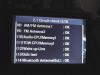
Nav menu option to see geo coordinate will show sat icon with number sat seen @ full screen mode, min 3 to lock position, mine in garage when pictures were taken, normally seen 9.
Last edited by theinmoe; Aug 1, 2009 at 09:18 PM.
Senior Member
Joined: Oct 2004
Posts: 311
Likes: 1
From: Washington DC
axe muderer with headlights
I am having this same issue, tried the reset and no luck. The other annoying thing is that the COMMAND will reset itself frequently due to this navigation location error.
I am going to the dealer in a few days, but just wanted to add myself to list of unlucky owners with this problem.
I have a 02/09 build date.
I am going to the dealer in a few days, but just wanted to add myself to list of unlucky owners with this problem.
I have a 02/09 build date.
Thread Starter
Member
Joined: Apr 2004
Posts: 202
Likes: 0
mercedes
Hey iatacs,
i'm sorry you're having the same problem. This problem came back for me. A few weeks ago, the nav was displaying wrong location on a saturday morning, then after i put in an address to find (after i got there, it corrected itself). Then on sunday morning i drove a few streets away and lost itself again. I then drove it straight to the dealership on monday morning and left the car on so the service manager could see there was a problem. I told them i'd wait for it.
2 hours later they tell me that they have to take the whole car apart because some connection is possibly lose. I then tell them to becareful taking things apart as I had my laser jammers installed and v1 custom wired. Of course they said, "Well that could be why you are having the problem, they could have nicked a wire some where." ALWAYS LOOKING TO BLAME SOMEONE ELSE!!! Infuriating me further, i went into a rage and told them i had the problem before I had that installed, which i did!
Three days later, car is still in shop and they tell me that the satellite radio cable center pin was missing, trying to blame my jammer installer. I DIDN'T TAKE THE CAR IN BECAUSE SAT RADIO WASN'T WORKING, IT WAS!! and that had no correlation to the gps. Then they call back and say my radar detector (v1) might be screwing with the signal of the gps, which is total
They then told me the car was picking up all 7 satellites fine and to bring the v1 in to see if it is interfering with the signal, so i brought it down and of course there was no problem. I also *****ed about having paid for the ipod kit and how it failed to charge my ipod, they then gave me some lame excuse that the apple is making the ipod cheaper, etc. I told them they were full of SH*T because the same ipod charged fine in my 2006 c class. They replaced the connector cable and it now charges my ipod.
Anyways, since having the car back this has happened to me once and after driving it for a bit it corrected itself. I dont' know what to do because the dealer kept blaming my installer, and yet they found nothing wrong besides claiming "interferance" which is total BS.
i'm sorry you're having the same problem. This problem came back for me. A few weeks ago, the nav was displaying wrong location on a saturday morning, then after i put in an address to find (after i got there, it corrected itself). Then on sunday morning i drove a few streets away and lost itself again. I then drove it straight to the dealership on monday morning and left the car on so the service manager could see there was a problem. I told them i'd wait for it.
2 hours later they tell me that they have to take the whole car apart because some connection is possibly lose. I then tell them to becareful taking things apart as I had my laser jammers installed and v1 custom wired. Of course they said, "Well that could be why you are having the problem, they could have nicked a wire some where." ALWAYS LOOKING TO BLAME SOMEONE ELSE!!! Infuriating me further, i went into a rage and told them i had the problem before I had that installed, which i did!
Three days later, car is still in shop and they tell me that the satellite radio cable center pin was missing, trying to blame my jammer installer. I DIDN'T TAKE THE CAR IN BECAUSE SAT RADIO WASN'T WORKING, IT WAS!! and that had no correlation to the gps. Then they call back and say my radar detector (v1) might be screwing with the signal of the gps, which is total
They then told me the car was picking up all 7 satellites fine and to bring the v1 in to see if it is interfering with the signal, so i brought it down and of course there was no problem. I also *****ed about having paid for the ipod kit and how it failed to charge my ipod, they then gave me some lame excuse that the apple is making the ipod cheaper, etc. I told them they were full of SH*T because the same ipod charged fine in my 2006 c class. They replaced the connector cable and it now charges my ipod.
Anyways, since having the car back this has happened to me once and after driving it for a bit it corrected itself. I dont' know what to do because the dealer kept blaming my installer, and yet they found nothing wrong besides claiming "interferance" which is total BS.

MBWorld Fanatic!
Joined: Feb 2004
Posts: 3,986
Likes: 6
From: SEATTLE WASHINGTON USA
'08 C300 Lux Barolo Red Beige Leather P2 MM 18" wheels '84 944
Hey guys,
Picked up my 2010 C300 4matic on saturday, was working fine. Just drove 40 miles to my office, the entire way the navigation was confused and did not display the location of the car correctly at all (car was on for over an hour). Showed me driving through lakes and other water! When I left my home my street was still off and from there it never recovered! (i was just looking at location, and did not put in a destination address for nav)
I figured once I got on one of the two major highways it would find itself but it never did. I'm not at my office and I turned car off and then on twice but the nav still shows i'm in Danbury and not Greewich!
Is there a way way to reset the location of the nav or when a restart of the car does it automatically find itself again or just pick up from the previous location of when the car was turned off?
I really have no time to go to the dealership but if so it's not going to be a pleasant experience for the people there! thanks in advanced!
Picked up my 2010 C300 4matic on saturday, was working fine. Just drove 40 miles to my office, the entire way the navigation was confused and did not display the location of the car correctly at all (car was on for over an hour). Showed me driving through lakes and other water! When I left my home my street was still off and from there it never recovered! (i was just looking at location, and did not put in a destination address for nav)
I figured once I got on one of the two major highways it would find itself but it never did. I'm not at my office and I turned car off and then on twice but the nav still shows i'm in Danbury and not Greewich!
Is there a way way to reset the location of the nav or when a restart of the car does it automatically find itself again or just pick up from the previous location of when the car was turned off?
I really have no time to go to the dealership but if so it's not going to be a pleasant experience for the people there! thanks in advanced!
You had better get used to this stuff.

Junior Member
Joined: Dec 2008
Posts: 16
Likes: 0
From: Herndon VA and Boston,MA
2009 SL 550 and 2008 Z06
I AM HAVING THE SAME PROBLEM
I have a bone stock C350 09 and the nav is off 100 miles. It is an intermittent problem but now I am going on day three so it is off to the dealer Monday
Senior Member
Joined: Oct 2004
Posts: 311
Likes: 1
From: Washington DC
axe muderer with headlights


