When you click on links to various merchants on this site and make a purchase, this can result in this site earning a commission. Affiliate programs and affiliations include, but are not limited to, the eBay Partner Network.
So, I recently bought the Eurocharged V5 tune, and initially had some problems getting it to load. Part of this I would put down to impatience, but part I would put down to the poor and out of date documentation that comes with the Mygenius from DIMSport.
Here is what they look like:
I have fixed my problems, and thought I would create a thread on tips and tricks for people who have just bought one or will do so in the future (I think OE and Eurocharged both use the Mygenius, so applies to both of those, but I'm sure others use it too). Some are dead obvious, and some a little more obscure, hopefully they help some of you. I welcome contributions from others.
Ok, so in some semblance of logical order, here they are:
When you get the device, it does not actually contain the tune. You need to obtain an ID from your car first, which gets sent as a file (via email) to the tuner, who then applies the tune and sends you back a file. This file gets loaded on to the Mygenius, which you then load onto your car.
In one of the future steps you will need to import an activation file into the software, so the first step is to email your tuner with the serial number of your Mygenius device requesting an activation file. Do this straight away so you will have it ready for this future step.
Next you need to install the Mygenius client software onto your PC. This is on the USB thumb drive that comes with the device.
Once you have installed the software, you need to update both client software AND the Mygenius device. This is to ensure that it is updated with the latest ECU communication protocols and can read and write to your ECU with no problems (no doubt there are bug fixes in the updates too). First update the software and the Mygenius to the latest versions they will go to (you need to keep updating after it finishes the first update until it tells you there are no more updates).
Now you import the activation file sent to you by the tuner (Import ABL from the TOP text menu)
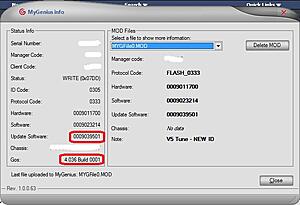
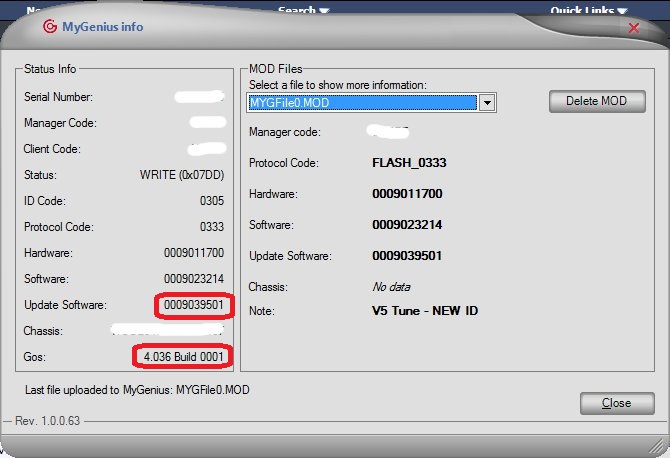
Next you update both the software and the device again (again, keep doing this until it wont update any more). If you are reading this in September / October 2014, you should get the software / Mygenius device to these versions.
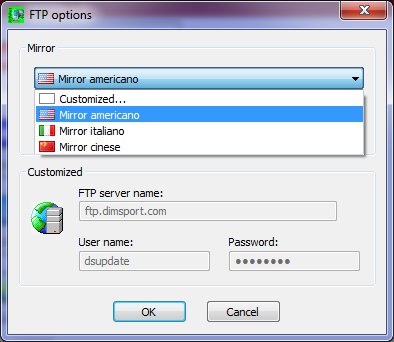
When you are doing the update, it connects to remote FTP servers to obtain the update files. I had issues occasionally getting the FTP to connect. I managed to fix these by changing the FTP mirrors. This is in the File->Options menu of the client software. By default, it is set to "Customised". But I found success changing this to "Mirror Americano" or "Mirror italiano".
Note that the update process takes a long time (in my experience), much longer for the small amount of data than typically required for updating other software on your PC
Changing to bullet points, as numbers keep resetting...
Once you are fully up to date, you are ready to ID your vehicle. To this you plug into the OBD II port of your car. On the C63 this is located under a flap underneath your steering wheel (at least it was on mine). Pull down the flap and plug in the Mygenius using the supplied OBD II cable.
As far as I can tell, the separate thin cable that comes with the Mygenius is not required for a C63. I have not used it.
Importantly, you should not expect the screens that come up when the mygenius is doing its thing to 100% line up with the documentation that comes with it. This documentation is many years out of date. So don't be worried if the screens are not the same. Just follow what the device says on screen.
When the device says "Switch on dash-board, check connections and press OK to" you need to have the car ignition ON. This is not just one turn of the key. This is turning the key like you would start the car (or pressing your start button) without putting your foot on the brake. All the dashboard lights should come on. This is important!!!
Once you have ID'd, and received the tune file back from the tuner, you can apply the tune. You will know its actually working (ie applying the tune) as the fan will come on and it will take a minute or two. It should tell you when its complete.
For those wanting to do a back to back dyno run with before and after, the procedure I have from Eurocharged (with input from others):
- Do up to 6 dyno runs stock to ensure stock ECU learning is optimised for Dyno
- Apply the tune
- Disconnect the battery and reconnect it
- Do up to 6 dyno runs with the tune
That's all I had for now. I'm sure I left stuff off. Feel free to add your own tips or ask questions, there is bound to be someone on here who can answer them.
This is good, thanks. Just as an FYI, I made the mistake of NOT turning the key to ignition position 2 (what you've described above) and only to 1 while using Mygenius to get my initial ECU readings. Fortunately, I still got the appropriate file output and this didn't affect the rest of the process.
The instructions that come with the device are mediocre. A couple other things, IIRC, the file extensions of the files that you'll need to worry about are:
1) xxxxx.abl - this is the initial config file, that you'll need to get from Eurocharged just to configure Mygenius even before you attach the device to your car
2) xxxxx.fpf - this is the file Mygenius takes off of your car that is sent to EC
3) xxxxx.MYG - this is the tune itself
This would have been a huge help for me. Don't forget to add that you need to email/call before you even do the update to get it activated. Then update, then stock tune, then modified tune!
The documentation is extremely lacking IMO. It also would be nice to know things like when the tune is properly programming, the fans come on full speed and you get the ESC Inoperable message on the dash, etc...
Great info here, if you search the euro charged site docs there's a slightly current version that includes a lot of this
The big part that no one says is the need to activate the unit which I assume is only during business hours, waiting for my activation from Friday
So when it's successful the fans go full speed and there is an esc error? Good to know I would have freaked out
My download went flawless thankfully otherwise I would have been lost.
This is a great write up from what I can remember when I installed it.
I will say, when you think your done, your not, it almost feels like you are running through the steps twice, which you kind of are to verify the tune installed properly. Be sure not to finish premature to the handheld telling you so.
To complete this post I attach the MyGenius user guide from the Eurocharged website. I assume this is the outdated instruction that was mentioned above. The file dates from 2010 and does not contain any point about activating the handheld, for example.
Eurocharged - Hint, hint :
If you have plans to issue an updated version, this would be a good time & place to let us know when you expect that to come out!
Correct, the manual says to unplug after dashboard off, but it asks you to run an error log again, with another dash on/off cycle, then it finishes. Very scary to read one set of instructions and see a totally different process occur!
This is good, thanks. Just as an FYI, I made the mistake of NOT turning the key to ignition position 2 (what you've described above) and only to 1 while using Mygenius to get my initial ECU readings. Fortunately, I still got the appropriate file output and this didn't affect the rest of the process.
This is exactly what I did. This caused the ID file to not be generated correctly in my case which meant the tune would not load. I had to reset the device, generate an ID file again and get the tuner to provide a new tune. Painful for such a minor mistake and no clear documentation to explain what I should have been doing.
To complete this post I attach the MyGenius user guide from the Eurocharged website. I assume this is the outdated instruction that was mentioned above. The file dates from 2010 and does not contain any point about activating the handheld, for example.
Eurocharged - Hint, hint :
If you have plans to issue an updated version, this would be a good time & place to let us know when you expect that to come out!
Yes, this is the old documentation I was talking about. This is actually provided by DIMSport, EC just put their logo on it. Not to say that EC couldnt produce their own up to date version of the doco.
Good write up! I actually loaded my software the first time and when I thought I was done I disconnected my Geniius and somehow locked the device and couldn't do no more flashes. I had to connect the device again and do the recovery path various times in order to get out of that mode. After many tries it worked and was able to get out of it. So just reiterating make sure the device says done once you upload a file so you don't go thru this recovery error.
Not sure if anyone has done the procedure to restore the native tune (for servicing, etc.), but maybe whoever has could add simple instructions for that as well? Not sure I'll be doing it for routine service (actually, don't think I will) but would be good to know just in case.
2010 M3 E90- sold, 2013 c63 sedan p31 eurocharghed V5, 2016 c63 s 2019 F Pace SVR 2021 E63S
I'm in the same boat. I had the tune installed back in June, thanks to Philip from Eurocharged. He did the tune for me, as he was attending a open house in Indy. So I'm assuming my original file was sent and tuned, then sent back and installed. I haven't messed with it since, just enjoying the tune. I agree with others, not sure if it needs to be back to stock for normal service. I hope I'm able to do it if it arises. Otherwise, I intend to leave it alone unless a update becomes available or a warranty issues develops. I would b very interested to hear any tips to make sure I don't screw it up.
went to prep the mygenius to download my ecu and did all the updates, the mygenius is the same version as your screenshot but the rest of the data is all blank...and in the mygenius client is says the mygenius device is not capable of uploading or downloading to the client.
Is this normal?
*******
Nevermind im an idiot, you get that after you download the file from the car (which yeah the prompts are nowhere close)
Downloading from the car was surprisingly fast.
Last edited by rentzington; Sep 23, 2014 at 05:28 PM.
Thanks Bardman.
What software environment were you installing on? Windows 7?
Windows 7. I don't think the USB thumb drive comes with windows 8 drivers. If you need these I'm pretty sure the thread with the previous group buy has them (not labour day but the one before that). In any case for completeness I might try to hunt these down and attach to this thread.
Windows 7. I don't think the USB thumb drive comes with windows 8 drivers. If you need these I'm pretty sure the thread with the previous group buy has them (not labour day but the one before that). In any case for completeness I might try to hunt these down and attach to this thread.
Mercedes SLR McLaren 722 S Is Extremely Rare Example Modified by McLaren
Slideshow: A one-of-one U.S.-spec Mercedes-Benz SLR McLaren Roadster became even rarer after a factory-backed transformation at McLaren's headquarters.


























 :
: