








Megacrazy's Build Thread
MBWorld Fanatic!
Joined: Jun 2015
Posts: 1,523
Likes: 85
From: New Jersey
2010 E550 P2 w/AMG Sport Package + Pano, 2015 Nissan Pathfinder
You have to be the coolest person on this forum. Amazing mods.....this was like reading a best selling novel #WTG. I looks like you should go into business doing this kind of stuff you have an uncanny knack for this.
Thread Starter
MBWorld Fanatic!


Joined: Oct 2012
Posts: 1,401
Likes: 312
CLK55 W209, CL63 W216

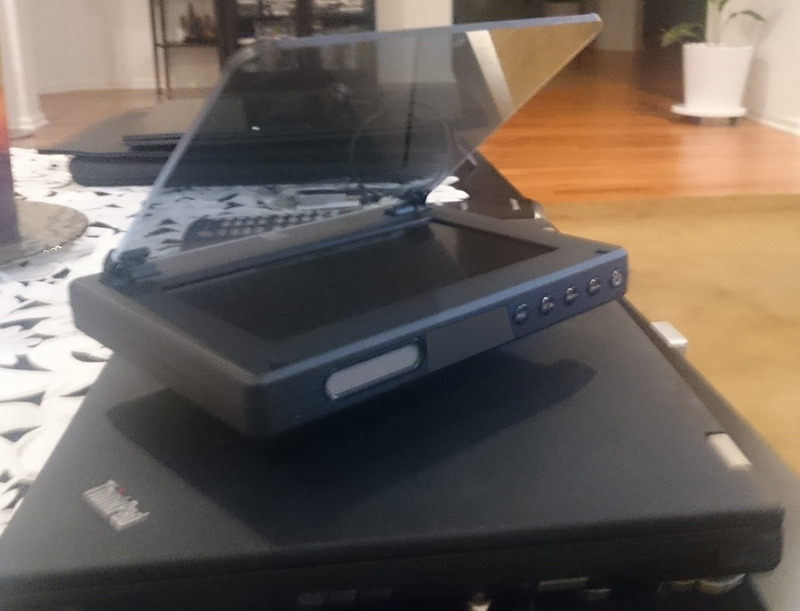
Anyway, on to the next iteration...cause I haven't been sleeping all this time. I've been missing the HUD from my other car for some time now so I decided to do something about it. I've been waiting for products like Navdy for some time but they're taking too long. They're also not going to be as customizable as I would like them to be so....Car computer/HUD time.
The idea is as follows:
- Heads up display
- Car computer with Windows 10
- Integration of HUD with thermal camera and CarPc
So...the project is fairly involved but here are some specs for those interested in details:
- Intel Compute Stick...upgrade to Win10
- Heads Up Display that takes wireless/HDMI/RCA inputs
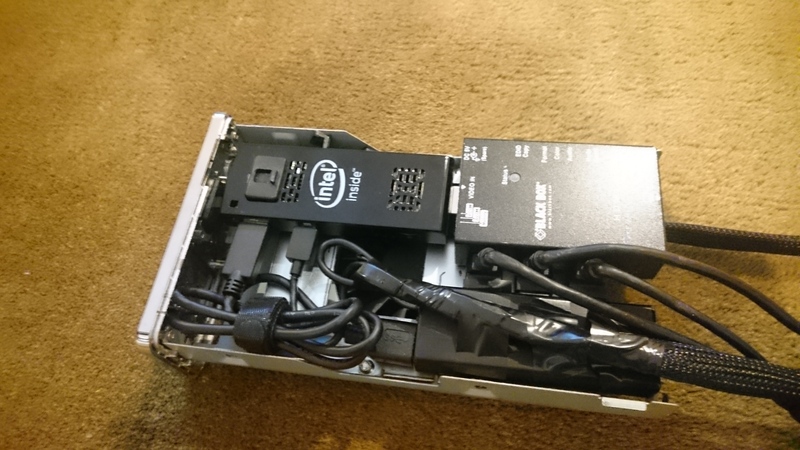
- RCA to HDMI converter for the thermal camera....after the video signal amplifier and the video signal composite isolator
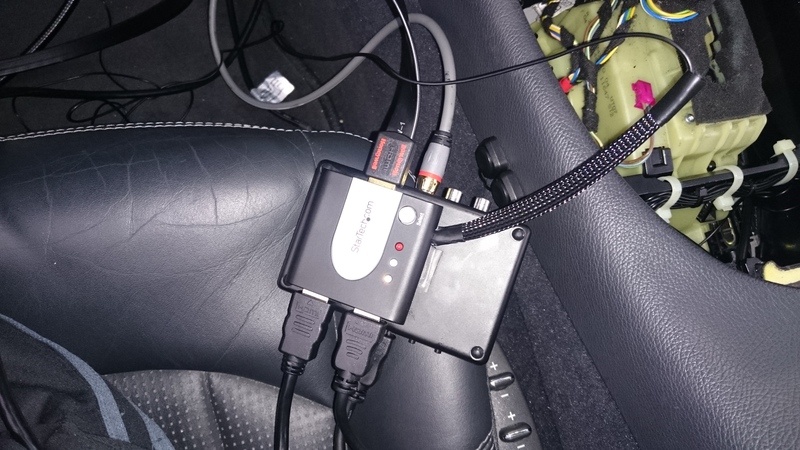
- HDMI splitter with matching Kenwood button to switch sources
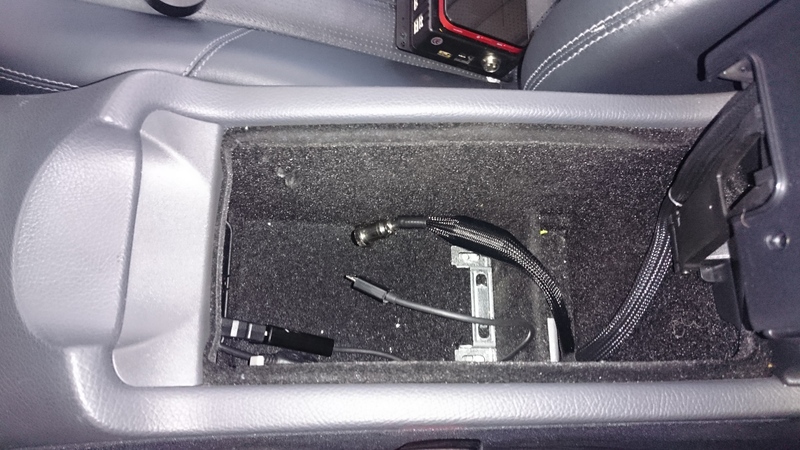
- Zendure A8 battery to power the computer while it's shutting down
- Ram Mount Tough Hub to power USB devices
- Bluetooth GPS antenna
- 3DConnexion Wireless Space Mouse for controls
- Hotspot to provide internet (already existing)
- OBDLink LX to provide OBD data
- Bluetooth microphone/hands free to speak to Cortana at the push of a button
- Box with 12V fan to keep the components cool
- USB 3.0 hub
- HDMI Ghost BlackBox to trick the HUD into thinking it's connected to a certain resolution graphics card...more on that later.
- DashCommand to display the main "gauge" part
- Copilot GPS for in yo' face maps
- Freaking hundreds of USB cables...from splitters to converters to adapters etc.
- USB voltage/current meter to keep an eye on what the comp is doing.
- Bluetooth 4.0 dongle
- USB Wifi card
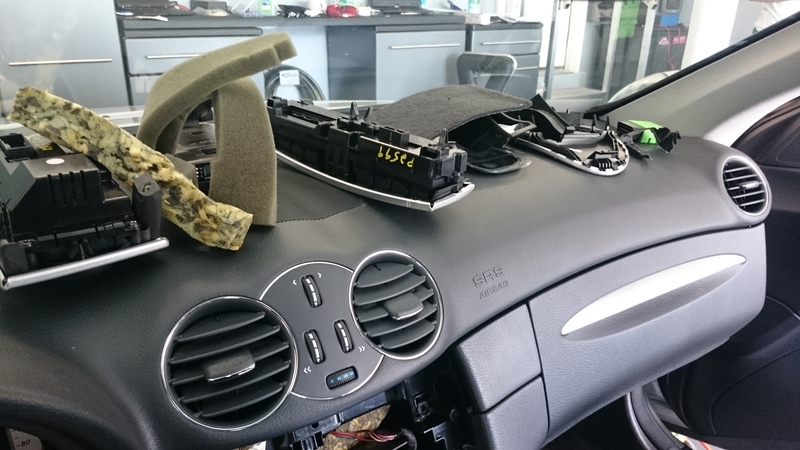
- 12v->5V transformer to power the USB hubs and all the USB devices. Grab switched power from the rear SAM and run it to the front.
As a word of advice...test all components together before installing. They don't play nice with each other sometimes especially in a car environment. As another word of advice, not all USB cables are created equal. Components that require "high" currents will require good USB cables.
Computer box. I have a lot of room where the CD changer used to be so that's where this will go. I'm using a modified hard drive enclosure. Trim and cut everything...and add stops to make sure everything is nice and fixed in there. I also changed the fan to a 12V fan that is much quieter and gave it a USB connector. I'll have a shot of the completed enclosure later.


Got a 3D mouse and made it fit into the center console shifter piece....Yup I cut the hell out of the shifter trim. I rewired the micro usb port on the mouse to get more room and used a magnetic cable to connect it. It's easier to pull the the trim piece off without having to worry about the USB port getting ripped off. I took the mouse apart and got rid of some of the case, trimmed it with a chrome ring and some alcantara on the bottom.


Wired an additional Kenwood PTT button to the HDMI splitter...to switch sources. It can be seen in the 2nd pic. I like consistency

Shot of the RCA to HDMI converter/upscaler. Find one that works well...some are pure crap.

The finished splitter on top of the upscaler ready to be installed under the driver side dash.
The battery/hotspot/RAM Hub will go in the center as it's air conditioned. Batteries have a tendency to go to **** quickly with heat.
Testing everything together see if it works.
Quick shot of the HUD
A lot more to follow as I take more pics. The project is almost complete...I've just been slacking on the pics.
Last edited by megacrazy; Sep 16, 2015 at 01:03 PM.
Thread Starter
MBWorld Fanatic!
Joined: Oct 2012
Posts: 1,401
Likes: 312
CLK55 W209, CL63 W216
Thread Starter
MBWorld Fanatic!
Joined: Oct 2012
Posts: 1,401
Likes: 312
CLK55 W209, CL63 W216
So here's batch 2. I'll snap some video of the thermal camera at night when I have some time.
Battery pack I used.

Assembled box


Finished USB hub with battery pack and hot spot installed

Mouse installed


View from outside the car

Dashcommand - I created my own gauges. I decided to copy some lambo gauges...and create my own as well in the same design pattern.


Windows Start

CoPilot

Live weather map

Battery pack I used.
Assembled box
Finished USB hub with battery pack and hot spot installed
Mouse installed
View from outside the car
Dashcommand - I created my own gauges. I decided to copy some lambo gauges...and create my own as well in the same design pattern.
Windows Start
CoPilot
Live weather map
Last edited by megacrazy; Jul 25, 2017 at 02:08 PM.
MB World Stories
The Best of Mercedes & AMG

Manual Mercedes? 6 Times Sindelfingen Let Drivers Have All The Fun
Verdad Gallardo
Mercedes SLR McLaren 722 S Is Extremely Rare Example Modified by McLaren
Verdad Gallardo
8 Classic Boxy Mercedes Designs That Have Aged Like Fine Wine
Verdad Gallardo
Flawlessly Restored Mercedes 190E Evo II Heads to Auction
Verdad Gallardo
Electric Mercedes C-Class Unveiled: 11 Things You Need to Know
Verdad Gallardo
Mercedes EQS Gets A Major Update: Everything You Need to Know
Verdad Gallardo
5 Underrated Mercedes-Benz Models That Don't Get the Love They Deserve
Verdad Gallardo
Mercedes 300D Has Pushed Well Past 1 Million Miles and It Ain't Stopping
Verdad Gallardo
10 Most Reliable Mercedes-Benz Models You Can Buy Used
Verdad Gallardo
MBWorld Fanatic!


Joined: Oct 2012
Posts: 1,427
Likes: 100
From: Florida
2002 CLK 55 AMG cabriolet Eurocharged
Always enjoy reading Megacrazy post.
I think alike but I work with linux and the hardware pictured here is tops. Beginning to believe that integration is easier with windows apps but win 10 is a mess for me right now.
I have used black box products in the past for fiber interface, Are you using any of the existing fiber or shaking hands with the Benz Can Bus protocol for this project.
One Curious Gator, Cheers
I think alike but I work with linux and the hardware pictured here is tops. Beginning to believe that integration is easier with windows apps but win 10 is a mess for me right now.
I have used black box products in the past for fiber interface, Are you using any of the existing fiber or shaking hands with the Benz Can Bus protocol for this project.
One Curious Gator, Cheers
Thread Starter
MBWorld Fanatic!
Joined: Oct 2012
Posts: 1,401
Likes: 312
CLK55 W209, CL63 W216
Thanks guys.
Gator, I actually had installed Ubuntu on it first thinking it would work better than the Windows 8 it came with. However, the lack of applications, lengthy boot time made it a poor choice and I switched back to Windows 8. There's an issue with one of the drivers as of now...but as soon as an updated driver is available I'll be running Windows 10. I think it runs better in general...at least in the car environment...than Windows 8.
Nope, no need to use fiber for this project as I am running an aftermarket headunit along with amps etc. Everything has been bypassed.
The BlackBox is used to make sure the PC plays nice with the HDMI switcher and HUD. It gets a little weird when you have so many converters and sources etc. So, basically it clones or spoofs an EDID signal to fool the display...and make it think something is always connected at a specific resolution. So far, I have to say the box is top notch. It passes through sound, specific resolutions, colors etc etc. It's perfect for this application.
Gator, I actually had installed Ubuntu on it first thinking it would work better than the Windows 8 it came with. However, the lack of applications, lengthy boot time made it a poor choice and I switched back to Windows 8. There's an issue with one of the drivers as of now...but as soon as an updated driver is available I'll be running Windows 10. I think it runs better in general...at least in the car environment...than Windows 8.
Nope, no need to use fiber for this project as I am running an aftermarket headunit along with amps etc. Everything has been bypassed.
The BlackBox is used to make sure the PC plays nice with the HDMI switcher and HUD. It gets a little weird when you have so many converters and sources etc. So, basically it clones or spoofs an EDID signal to fool the display...and make it think something is always connected at a specific resolution. So far, I have to say the box is top notch. It passes through sound, specific resolutions, colors etc etc. It's perfect for this application.

MBWorld Fanatic!
Joined: Oct 2012
Posts: 1,427
Likes: 100
From: Florida
2002 CLK 55 AMG cabriolet Eurocharged
It sounds real interesting and you have some good support tools for interfacing all of the controllers.
I like the Windows 10 but a lot of my 32 bit tools are not happy with it at all plus I am learning all the hidden widgets the hard way.
Ubuntu is one of the strongest linux variants which makes it google like and this means unwanted advertising and information gathering systems.
I am working with Texas Instruments ARM A8 Cortex which has a lot of support for specialty products like most of your smart TV interface adapters, Automotive growth is endless.
I work with integration of microchip (PIC) can bus controller and a 7" touch screen, I also stay in the developer loop with special low resolution cost Debian and Angstrom linux versions. Once the com drivers are properly done I can start loading casual apps and finally the vehicle on-board wi-fi for phones Ipad/pod etc.
Its all for fun but it would be nice to market it one day. Stay in touch and keep us posted.
The Windows IOS might be favorable for what you are constructing as well it is more Android like but less tech than a full blown Windows OP system that will use some space.
Gator
I like the Windows 10 but a lot of my 32 bit tools are not happy with it at all plus I am learning all the hidden widgets the hard way.
Ubuntu is one of the strongest linux variants which makes it google like and this means unwanted advertising and information gathering systems.
I am working with Texas Instruments ARM A8 Cortex which has a lot of support for specialty products like most of your smart TV interface adapters, Automotive growth is endless.
I work with integration of microchip (PIC) can bus controller and a 7" touch screen, I also stay in the developer loop with special low resolution cost Debian and Angstrom linux versions. Once the com drivers are properly done I can start loading casual apps and finally the vehicle on-board wi-fi for phones Ipad/pod etc.
Its all for fun but it would be nice to market it one day. Stay in touch and keep us posted.
The Windows IOS might be favorable for what you are constructing as well it is more Android like but less tech than a full blown Windows OP system that will use some space.
Gator
Thread Starter
MBWorld Fanatic!
Joined: Oct 2012
Posts: 1,401
Likes: 312
CLK55 W209, CL63 W216
That's pretty interesting. You should definitely market something like that. Short of making your own the choices are pretty bleak.
I enjoyed the latest version of Ubuntu and it seemed quite polished. unfortunately there were no apps I could use and it doesn't take well to unexpected shutdowns...just like Android. So yeah the least likely choice it is...Windows haha.
I enjoyed the latest version of Ubuntu and it seemed quite polished. unfortunately there were no apps I could use and it doesn't take well to unexpected shutdowns...just like Android. So yeah the least likely choice it is...Windows haha.
Thread Starter
MBWorld Fanatic!
Joined: Oct 2012
Posts: 1,401
Likes: 312
CLK55 W209, CL63 W216
So...I got bored the other day and I decided to go after the valuable real estate behind the rear view mirror. I just had my dash cam there and decided it's time for an upgrade. What kind of upgrade? Night vision.
In addition to the thermal camera, I am adding a custom...made...night vision camera...and cleaning up my HUD project some more and incorporating it with the dash better. I have to say it's great...having all the info right in front of you, along with maps...different modes of vision etc is amazing.
The idea was to take a night vision scope I just...had...set it to 3x zoom, install an IR illuminator in the bumper that's powerful enough for 100m and feed it to the HUD. On to some pics. I am kind of in the middle of this project.
Getting the case for the camera ready from scratch.

Gutting the HUD GPS antenna and moving it into the camera case...space savings.

IR illuminator painted and installed next to the fog light.

Camera installed and color matched, along with a new dash camera (left side).


In addition to the thermal camera, I am adding a custom...made...night vision camera...and cleaning up my HUD project some more and incorporating it with the dash better. I have to say it's great...having all the info right in front of you, along with maps...different modes of vision etc is amazing.
The idea was to take a night vision scope I just...had...set it to 3x zoom, install an IR illuminator in the bumper that's powerful enough for 100m and feed it to the HUD. On to some pics. I am kind of in the middle of this project.
Getting the case for the camera ready from scratch.
Gutting the HUD GPS antenna and moving it into the camera case...space savings.
IR illuminator painted and installed next to the fog light.
Camera installed and color matched, along with a new dash camera (left side).
Last edited by megacrazy; Jul 25, 2017 at 01:54 PM.

Thread Starter
MBWorld Fanatic!
Joined: Oct 2012
Posts: 1,401
Likes: 312
CLK55 W209, CL63 W216
Thread Starter
MBWorld Fanatic!
Joined: Oct 2012
Posts: 1,401
Likes: 312
CLK55 W209, CL63 W216
So I think I'm happy with the physical aspect of it now. I finished the camera and painted everything to match the dash. I also added some CF paddles that move up and down to contour things to the dash better. I relocated the GPS antenna from the camera to the trim piece in front of the HUD...having 2 GPS antennas in the same area creates some kind of interference apparently.
Up next some new software features. I'm thinking pedestrian/car/lane detection stuff maybe. I'll have to think about how useful that would be


Up next some new software features. I'm thinking pedestrian/car/lane detection stuff maybe. I'll have to think about how useful that would be
Last edited by megacrazy; Jul 25, 2017 at 01:48 PM.
Thread Starter
MBWorld Fanatic!
Joined: Oct 2012
Posts: 1,401
Likes: 312
CLK55 W209, CL63 W216
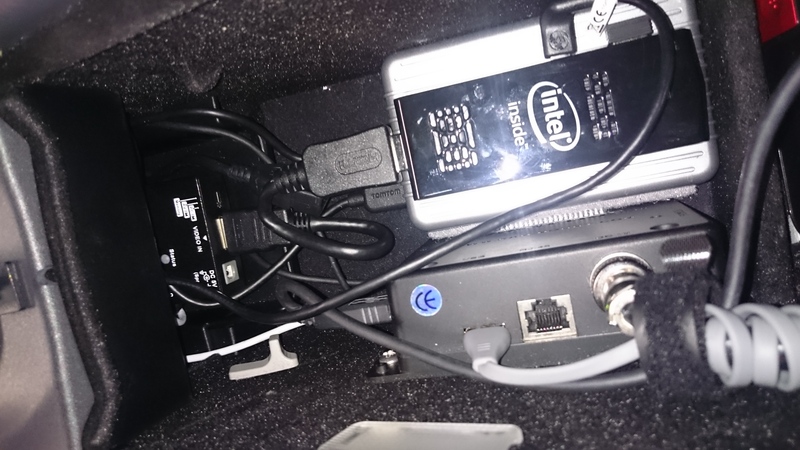
Final update on this. Completely revamped the computer setup.
- Different computer
- All digital setup now meaning both cameras connect directly to the computer
- 2 Fans with fan controller to keep everything nice and cool. One fan blows in air and the other one dumps it into the cabin fan.


- Different computer
- All digital setup now meaning both cameras connect directly to the computer
- 2 Fans with fan controller to keep everything nice and cool. One fan blows in air and the other one dumps it into the cabin fan.
Last edited by megacrazy; Jul 25, 2017 at 01:47 PM.
Thread Starter
MBWorld Fanatic!
Joined: Oct 2012
Posts: 1,401
Likes: 312
CLK55 W209, CL63 W216
Haha thanks guys. I have to say, it comes extremely handy on rural roads with low light conditions. The NV camera is zoomed in so you can easily scan the road ahead beyond the range of the headlights.
I'll venture into pothole detection/object tracking next. Let's see what happens
I'll venture into pothole detection/object tracking next. Let's see what happens
Super Member
Joined: Aug 2013
Posts: 709
Likes: 48
From: NFLD
2017 C43 AMG, 2010 C350 4Matic, 9 Motorcycles
This is exactly what I want to do. I just made a thread in the W204 forum about this earlier tonight (although I made it a little bit more on the infotainment side, because I wasn't sure how many people were comp savy around here, apparently... very very much so.. hahaha.) but this would be PERFECT for what I want to do...
I wish there was a DIY guide!! Hahahaha!
It's funny because I currently work in IoT at a computer company that develops software, but I'm not on the software development side, and it's so frustrating to know I'm in a building everyday with people who have the knowledge I need to do what I want but I myself don't.
What software do you run on Win10 for this?!
I can't wait to set this up...
I am trying it in my jeep resto project first and if I can get it going well enough, I will be throwing it in my C350 guarrenteed.
I am in awe of your ability.
You have done something truly astounding... I can only hope that I get to your level of competence in your work.
Also, what are the brands/type of HUD and FLIR you used?!
I wish there was a DIY guide!! Hahahaha!
It's funny because I currently work in IoT at a computer company that develops software, but I'm not on the software development side, and it's so frustrating to know I'm in a building everyday with people who have the knowledge I need to do what I want but I myself don't.
What software do you run on Win10 for this?!
I can't wait to set this up...
I am trying it in my jeep resto project first and if I can get it going well enough, I will be throwing it in my C350 guarrenteed.
I am in awe of your ability.
You have done something truly astounding... I can only hope that I get to your level of competence in your work.
Also, what are the brands/type of HUD and FLIR you used?!
Last edited by Josh.A.Hussey; Jun 22, 2016 at 10:44 PM.


