When you click on links to various merchants on this site and make a purchase, this can result in this site earning a commission. Affiliate programs and affiliations include, but are not limited to, the eBay Partner Network.
So, after a few days using the 7.16 update, my front camera issue mysteriously fixed itself..
I haven’t changed any settings or did any additional resets.. strange.
How it operates how is when I engage R, the reverse camera shows and then when I put the vehicle in D, the front camera shows up until 10mph. If I speed over 10mph, it reverts back to Carplay. However, if I don’t speed higher than 20mph(the factory setting to hide front camera), when I slow down to a stop, it will revert back to front view camera.
Can those who have updated to fix their front camera issue confirm this is how it operates?
Ideally it should show the front camera the whole duration until 20mph is reached. Not flip to CarPlay over 10mph and show front camera again when stopped.
Edit: Spoke too soon, now it doesn’t work again. I am convinced my unit is broken.
Last edited by 95Sinned420; Jul 26, 2020 at 08:22 PM.
So, after a few days using the 7.16 update, my front camera issue mysteriously fixed itself..
I haven’t changed any settings or did any additional resets.. strange.
How it operates how is when I engage R, the reverse camera shows and then when I put the vehicle in D, the front camera shows up until 10mph. If I speed over 10mph, it reverts back to Carplay. However, if I don’t speed higher than 20mph(the factory setting to hide front camera), when I slow down to a stop, it will revert back to front view camera.
Can those who have updated to fix their front camera issue confirm this is how it operates?
Ideally it should show the front camera the whole duration until 20mph is reached. Not flip to CarPlay over 10mph and show front camera again when stopped.
Edit: Spoke too soon, now it doesn’t work again. I am convinced my unit is broken.
I have seen similar behaviour in my car. Though it works most of the time. I suspect the firmware coders don't have a 360 camera system and trying to troubleshoot via us.
Ordered one from Road Top for my 2013 ML350 Bt. I ordered one from Carsara about a month ago but the package got lost in transit. I received a refund and their customer service was top notch. The reason I ordered with Road Top (even though it was 40$ more expensive than Carsara) is that I wanted faster shipping. If you're not in a hurry and wouldn't mind waiting longer, I recommend Carsara. Their unit is the exact same as Road Top (cheaper but slower shipping). I'll keep everyone posted once I receive the unit and install it.
Let us know how you like it. Also curious how long it took to arrive and whether DHL hit you with any brokerage/customs fees on delivery...
I finally updated the firmware to the 3/20 version. This is the first update that's been done on my box since the initial install over a year ago. I was nervous about the iOS13 update, but that was more or less seamless. I did notice that the wireless connection seemed slower than prior to the iOS13 release, but I didn't bother to check for a FW update from Joyeauto, until now. Now that I've updated the FW, the wireless connection is very quick again, as it was initially.
I did have to reset the icon, as previously described, using the 1123 password for CarPlay in the Joyeauto settings menu. I also had to reset the BT in the Joyeauto menu to reset the wireless connection. Other than that the update was pretty smooth and straightforward.
Thx to all for documenting the issues and procedures!
This is the first update that's been done on my box since the initial install over a year ago. I was nervous about the iOS13 update, but that was more or less seamless.
FWIW, I've been testing iOS 14 (currently beta 3) and it appears to work just fine with the latest Joyeauto software (2020-3-18).
FWIW, I've been testing iOS 14 (currently beta 3) and it appears to work just fine with the latest Joyeauto software (2020-3-18).
Thx! That's good to know. ISTR, other CarPlay boxes had issues with the iOS13 release. I'm glad Joyeauto has been supporting their product with FW updates.
I've been using the mirroring option to watch videos through YouTube and it works great with audio coming through the car speakers. I noticed some other apps don't allow the video play on the screen even though the audio still works. For example, HBO Max I can't get video on the screen only audio. Does anyone know if certain apps prevent this or is this something with the phone settings
Got my Road Top unit installed yesterday. I hit a few bumps along the way that I'll share in case others run into an issue:
Unit was installed, but wouldn't play sound. I forgot I had an HK vehicle and forgot to set the Amp to External as Cadetdrivr indicated in the tutorial instructions. After I adjusted in the Engineering menu my sound still would not play. I ended up power cycling the vehicle (let it sit for 10 minutes) and then everything worked fine after that
COMAND started spontaneously shutting off on me at one point (screen would display "COMAND is shutting down") - I let the vehicle run for a bit and then it seemed to happen. Not sure if it was voltage related or not.
Like meatballr, I found the volume levels between the COMAND interface and Carplay interface to be pretty different - Carplay is much lower when switching. As meatballr said, not a big deal as I won't be using the COMAND side of things very often.
A few questions:
Adjusting for the volume difference between COMAND and Carplay is as easy as increasing the volume, but I've found that the Google Maps voice sounds terrible (I'd say it sounds "thin" and "shallow" and cracks up as if suffering distortion). Has anyone else experienced this? Does any one have an EQ profile they suggest?
I'm going to update to the newest MCU shared on this thread. Is the "8032" password good for all units and updates or do I need to contact Road Top for my own password?
Has anyone experienced the COMAND unit shutting itself down? I'm unclear if the installation is actually related or that maybe I was just running the battery down a bit too much while troubleshooting.
I'm going to update to the newest MCU shared on this thread. Is the "8032" password good for all units and updates or do I need to contact Road Top for my own password?
Has anyone experienced the COMAND unit shutting itself down? I'm unclear if the installation is actually related or that maybe I was just running the battery down a bit too much while troubleshooting.
Thanks,
8032 is the password for al the Road Top units. I have confirmed with Road Top that there are TWO different hardware versions so ONLY update IF the version matches. Also, that version fixes the 360 Camera issue. If you don't have the 360 Camera don't bother with it.
FWIW, Comand will automatically shut itself off after a certain period of time if the engine is not running to save the battery. Hopefully that's all you experienced.
Last edited by cadetdrivr; Aug 2, 2020 at 09:55 AM.
Thanks, cadetdrivr. Took a spin with the car today and I think you were correct - Comand seemed to operate as normal.
To respond to a part of my own question and anticipate helping anyone who has a similar issue: 1. Adjusting for the volume difference between COMAND and Carplay is as easy as increasing the volume, but I've found that the Google Maps voice sounds terrible (I'd say it sounds "thin" and "shallow" and cracks up as if suffering distortion). Has anyone else experienced this? Does any one have an EQ profile they suggest?
I found this guide on Apple support forum: https://discussions.apple.com/thread/8057767. TLR - the navigation voice is controlled independent of normal music volume. You can only modify the navigation voice volume when the voice is actively speaking. I've not tried it yet, but seems like the solution to my problem.
Thanks to everyone who has contributed to this thread and made this such a seamless experience. So awesome to finally have Carplay!
You can only modify the navigation voice volume when the voice is actively speaking. I've not tried it yet, but seems like the solution to my problem.
If this does not work, you may want to try this when using Google maps for directions while the phone in NOT connected to CarPlay and using the phone's speaker for music and directions.
Unlike an integrated OEM system, it appears that Comand only amplifies the audio input from the CarPlay box as far as I can gather. (It would be impressive if there were and it worked.)
Big thank you to everyone especially cadetdrivr for such detailed instructions and experiences. The link you have sent on Amazon shows currently unavailable. Is this the same unit
Big thank you to everyone especially cadetdrivr for such detailed instructions and experiences. The link you have sent on Amazon shows currently unavailable. Is this the same unit
Yes, that’s the one. Just gotta make sure you order the right unit (NTG 4.5/4.7 or NTG 5.0/5.1) depending on your vehicle. These are not for NTG 4.0.
Cheers mate. Yep have a CLA 2013 so it will be 4.5
Is there a detailed set of instructions for this newer version via a manual or video that I can pass on to the installer? Any other specific instructions I should let him know about? Should I get him to install the USB to the centre console for better quality I assume?
Should I get him to install the USB to the centre console for better quality I assume?
You will want access to USB for potential firmware updates and/or using a wired connection (useful for long trips so the phone battery remains charged). Where that USB connection is located is up to you. IMHO, you won't experience a difference in quality as the wireless connection uses Wi-Fi which has plenty of bandwidth compared to USB.
All the NTG are virtually identical across MB so the gotchas are insuring the DIP switches on the CarPlay unit are set to match the screen size for your car and realizing that one can make the installation much simpler as you may not need to run an AUX input to the center console (see post #2 in this thread).
You will want access to USB for potential firmware updates and/or using a wired connection (useful for long trips so the phone battery remains charged). Where that USB connection is located is up to you. IMHO, you won't experience a difference in quality as the wireless connection uses Wi-Fi which has plenty of bandwidth compared to USB.
All the NTG are virtually identical across MB so the gotchas are insuring the DIP switches on the CarPlay unit are set to match the screen size for your car and realizing that one can make the installation much simpler as you may not need to run an AUX input to the center console (see post #2 in this thread).
Cheers mate once again for your invaluable feedback. Can't wait to have it running in my car!
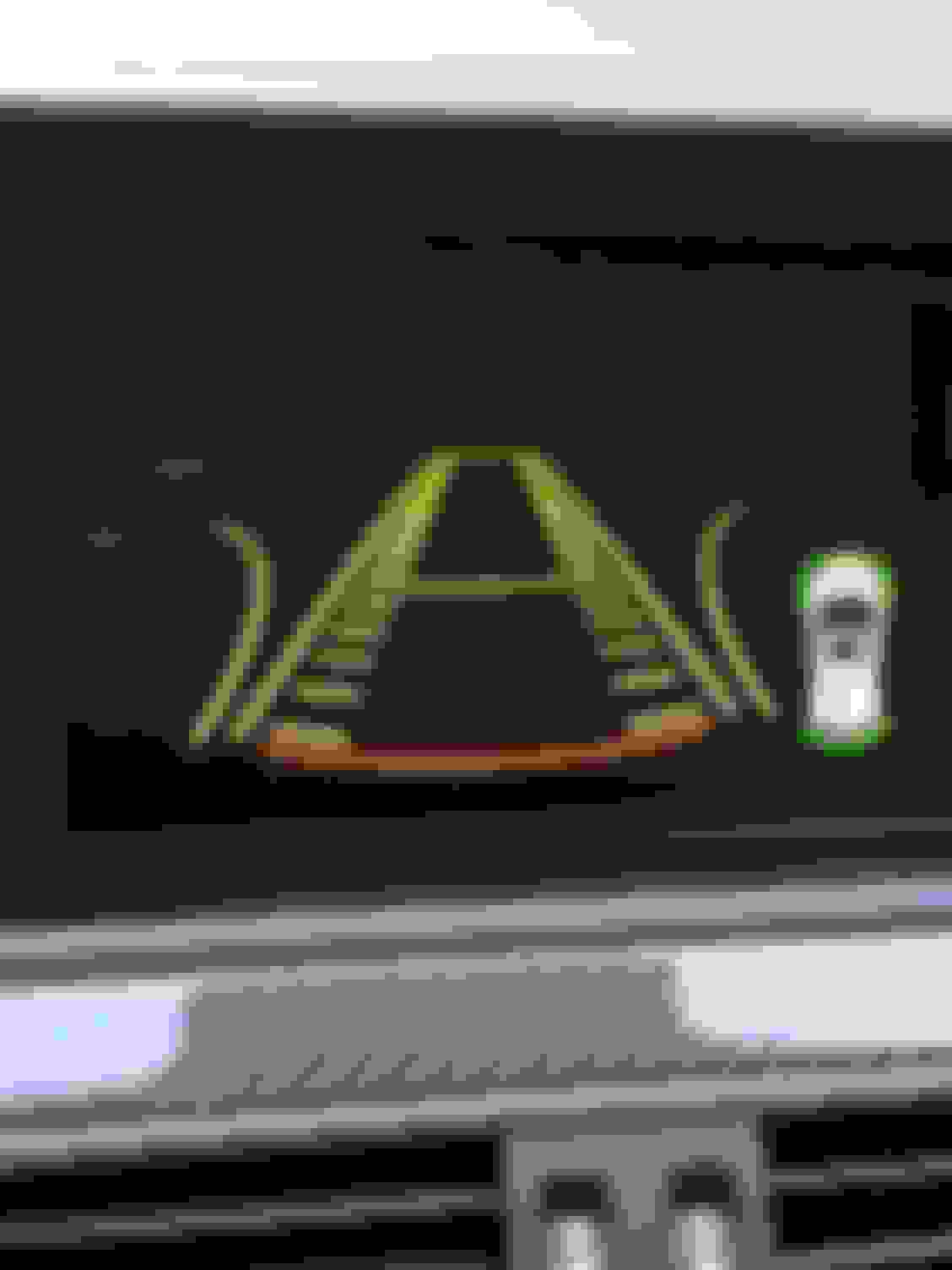
Any idea what this screen means? I'm assuming it has something to do with the camera. I have the OEM backup camera and it's been working fine with the roadtop unit. I was backing up and this screen appeared. Even after I put it in park, back to drive etc,
the screen didn't go away. Had to turn the car off in order to get out of that screen
I suppose you could insert a splitter/crossover between the unit and the car's AUX input when using the MB AUX input (in the armrest) instead of via a direct connection with the harness?
Just got a response from a unit I was about to purchase on eBay. He said his units are newer generation. I looked at his link and he has a comparison on why his is better. Can anyone confirm if this is legit? The comparison is at the bottom of the page.
Just got a response from a unit I was about to purchase on eBay. He said his units are newer generation. I looked at his link and he has a comparison on why his is better. Can anyone confirm if this is legit? The comparison is at the bottom of the page.
Unless the website is totally out of date the photos of this unit appear to be yet another version of the unit Joyeauto and others sell. And some of the comparisons are nonsensical. Also, one 'tell' is is still uses an external mic and not the MB OEM one.
Originally Posted by achandab1
Otherwise is this model still the best on the market?
Mercedes SLR McLaren 722 S Is Extremely Rare Example Modified by McLaren
Slideshow: A one-of-one U.S.-spec Mercedes-Benz SLR McLaren Roadster became even rarer after a factory-backed transformation at McLaren's headquarters.



















 R - the navigation voice is controlled independent of normal music volume. You can only modify the navigation voice volume when the voice is actively speaking. I've not tried it yet, but seems like the solution to my problem.