As of March 25th my order still has not shipped yet. It has been over 2 weeks. I am starting to think this is not going to end well.
I have canceled my order for the CAPMB-51 because the product never shipped out. I apologize to anyone who was waiting for me to test it. After 20 days with no shipping I just could not trust that a working product would show up.
Check with your dealer buddy if the $99-$199 MB CarPlay upgrade kit will work for your VIN# - comes with Apple/Android cables - CarPlay is seamless - to activate Android Auto will take NetStar update to COMAND to make capable - again dealer parts dept needs to check your VIN# for compatibility..
As always thank you for your input. When I asked my local mb dealer parts department for this, they couldn't figure out what I was asking about. They said they'd call me back if they figured it out but never did.
Quote: Update!
For people with Comand NTG5.1 you need:
1. Find a person who can apply codes in Vedoc:
Code 14U (Smartphone Integrationspaket)
Code 16U (Smartphone Integration Carplay)
Code 17U (Smartphone Integration Google Automotive Link)
2. wait for 3 days (to be sure that codes applied)
3. go to your nearest dealer and ask them about warranty SW update on your head unit (create a case why they should update your HU)
That's it you will get Android Auto & Apple Carplay in your car with saved warranty and saved money!
Bad news for people with Audio 20... VeDoc is NOT accepts codes above
[QUOTE] Apple Car Play and Android Auto upgrade for NTG5*1
Price: £399.00 including VAT 20.00% ( £66.50 )
If your car has NTG5*1 COMAND Online but no Apple CarPlay or Android Auto (but not W212 E class saloon) we can add Apple Car Play and Android Auto to the vehicle. This is normally vehicles built before 30/11/2015.
This is not for NTG5*2 (S, CL, Vito, GLC) vehicles, and not for vehicles with Audio-20.
This *has* to be done at our sister company's workshop in Lightwater Surrey, UK (M3 J2) using a special process or the warranty on the COMAND is voided. We have to replace a component in the vehicle (including the USB connector port in the car), add a software license and upgrade the firmware in the COMAND system.
- The price includes fitting, although we may ship the parts to you.
We need your VIN number and whether you want lightning or Micro USB cable so please put these in the comments box alongside when you would like to visit in the comments box.
Compatibility (Dates are Build Dates not 1st registered dates).
• A-Class - W176 (09/15- ): only for NTG 5*1 COMAND Online up until 30.11.2015
• B-Class - W242EV ((USA 06/14- ) 11/14- ): only for NTG 5*1 COMAND Online up until 30.11.2015 • B-Class - W246 (11/14- ): only for NTG 5*1 COMAND Online up until 30.11.2015
• B-Class - W242NGD (11/14- ): only for NTG 5*1 COMAND Online up until 30.11.2015
• CLA - C117 (04/13- ): only for NTG 5*1 COMAND Online up until 30.11.2015
• CLA - X117 (03/15- ): only for NTG 5*1 COMAND Online up until 30.11.2015
• CLS - C218 (09/14- ): only for NTG 5*1 COMAND Online up until 30.11.2015
• CLS - X218 (09/14- ): only for NTG 5*1 COMAND Online up until 30.11.2015
• E-Class - C207 (05/13- ): only for NTG 5*1 COMAND Online up until 30.11.2015
• E-Class - A207 (05/13- ): only for NTG 5*1 COMAND Online up until 30.11.2015
• GLA - X156 (03/14- ): only for NTG 5*1 COMAND Online up until 30.11.2015
• GLE - C292 (07/15- ): only for NTG 5*1 COMAND Online up until 30.11.2015
• M-GLE-Class - W166 ((USA 08/15) 09/15- ): only for NTG 5*1 COMAND Online up until 30.11.2015
[QUOTE]
Hello all, I just had the Smartphone Integration Package installed in my recently purchased CPO 2016 GLE 450 AMG. My vehicle was produced in 11/15 and therefore was not equipped with Apple Carplay or Android Auto. It did come equipped with the COMAND system though. I did some research and found this part number: A2468203800
It comes with the updated USB port module and 2 cables (1 lightning cable, and 1 android USB cable). I took the parts to my local MB dealer and told them about the upgrade and that I wanted it installed. After some VIN research and part verification on their side, they were able to confirm that my vehicle was compatible with the upgrade. Replacing the USB module only took a few minutes. Flashing the COMAND with the updated software took about 3 hours (I was only charged for 1 hour ). After they were finished, I hooked up my iPhone 7 Plus and Viola!, Apple CarPlay! After I got home I switched the settings to Android Auto and connected my Android phone. BOOM! Android Auto on the display! A neat side effect of the COMAND software update is that instead of the standard "Mercedes-Benz" splash screen, the display shows the "AMG" logo upon power-up.
So did you simply contact your dealer to see if your vehicle was eligible for the Part #A2468203800 upgrade? And they took care of the rest?
Yes, but I had to make my service rep aware that the upgrade even existed. He had no idea what I was talking about when I talked to him initially, lol.
Print-off this information bulletin and take it to your service rep. It should make the process WAAAAY easier for you (as it did for me): car-play.pdf
Hello all, I just had the Smartphone Integration Package installed in my recently purchased CPO 2016 GLE 450 AMG. My vehicle was produced in 11/15 and therefore was not equipped with Apple Carplay or Android Auto. It did come equipped with the COMAND system though. I did some research and found this part number: A2468203800
It comes with the updated USB port module and 2 cables (1 lightning cable, and 1 android USB cable). I took the parts to my local MB dealer and told them about the upgrade and that I wanted it installed. After some VIN research and part verification on their side, they were able to confirm that my vehicle was compatible with the upgrade. Replacing the USB module only took a few minutes. Flashing the COMAND with the updated software took about 3 hours (I was only charged for 1 hour ). After they were finished, I hooked up my iPhone 7 Plus and Viola!, Apple CarPlay! After I got home I switched the settings to Android Auto and connected my Android phone. BOOM! Android Auto on the display! A neat side effect of the COMAND software update is that instead of the standard "Mercedes-Benz" splash screen, the display shows the "AMG" logo upon power-up.
Yes, but I had to make my service rep aware that the upgrade even existed. He had no idea what I was talking about when I talked to him initially, lol.
Print-off this information bulletin and take it to your service rep. It should make the process WAAAAY easier for you (as it did for me): Attachment 353629
Thanks again...gave it to my Service Advisor, and around $300 installed later, I was ready to go
We asked the service advisor about the apple CarPlay upgrade for our 2016 and they said they could install it. They quoted us $144 for parts and labor which seems really low to me compared to what other have paid to have it installed. Is there some other apple cord or something that they might be referencing that would cost that much and not be the CarPlay module?
So we asked our dealer about the adding apple carplay. Even printed off the the PDF and was told it would be $144 out the door which seems really low compared to what has been reported on here. Is there some other Apple product that they might be referencing at that price?
So we asked our dealer about the adding apple carplay. Even printed off the the PDF and was told it would be $144 out the door which seems really low compared to what has been reported on here. Is there some other Apple product that they might be referencing at that price?
The part itself only cost $99, which is the usb port located inside the armrest. The dealer will need to flip the switch and upgrade to the latest firmware (if you don't already have it) and they typically charge around $200 for that.
San Jose Stevens creek Mercedes adviser Charlie Fisher quoted $450~ish to upgrade my 2016 GLE350 and I purchased the car from them.....
Where are you all getting $200 ~ $300 quote?
I now have Apple Car Play !!!! (My first post ever)
Quote:
Originally Posted by Launchstation
Yes, but I had to make my service rep aware that the upgrade even existed. He had no idea what I was talking about when I talked to him initially, lol.
Print-off this information bulletin and take it to your service rep. It should make the process WAAAAY easier for you (as it did for me): Attachment 353629
So happy that they were able to do this. Thanks to "LaunchStation"s post with the attached MB Bulletin, I was able to get this upgrade installed on my 2016 GLE350. Exact same experience Launch described. Printed off the bulletin and showed to service adviser and after checking a few things, they were able to confirm it would work with my car. Ordered the part (arrived 2 days later) and quickly scheduled me the afternoon the part came in. Had to pay for the kit $95 (Part nbr 246-820-38-00), labor to install $153.95 and shop supplies - $17.13 for a grand total of $275.06.
First Certified MB to buy from a dealer and I am one happy camper so far!! Well worth the extra money to get first class service.
I recently traded in my 2016 GLE350 for a fully loaded 2016 GLE400 with a build date of 10/15 that did not have Carplay. I'm happy to report that the dealer was able to successfully program Carplay and Android audio!!!! They had to run the install a couple of times before they got it working. I paid $100 for the part and they didn't charge me for the install.
Wow. After reading this today I called my dealership and they said hey think they can do it but quoted me an estimated price if $550. I need a new dealership.
I recently traded in my 2016 GLE350 for a fully loaded 2016 GLE400 with a build date of 10/15 that did not have Carplay. I'm happy to report that the dealer was able to successfully program Carplay and Android audio!!!! They had to run the install a couple of times before they got it working. I paid $100 for the part and they didn't charge me for the install.
Thanks, which Mercedes dealer did you go to and who is your adviser?
I have a 12/2015 GLE350 and I am in Northern Cal, I might go down there sometimes. Stevens Creek Mercedes wants to charge me $400 to install and $200 for the part.
I bought a OBD2 activator but still needs an instruction to open up my center console/arm rest to install A246 820 3800.
Bought a 2016 GLE350 4Matic CPO last weekend (wife's new ride). It was put into service Dec 2015, haven't looked at the build date yet. My nephew is a certified MB tech at the dealership. He said that if it has the Smartphone logo on the USB port, there are two possibilities. It needs the $100 part plus the dealer update, or just the update. Before they do they update, they have to submit something to MB to get the right code to download. He said the dealer shouldn't charge more than an hour labor total. Having him do it in the next couple of weeks and I'll report back.
BTW, this has to be the most convoluted update I've ever seen. Too many different scenarios and nobody knows exactly what the process is to get it done on the pre Jan 2016 GLE's.
my understanding is that for pre 1/2016 you can buy a kit A246 820 3800 for about $96 from dealer and ask them to update code 14U (my dealer told me it will take about 3 hours and it will cost about $500)
just like listed in the attachment.
my understanding is that for pre 1/2016 you can buy a kit A246 820 3800 for about $96 from dealer and ask them to update code 14U (my dealer told me it will take about 3 hours and it will cost about $500)
just like listed in the attachment.
So I have 2016 GLE and I printed the CarPlay PDF from this forum and took it to dealer for retrofit of CarPlay. He's never head of this retrofit upgrade and after a while with discussion with some others, he said they can't do it on my vehicle cause my vehicle doesn't have 'Smartphone Integration Package'. Our GLE didn't have the 'smartphone integration package' when we bought it but I thought the point of upgrade was precisely for 2016 GLE vehicles without that package, to get the CarPlay activated?
Slideshow: A one-of-one U.S.-spec Mercedes-Benz SLR McLaren Roadster became even rarer after a factory-backed transformation at McLaren's headquarters.





 you will get Android Auto & Apple Carplay in your car with saved warranty and saved money!
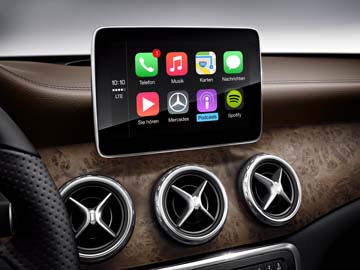

 ). After they were finished, I hooked up my iPhone 7 Plus and Viola!, Apple CarPlay! After I got home I switched the settings to Android Auto and connected my Android phone. BOOM! Android Auto on the display! A neat side effect of the COMAND software update is that instead of the standard "Mercedes-Benz" splash screen, the display shows the "AMG" logo upon power-up.