When you click on links to various merchants on this site and make a purchase, this can result in this site earning a commission. Affiliate programs and affiliations include, but are not limited to, the eBay Partner Network.
a) with "dongle" do you mean a standard USB to Lightning cable?
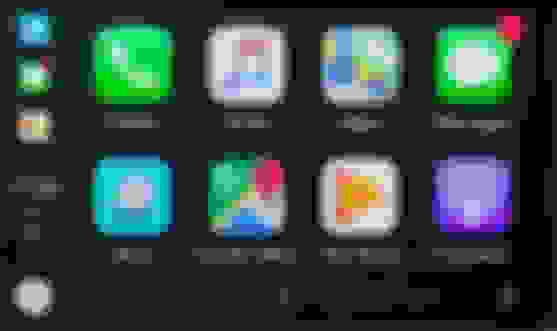
b) just to be sure we talk about the same thing when we use the word "CarPlay": Apple CarPlay allows you to run apps from your iPhone, it then takes over the display of the headunit, which will look like this
If I missed the demo of Apple CarPlay in your videos I apologize, please let me know in which video it is, I know you can't post links here
c) about the location of the GPS antenna, let me ask my question differently:
In your experience, what's the best location in a W221 to place the GPS antenna to get a good compromise between reception and ease of installation/routing?
Thanks Chris, I'm not trying to be difficult, I just want to be 100% sure I understand what I'm buying
a) with "dongle" do you mean a standard USB to Lightning cable?
b) just to be sure we talk about the same thing when we use the word "CarPlay": Apple CarPlay allows you to run apps from your iPhone, it then takes over the display of the headunit, which will look like this
If I missed the demo of Apple CarPlay in your videos I apologize, please let me know in which video it is, I know you can't post links here
c) about the location of the GPS antenna, let me ask my question differently:
In your experience, what's the best location in a W221 to place the GPS antenna to get a good compromise between reception and ease of installation/routing?
Thanks Chris, I'm not trying to be difficult, I just want to be 100% sure I understand what I'm buying
Cheers
Christopher
You buy an antenna splitter and use the stock GPS antenna. The antenna that comes with the unit is garbage and wouldn't run that in a car.
Here is the screenshot of the cable..I got mine off ebay for $7 works like a charm too.. but make sure you get one thats at least 3ft in length anything shorter is almost too short like mine is but I made it work.. if you dont get from ebay search for (Fakra C Male Blue to SMB Female RA SMA Male Y Pigtail Combined Cable RG174) or (Fakra ”C“ Male to SMB Female 5005 SMA Male RG174 Y Splitter Combined Cable) amazon has them also..
Alright, so I bought one of these, and I have just installed it and tested it. It seems to work well, quick, the touch screen is capasitive and very responsive, and very cool with Google Maps navi, WIFI, and not least the newer design on the menus etc. The only thing I haven't got right yet is the sound from the Android, but I think that's just because I received the wrong MOST box (W221 2010-2013 with AUX), I have 2006 with TV. I'll try with the correct box first, if that still doesn't work I'll cut some wires and try megacrazy's idea of hacking into the comand AUX pins. Sound from original Comand is ok.
All other functions seems to work. The only small things I've noticed is that the "ESP off" hard button is replaced by a suspension icon soft button, and when I press that nothing happens. I don't know if that is specific to my S65 AMG, but it's the wrong icon and soft button in the software for my car. The two other soft buttons (rise/lower and "PDC off") are both working fine. Last thing is that when i go into NTG mode to the original Comand, the left side menu is a bit too big so it doesn't show the last part of the left of the Comand screen. You can see that in the video. I don't know if that is something tuneable?
Alright, so I bought one of these, and I have just installed it and tested it. It seems to work well, quick, the touch screen is capasitive and very responsive, and very cool with Google Maps navi, WIFI, and not least the newer design on the menus etc. The only thing I haven't got right yet is the sound from the Android, but I think that's just because I received the wrong MOST box (W221 2010-2013 with AUX), I have 2006 with TV. I'll try with the correct box first, if that still doesn't work I'll cut some wires and try megacrazy's idea of hacking into the comand AUX pins. Sound from original Comand is ok.
All other functions seems to work. The only small things I've noticed is that the "ESP off" hard button is replaced by a suspension icon soft button, and when I press that nothing happens. I don't know if that is specific to my S65 AMG, but it's the wrong icon and soft button in the software for my car. The two other soft buttons (rise/lower and "PDC off") are both working fine. Last thing is that when i go into NTG mode to the original Comand, the left side menu is a bit too big so it doesn't show the last part of the left of the Comand screen. You can see that in the video. I don't know if that is something tuneable?
In order to get the ESP button to show up go to small menu on the the left where the buttons are and press & hold for 10-15 seconds and it will change to the 5 button setup you have when the OEM buttons were present... its also a video on youtube on how to do it heres the link
Does anyone have Waze loaded on this platform? Hoping to place an order on this soon, but that would be a show stopper for me if it doesn't work or does not display well.
In order to get the ESP button to show up go to small menu on the the left where the buttons are and press & hold for 10-15 seconds and it will change to the 5 button setup you have when the OEM buttons were present... its also a video on youtube on how to do it heres the link
https://youtu.be/Eugw-upwYPE
Has anyone gotten this to work? Doesn't work for me.
I tested changing the buttons, it worked fine for me and all three buttons are now working as designed. The only thing not good is the small menu overlay on the left side of the NTG mode when the screen shows the original Comand window. A small detail, but those small things makes the experience a bit "chinese" instead of OEM. But if it isn't adjustable already(I've searched but not found), I am sure it can easily be fixed with a software update, if the producers care.
I uploaded a couple of new videos, one to show more functions, and the other to show Google Maps navigation. I also tested Waze and it is working fine.
Mercedes SLR McLaren 722 S Is Extremely Rare Example Modified by McLaren
Slideshow: A one-of-one U.S.-spec Mercedes-Benz SLR McLaren Roadster became even rarer after a factory-backed transformation at McLaren's headquarters.



 hello .. im korea in seoul i have 10.25 android