




SPEEDRIVEN | Block Tuner + S63 AMG

Thread Starter
Banned
Joined: Sep 2010
Posts: 2,542
Likes: 72
From: Palatine, IL
Speedriven
SPEEDRIVEN | Block Tuner + S63 AMG
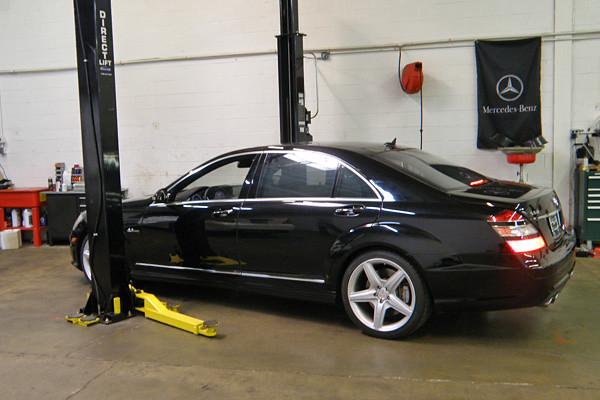
A few days ago, this gorgeous S63 AMG showed up at Speedriven's Palatine, IL garage - presenting a perfect opportunity to illustrate how our Speedriven Block Tuner worked on newer Mercedes / AMGs. The following is a step-by-step photo guide for those of your who've been asking some specific questions - I hope this answers some of them!
1 UNLOCKING THE ECU
On the 63-series AMGs, the ECU still has to come out of the car and get sent to Speedriven to be "unlocked". On the S63, the ECU is located under the hood, at the base of the windshield, on the driver's side (shown).

The ECU is usually sent back the day we receive it here at Speedriven, so if you drop the ECU into a FedEx box on Monday afternoon, you'll be back on the road by 10AM Wednesday. Now that the ECU is "unlocked" you'll be able to write to it using the Block Tuner (think of the old 3.5" floppy disks).
2 WRITING TO THE ECU
NOTE: reading the ECU won't be a necessary step on a 63, because we can load a Speedriven file on the ECU while it's being unlocked, and ship the Block Tuner with the stock software and the Speedriven ECU Software so you wouldn't need to read out the ECU. Unlocking the ECU is not detectable by the dealer.
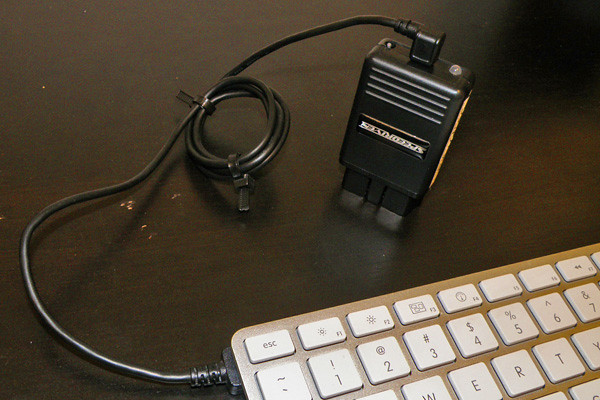
The Block Tuner connects to your computer using a mini-USB/USB cable.
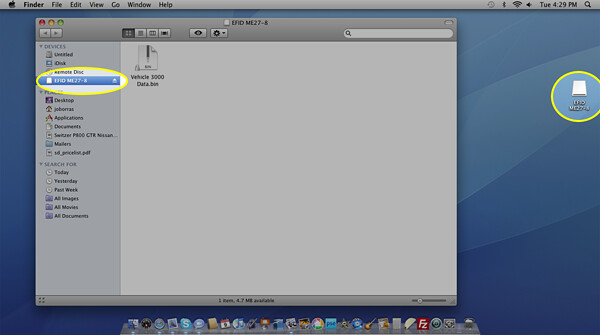
The process for loading a file from your computer to the Block Tuner is the same as a USB thumb drive or external hard drive. Just drag and drop the file into the Block Tuner folder (shown here, on a Mac).
You can load 2 files on the Block Tuner, and select between them using the physical switch on the Block (up/down = stock/tuned, or pump gas/race gas, or tuner 1/tuner 2 for a comparison, for example).
Once that's done, you can remove the Block Tuner from the computer. Select the file you'd like to load onto the car by putting the switch in either the up or down position, then plug the Block into the OBDii port, under the dash (below) ...
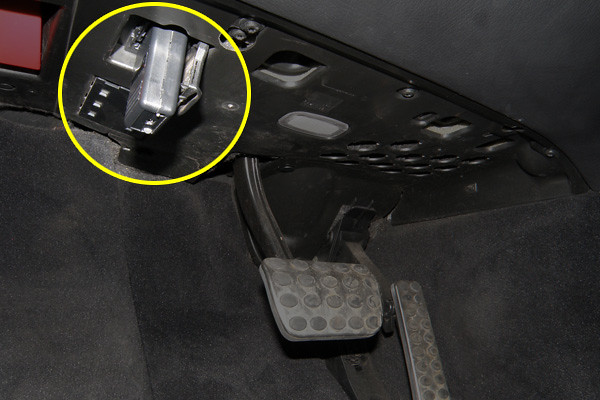
... turning the key to the "on" position will initiate a programming cycle. The gauges will start to react and the engine fans will start running throughout the cycle.
Once the programming is complete, the Block Tuner's LED will glow green. Turn off the car, remove the Block Tuner, and you're ready to go with a new file loaded on the car.

If you ever want to put your ECU back to stock, make sure there is a stock setting on the Block Tuner, select the stock file by setting the switch to the appropriate up or down position, and load the file to the ECU (following the included manual, of course).
That's it! I hope this answers some of your questions and THANK YOU for reading this far.

MBWorld Fanatic!
Joined: Aug 2010
Posts: 2,493
Likes: 3
MB
Speedriven,
Below is part of the instructions for this device:
"If this is the first time attaching to a car or you have removed the Vehicle Data file to force a new read of the car’s details, the external flash will be erased and the Vehicle Data file will be written. The LED will be solid RED during this time. This can take a few minutes so be patient. Once done you will get a blink two red pattern indicating it has married to the car and there is no matching firmware on the programmer (which is normal as it was just erased so all firmware has been removed and there is nothing to match to…)."
What does it mean when the LED does not go solid red, but rather starts the blinking two red pattern immediately after you turn on the ignition?
Basically, how can you make the programmer take the "few minutes" of solid RED, when the programmer doesn't want to do that, but instead, it just starts the blinking two red pattern?
I assume when the programmer does this, it's not functioning properly. Is that correct?
Below is part of the instructions for this device:
"If this is the first time attaching to a car or you have removed the Vehicle Data file to force a new read of the car’s details, the external flash will be erased and the Vehicle Data file will be written. The LED will be solid RED during this time. This can take a few minutes so be patient. Once done you will get a blink two red pattern indicating it has married to the car and there is no matching firmware on the programmer (which is normal as it was just erased so all firmware has been removed and there is nothing to match to…)."
What does it mean when the LED does not go solid red, but rather starts the blinking two red pattern immediately after you turn on the ignition?
Basically, how can you make the programmer take the "few minutes" of solid RED, when the programmer doesn't want to do that, but instead, it just starts the blinking two red pattern?
I assume when the programmer does this, it's not functioning properly. Is that correct?
Thread Starter
Banned
Joined: Sep 2010
Posts: 2,542
Likes: 72
From: Palatine, IL
Speedriven
Speedriven,
Below is part of the instructions for this device:
"If this is the first time attaching to a car or you have removed the Vehicle Data file to force a new read of the car’s details, the external flash will be erased and the Vehicle Data file will be written. The LED will be solid RED during this time. This can take a few minutes so be patient. Once done you will get a blink two red pattern indicating it has married to the car and there is no matching firmware on the programmer (which is normal as it was just erased so all firmware has been removed and there is nothing to match to…)."
What does it mean when the LED does not go solid red, but rather starts the blinking two red pattern immediately after you turn on the ignition?
Basically, how can you make the programmer take the "few minutes" of solid RED, when the programmer doesn't want to do that, but instead, it just starts the blinking two red pattern?
I assume when the programmer does this, it's not functioning properly. Is that correct?
Below is part of the instructions for this device:
"If this is the first time attaching to a car or you have removed the Vehicle Data file to force a new read of the car’s details, the external flash will be erased and the Vehicle Data file will be written. The LED will be solid RED during this time. This can take a few minutes so be patient. Once done you will get a blink two red pattern indicating it has married to the car and there is no matching firmware on the programmer (which is normal as it was just erased so all firmware has been removed and there is nothing to match to…)."
What does it mean when the LED does not go solid red, but rather starts the blinking two red pattern immediately after you turn on the ignition?
Basically, how can you make the programmer take the "few minutes" of solid RED, when the programmer doesn't want to do that, but instead, it just starts the blinking two red pattern?
I assume when the programmer does this, it's not functioning properly. Is that correct?
We'll try to get to the bottom of it for you.
MBWorld Fanatic!
Joined: Aug 2010
Posts: 2,493
Likes: 3
MB
That's a fair assumption - but there are different versions of this device (they aren't "all the same", as has been put out by some shops through their clients/fans). Do you have one of ours? Call 847.485.8126 to talk to me/Marcin.
We'll try to get to the bottom of it for you.
We'll try to get to the bottom of it for you.

MBWorld Fanatic!
Joined: May 2009
Posts: 1,463
Likes: 2
From: Norte America
MBUSA
What data can be retrieved from the BT and what sort of frame rates?
Ability to record data logging?
Ability to read/clear codes?
AFR data?
This would be a good replacement for most scan tools
Ability to record data logging?
Ability to read/clear codes?
AFR data?
This would be a good replacement for most scan tools
Trending Topics
Thread Starter
Banned
Joined: Sep 2010
Posts: 2,542
Likes: 72
From: Palatine, IL
Speedriven
Resolution depends on the model being logged (more fps available from a 63AMG than, for example, a 600 V12) - other than that, it can log just about anything the ECU sees: rpm, vehicle speed, throttle position, etc., as well.
MB World Stories
The Best of Mercedes & AMG

Manual Mercedes? 6 Times Sindelfingen Let Drivers Have All The Fun
Verdad Gallardo
Mercedes SLR McLaren 722 S Is Extremely Rare Example Modified by McLaren
Verdad Gallardo
8 Classic Boxy Mercedes Designs That Have Aged Like Fine Wine
Verdad Gallardo
Flawlessly Restored Mercedes 190E Evo II Heads to Auction
Verdad Gallardo
Electric Mercedes C-Class Unveiled: 11 Things You Need to Know
Verdad Gallardo
Mercedes EQS Gets A Major Update: Everything You Need to Know
Verdad Gallardo
5 Underrated Mercedes-Benz Models That Don't Get the Love They Deserve
Verdad Gallardo
Mercedes 300D Has Pushed Well Past 1 Million Miles and It Ain't Stopping
Verdad Gallardo
10 Most Reliable Mercedes-Benz Models You Can Buy Used
Verdad Gallardo
Thread Starter
Banned
Joined: Sep 2010
Posts: 2,542
Likes: 72
From: Palatine, IL
Speedriven
I do not have one of your block tuners. I was under the impression they were the same, but as you say, I am wrong in thinking that. So, I apologize for any misunderstanding that I may have caused. I certainly do not want to interfere with your sales as you have always been very helpful in answering questions.
That said, you may very well have the same unit we offer, or maybe you have an earlier version that was sold by someone else, but if you're having issues with it please don't hesitate to call us, or at least call your vendor.

Thread Starter
Banned
Joined: Sep 2010
Posts: 2,542
Likes: 72
From: Palatine, IL
Speedriven
I believe so, but I'd want to confirm with Marcin. The problem is that what the ECU (and, therefor, the BT) can and can't see varies with the different hardware combinations - you have an SLK55, I think? On that car, like on the V12s, you have the separate TCU, which might make the answer "no" (in the 63s, for example, lots of the transmission stuff happens in the ECU).
He comes in around 10AM EST, so - maybe 30 min.? I'll check with him and post on here again.
He comes in around 10AM EST, so - maybe 30 min.? I'll check with him and post on here again.


