



Audio Experts...Please Help

Thread Starter
Junior Member
Joined: Aug 2008
Posts: 62
Likes: 0
From: TX
C300
Audio Experts...Please Help
I really hate the sound quality when I play my ipod songs through the AUX port. I know that this is expected and that it cannot be compared to the radio or cd etc..I have just the regular non MM package on an 08 sport. My question is besides changing out the speakers, amp, subs etc, is there any other way I can get better sound quality and higher volume? I read somewhere that I should dl certain bit rate songs or swapping to a better aux cord. Not sure what I need to do to improve the sound. Please share your input, thanks.

Super Moderator

Joined: Jun 2008
Posts: 19,942
Likes: 192
From: Llandudno, Cape Town, South Africa
late 2009 CLK 350 Coupe Elegance, '65 Jaguar S Type wires
I doubt you will hear a cable difference with this setup but recording with a minimum of compression/highest bit rate possible will improve sound if the original recording was reasonable of course. I'm afraid it's crap in = crap out.

Member
Joined: Oct 2010
Posts: 139
Likes: 1
From: Virginia
2010 C350, 2011 BMW 328xi
By adjusting the eq in the engineering menu you can make a world of difference in the sound quality. So much so it is almost getting a new set of speakers. There are several threads discussing this. It depends on your own personal taste in sound as well. I tried a few of the setups that othersthe have used then futher changed it for the sound i was lookng for--and got it. Granted its no HK system but when listening to dub step through my droid the base actually shakes my pants leg. I set the lowest range all the way down to 30hrz and was amazed at what the stock speakers could put out.
Doing this will time and patience until you get the sound you are looking for.
Doing this will time and patience until you get the sound you are looking for.
Thread Starter
Junior Member
Joined: Aug 2008
Posts: 62
Likes: 0
From: TX
C300
By adjusting the eq in the engineering menu you can make a world of difference in the sound quality. So much so it is almost getting a new set of speakers. There are several threads discussing this. It depends on your own personal taste in sound as well. I tried a few of the setups that othersthe have used then futher changed it for the sound i was lookng for--and got it. Granted its no HK system but when listening to dub step through my droid the base actually shakes my pants leg. I set the lowest range all the way down to 30hrz and was amazed at what the stock speakers could put out.
Doing this will time and patience until you get the sound you are looking for.
Doing this will time and patience until you get the sound you are looking for.
Member
Joined: Oct 2010
Posts: 139
Likes: 1
From: Virginia
2010 C350, 2011 BMW 328xi
On the radio simultaneously press the hang-up, # and 1 keys and hold until the engineering menu pops up. There are sub-menues that include audio sound. I can get some screen shots later but I beleive there are some detailed threads out there already that cover accessing the audio menu and the equalizer. Note: BE VERY CAREFUL ABOUT CHANGING OTHER ITEMS IN THIs MENU. Some changes can cuase problems in your system that only the dealership can fix...
I will get a picture of my settings if that will help? Again I was truely impressed by what the stock speakers will do once you tune them.
I will get a picture of my settings if that will help? Again I was truely impressed by what the stock speakers will do once you tune them.
Trending Topics

Member
Joined: Jan 2012
Posts: 109
Likes: 0
C230 Kompressor
I really hate the sound quality when I play my ipod songs through the AUX port. I know that this is expected and that it cannot be compared to the radio or cd etc..I have just the regular non MM package on an 08 sport. My question is besides changing out the speakers, amp, subs etc, is there any other way I can get better sound quality and higher volume? I read somewhere that I should dl certain bit rate songs or swapping to a better aux cord. Not sure what I need to do to improve the sound. Please share your input, thanks.
DAC that is built into the deck which should be much better. Now, if you are connecting using the later, then the only thing you can do is maybe adjust the eq or get a better system. Or, you would have to use Lossless files rather AAC, MP3, MP4 files since they don't sound as good as Lossless files do. I hope i helps. Let me know if you have more questions.
MB World Stories
The Best of Mercedes & AMG

Manual Mercedes? 6 Times Sindelfingen Let Drivers Have All The Fun
Verdad Gallardo
Mercedes SLR McLaren 722 S Is Extremely Rare Example Modified by McLaren
Verdad Gallardo
8 Classic Boxy Mercedes Designs That Have Aged Like Fine Wine
Verdad Gallardo
Flawlessly Restored Mercedes 190E Evo II Heads to Auction
Verdad Gallardo
Electric Mercedes C-Class Unveiled: 11 Things You Need to Know
Verdad Gallardo
Mercedes EQS Gets A Major Update: Everything You Need to Know
Verdad Gallardo
5 Underrated Mercedes-Benz Models That Don't Get the Love They Deserve
Verdad Gallardo
Mercedes 300D Has Pushed Well Past 1 Million Miles and It Ain't Stopping
Verdad Gallardo
10 Most Reliable Mercedes-Benz Models You Can Buy Used
Verdad Gallardo
Member
Joined: Oct 2010
Posts: 139
Likes: 1
From: Virginia
2010 C350, 2011 BMW 328xi
pictures of engineering menus
Guys,
sorry for the delay--was out for a a few days.
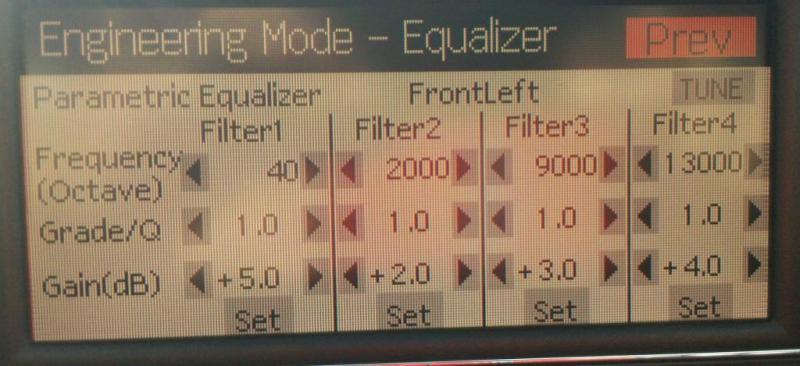
Each of the the pictures below go through each menu for adjusting sound, in particular the equalizer. The parametric settings are what works for me. this is something you will have to trial and error on to get what you want for sound. I will tell you that it was like I installed a new set of speakers. I was amazed how much the stock speakers can take. as you can see I have filter 1 dow the 40 hrz with a +5 gain--makes my pants shake!
As a caution--make sure you take a screen shot before you change anything so you can return to the start point if need be. Also each speaker will have to be adjusted separately.
Hope this helps!
Main Menu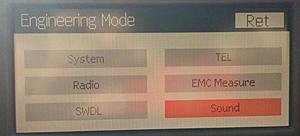
Sound menu. Select equalizer menu.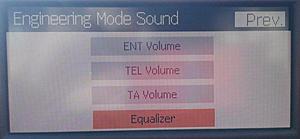
Select speaker to adjust.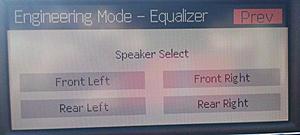
Select parametric equalizer.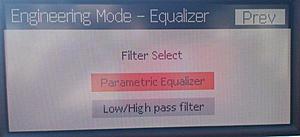
These are my settings--very happy with them. Sounds great from dub-step to opera. Clean highs and great lows.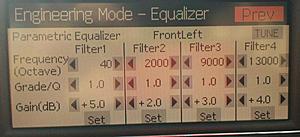
sorry for the delay--was out for a a few days.
Each of the the pictures below go through each menu for adjusting sound, in particular the equalizer. The parametric settings are what works for me. this is something you will have to trial and error on to get what you want for sound. I will tell you that it was like I installed a new set of speakers. I was amazed how much the stock speakers can take. as you can see I have filter 1 dow the 40 hrz with a +5 gain--makes my pants shake!
As a caution--make sure you take a screen shot before you change anything so you can return to the start point if need be. Also each speaker will have to be adjusted separately.
Hope this helps!
Main Menu
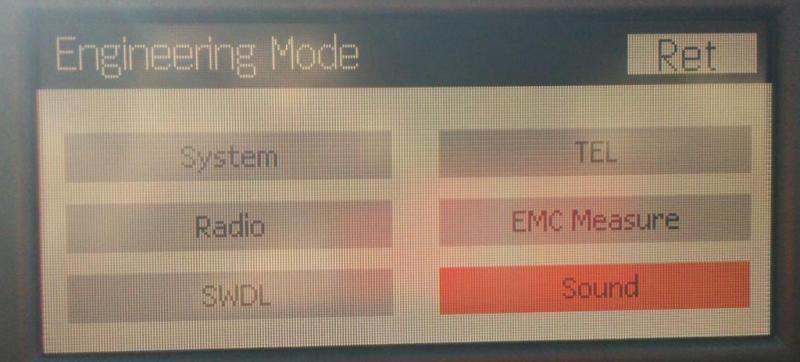
Sound menu. Select equalizer menu.
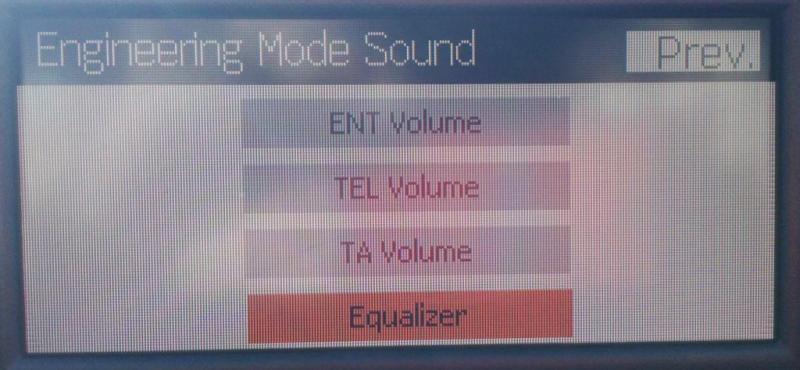
Select speaker to adjust.
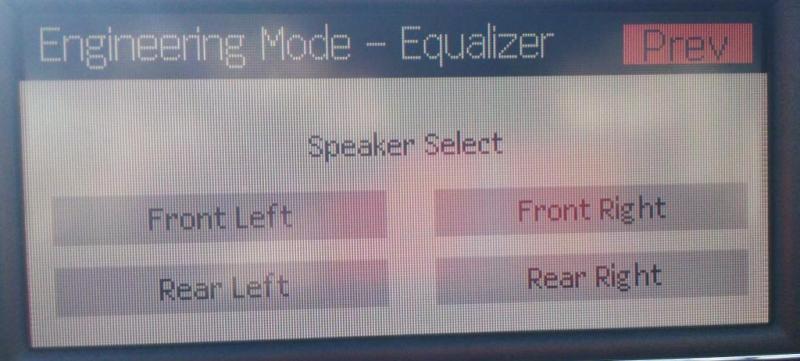
Select parametric equalizer.
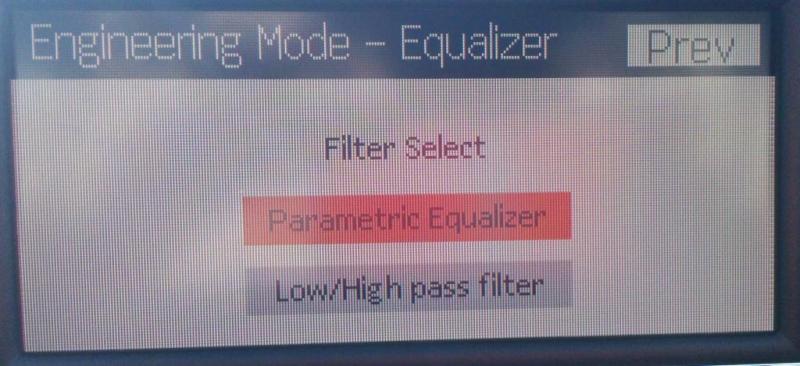
These are my settings--very happy with them. Sounds great from dub-step to opera. Clean highs and great lows.
Member
Joined: Jan 2012
Posts: 109
Likes: 0
C230 Kompressor
Guys,
sorry for the delay--was out for a a few days.
Each of the the pictures below go through each menu for adjusting sound, in particular the equalizer. The parametric settings are what works for me. this is something you will have to trial and error on to get what you want for sound. I will tell you that it was like I installed a new set of speakers. I was amazed how much the stock speakers can take. as you can see I have filter 1 dow the 40 hrz with a +5 gain--makes my pants shake!
As a caution--make sure you take a screen shot before you change anything so you can return to the start point if need be. Also each speaker will have to be adjusted separately.
Hope this helps!
Main Menu Attachment 227864
Sound menu. Select equalizer menu. Attachment 227865
Select speaker to adjust. Attachment 227866
Select parametric equalizer. Attachment 227867
These are my settings--very happy with them. Sounds great from dub-step to opera. Clean highs and great lows. Attachment 227868
sorry for the delay--was out for a a few days.
Each of the the pictures below go through each menu for adjusting sound, in particular the equalizer. The parametric settings are what works for me. this is something you will have to trial and error on to get what you want for sound. I will tell you that it was like I installed a new set of speakers. I was amazed how much the stock speakers can take. as you can see I have filter 1 dow the 40 hrz with a +5 gain--makes my pants shake!
As a caution--make sure you take a screen shot before you change anything so you can return to the start point if need be. Also each speaker will have to be adjusted separately.
Hope this helps!
Main Menu Attachment 227864
Sound menu. Select equalizer menu. Attachment 227865
Select speaker to adjust. Attachment 227866
Select parametric equalizer. Attachment 227867
These are my settings--very happy with them. Sounds great from dub-step to opera. Clean highs and great lows. Attachment 227868
Personally, i am not suggesting what your doing is wrong or right, but I would be much more inclined to discuss this feature with someone at Harmon before adjusting them, just to make sure.
If someone has talked to Harmon, please let us know what they say, I think people should know ahead of time.
Also, does this system have a microphone built into the car that is part of a room correction software integrated into the system? is that explained in the owner's manual? is this eq functionality explained in the owner's manual? just curious.
Last edited by Oneness; Feb 5, 2012 at 01:09 AM.
Member
Joined: Jan 2012
Posts: 109
Likes: 0
C230 Kompressor
Guys,
sorry for the delay--was out for a a few days.
Each of the the pictures below go through each menu for adjusting sound, in particular the equalizer. The parametric settings are what works for me. this is something you will have to trial and error on to get what you want for sound. I will tell you that it was like I installed a new set of speakers. I was amazed how much the stock speakers can take. as you can see I have filter 1 dow the 40 hrz with a +5 gain--makes my pants shake!
As a caution--make sure you take a screen shot before you change anything so you can return to the start point if need be. Also each speaker will have to be adjusted separately.
Hope this helps!
Main Menu Attachment 227864
Sound menu. Select equalizer menu. Attachment 227865
Select speaker to adjust. Attachment 227866
Select parametric equalizer. Attachment 227867
These are my settings--very happy with them. Sounds great from dub-step to opera. Clean highs and great lows. Attachment 227868
sorry for the delay--was out for a a few days.
Each of the the pictures below go through each menu for adjusting sound, in particular the equalizer. The parametric settings are what works for me. this is something you will have to trial and error on to get what you want for sound. I will tell you that it was like I installed a new set of speakers. I was amazed how much the stock speakers can take. as you can see I have filter 1 dow the 40 hrz with a +5 gain--makes my pants shake!
As a caution--make sure you take a screen shot before you change anything so you can return to the start point if need be. Also each speaker will have to be adjusted separately.
Hope this helps!
Main Menu Attachment 227864
Sound menu. Select equalizer menu. Attachment 227865
Select speaker to adjust. Attachment 227866
Select parametric equalizer. Attachment 227867
These are my settings--very happy with them. Sounds great from dub-step to opera. Clean highs and great lows. Attachment 227868
I think these settings are for setting up the system, because if you change things you might actually set the system to actually cause distortion. I, personally, would contact someone at Harmon before making changes. these systems are tailored and tuned for the amps, drivers, and the car they are going in. If you add certain frequencies and the driver is not meant to handle increased amounts of bass, it might cause additional distortion and it might blow a driver. I would HIGHLY recommend checking with Harmon just to make sure. Nothing worse than making an adjustment and then finding out it actually causes expensive problems later. this is just my common sense and caution.
Member
Joined: Oct 2010
Posts: 139
Likes: 1
From: Virginia
2010 C350, 2011 BMW 328xi
Thanks Oneness. I did not call Harmon. I have an Audio 20 system so was not set-up by Harmon. I merely adjusted to what sounds good to me. No distortion at all by the way. I turned the volume to as high as I could take it and still no distortion that I could hear.
I am by no means an audio expert, and I am sure that I could get a much greater sound if I invested an extra couple $2K in speakers, amps, and sub. But for now this was my economical solution to a flat sounding system. If you look at the original setting you will see they are completely flat. For my ears that did not work as I wanted more color and greater low frequency response. By adjusting the EQ, I got it, without investing anything more than time.
There are a few other posts here about this as well. I learned how to do from other forum members, did a bunch of research to understand each of the settings and filter ranges and to understand that when I changed something I knew what I was changing and why. Each of the filter ranges cover and specific ranges of instruments or sounds (bass, snare, guitar, vocals, etc). I made my adjustments based on what I like to here the most. I like a strong bass line, clear snare, undistorted vocals yet limits on high-pitched vocals and guitars. Others may feel different. I have posted this as "a way" to solve your audio woes without a bunch of $$. And yes I agree--one must be careful not to set to high distortion or to damage your system. Frankly by entering the secret engineering menu you have already accepted that risk by doing so.
I am by no means an audio expert, and I am sure that I could get a much greater sound if I invested an extra couple $2K in speakers, amps, and sub. But for now this was my economical solution to a flat sounding system. If you look at the original setting you will see they are completely flat. For my ears that did not work as I wanted more color and greater low frequency response. By adjusting the EQ, I got it, without investing anything more than time.
There are a few other posts here about this as well. I learned how to do from other forum members, did a bunch of research to understand each of the settings and filter ranges and to understand that when I changed something I knew what I was changing and why. Each of the filter ranges cover and specific ranges of instruments or sounds (bass, snare, guitar, vocals, etc). I made my adjustments based on what I like to here the most. I like a strong bass line, clear snare, undistorted vocals yet limits on high-pitched vocals and guitars. Others may feel different. I have posted this as "a way" to solve your audio woes without a bunch of $$. And yes I agree--one must be careful not to set to high distortion or to damage your system. Frankly by entering the secret engineering menu you have already accepted that risk by doing so.
Last edited by ltcinf; Feb 5, 2012 at 09:31 AM. Reason: spelling.
Member
Joined: Jan 2012
Posts: 109
Likes: 0
C230 Kompressor
Thanks Oneness. I did not call Harmon. I have an Audio 20 system so was not set-up by Harmon. I merely adjusted to what sounds good to me. No distortion at all by the way. I turned the volume to as high as I could take it and still no distortion that I could hear.
I am by no means an audio expert, and I am sure that I could get a much greater sound if I invested an extra couple $2K in speakers, amps, and sub. But for now this was my economical solution to a flat sounding system. If you look at the original setting you will see they are completely flat. For my ears that did not work as I wanted more color and greater low frequency response. By adjusting the EQ, I got it, without investing anything more than time.
There are a few other posts here about this as well. I learned how to do from other forum members, did a bunch of research to understand each of the settings and filter ranges and to understand that when I changed something I knew what I was changing and why. Each of the filter ranges cover and specific ranges of instruments or sounds (bass, snare, guitar, vocals, etc). I made my adjustments based on what I like to here the most. I like a strong bass line, clear snare, undistorted vocals yet limits on high-pitched vocals and guitars. Others may feel different. I have posted this as "a way" to solve your audio woes without a bunch of $$. And yes I agree--one must be careful not to set to high distortion or to damage your system. Frankly by entering the secret engineering menu you have already accepted that risk by doing so.
I am by no means an audio expert, and I am sure that I could get a much greater sound if I invested an extra couple $2K in speakers, amps, and sub. But for now this was my economical solution to a flat sounding system. If you look at the original setting you will see they are completely flat. For my ears that did not work as I wanted more color and greater low frequency response. By adjusting the EQ, I got it, without investing anything more than time.
There are a few other posts here about this as well. I learned how to do from other forum members, did a bunch of research to understand each of the settings and filter ranges and to understand that when I changed something I knew what I was changing and why. Each of the filter ranges cover and specific ranges of instruments or sounds (bass, snare, guitar, vocals, etc). I made my adjustments based on what I like to here the most. I like a strong bass line, clear snare, undistorted vocals yet limits on high-pitched vocals and guitars. Others may feel different. I have posted this as "a way" to solve your audio woes without a bunch of $$. And yes I agree--one must be careful not to set to high distortion or to damage your system. Frankly by entering the secret engineering menu you have already accepted that risk by doing so.
As long as you aren't reaching noticeable levels of distortion. For me, I will contact Harmon to see if they have any suggestions if I am not happy with the sound quality, The other thing that comes to mind is if someone is changing drivers to another brand, they might have to go into this section to make sure that the new drivers match the rest of the system. The local car audio installer suggested that for the smaller systems that have the smaller subwoofer that maybe changing the subwoofer for a more powerful one is probably the most common upgrade for these systems, which is a consideration. Obviously some of the systems have a larger sub that is fine. Anyway, if someone has some additional information regarding making these changes, that would helpful.

Super Member
Joined: Nov 2009
Posts: 533
Likes: 0
From: Westchester, NY
2009 C-300 Sport
Itcinf the way that you set up the equalizer for the front left is that the same way you set it up for all 4 speakers? And what style of music is that your playing that you see a difference or is there still a difference with any kind of music your playing?
Member
Joined: Jan 2012
Posts: 109
Likes: 0
C230 Kompressor
What the audiophiles are typically looking for is to be able to have an instrument like a piano to sound as close to the actual piano used in the recording as if it was recorded in the same room. For instance, if one were to put a piano in the room and have someone play it and compare to a recording of the same person playing in the same room, etc., one couldn't tell the difference. that is typically what the audiophile crowd ultimately wants. Obviously, it is impossible to perform this test, but that is how systems should be designed is for exact reproduction. It is impossible to use pop, rock recordings since most of those recordings are not always using real instruments, or recording techniques to capture the sound. So it boils down to personal preference. Plus, we are dealing with different quality mastering and then less than perfect copies of the original recordings because they are using MP3, etc. which don't sound like the original masters, so we end up trying to compensate by adding bass, treble, etc. etc. etc.
Last edited by Oneness; Feb 5, 2012 at 07:10 PM.
Member
Joined: Oct 2010
Posts: 139
Likes: 1
From: Virginia
2010 C350, 2011 BMW 328xi
I generally listen to alternative( Foo Fighters) and classic rock. But also listen my son's dub step which with the new settings has a world of difference in sound. I can hear lows I have not heard before. Better yet I can feel the lows that I can't hear that gives me another sensation of the music I am listening to.
On occasion I listen to George Winston or Mozart when I need to have a calm moment after a bad day in the office.
Lastly my 13 year old daughter listens to all new pop stuff which also sounds great (to her of course).
Super Member
Joined: Nov 2009
Posts: 533
Likes: 0
From: Westchester, NY
2009 C-300 Sport
Itcinf one last question by you saying that it had a world of difference in sound and that it also sounds great, do you mean that it sounds much more clear or that the volume has gotten up higher and is louder now? If is the volume Situation that has gotten much louder and the max of the volume before was 5, how would u rate it now on a scale from 1-10?
Member
Joined: Oct 2010
Posts: 139
Likes: 1
From: Virginia
2010 C350, 2011 BMW 328xi
Itcinf one last question by you saying that it had a world of difference in sound and that it also sounds great, do you mean that it sounds much more clear or that the volume has gotten up higher and is louder now? If is the volume Situation that has gotten much louder and the max of the volume before was 5, how would u rate it now on a scale from 1-10?
The sound itself changed in that the I now hear the music the way I like it and hear instruments and vocals more clearly rather than muffled. Hope this makes sense.


