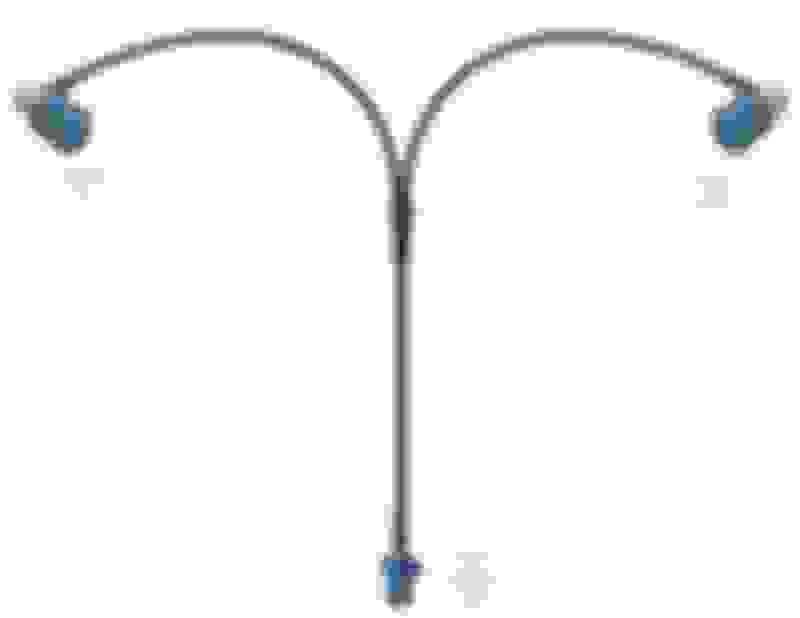
So the single end of the splitter connects to the cable coming from the radio and then the two ends connect, one to the android head unit cable and one to the farka to SMA pigtail which then connects to the android head unit GPS SMA connector.
Nice one.
Yes. You've defined a splitter. You're splitting the factory GPS antenna, with one side going to COMAND, and the other to the Android screen replacing the ****ty, never can get it positioned just right/hidden in the dash, under the dash etc etc....one that came with the Android unit.
Yes. You've defined a splitter. You're splitting the factory GPS antenna, with one side going to COMAND, and the other to the Android screen replacing the ****ty, never can get it positioned just right/hidden in the dash, under the dash etc etc....one that came with the Android unit.
I posted two cables you need. You only referenced one. It's kinda hard to mess it up.
I didn't show the pic of the second cable but made reference to it in the wording "Connect to SMA extension" on the image.
I think I have worked it out anyway. I had assumed that I was plugging this splitter into the same connector near the screen but that is for video, not GPS.
I need to disconnect the OEM GPS antenna fakra cable from the head unit and connect it to the splitter single end and then connect the two other ends of the splitter to the GPS input of the head unit and the GPS input on the android screen.
I didn't show the pic of the second cable but made reference to it in the wording "Connect to SMA extension" on the image.
I think I have worked it out anyway. I had assumed that I was plugging this splitter into the same connector near the screen but that is for video, not GPS.
I need to disconnect the OEM GPS antenna fakra cable from the head unit and connect it to the splitter single end and then connect the two other ends of the splitter to the GPS input of the head unit and the GPS input on the android screen.
Android 4G+64G 4G LTE Car GPS Navigation Multimedia Player for Mercedes Benz E Class W212 Media Interface in center compartment and USB port NTG4.5
Hi, I'm new user. I don't know how and where I should ask about my issue !
I have E350 W212 year 2013. I installed Android display. Sound not work !!, all others are working well: display (videos) ,GPS (Google Map), Bluetooth (Samsung S10+) and so on. In my car has Media Interface in center compartment. I got media cable (in the Android packet) to connect AUX device like phone, but I can't get sound even from my Samsung.
Please can someone help my find the way for sound ?
if you don't use the crappy antenna that comes with, and use a fakra splitter to use the oem antenna, the nav works beautifully.
re: the audio, I would not call it subpar as long as you use a noise isolator if there's an issue. Mine is wired directly to the car and have no audio issues at all.
have had my unit in for almost 2 years. As long as you don't treat it like a tablet and try to install 10000 apps it works great
I know you replied a while back, but I haven't had a chance to get back to the forum. When you say, "Mine is wired directly to the car", is this to imply the audio is coming from COMAND and not the Android device? Not really following... Would love to know more.
I have a W212 E Class Estate and the armrest in the box is a Media Interface, which I have received AUX cable. But Comand 4.5 doesn't play the upcoming sound of the Samsung S10 !
Please can you tell what's the problem, would there be any instructions for this ?
I have recently had a 10.25 android screen fitted to my c class 2015 (w205) I know this a w204 forum but I’m guessing the screens are all pretty much the same.
I have an audio issue where I can hear a fuzzy/whining sound at the start of songs and in between tracks changing. If I select Neural and Rev the car, the sound goes up and down with the revs. I was just wandering if anyone else has encountered this issue and how you solved it? Also if air con is on it can make it worse too.
also anyone have any perfect settings for the dsp (equaliser) and also did you change any settings on the original system??
any help be much appreciated
many thanks everyone.
I've got a couple of questions. I have an Android phone. Does anyone know if it is possible to set up your android phone as a mobile hotspot to provide internet connectivity to the head unit while maintaining the bluetooth connection to the factory phone connection? I'd really like to avoid using this unit as the phone unit - I've had bad luck with the mics on android based head units being more or less worthless. Or is there another way to address this? If yes, I assume I would not necessarily need to switch the display back and forth between the head unit display and the Comand display just to answer a call, correct?
I would probably avoid using Android Auto if I went this pathway.
I've got a couple of questions. I have an Android phone. Does anyone know if it is possible to set up your android phone as a mobile hotspot to provide internet connectivity to the head unit while maintaining the bluetooth connection to the factory phone connection? I'd really like to avoid using this unit as the phone unit - I've had bad luck with the mics on android based head units being more or less worthless. Or is there another way to address this? If yes, I assume I would not necessarily need to switch the display back and forth between the head unit display and the Comand display just to answer a call, correct?
I would probably avoid using Android Auto if I went this pathway.
yes. Just don't connect your phone to the android side via BT. See my earlier posts about Macrodroid.
Hi Guys, Sorry for highjacking this thread as i have a G class, not a C class. But figure i would ask here since its the most active on this topic.
Background: I have a 2013 G63, ordered NaviFly N600 Android 10.25 screen. Because my bluetooth connectivity stopped working with my Iphone with IOS14, i had to reset to factory settings. As result of that, i had to reinstall firmware.
The seller sent me the firmware in zip format. His instruction was to plug in the usb drive with the zip file, along with another ( that was uncompressed per their instructions) folder in root directory.
The error message says it can not open the zip file. Am i doing something incorrectly? Thanks in advance
A bit more information; I got the N600 (Android 10.0, 8 cores 4GB+64GB,10.25inch Seven colors anti-glare screen,Resolution 1920*720. Built in carplay CPU=MSM8953 Snapdragon625).
Yes I would buy it again, but I kind of enjoy these types of challenges. On the other hand if I had bricked my COMAND or trashed my fiber ring that would be another story. Screen is very nice, UI is really good, steering wheel buttons and control knob all work, and wireless CarPlay works great. I have no idea what shops charge these days and I would not have anyone do it did not have experience working on MB/Android. Knowing everything now I probably could have knocked the whole thing out start to finish in less than 90 minutes. A comprehensive install (putting USBs in glove box, installing Android phone speaker and mic, etc.) would probably take another hour of two. I put my 4G and GPS antennas on a little ledge right where the screen came out and they seem to be working just fine there. I have seen other install videos where they ran these up the front interior pillars.
I have the same unit for my 2013 g63, issues i'm encountering so far are;
1) blue tooth not pairing for carplay, worked in the beginning, refuse to pair after and had to reset to factory
2) unable to update to the latest firmware, this could be poor instructions from seller, see my post today, its uable to open the zip file
3) Sound quality from the nav screen is very " staticky", when there is no source sound, you hear static. Can this be fixed with better qualty AUX cable? Reroute the connection?
4) The real estate to the right of the OEM screen is just a blank road showing nothing, same as yours. However, i can not adjust the KMPH to MPH either (im in the US), and yes i did make the change in factory settings.
Hi Guys, Sorry for highjacking this thread as i have a G class, not a C class. But figure i would ask here since its the most active on this topic.
Background: I have a 2013 G63, ordered NaviFly N600 Android 10.25 screen. Because my bluetooth connectivity stopped working with my Iphone with IOS14, i had to reset to factory settings. As result of that, i had to reinstall firmware.
The seller sent me the firmware in zip format. His instruction was to plug in the usb drive with the zip file, along with another ( that was uncompressed per their instructions) folder in root directory.
The error message says it can not open the zip file. Am i doing something incorrectly? Thanks in advance
can you scroll to update from SD card? Select the zip from there.
Hi, just installed a 4gb 64gb 10.25 system I'm my c207 ntg 4.0 and so far am very happy with it. I managed to avoid a lot of the problems people on here had encountered such as steering controls, sound problems etc. Although I still haven't managed to get the headunit back in place..
Was wondering if its a big job to install viper4android as the standard equaliser doesn't seem to be any good. Also every tine I press return on my dial to get out of the original ntg screen it seems to open Google maps. A minor irritation but one I'd like to fix. Thanks all. I Wouldnt have even bought it only for this thread and all its info.
The dimming at night function doesn't seem to work, it seems to stay the brightness day or night. Any one got any ideas?
Press and hold longer the 'return' button to switch between the screen.
Slideshow: A one-of-one U.S.-spec Mercedes-Benz SLR McLaren Roadster became even rarer after a factory-backed transformation at McLaren's headquarters.