When you click on links to various merchants on this site and make a purchase, this can result in this site earning a commission. Affiliate programs and affiliations include, but are not limited to, the eBay Partner Network.
Just picked up a 2016 E400 and it has Distronic Plus. I played with it a bit on my drive in to work today and it seems as though the twist knob on the end of the cruise control stalk is not working.
From what I've seen, when the knob is turned, the set following distance should appear in the cluster display, but when I try nothing happens. This is regardless of whether distronic is on or off. thinking it was speed related I got up to around 50mph and it still did not make a difference. Other than this, the system works perfectly.
Any thoughts? The car is still under warranty so I'll be calling the dealer if this operation doesn't sound normal.
The knob does set the follow distance but you need a car in front to show you....
or have the little distronic screen up on the dash and as you change know you can see the lines change I think...
been a while as i do not use that screen unless foggy out...
and I also keep it on min distance unless weather sucks...
My suggestion put on min distance
get on interstate
Get behind a car doing comfortable speed and set you distronic speed 5-10mph faster.
Get the distronic screen on.
slowly turn know to increase distance and watch car in front to see if the dsitance does not increase or not,.
^ Yes, follow those directions. The Display will not show distance unless you have scrolled to the Distronic menu. It will not automatically pop up. Seems like you are fine.
I know its an old thread. But did you ever fixed it? I have a similar problem. It worked fine until they did a software update.
Now turning the knob does nothing.
I know its an old thread. But did you ever fixed it? I have a similar problem. It worked fine until they did a software update.
Now turning the knob does nothing.
You should use your favorite scanner to read the chassis faults.
Your front radar module may have becomed contaminated.
I wish I could deactivate Distronic completely and just have simple cruise control. Too often the sensors are dirty from weather conditions so the Distronic throws a warning to clean your sensors while disabling cruise! I'm not about to pull over on the highway every few kms and I'm sure they wouldn't on the Autobahn either :-(
I wish I could deactivate Distronic completely and just have simple cruise control. Too often the sensors are dirty from weather conditions so the Distronic throws a warning to clean your sensors while disabling cruise! I'm not about to pull over on the highway every few kms and I'm sure they wouldn't on the Autobahn either :-(
Actually there's a quick fix that may help change your opinion:
the dirt is on the inside of the front plastic cover.
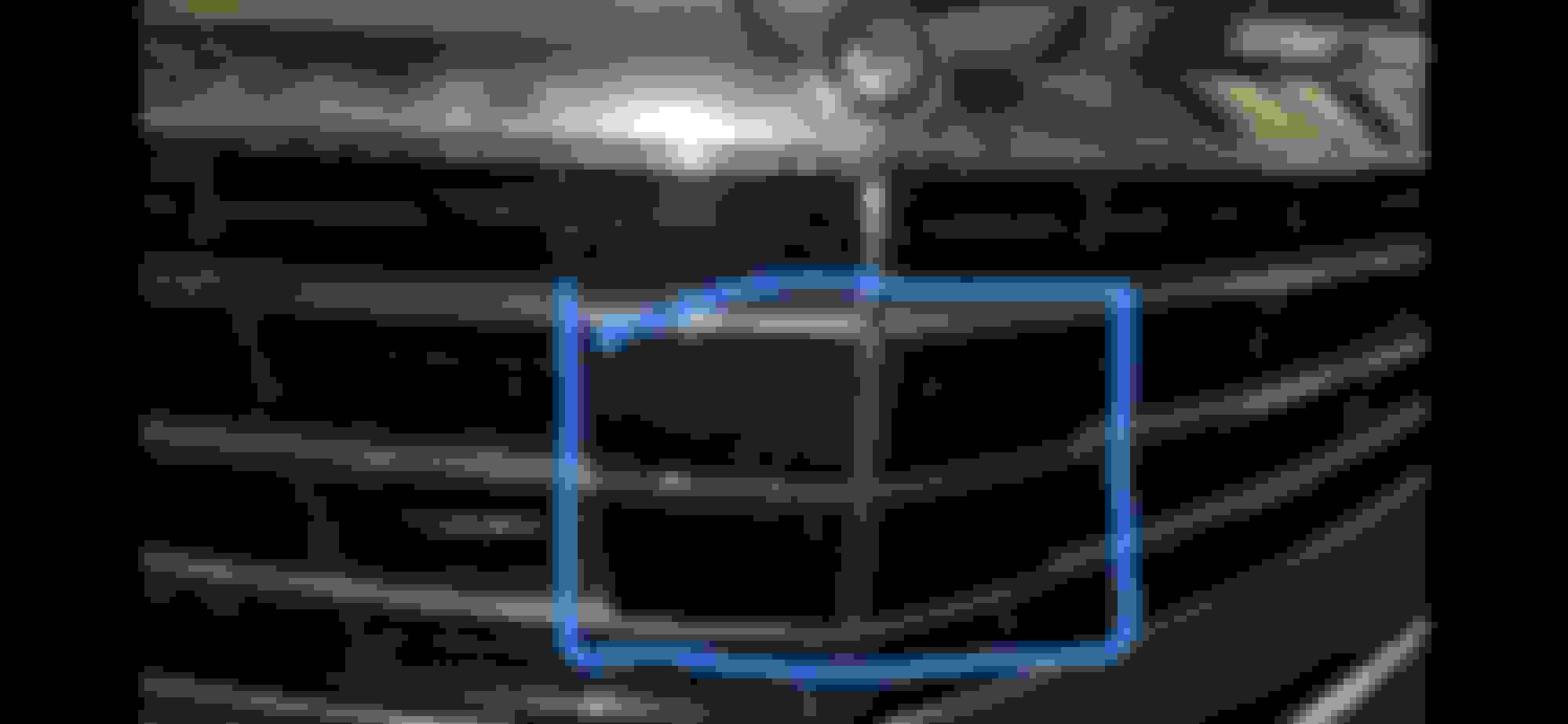
The big round plastic star or rectangular plastic cover are only an primary protection for the radar module that is located one inch behind.
Once you get the road grime cleaned up DistroPlus works reliably.
I actually tested it out, and it works as it should be. I can follow a car until the car stops at a traffic light to 0mph. When I am in the settings for the follow distance graph, I can see the distance change when turning the knob on the distronic lever. However, when I am outside of that graph setting, and turning the knob, it wont take me there.
I truly believe before the car got software updated, turning the knob will show you the graph and follow distance for a few seconds.
I really hope someone can test this on his/her car for me, preferably a w166 GLE. And see how it reacts with turning the distronic knob.
Also, on my car its not called distronic plus anymore, its distronic advanced.
You need to clean the back-side of the front plastic cover. plastic front radar cover (or big round star)
The actual radar enclosure is one inch behind all this frontal stuff.
There's enough room for plenty of road projection to land on the back side of grill cover even in sunny bone-dry California.
The radar box itself is actually clean - You may decide to RTV-seal the harness wires to later keep $3k in your own pocket.
> How to proceed:
-- Remove only the shinny plastic grill assembly (no need to mess with whole bumper)
-- Then you have access to back side of plastic cover.
-- Don't scratch it, use wet paper or windex cleaner.
-- +++ protection +++
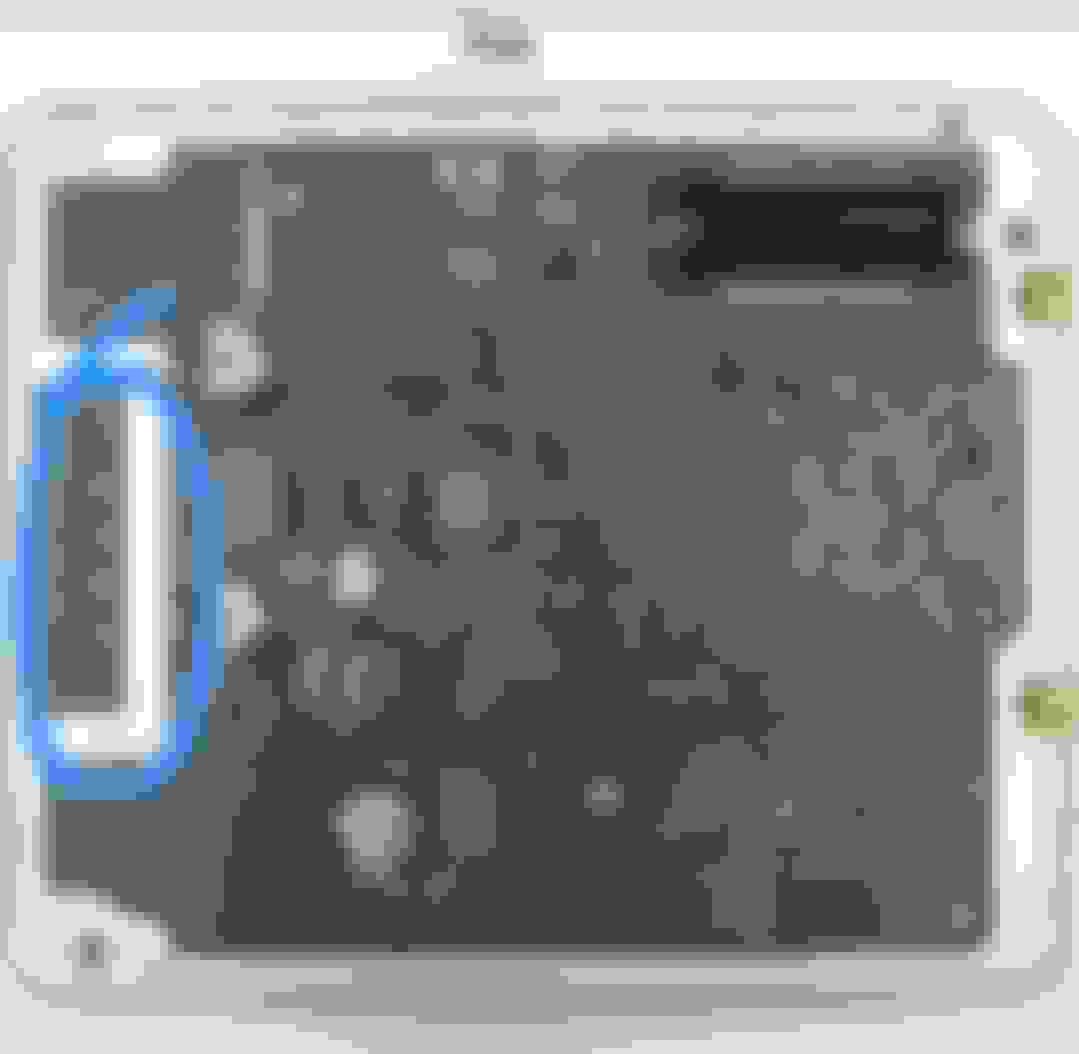
I went there to visit my radar module. A true military style beauty. I could not resolder its circuit board. I looked for pics yesterday and couldn't locate.
Anyway you don't need to deal with radar module itself.
Once cleaned you'll see radar reacts much more readily. I definitely recommend cleaning dirty cover every couple years.
It is self-calibrating by driving. No reset procedure necessary here.
++++ cancel next visit: "ceramic" coat it!
-- May be a good idea to prevent grime dirt from sticking to plastic.
Try fancy "ceramic" type of magic spray protector.
Still can't locate my own pics... a confirmed solderless module. radar uses solderless connections
Last edited by CaliBenzDriver; Apr 17, 2024 at 05:47 PM.
Actually there's a quick fix that may help change your opinion:
the dirt is on the inside of the front plastic cover.
The big round plastic star or rectangular plastic cover are only an primary protection for the radar module that is located one inch behind.
Once you get the road grime cleaned up DistroPlus works reliably.
Hey, I appreciate your thinking but I’m taking about snow and slush that is common up here for half the year (just had a snow storm two days ago) and completely coats the front (and rear in the case of square-back wagons). This situation should have revealed itself during M-B cold-weather testing and led them to add a means to deactivate the sensors rather than disable the entire system.
Last edited by need2speed; Apr 18, 2024 at 10:35 AM.
Hey, I appreciate your thinking but I’m taking about snow and slush that is common up here for half the year (just had a snow storm two days ago) and completely coats the front (and rear in the case of square-back wagons).
This situation should have revealed itself during M-B cold-weather testing and led them to add a means to deactivate the sensors rather than disable the entire system.
I see... you guys up North have extreme weather events that are no match for radars going nuts with false positives obstacles...
Do you want to TEST switching OFF offending sensors ?
-- Identify where power comes from and shared with what other circuits.
-- With chassis powered OFF, test powering down sensors circuit then power ON car to see what sort of faults pop up and how ESP likes/dislikes this.
I finally tracked down my radar pics...
radar extraction radar state of the art high-frequency
Solderless connections are deep under stack of mechanical antenna I did not dare to disturb at this time.
Last edited by CaliBenzDriver; Apr 18, 2024 at 01:58 PM.
2015 SL400 (M276 Turbo), 2014 C350 Sport (M276 NA), 2004 SL500 (M113), 2004 Audi TT225 (BEA)
Originally Posted by need2speed
No! Would try if there was a software hack, though...
There are options in Xentry and LAUNCH Creader that appear to allow you to turn of Distronic Plus and turn on Cruise Control. Probably under Front SAM.
2010 E550(S212), 2006 Chrysler Crossfire (SLK 320 R170 in disguise), 2012 CLS500 (x218)
Originally Posted by MBGparts
I actually tested it out, and it works as it should be. I can follow a car until the car stops at a traffic light to 0mph. When I am in the settings for the follow distance graph, I can see the distance change when turning the knob on the distronic lever. However, when I am outside of that graph setting, and turning the knob, it wont take me there.
I truly believe before the car got software updated, turning the knob will show you the graph and follow distance for a few seconds.
I really hope someone can test this on his/her car for me, preferably a w166 GLE. And see how it reacts with turning the distronic knob.
Also, on my car its not called distronic plus anymore, its distronic advanced.
Still called Distronic plus on mine and I don't think it had any updates in a looooong time. It's a 2012 CLS (w218) and shows the same behaviour as yours.
Turning the knob will not bring you back to the distronic screen however if you want a quick way in that screen, just pull the lever, it'll go back to the screen even if the distronic is already active.
Also, reading the manual, I realised it's not a following distance, it's a following time which explains why mine never reached the farthest end of the scale despite turning the knob all the way.
Manual states it's from 1s to 2 seconds.
2010 E550(S212), 2006 Chrysler Crossfire (SLK 320 R170 in disguise), 2012 CLS500 (x218)
Originally Posted by need2speed
I wish I could deactivate Distronic completely and just have simple cruise control. Too often the sensors are dirty from weather conditions so the Distronic throws a warning to clean your sensors while disabling cruise! I'm not about to pull over on the highway every few kms and I'm sure they wouldn't on the Autobahn either :-(
I wish I could to, where I live there is a radio telescope and, with my luck, it's forbidden to use such radars in a wide range around it, so I lose a lot of functionalities (Distronic, blind spot warning..) and not having the option for a "standard" cruise control is a pain even though I make do with the speed limiter (can't recall the Mercedes name).
I wish I could to, where I live there is a radio telescope and, with my luck, it's forbidden to use such radars in a wide range around it, so I lose a lot of functionalities (Distronic, blind spot warning..) and not having the option for a "standard" cruise control is a pain even though I make do with the speed limiter (can't recall the Mercedes name).
the solution may be 4Ft away
get your radar module to sleep : unplug or pull fuse
2010 E550(S212), 2006 Chrysler Crossfire (SLK 320 R170 in disguise), 2012 CLS500 (x218)
Wouldn't that do the same as the automatic stuff that I have and just render distronic unavailable?
I'll try to put the fuse someday to see how it goes. But a software solution would have been much better and very welcomed.
2015 SL400 (M276 Turbo), 2014 C350 Sport (M276 NA), 2004 SL500 (M113), 2004 Audi TT225 (BEA)
DEACTIVATING DISTRONIC
Not sure if this will work, but I did find that in the Central Gateway Module (CGW/ZGW) N93 that you may be able to deactivate Distronic (or Distronic Plus) using the LAUNCH Creader Elite 2.0 BENZ scan tool. (You can also do it with the higher-end Autel tool and XENTRY.)
WARNING! PROCEED AT YOUR OWN RISK! THESE STEPS HAVE NOT BEEN TESTED SINCE I AM HAPPY WITH DISTRONIC PLUS.
1. Navigate to the CGW Module (N93) and first BACKUP your coding! Second, select Variant Coding.
2. Select 02_global_variant_coding.
3. Scroll down until you find Code 440 (Cruise Control) and Code 219 (Distronic). If you have Distronic Plus, these two items show as NOT AVAILABLE. Clicking on each item will give you the option to change to setting (coding). Make no changes at this time. Just to be sure, make another Backup of the settings. Only one of the three settings (Cruise Control, Distronic, or Distronic Plus) can be Available at one time.
4. Scroll down further until you find DISTRONIC. (I think this may actually be Distronic Plus.)
5. Selecting DISTRONIC will give you the option to change the setting from AVAILABLE to NOT AVAILABLE. Make the change and select OK (bottom left button).
6. You may want to scroll back up and change the setting on either Code 440 (Cruise Control) or Code 219 (Distronic). You cannot have more than one option available at a time, so proceed making one change at a time. Lastly, you will need to Write Coding for any change to take effect.
7. If you have problems, go back and Recover your settings that you backed up
OR
Last edited by JettaRed; Apr 20, 2024 at 01:32 PM.
Thanks very much for taking the time to explore this. It seems like a logical process but I'm chicken and will wait for someone to confirm it works before investing in a scan tool.
2015 SL400 (M276 Turbo), 2014 C350 Sport (M276 NA), 2004 SL500 (M113), 2004 Audi TT225 (BEA)
Originally Posted by need2speed
Thanks very much for taking the time to explore this. It seems like a logical process but I'm chicken and will wait for someone to confirm it works before investing in a scan tool.
You should have a proper scan tool anyway. It is not a one-time use tool, but one which you will need and use often. Either of these will work -- they use the same software. Version 2.0 has an internal battery and larger screen. Functionally, they are the same. They may be even cheaper on AliExpress, if you want to wait. It should be a no-brainer to get one if you own a Mercedes. Cheap generic OBD scanners from Walmart won't cut it.
Still called Distronic plus on mine and I don't think it had any updates in a looooong time. It's a 2012 CLS (w218) and shows the same behaviour as yours.
Turning the knob will not bring you back to the distronic screen however if you want a quick way in that screen, just pull the lever, it'll go back to the screen even if the distronic is already active.
Also, reading the manual, I realized it's not a following distance, it's a following time which explains why mine never reached the farthest end of the scale despite turning the knob all the way.
Manual states it's from 1s to 2 seconds.
Hope it helps.
Thank you so much for clarifying this. Although it's not a big deal, but just confused that it was different before.
Mercedes SLR McLaren 722 S Is Extremely Rare Example Modified by McLaren
Slideshow: A one-of-one U.S.-spec Mercedes-Benz SLR McLaren Roadster became even rarer after a factory-backed transformation at McLaren's headquarters.


























 . on W166, it has a star emblem, which is easier to access