



2002 Bluetooth upgrade questions

Thread Starter
MBWorld Fanatic!


Joined: Jan 2008
Posts: 6,151
Likes: 533
Mercedes
2002 Bluetooth upgrade questions using BMW btum puck
I have the v60 cradle in my armrest so I bought a BMW btum Bluetooth puck,
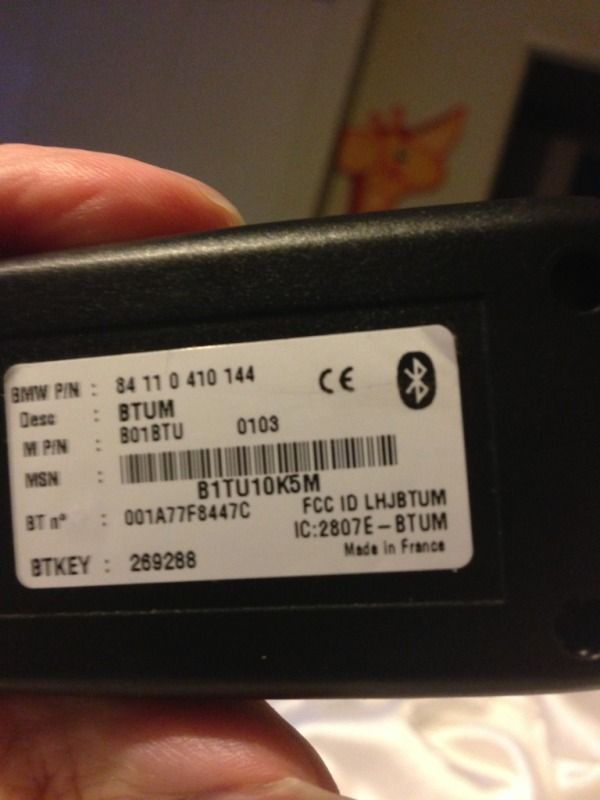
I plug it into the armrest cradle and the puck lights up with the blue led , and it pairs with my phone (all forum posts say this puck is the same as Mercedes one)
https://mbworld.org/forums/showthread.php?t=384681&styleid=18
But I still can't make or receive calls and get this message on my command screen. Similar issues reported here
https://mbworld.org/forums/showthread.php?t=186569&page=2

Do I have to buy more parts to make Bluetooth work in a 2002? USA car. I have read through
http://www.wireless4mb.com/page19/page19.html
And
http://phdwebsite.powerpulse.cc/Phone%20Install%20Bulletins/CL%2002-01.pdf
But still can't figure it out
I plug it into the armrest cradle and the puck lights up with the blue led , and it pairs with my phone (all forum posts say this puck is the same as Mercedes one)
https://mbworld.org/forums/showthread.php?t=384681&styleid=18
But I still can't make or receive calls and get this message on my command screen. Similar issues reported here
https://mbworld.org/forums/showthread.php?t=186569&page=2
Do I have to buy more parts to make Bluetooth work in a 2002? USA car. I have read through
http://www.wireless4mb.com/page19/page19.html
And
http://phdwebsite.powerpulse.cc/Phone%20Install%20Bulletins/CL%2002-01.pdf
But still can't figure it out
Last edited by tusabes; Feb 8, 2014 at 05:01 AM.

Super Member
Joined: Feb 2009
Posts: 780
Likes: 11
From: Dallas, TX
Range Rover
When you figure it out let me know. I got the same problem. Replaced the telephone module in the trunk twice, checked fuses, everything . My Funny thing is my entire audio system goes out when it's plug in and wired through the fiber optic system. I have tested my telephone boxes in other cars and they work. Finally just gave up. Figure it a good thing . Forces me to drive the ML every now and then. It's a nice feature to have, especially for conference calls

Member

Joined: Jul 2010
Posts: 129
Likes: 0
From: New Jersey
2014 S550 4matic 2003 SL500 2009 CLS550 2008 CLK350 2002 L320 2006 E350
hope this helps
I have the v60 cradle in my armrest so I bought a BMW btum Bluetooth puck,
I plug it into the armrest cradle and the puck lights up with the blue led , and it pairs with my phone (all forum posts say this puck is the same as Mercedes one)
https://mbworld.org/forums/showthrea...681&styleid=18
But I still can't make or receive calls and get this message on my command screen. Similar issues reported here
https://mbworld.org/forums/showthrea...=186569&page=2
Do I have to buy more parts to make Bluetooth work in a 2002? USA car. I have read through
http://www.wireless4mb.com/page19/page19.html
And
http://phdwebsite.powerpulse.cc/Phon...CL%2002-01.pdf
But still can't figure it out
 Try to remove this little box or find out what this indicates. That is probably where the interruption is. https://mbworld.org/forums/picture.p...ictureid=19194 a little "s" should be in display
Last edited by la22bay; Feb 8, 2014 at 09:10 AM. Reason: add note
Member
Joined: Jul 2010
Posts: 129
Likes: 0
From: New Jersey
2014 S550 4matic 2003 SL500 2009 CLS550 2008 CLK350 2002 L320 2006 E350
https://mbworld.org/forums/picture.p...ictureid=19194
notice box above mute box a little "s" should be displaying. You have a "white little box icon there" this should not be there
notice box above mute box a little "s" should be displaying. You have a "white little box icon there" this should not be there
Last edited by la22bay; Feb 8, 2014 at 09:41 AM.
Member
Joined: Jul 2010
Posts: 129
Likes: 0
From: New Jersey
2014 S550 4matic 2003 SL500 2009 CLS550 2008 CLK350 2002 L320 2006 E350
better image
Notice the little box icon in the far upper right above mute box of this image? that should not be there. your 2002 has the correct PSE equipped for BT. If you get the actual Mercedes Puck it will work and recognize on screen. I converted a 2000 with analog system, replacing cradle, PSE and installing all the parts purchased a second puck on ebay used for this vehicle no problem. what type of cell phone, are you using? check settings to see why that little box is displayed. this is not displaying on my 2000S430 OR 2003 SL500 SCREENS. Try to remove this little box or find out what this indicates. That is probably where the interruption is. https://mbworld.org/forums/picture.p...ictureid=19194 a little "s" should be in display
Try to remove this little box or find out what this indicates. That is probably where the interruption is. https://mbworld.org/forums/picture.p...ictureid=19194 a little "s" should be in display
Thread Starter
MBWorld Fanatic!
Joined: Jan 2008
Posts: 6,151
Likes: 533
Mercedes
Ok thanks, so how do I get the "s" instead of the little white box ?
Is it because I am using the BMW puck instead of a Mercedes puck ? Or another problem ?
Is it because I am using the BMW puck instead of a Mercedes puck ? Or another problem ?
Last edited by tusabes; Feb 8, 2014 at 11:11 AM.
Member
Joined: Jul 2010
Posts: 129
Likes: 0
From: New Jersey
2014 S550 4matic 2003 SL500 2009 CLS550 2008 CLK350 2002 L320 2006 E350
if you need part # let me know. Try entering code 62872 when your phone request code this might link it.
Last edited by la22bay; Feb 8, 2014 at 11:24 AM. Reason: One possibility
Trending Topics

MBWorld Fanatic!
Joined: Jun 2002
Posts: 1,284
Likes: 37
From: North Carolina
2003 S500 - Toyota Corolla (in the rain)
I agree with la22bay that it has something to do with the programming. I have the Mercedes bluetooth puck with the V60 and it works just fine through the command once it is paired up. Even when my car is not in use and I turn on my cell phone it still will try to link up with the car. I can post a picture of what it looks like if you are interested.
MB World Stories
The Best of Mercedes & AMG

Manual Mercedes? 6 Times Sindelfingen Let Drivers Have All The Fun
Verdad Gallardo
Mercedes SLR McLaren 722 S Is Extremely Rare Example Modified by McLaren
Verdad Gallardo
8 Classic Boxy Mercedes Designs That Have Aged Like Fine Wine
Verdad Gallardo
Flawlessly Restored Mercedes 190E Evo II Heads to Auction
Verdad Gallardo
Electric Mercedes C-Class Unveiled: 11 Things You Need to Know
Verdad Gallardo
Mercedes EQS Gets A Major Update: Everything You Need to Know
Verdad Gallardo
5 Underrated Mercedes-Benz Models That Don't Get the Love They Deserve
Verdad Gallardo
Mercedes 300D Has Pushed Well Past 1 Million Miles and It Ain't Stopping
Verdad Gallardo
10 Most Reliable Mercedes-Benz Models You Can Buy Used
Verdad Gallardo
Member
Joined: Jul 2010
Posts: 129
Likes: 0
From: New Jersey
2014 S550 4matic 2003 SL500 2009 CLS550 2008 CLK350 2002 L320 2006 E350
compare specs

https://mbworld.org/forums/members/l...pecs-42434.jpg
Super Member
Joined: Feb 2009
Posts: 780
Likes: 11
From: Dallas, TX
Range Rover
hmm, im wondering if that is it. Im connecting a digital puck and cradle to a analog system... I simply took it out of my ML and plugged the cradle and puck in and got a no go. But even without that anytime I plug in any module in the trunk the system dies. It is program to accept the telephone though. go figure.

Super Member


Joined: Sep 2010
Posts: 544
Likes: 22
From: Texas
13's550/2000's430/13'gl63/'13's550/10's63
teh bmw puck will only work on some mb models form 2004 and 2005, and that is the s class anc e class, only. it will not work on 2000-2003, in you are adding puck to 2000 to 2003 make sure that the pse in the trunk has the blue label on it, there are lots of post on this on here.
Thread Starter
MBWorld Fanatic!
Joined: Jan 2008
Posts: 6,151
Likes: 533
Mercedes
I didnt know the BMW puck only worked on 2004-2005 models , thanks . Its ok I got it so cheap I can resell it
I'm not paying $300-400 for the m b puck
. I have a Motorola roadster universal bluetooth adapter that plays both my phone calls and my music through FM channel on my radio . $46 on amazon .
I'm not paying $300-400 for the m b puck
. I have a Motorola roadster universal bluetooth adapter that plays both my phone calls and my music through FM channel on my radio . $46 on amazon .
Thread Starter
MBWorld Fanatic!
Joined: Jan 2008
Posts: 6,151
Likes: 533
Mercedes
I agree with la22bay that it has something to do with the programming. I have the Mercedes bluetooth puck with the V60 and it works just fine through the command once it is paired up. Even when my car is not in use and I turn on my cell phone it still will try to link up with the car. I can post a picture of what it looks like if you are interested.
Member
Joined: Jul 2010
Posts: 129
Likes: 0
From: New Jersey
2014 S550 4matic 2003 SL500 2009 CLS550 2008 CLK350 2002 L320 2006 E350
Member
Joined: Jul 2010
Posts: 129
Likes: 0
From: New Jersey
2014 S550 4matic 2003 SL500 2009 CLS550 2008 CLK350 2002 L320 2006 E350
this phone on eBay for $75 some as low as $10Look for this one https://mbworld.org/forums/members/l...-one-42470.jpg remember your PSE is equipped to use bluetooth puck, the actual phone was the original intended component to fit in that cradle. Just like analog tv, signal changed to digital, that is for video signal quality, audio not really affected, don't let them tell you they can't just activate it over the phone.
Last edited by la22bay; Feb 10, 2014 at 03:50 PM. Reason: Additional info
MBWorld Fanatic!
Joined: Jun 2002
Posts: 1,284
Likes: 37
From: North Carolina
2003 S500 - Toyota Corolla (in the rain)
I have been using the V60 puck for several years and have changed my cell phone at least 7 or 8 times during that period and they all work. All I have to do is link the phone up to the car and enter the passcode that came with the puck......and bingo it goes live.


