


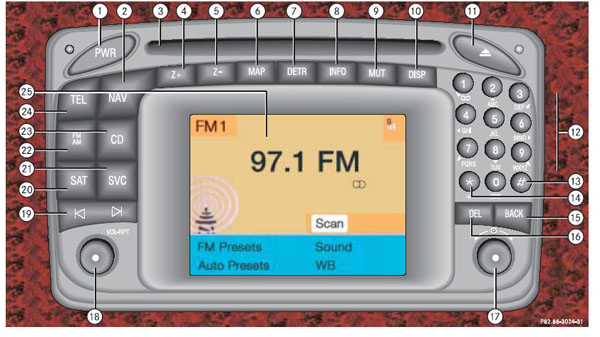


 tooooo bad I think I have to buy an mp3 changer, or are there any other cost effective solution for this comand????


Video in motion & MP3 enabled Command

Member
Joined: Apr 2006
Posts: 123
Likes: 0
E55
2003 software version 32
My car is an 04 but the SW version says 32/03 which I am presuming means 32nd version of 2003. (there are other areas where '03 appears too - like in HW versions).
...and like I said in the previous entry I posted - I cannot get the into any secret submenus items for MP3 - I get into the Engineering menu easily (and that is where the version numbers are from) - but no MP3 items show even after repeatedly trying the #,* < combo....in all orders and for lengthy amounts of time. This might explain others inability to get that menu too.
...so is there someone out there who is clever enough to tell me if this unit can have an upgraded SW version loaded so it will run MP3's (after setting the secret flags in the engineering menu)...if so is this a dealer thing...is it likely to be "free" (hope!)
Thanks for any suggestions...
...and like I said in the previous entry I posted - I cannot get the into any secret submenus items for MP3 - I get into the Engineering menu easily (and that is where the version numbers are from) - but no MP3 items show even after repeatedly trying the #,* < combo....in all orders and for lengthy amounts of time. This might explain others inability to get that menu too.
...so is there someone out there who is clever enough to tell me if this unit can have an upgraded SW version loaded so it will run MP3's (after setting the secret flags in the engineering menu)...if so is this a dealer thing...is it likely to be "free" (hope!)
Thanks for any suggestions...

MBWorld Fanatic!
Joined: Apr 2005
Posts: 1,117
Likes: 0
From: Brisbane, Australia
2003 E55
Here are some photos I took - see if they help.
1. my COMAND - 2003 w211 E55 - Australian (?=Euro)
2. Engineer mode after - mute-end call- SERV
3. Software version in Engineers menu (mine had been update by the dealer to enable mp3 and during the ? SBC recall)
4. next screen AFTER # - * - <. Note new soft key menu down right side of screen.
5. One of the submenus
1. my COMAND - 2003 w211 E55 - Australian (?=Euro)
2. Engineer mode after - mute-end call- SERV
3. Software version in Engineers menu (mine had been update by the dealer to enable mp3 and during the ? SBC recall)
4. next screen AFTER # - * - <. Note new soft key menu down right side of screen.
5. One of the submenus
MB World Stories
The Best of Mercedes & AMG

8 Oddball Mercedes Ideas That Actually Made it to Production
Verdad Gallardo
Dubai Tuner Gives the Mercedes G-Class An Entirely New Look
Verdad Gallardo
Six Gift Ideas Your AMG Loving Dad or Grad Will Cherish

7 Craziest Things AMG Gas Ever Built
Verdad Gallardo
New Electric Mercedes-AMG GT 4-Door Coupe Unveiled: 10 Things You Need to Know
Verdad Gallardo
6 Mercedes Models That Did NOT Age Well (But Are Somehow Still Cool)
Verdad Gallardo
Manual Mercedes? 6 Times Sindelfingen Let Drivers Have All The Fun
Verdad Gallardo
Mercedes SLR McLaren 722 S Is Extremely Rare Example Modified by McLaren
Verdad Gallardo
8 Classic Boxy Mercedes Designs That Have Aged Like Fine Wine
Verdad Gallardo
Member
Joined: Apr 2006
Posts: 123
Likes: 0
E55
thanks OzE55
thanks mate!
These do help - now I know that I am not going nuts, as you have the older car and still with new Sw you have the MP3 option....it looks more like I simply have the older SW which can't do it..need an update. I will ask the dealer...
These do help - now I know that I am not going nuts, as you have the older car and still with new Sw you have the MP3 option....it looks more like I simply have the older SW which can't do it..need an update. I will ask the dealer...

Newbie
Joined: May 2006
Posts: 2
Likes: 0
CLK 209 Command
Hi All,
I was just wondering if the codes you've all posted here will work for a CLK w209?
I have tried it but nothing happened. Is the code 5-3-7 or 3-5-7?
I am very desperate to be able to enable video-in-motion.
PLEASE HELP.
Thanks
I was just wondering if the codes you've all posted here will work for a CLK w209?
I have tried it but nothing happened. Is the code 5-3-7 or 3-5-7?
I am very desperate to be able to enable video-in-motion.
PLEASE HELP.
Thanks
MBWorld Fanatic!
Joined: Apr 2005
Posts: 1,117
Likes: 0
From: Brisbane, Australia
2003 E55
Originally Posted by seuprof
Hi All,
I was just wondering if the codes you've all posted here will work for a CLK w209?
I have tried it but nothing happened. Is the code 5-3-7 or 3-5-7?
I am very desperate to be able to enable video-in-motion.
PLEASE HELP.
Thanks
I was just wondering if the codes you've all posted here will work for a CLK w209?
I have tried it but nothing happened. Is the code 5-3-7 or 3-5-7?
I am very desperate to be able to enable video-in-motion.
PLEASE HELP.
Thanks

Member
Joined: Nov 2004
Posts: 215
Likes: 0
From: Sydney, Australia
2012 C63 Coupe Iridium Silver
OzE55 do you have a tv tuner in your car?
Im wondering if this "dvd in motion" will also enable "tv in motion"... I haven't actually looked at the options in Rafal's car yet - maybe there is more than one option if you have a tv tuner.
Im wondering if this "dvd in motion" will also enable "tv in motion"... I haven't actually looked at the options in Rafal's car yet - maybe there is more than one option if you have a tv tuner.

Super Member
Joined: Jul 2005
Posts: 577
Likes: 0
From: South Florida
2007 S65, 2005 Nissan Armada
the codes work fine to enter into a us version command also mine is a 2005 e55. When I went in the MP3 and LCT were already enabled. HollandMMI and IPS were disabled, I enabled them but didn't notice any changes in the car. I am guessing that HollandMMI is the telephone (just a guess) but I have no idea what IPS is. If the car does something strange i'll post it here. Maybe IPS is Immediate Power Supplement???
Almost forgot my car has every option except the telephone and rear sunshades. I do have the Sirius. Maybe that can enlighten someone to what these acronyms stand for.
Almost forgot my car has every option except the telephone and rear sunshades. I do have the Sirius. Maybe that can enlighten someone to what these acronyms stand for.
Last edited by pas; May 31, 2006 at 05:16 PM.
MBWorld Fanatic!
Joined: Apr 2005
Posts: 1,117
Likes: 0
From: Brisbane, Australia
2003 E55
Originally Posted by tommaey
OzE55 do you have a tv tuner in your car?
Im wondering if this "dvd in motion" will also enable "tv in motion"... I haven't actually looked at the options in Rafal's car yet - maybe there is more than one option if you have a tv tuner.
Im wondering if this "dvd in motion" will also enable "tv in motion"... I haven't actually looked at the options in Rafal's car yet - maybe there is more than one option if you have a tv tuner.
I figure there are enough idiots trying to kill me on the road without me helping them by watching a DVD while driving.


Senior Member
Joined: May 2006
Posts: 354
Likes: 0
From: Australia/Hong Kong
05 E55, R33 GTR, R33 GTS-t
this is a really cool thread! takes me back years when we would discover key codes to enter into the super nintendo to unlock extra players etc!!!
thanks!
Edit: awesome i just tried it and worked no probs. i found pressing the 2 first buttons simultaneously (aka ctrl + alt) then the third key (aka del) without success. I pressed and held each button for about 2 secs before adding another button then once all 3 are down it took ~5 secs.
excellent! I was told it would cost some dollars to get it modded for video in motion and now ive just done it for free! thanks again!!
thanks!
Edit: awesome i just tried it and worked no probs. i found pressing the 2 first buttons simultaneously (aka ctrl + alt) then the third key (aka del) without success. I pressed and held each button for about 2 secs before adding another button then once all 3 are down it took ~5 secs.
excellent! I was told it would cost some dollars to get it modded for video in motion and now ive just done it for free! thanks again!!
Last edited by sly55; Jun 26, 2006 at 03:54 AM.
Senior Member
Joined: May 2006
Posts: 354
Likes: 0
From: Australia/Hong Kong
05 E55, R33 GTR, R33 GTS-t
Originally Posted by tommaey
OzE55 do you have a tv tuner in your car?
Im wondering if this "dvd in motion" will also enable "tv in motion"... I haven't actually looked at the options in Rafal's car yet - maybe there is more than one option if you have a tv tuner.
Im wondering if this "dvd in motion" will also enable "tv in motion"... I haven't actually looked at the options in Rafal's car yet - maybe there is more than one option if you have a tv tuner.
Its pretty cool, in the Dr. Dist. menu you can select various video lock out functions. You can have it so the park brake must be on to watch, gear lever in P, or up to 10km/hr speed before it turns off video. Good stuff!!

Newbie
Joined: May 2006
Posts: 11
Likes: 0
These menus are also effected by the software version and maybe the firmware. Very early units had software that didn't allow access and I now believe MB has removed the feature on 2006 cars. My car has software HU:15/2004 and is euro spec and I can access and change all the featuresi n the guide. There is also different software versions for USA COMAND
Have a look at these links:
Difference between EU and USA COMAND
http://www.mbenznl.com/products
INSTRUCTIONS ON USING THE CODES
http://www.freenetpages.co.uk/hp/tow...DENMENUsv2.PDF
Hope this helps
Have a look at these links:
Difference between EU and USA COMAND
http://www.mbenznl.com/products
INSTRUCTIONS ON USING THE CODES
http://www.freenetpages.co.uk/hp/tow...DENMENUsv2.PDF
Hope this helps
Last edited by steve.link; Jul 10, 2006 at 01:13 PM. Reason: Wrong link

Senior Member
Joined: Jun 2006
Posts: 352
Likes: 0
From: Fredericksburg, VA
CLS55 AMG
CLS 55 AMG. I got to the various menus on my 13/2004 US version. MP3 was already working and was able to burn DVD (4gig) MP3 and play through my head unit.
Did not know how to get DVD Movies to work. Turned on region 0, put in Family Guy and got a CD ERROR. Any thoughts?
Did not know how to get DVD Movies to work. Turned on region 0, put in Family Guy and got a CD ERROR. Any thoughts?
Senior Member
Joined: Jun 2006
Posts: 352
Likes: 0
From: Fredericksburg, VA
CLS55 AMG
Steve,
I'm sure it's US, since im in the US, however..the single drive on top of COMMAND plays DVD MP3's. I guess your refering to the COMMAND 6-disc drive?? If that is the case, then 'NO', those 6-disk does not even read my DVD MP3. I'm happy to at least have the single drive play a 4+ gig mp3 burn. Like having an IPod that you never need to charge!!
AJ
I'm sure it's US, since im in the US, however..the single drive on top of COMMAND plays DVD MP3's. I guess your refering to the COMMAND 6-disc drive?? If that is the case, then 'NO', those 6-disk does not even read my DVD MP3. I'm happy to at least have the single drive play a 4+ gig mp3 burn. Like having an IPod that you never need to charge!!
AJ
MBWorld Fanatic!
Joined: Apr 2005
Posts: 1,117
Likes: 0
From: Brisbane, Australia
2003 E55
Originally Posted by BlackCard
CLS 55 AMG. I got to the various menus on my 13/2004 US version. MP3 was already working and was able to burn DVD (4gig) MP3 and play through my head unit.
Did not know how to get DVD Movies to work. Turned on region 0, put in Family Guy and got a CD ERROR. Any thoughts?
Did not know how to get DVD Movies to work. Turned on region 0, put in Family Guy and got a CD ERROR. Any thoughts?
Why not try another movie or change back to the USA region code and see what happens.
If it plays an mp3 DVD you should at least get the sound playing from a DVD movie disc if the disc is OK and region code OK.

Member
Joined: Jun 2006
Posts: 233
Likes: 0
From: Bay Area, CA
E55
Originally Posted by BlackCard
Steve,
I'm sure it's US, since im in the US, however..the single drive on top of COMMAND plays DVD MP3's. I guess your refering to the COMMAND 6-disc drive?? If that is the case, then 'NO', those 6-disk does not even read my DVD MP3. I'm happy to at least have the single drive play a 4+ gig mp3 burn. Like having an IPod that you never need to charge!!
AJ
I'm sure it's US, since im in the US, however..the single drive on top of COMMAND plays DVD MP3's. I guess your refering to the COMMAND 6-disc drive?? If that is the case, then 'NO', those 6-disk does not even read my DVD MP3. I'm happy to at least have the single drive play a 4+ gig mp3 burn. Like having an IPod that you never need to charge!!
AJ
I have the same issues. I can play CD-MP3 and DVD-MP3 on the top single player but not on the 6-disc changer. That's no problem for me since I'm quite happy that it can play the DVD-MP3 on top already.
My questions is can/how to make it so the DVD movies will work. It is currently outputting CD-Error as well. I can access all the secret menu without any problems. I don't have the "movie in motion block" but I do have the driver distraction menu.
TIA!


