When you click on links to various merchants on this site and make a purchase, this can result in this site earning a commission. Affiliate programs and affiliations include, but are not limited to, the eBay Partner Network.
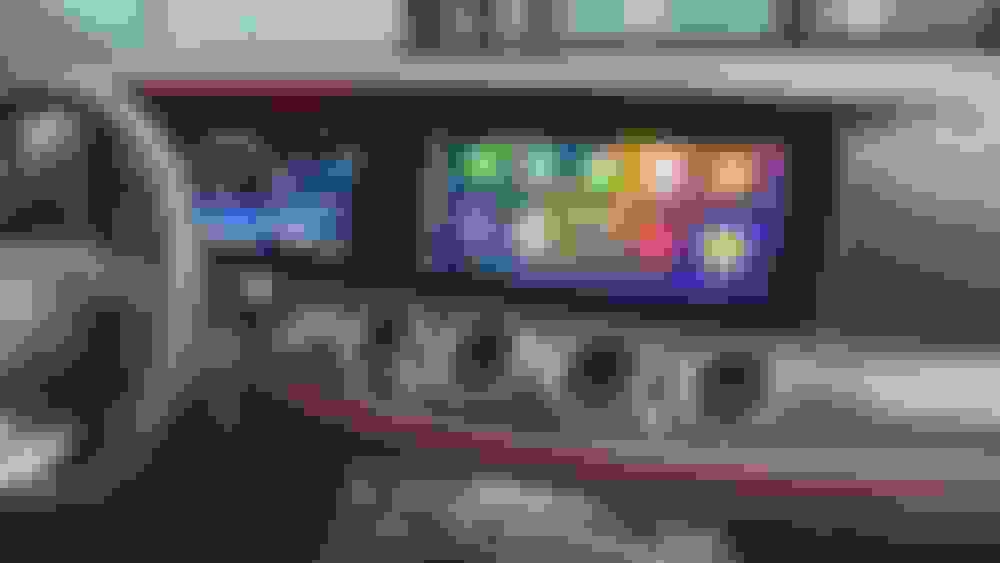
I don't have my car yet. Are you all saying the factory screen does not support Car Play in full screen already? What does it look like?
it doesn’t. It’s a smaller square in the center of the big center screen. It’s embarrassing that a car this expensive doesn’t come with factory wireless CarPlay or full screen CarPlay
it doesn’t. It’s a smaller square in the center of the big center screen. It’s embarrassing that a car this expensive doesn’t come with factory wireless CarPlay or full screen CarPlay
I think due to MBUX 1.0, it’s like 3/4 screen, in order to keep the climate control temp displays always visible in same place on the screen. Would be nice if MB updated software to fix this.
It’s back to full screen in the following version of MBUX.
I heard that the pre-facelift models can do full screen. However the facelift models cannot. My 2023 doesn't do it full screen. Very frustrating
Yup that's probably it. Pretty lame considering you have the "upgrade". My functionality is awesome and I don't want a touchscreen because fingerprints bad.
I have a hard time keeping track of these sellers with similar names. I bought from one called CarLink. When I had a problem they were out of business. I am not saying that this is the same company under a different name but I wonder. They have reviews but not from people on this site. Asinga01 and Race MX asked for an install video and they said PM us and we will send it. Why not post it on line. On their site they have reviews but I do not know if I trust the reviews.
I installed the CarLink in my W222 and it was buggy. It disconnected and intermittently I had to start the car again to make it work. I pulled it out.
I would feel much better if a long time MBWorld user installed it and reviewed it so we know the review is from a trusted source.
Also if we hav to pull the dashboard apart I wonder if it s worth it. If a long time user here wants to test it I would chip in and help pay for the test. Is anybody else game for this?
If it works and if I think I can install it I would buy it.
I think Carlinkit stuff is sold by several random sellers all with similar names.
I don't use the Carlinkit often in my E63, but when I do sometimes it works well, sometimes it's glitchy and randomly disconnects and reconnects a minute later, and lots of audio skipping. Even with software updates, the glitches are random.
Built-in wireless Carplay on my GLE63 is also occasionally glitchy too and randomly skips audio. Like I'll go for a 4h drive and no problems, then next day 10m drive and lots of skipping.
I actually did buy the NTG6.0 version for my 2021 E63 and attempted the install. The lack of useful directions and/or videos was extremely frustrating to say the least. Trying to figure out how to get the factory center console apart was a total nightmare, but eventually found the trick to it (gotta slide the whole thing backwards a bit). Link below to the one I have:
I then made all my connections and fired it up briefly and it seemed to work fine. However, when I attempted to find a place to stuff the unit itself I hit another brickwall. The only video I could find just shows these guys throwing it behind the radio, but as far as I could determine there is simply not enough space back there for it to fit. I also looked at trying to hide it in various places inside the center console, but could not come up with a good fit at the time. After several hours of messing with it I gave up and put it back to stock configuration.
I am taking some time off next week for the holiday, so one of my projects is to attempt the install again. If I can get it working I will report back here.
I actually did buy the NTG6.0 version for my 2021 E63 and attempted the install. The lack of useful directions and/or videos was extremely frustrating to say the least. Trying to figure out how to get the factory center console apart was a total nightmare, but eventually found the trick to it (gotta slide the whole thing backwards a bit). Link below to the one I have:
I then made all my connections and fired it up briefly and it seemed to work fine. However, when I attempted to find a place to stuff the unit itself I hit another brickwall. The only video I could find just shows these guys throwing it behind the radio, but as far as I could determine there is simply not enough space back there for it to fit. I also looked at trying to hide it in various places inside the center console, but could not come up with a good fit at the time. After several hours of messing with it I gave up and put it back to stock configuration.
I am taking some time off next week for the holiday, so one of my projects is to attempt the install again. If I can get it working I will report back here.
I suspect all the ratings you read on their site are bogus because nobody spoke about the install. If they can do this you have to ask why MB can not or will not do it. When I rent a car will full screen it makes a difference. It is better to see a bigger map AND directions.
after several hours of trial and error I was able to get it installed and working.
the video the posted is basically useless so I’ll breakdown the steps and post some pics.
couple of quick notes:
the video says to mount behind the head unit. You cannot as there simply is not enough room behind, below or to either side for the module to fit. There is just enough wire harness length though to mount it in the center console. The steps below outline how to remove that.
also in the video they gloss over how to remove the head unit and make it look as though you can just remove 4 screws and pull. That will not work. The head unit bracket has small hooks that point down and grab hold of the main dashboard bracket. With the center console fully installed there is not enough room to lift and pull forward on the head unit. My first time trying to install this I spent hours wrestling with this step. I realized on attempt number 2 today that you can unbolt the center console assembly and then slide it back by about an inch. This gives you just the little bit of room you need.
the wiring is straightforward and color coded and their instructions are at least accurate for this part. Though it is hard to screw up.
operationally I’ll say it takes about 30 seconds or so to linkup but seems to work just fine and is in full screen after that. I’ll run around with it and report back in a week or two how I like it operationally.
you will need to remove two rubber stoppers when you open the center console
under the stoppers are two t15 torx screws, remove those
That will allow you to pull up on the small trim piece for the center armrest flaps button and pop it out
under it there are two more torx screws, t15 I believe as well
once those are out you can pull up on the center console insert, where all the dash controls are located and it will release
you will need to unplug two wire harnesses in the center along the transmission tunnel, one is black and the other is white.
That will allow you to set it to the side
there are then 2 t20 screws that hold the head unit in place and 2 that bolt the center console to the dash that need to be removed
next return to the armrest area and pull out the small piece of felt lining, this will expose two 10mm bolts holding it down to the transmission tunnel, remove those
you will also need to remove another t15 or t20 screws that is hiding under the felt inside the armrest console that is facing the rear of the car.
then get in the backseat, it’s easier trust me, and grab the backside of the center console trim at the very top. This is the piece that holds the ac vents for the rear. Pull up and back and it will pop right out.
then you will be able to see that the top of the armrest flaps is a separate topper if you will type of thing that sits on the main center console body.
There are two t15 or t20 screws on the backside that you must remove.
then You will have to pull on the backside of this to release it from the main center console. You can then set it aside. You need to do this to make room to run the wires to the car link module.
The interface itself and especially the cables are not automotive compatible.
As you or anyone else can easily compare the quality and the materials of original car cables, connectors and modules and this "Christmas tree " or home use hardware and cables.
Even if the car wasn't AMG, this kind of not automotive components, besides denying common sense, will add irremediable damage in the near future, starting with electrostatic interferences, forcing car energy management to make wrong calculations and ending with exploded capacitors in the best case scenarios.
Not even a Chinese car, does not use cables, connectors or capacitors for home use.
Google about standards for cable and connectors for the automotive industry, where the temperatures, vibrations, electrostatic mechanical stress and a lot of different parameters are mandatory, as the car usually drives on public roads, where some others can be affected...
You are a very nice guy for taking the time to report on this. Thank you. I am afraid of this device. I think I am going to just put up with narrow CarPlay.
I’ve been running it for a few weeks so I’d thought I give a little update.
pros:
it connects much faster than I initially thought, more like 5-10 seconds I’d guess. Fast enough that I don’t find it distracting or annoying.
The system has been rock solid and stable, no weird lockups, crashes or other random issues. It’s actually much more stable the the iDrive 8 system in my old M3.
full screen works as advertised and there is zero lag when going from app to app or screen to screen.
cons:
The center touchpad only seems to work left to right on the main screen, except when it gets to the left side menu and then it sometimes works up and down.
When entering a tight parking spot the cameras are not triggered active by the parking sensors any longer. The car does still beep and the hud works but you don’t get a camera view on the screen.
The system is fully interrupting the mbux normal screens so anytime you want to go into other system screens you have to long press the hang up call button to toggle back to the native mbux. It’s worth noting this is called out on the instructions and ever then works just like the factory system.
if I had to do over would I do it again? No
I did the upgrade mostly for quick and reliable wireless connectivity vs having full screen. I’ve tried other wireless enablement type devices years ago and they were not quick or reliable so I’d thought I would try this. I think I’ll try one of those again and end up removing this.
if anyone has any other questions let me know I’m happy to help
Mercedes SLR McLaren 722 S Is Extremely Rare Example Modified by McLaren
Slideshow: A one-of-one U.S.-spec Mercedes-Benz SLR McLaren Roadster became even rarer after a factory-backed transformation at McLaren's headquarters.