





Back up camera

Thread Starter
Member
Joined: Mar 2008
Posts: 157
Likes: 2
From: Houston
C350
Back up camera
From hidden engineering menu, back up camera option can be activated. Just need a camera to work I guess.
In Mitsubishi forum has same mod with the pictures of back connections to the head unit.
Link
In Mitsubishi forum has same mod with the pictures of back connections to the head unit.
Link
Thread Starter
Member
Joined: Mar 2008
Posts: 157
Likes: 2
From: Houston
C350
Trending Topics
MB World Stories
The Best of Mercedes & AMG

Manual Mercedes? 6 Times Sindelfingen Let Drivers Have All The Fun
Verdad Gallardo
Mercedes SLR McLaren 722 S Is Extremely Rare Example Modified by McLaren
Verdad Gallardo
8 Classic Boxy Mercedes Designs That Have Aged Like Fine Wine
Verdad Gallardo
Flawlessly Restored Mercedes 190E Evo II Heads to Auction
Verdad Gallardo
Electric Mercedes C-Class Unveiled: 11 Things You Need to Know
Verdad Gallardo
Mercedes EQS Gets A Major Update: Everything You Need to Know
Verdad Gallardo
5 Underrated Mercedes-Benz Models That Don't Get the Love They Deserve
Verdad Gallardo
Mercedes 300D Has Pushed Well Past 1 Million Miles and It Ain't Stopping
Verdad Gallardo
10 Most Reliable Mercedes-Benz Models You Can Buy Used
Verdad Gallardo
Senior Member
Joined: Jan 2008
Posts: 373
Likes: 33
From: Vancouver, BC
08 C300
ok, i was playing with this menu and got to software update section.
after I went in there, this message poped up and can not get out from it.
anybody know how?????
please don't tell me i need to bring the car to dealer.
after I went in there, this message poped up and can not get out from it.
anybody know how?????
please don't tell me i need to bring the car to dealer.
Thread Starter
Member
Joined: Mar 2008
Posts: 157
Likes: 2
From: Houston
C350
It did that to me couple of times, at SW update menu when you pull down common knob. I did the following to clear this. Eject the CD, hit clr key beside common knob. Re insert the CD and during loading hit clr and press command knob many times. Abort icon will highlight and you can exit from there. I warned this on the other post not try SW update.
Thread Starter
Member
Joined: Mar 2008
Posts: 157
Likes: 2
From: Houston
C350
Following link shows how to install backup camera.
Link
It should connect to the back of head unit. There are some empty connector slot at the back of the head unit. I also want to know pin out of these empty connectors. Video AUX is another option that is available which can be used for low light or night vision camera installed infront of the car. This head unit is manufactured by Mitsubishi MELCO. There are some software CD patch for VIM different model head unit from MELCO.
Link
link
Link
It should connect to the back of head unit. There are some empty connector slot at the back of the head unit. I also want to know pin out of these empty connectors. Video AUX is another option that is available which can be used for low light or night vision camera installed infront of the car. This head unit is manufactured by Mitsubishi MELCO. There are some software CD patch for VIM different model head unit from MELCO.
Link
link
Senior Member
Joined: Jan 2008
Posts: 373
Likes: 33
From: Vancouver, BC
08 C300
It did that to me couple of times, at SW update menu when you pull down common knob. I did the following to clear this. Eject the CD, hit clr key beside common knob. Re insert the CD and during loading hit clr and press command knob many times. Abort icon will highlight and you can exit from there. I warned this on the other post not try SW update.

btw, just sent you PM.
Junior Member
Joined: Aug 2008
Posts: 56
Likes: 0
2012 CLS 63 AMG
The links use midcity chip correct? I was just curious if the input was already there and if there was a plug and play version?
I do like the VIM available from Midcity, but stile unsure what I want to do.
I do like the VIM available from Midcity, but stile unsure what I want to do.
Thread Starter
Member
Joined: Mar 2008
Posts: 157
Likes: 2
From: Houston
C350
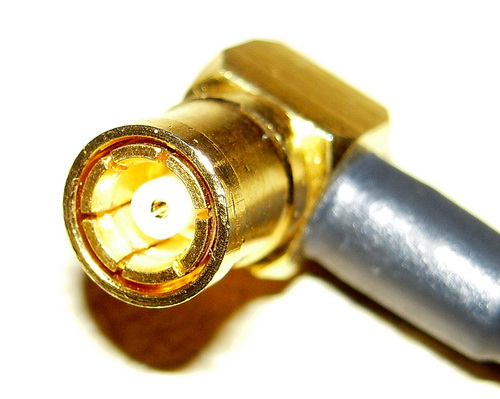
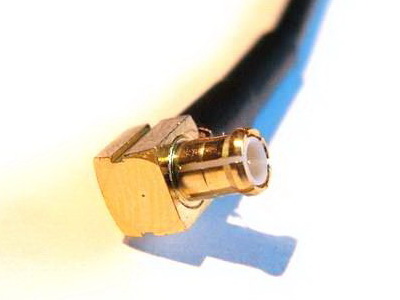
No, this is activated just from eng menu, without the chip. You can try it now. When you reverse, you will see this screen. We dont know about plug and play yet. Green FAKRA connector at the back of head unit is for video input. white46 will try this weekend with a camera.
Senior Member
Joined: Nov 2007
Posts: 412
Likes: 0
From: Amsterdam, The Netherlands
C180K 2011 COMAND, AMG, Dynamic Xenon, Business Pack, H&K Audio and +
No, this is activated just from eng menu, without the chip. You can try it now. When you reverse, you will see this screen. We dont know about plug and play yet. Green FAKRA connector at the back of head unit is for video input. white46 will try this weekend with a camera.
Senior Member
Joined: Nov 2007
Posts: 412
Likes: 0
From: Amsterdam, The Netherlands
C180K 2011 COMAND, AMG, Dynamic Xenon, Business Pack, H&K Audio and +
After changing the Reverse Camera to "installed" I went back to my desk. When i finished working and get back to my car and started it the Blank screen for reverse camera was working.
Now the question is . is it plug and play?
Senior Member
Joined: Jan 2008
Posts: 373
Likes: 33
From: Vancouver, BC
08 C300
I got it to display the blank screen. After the change to "installed" . you have to get the key out and wait for maybe 5 mins or so. And then start the car and it will work once you change the gear to reserve.
After changing the Reverse Camera to "installed" I went back to my desk. When i finished working and get back to my car and started it the Blank screen for reverse camera was working.
Now the question is . is it plug and play?
After changing the Reverse Camera to "installed" I went back to my desk. When i finished working and get back to my car and started it the Blank screen for reverse camera was working.
Now the question is . is it plug and play?


Member
Joined: Jul 2008
Posts: 85
Likes: 0
From: Poland
C63
I'm not sure which connector is which. It is FAKRA connector behind the navi, also not sure whether it's male or female. Since I have both connectors we will see this weekend when I try to hook it up with AUX video input.
it should be plug and play. we will see after this weekend.
it should be plug and play. we will see after this weekend.
Don't forget to let us know.


Super Member
Joined: Mar 2008
Posts: 556
Likes: 1
From: California
2008 Sport C-300, 2003 Accord Coupe V6
Do you think this camera would work with our screen, for non MM? Wireless cam, no wiring.
http://www.costco.com/Browse/Product...=0F&lang=en-US
http://www.costco.com/Browse/Product...=0F&lang=en-US
Senior Member
Joined: Jan 2008
Posts: 373
Likes: 33
From: Vancouver, BC
08 C300
for the moment of truth.
BWAHAHAHAHAHAHAHAHAHAHAHAHAHAHAHAHAHAHAHAHA
I'M SO GETTING REAR-VIEW CAMERA NOW!!!
or...
maybe...
carputer?
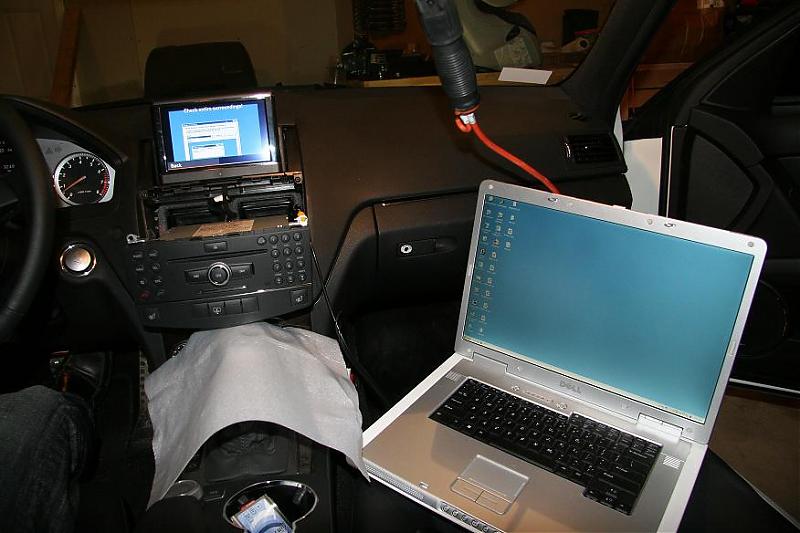
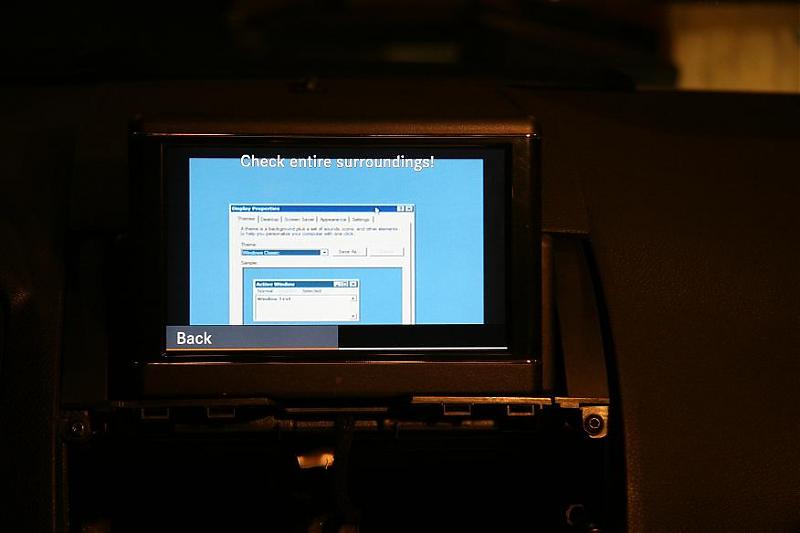
cost so far, $10 + camera cost around $150. so in total, less than $200 for the rear-view camera. i also can add rca input select for extra $20 and i'll have extra aux input in glove box.
can not get any better than this.
BWAHAHAHAHAHAHAHAHAHAHAHAHAHAHAHAHAHAHAHAHA
I'M SO GETTING REAR-VIEW CAMERA NOW!!!
or...
maybe...
carputer?
cost so far, $10 + camera cost around $150. so in total, less than $200 for the rear-view camera. i also can add rca input select for extra $20 and i'll have extra aux input in glove box.
can not get any better than this.
Last edited by white46; Oct 9, 2008 at 10:16 PM.


