


Cut all the intro crap, I will just get into the steps. 
1.Things to buy
- camera. lol I bought Kenwood CCD-2000 from ebay for $150.
- RCA extension cable. 6ft should be good enough. $10
- 2002 and up REVERSE VW/BMW antenna adapter (EURO A107) $15
(make sure you get REVERSE adapter)
- RCA female plug only (bought it from CircuitCity) $5
2. Before you do anything, enable Back up camera option on HU.
3. Make AUX input cable that fits back of HU.
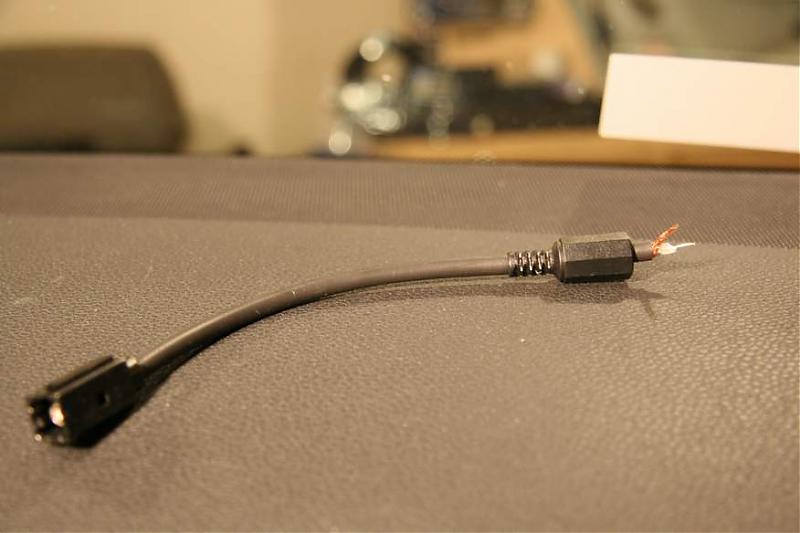
- cut one side of antenna adapter
- closer look
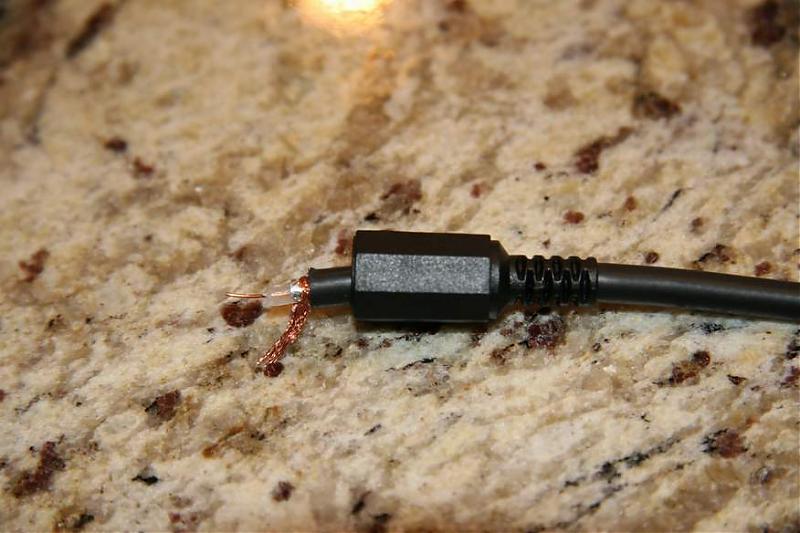
- Solder the wire and RCA plug.
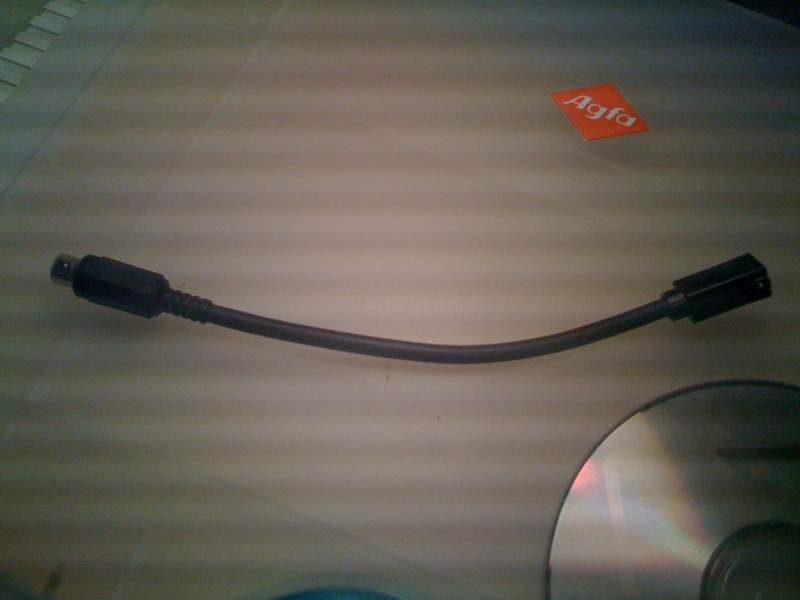
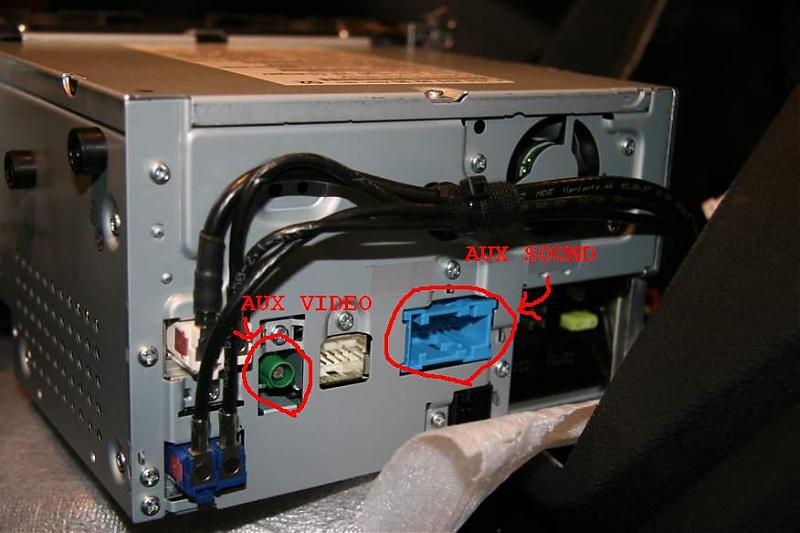
- from Back of HU, connect it to the green plug.
From this point, there isn't much to tell you.
There are 2 GREAT posts on how to install the camera.
https://mbworld.org/forums/c-class-w204/262634-diy-rear-camera-install-w-pics-centered-location.html
and
https://mbworld.org/forums/c-class-w204/254208-diy-i-ve-unleashed-cyclops.html
Jus pick the one you like and follow their step.
I went with 'Rick Hunter's way. I didn't like to feed RCA extension cable through headliner. But it's personal preferance anyways.
Mine works like charm.
1.Things to buy
- camera. lol I bought Kenwood CCD-2000 from ebay for $150.
- RCA extension cable. 6ft should be good enough. $10
- 2002 and up REVERSE VW/BMW antenna adapter (EURO A107) $15
(make sure you get REVERSE adapter)
- RCA female plug only (bought it from CircuitCity) $5
2. Before you do anything, enable Back up camera option on HU.
Quote:
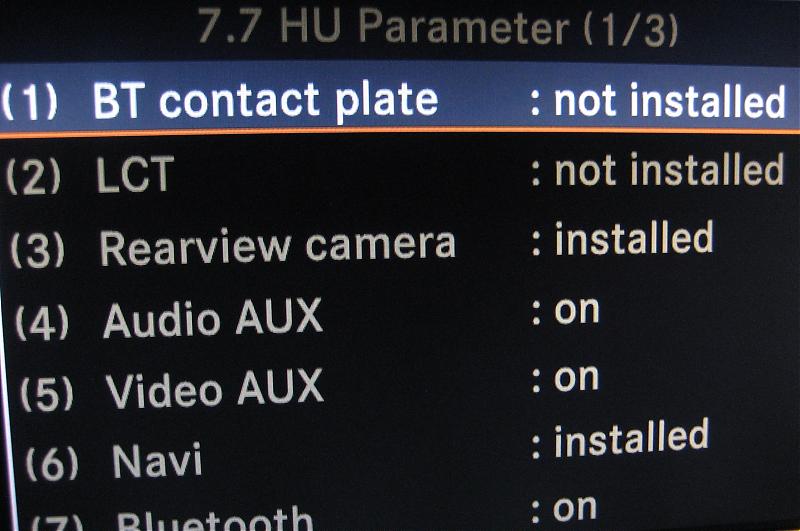
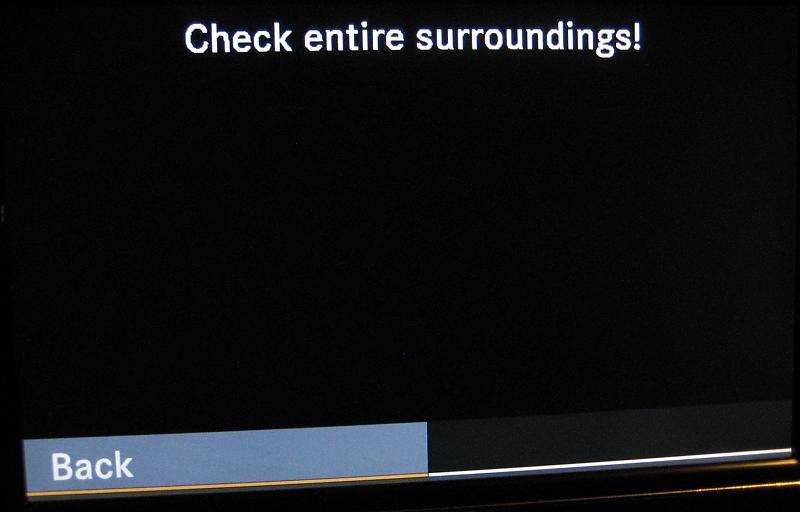
if you got this part working, then proceed to next step.Originally Posted by theinmoe
At center command, press and hold 3 buttons, " hang up , 1 and #. You will see Eng menu in LCD. Go to (option 7, sub menu 7) HU parameter and enable backup camera install.
3. Make AUX input cable that fits back of HU.
- cut one side of antenna adapter
- closer look
- Solder the wire and RCA plug.
- from Back of HU, connect it to the green plug.
From this point, there isn't much to tell you.
There are 2 GREAT posts on how to install the camera.
https://mbworld.org/forums/c-class-w204/262634-diy-rear-camera-install-w-pics-centered-location.html
and
https://mbworld.org/forums/c-class-w204/254208-diy-i-ve-unleashed-cyclops.html
Jus pick the one you like and follow their step.
I went with 'Rick Hunter's way. I didn't like to feed RCA extension cable through headliner. But it's personal preferance anyways.
Mine works like charm.

Senior Member
do you still need to install the VIM for this to work?
Quote:
NOOriginally Posted by aprince2die4
do you still need to install the VIM for this to work?
Rear-view camera has nothing to do with VIM.

MBWorld Fanatic!
RCA extension cable
Audio or video (RG-58) cable?
BTW great DIY I hope to maybe do it this weekend.
Also this may sound like a stupid question how do you get the head unit out of the dash? Thanks.
Audio or video (RG-58) cable?
BTW great DIY I hope to maybe do it this weekend.
Also this may sound like a stupid question how do you get the head unit out of the dash? Thanks.
MBWorld Fanatic!
Quote:
That I can help with. Any good car audio store should have them in stockOriginally Posted by mb_horseshoe
where do you buy the antenna adapter?
Quote:
Audio or video (RG-58) cable?
BTW great DIY I hope to maybe do it this weekend.
Also this may sound like a stupid question how do you get the head unit out of the dash? Thanks.
it's rca video cable since we are not dealing with any sound. I happend to found one at home just collecting dust. Originally Posted by Ron Jr
RCA extension cableAudio or video (RG-58) cable?
BTW great DIY I hope to maybe do it this weekend.
Also this may sound like a stupid question how do you get the head unit out of the dash? Thanks.

this is all you need for disassemble.
http://www.youtube.com/watch?v=v_5Fkawy-_g
make sure you TEST
MB World Stories
The Best of Mercedes & AMG
Explore

Manual Mercedes? 6 Times Sindelfingen Let Drivers Have All The Fun
Verdad Gallardo
Mercedes SLR McLaren 722 S Is Extremely Rare Example Modified by McLaren
Verdad Gallardo
8 Classic Boxy Mercedes Designs That Have Aged Like Fine Wine
Verdad Gallardo
Flawlessly Restored Mercedes 190E Evo II Heads to Auction
Verdad Gallardo
Electric Mercedes C-Class Unveiled: 11 Things You Need to Know
Verdad Gallardo
Mercedes EQS Gets A Major Update: Everything You Need to Know
Verdad Gallardo
5 Underrated Mercedes-Benz Models That Don't Get the Love They Deserve
Verdad Gallardo
Mercedes 300D Has Pushed Well Past 1 Million Miles and It Ain't Stopping
Verdad Gallardo
10 Most Reliable Mercedes-Benz Models You Can Buy Used
Verdad Gallardo
Senior Member
Quote:
is it the EU-10, EU-20, or EU-30?Originally Posted by Ron Jr
That I can help with. Any good car audio store should have them in stock
Quote:
i edited my original post.Originally Posted by mb_horseshoe
is it the EU-10, EU-20, or EU-30?
it's 2002 and up VW antenna adapter. NOT 2000.

Junior Member
Just wanted to add my 2 cents for your DIY, great job...Just did mine last weekend. You can save a little hassle by ordering the FAKRA to RCA connector from Mid-City for $21+shipping, I used a 12' RCA connector, just enough if you follow the truck mounted DIY https://mbworld.org/forums/showthrea...57#post3074757 (THANKS TO RICK & VADAR SS)
Also you can see the whole install done by mid-city (only difference is they use their VIM) this is a great resource because it's tricky getting the vent out and the clips to release the COMAND unit.
http://www.youtube.com/watch?v=v_5Fkawy-_g
The Mid-City guys were also very cool about helping out.
Cost total about $200, plus 4hrs for the install.
Also you can see the whole install done by mid-city (only difference is they use their VIM) this is a great resource because it's tricky getting the vent out and the clips to release the COMAND unit.
http://www.youtube.com/watch?v=v_5Fkawy-_g
The Mid-City guys were also very cool about helping out.
Cost total about $200, plus 4hrs for the install.


Alright, so the only thing Im really scared about is installing the actual camera and running lines to the front of the car. Would a place like Circuit City, who installs 3rd party backup cams, install it for me?

Senior Member
THUMBS UP from Rick Hunter
Nice to see another DIY to an option that should have been offered standard from the dealer in the first place.
So the installation really was THAT easy, eh!
Nice to see another DIY to an option that should have been offered standard from the dealer in the first place.
So the installation really was THAT easy, eh!
Quote:
Nice to see another DIY to an option that should have been offered standard from the dealer in the first place.
So the installation really was THAT easy, eh!
Thank you. Originally Posted by Rick Hunter
THUMBS UP from Rick Hunter Nice to see another DIY to an option that should have been offered standard from the dealer in the first place.
So the installation really was THAT easy, eh!
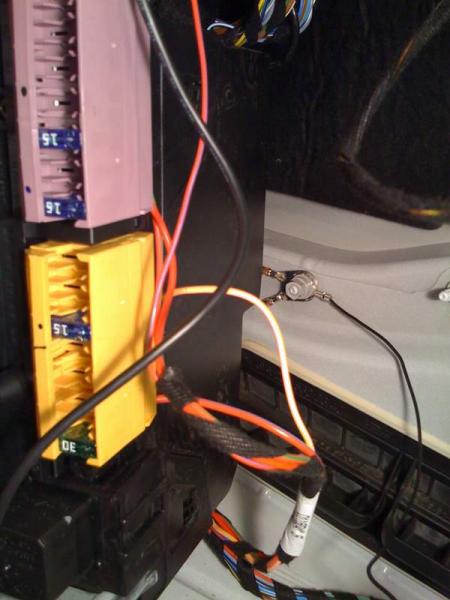
btw, I wired the grounding to little different place.

Senior Member
just bought the fakra adapter and the camera. going to do this as soon as the parts come. thanks for the write-up!

Senior Member
Am I the only one seeing red Xs for the pix in the original post ?

Newbie
You need to use MS Internet Explorer Browser. When I use Google Chrome or Mozilla Firefox browser I also have the "red x".

Super Member
Quote:
Not quite true. I'm using a current version of Firefox and seeing the pic just fine!Originally Posted by na011
You need to use MS Internet Explorer Browser. When I use Google Chrome or Mozilla Firefox browser I also have the "red x".
Senior Member
I am using MS IE and still have no pix.
pm me with your email address. i will send them to you.
MBWorld Fanatic!
Quote:
Just log in again. Happens sometimes. Firefox 3.03Originally Posted by na011
You need to use MS Internet Explorer Browser. When I use Google Chrome or Mozilla Firefox browser I also have the "red x".
MBWorld Fanatic!
Clear your cache.
Super Member
Looking at the page source, this is the first image:
https://mbworld.org/forums/attachmen...p;d=1223169479
(redisplayed with included spaces so you can see the whole thing: ...
h ttp:// www.mbworld.org/ forums/ attachment.php?attachmentid=140801&d=122316947 9
How it works is like this: It's identifying an image that is supposed to be displayed, IF you are authorized to see it. If you take this http: address to a different browser window, and use it as the page address, it will immediately ask you to log in. After that, it will display the first image. (There are two.)
Once you do log in, it thanks you for logging in, then displays the photo. So, entering this http address results in the forum software going through 3 screens. When you are logged in as a normal user, this is all "automatic", but it can help explain why pages sometimes load slowly.
If you're not seeing the photo, then essentially you're not logged in. If you think you're logged in (e.g., there is a welcome message near the top that has your login name on it), then there might be an error in your account.
I don't know if clearing the cache is useful. You could try different browsers, or a different computer. I can see this photo from IE or Firefox, but I have to be logged in first.
https://mbworld.org/forums/attachmen...p;d=1223169479
(redisplayed with included spaces so you can see the whole thing: ...
h ttp:// www.mbworld.org/ forums/ attachment.php?attachmentid=140801&d=122316947 9
How it works is like this: It's identifying an image that is supposed to be displayed, IF you are authorized to see it. If you take this http: address to a different browser window, and use it as the page address, it will immediately ask you to log in. After that, it will display the first image. (There are two.)
Once you do log in, it thanks you for logging in, then displays the photo. So, entering this http address results in the forum software going through 3 screens. When you are logged in as a normal user, this is all "automatic", but it can help explain why pages sometimes load slowly.
If you're not seeing the photo, then essentially you're not logged in. If you think you're logged in (e.g., there is a welcome message near the top that has your login name on it), then there might be an error in your account.
I don't know if clearing the cache is useful. You could try different browsers, or a different computer. I can see this photo from IE or Firefox, but I have to be logged in first.
MBWorld Fanatic!
Quote:
Friends don't let friends use MS stuff.Originally Posted by na011
You need to use MS Internet Explorer Browser. When I use Google Chrome or Mozilla Firefox browser I also have the "red x".


