


 Jun 4, 2015, 08:20 PM
Last edit by: IB Advertising
See related guides and technical advice from our community experts:
- Mercedes-Benz E-Class: Recalls and Technical Service Bulletins
Important information to help you understand your Mercedes-Benz

Service E-Class (211) USA

Senior Member
Joined: Oct 2006
Posts: 258
Likes: 1
From: socal

I have the same exact problem on a 2004 E320. Yet I've reset it without problems on a 2005 E500.
I get these three screens...
 click to see larger

 Help!
Help!
Senior Member
Joined: Oct 2006
Posts: 258
Likes: 1
From: socal

Ok so I finally figure it out. I got a pm from konigstiger that I needed to cancel the service and confirm each, line to line. I cancel the services but did not see the line to line confirmation for each available.
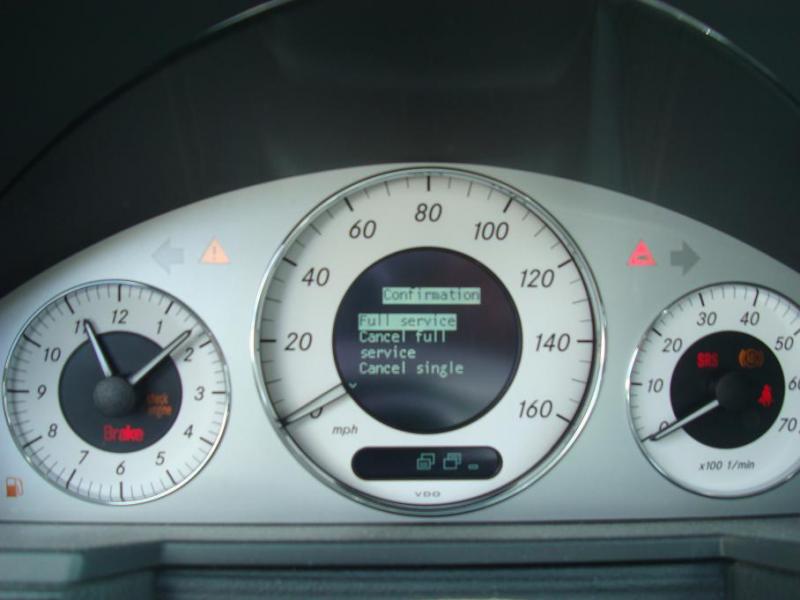
Sorry I found out none of my pictures were focused before I let the car go but I will update if I get the car again. These are with older pictures I did take...
Last edited by health services; Apr 19, 2010 at 01:40 AM.
Senior Member
Joined: Oct 2006
Posts: 258
Likes: 1
From: socal
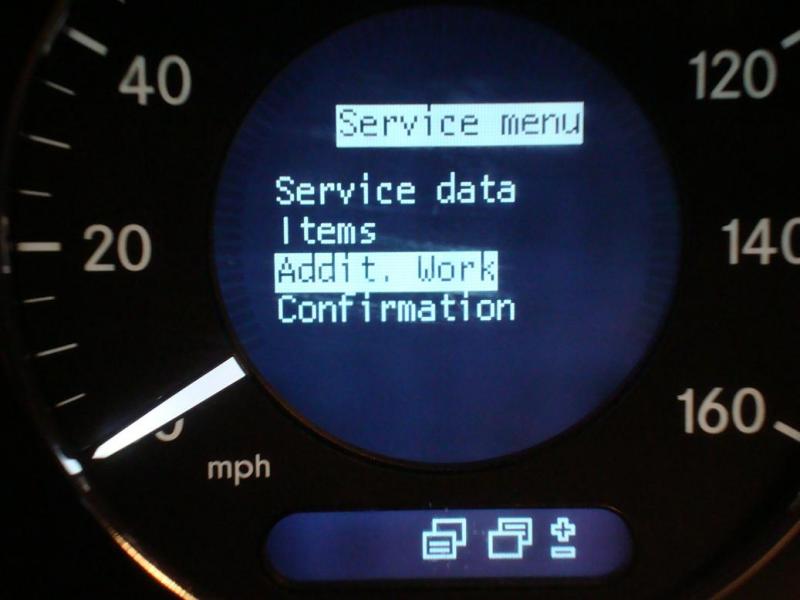
Go to the service menu.
scrow up or down with the (+) or (-) until you get to 'addit work' click or hit the left outer lower button to proceed
scrow up or down with the (+) or (-) until you get to 'addit work' click or hit the left outer lower button to proceed
Last edited by health services; Apr 19, 2010 at 01:39 AM.
Senior Member
Joined: Oct 2006
Posts: 258
Likes: 1
From: socal
under 'addit work'
Scrow up or down with (+) or (-) to the lines you want to cancel. hit the left outer loer button to the comfirmation page.
Scrow up or down with (+) or (-) to the lines you want to cancel. hit the left outer loer button to the comfirmation page.
Last edited by health services; Apr 19, 2010 at 01:38 AM.
Senior Member
Joined: Oct 2006
Posts: 258
Likes: 1
From: socal
I guess the later model cars have a similar menu.
under 'addit work'
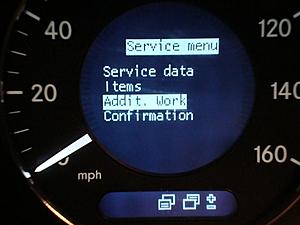
US service 12?
Which is a oil change I think...
hit the left outer lower button and you will get to the next page
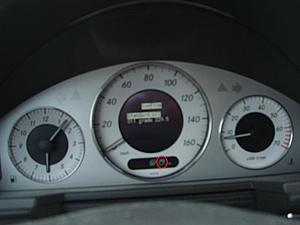
Standard oil
Oil grade blah blah
Hit the left outer lower button again to confirm
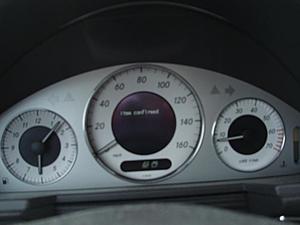
Afterwards hit the left outer upper button to back out of the screens.
under 'addit work'
US service 12?
Which is a oil change I think...
hit the left outer lower button and you will get to the next page
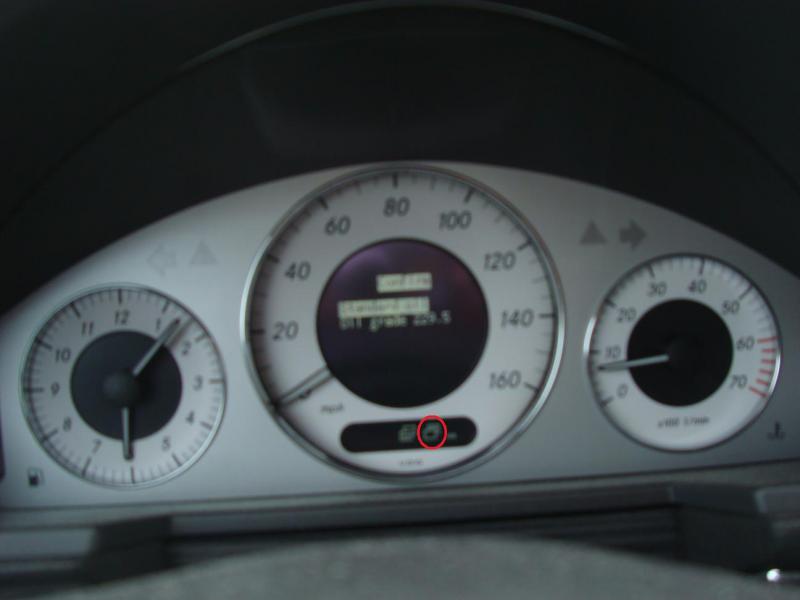
Standard oil
Oil grade blah blah
Hit the left outer lower button again to confirm
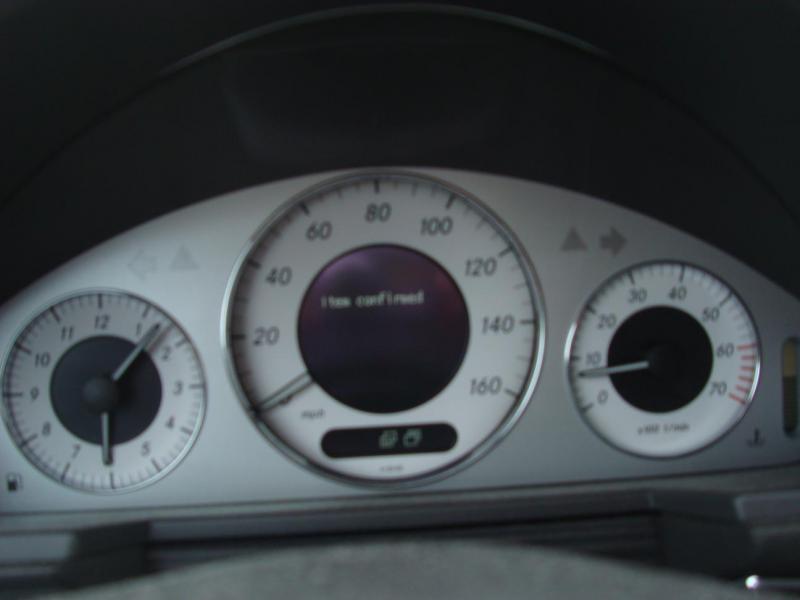
Afterwards hit the left outer upper button to back out of the screens.
Last edited by health services; Apr 19, 2010 at 01:37 AM.

Senior Member
Joined: Jun 2009
Posts: 268
Likes: 1
From: Northern Virginia
2006 E320CDI

Senior Member
Joined: Aug 2009
Posts: 467
Likes: 1
From: Long Island, NY
A few toys & 07' E350 4matic w/AMG sport packg.
MB World Stories
The Best of Mercedes & AMG

New Electric Mercedes-AMG GT 4-Door Coupe Unveiled: 10 Things You Need to Know
Verdad Gallardo
6 Mercedes Models That Did NOT Age Well (But Are Somehow Still Cool)
Verdad Gallardo
Manual Mercedes? 6 Times Sindelfingen Let Drivers Have All The Fun
Verdad Gallardo
Mercedes SLR McLaren 722 S Is Extremely Rare Example Modified by McLaren
Verdad Gallardo
8 Classic Boxy Mercedes Designs That Have Aged Like Fine Wine
Verdad Gallardo
Flawlessly Restored Mercedes 190E Evo II Heads to Auction
Verdad Gallardo
Electric Mercedes C-Class Unveiled: 11 Things You Need to Know
Verdad Gallardo
Mercedes EQS Gets A Major Update: Everything You Need to Know
Verdad Gallardo
5 Underrated Mercedes-Benz Models That Don't Get the Love They Deserve
Verdad Gallardo
Newbie
Joined: Nov 2008
Posts: 4
Likes: 0
'03 E500 W211
For what year is the attached FFS Schedule?

Newbie
Joined: Sep 2010
Posts: 1
Likes: 0
taurus
Does anyone know what the average yearly mileage for driving a vehicle? I thought it was 15000 or 20000, but am being told by a car salesman (not my favorite profession) that it is only 12000 or 13000. Help anyone know ?


Member
Joined: May 2010
Posts: 97
Likes: 1
'06 E320 CDI, '04 Sprinter 316 CDI
Reset Computer if oil change is required due to time, not mileage?
Hi,
I was wondering about an issue I have....
I just bought an 06' E320 CDI with 20,000 miles.
My Service D just showed up, and after checking with the display, it states I need to do Service Items: 3, 5, 9, 10, 12, 13, 16
Additional items: 1, 2, 3, 5, 8, 9, 10, 12, 16, 20.
My question is, seeing as the oil by mileage is meant to be changed at 13K mile increments, my current mileage is only 20,500 miles.....so do I reset the computer once I change the oil, fuel filter, and combination air filter?
or do I wait until it hits 26K miles before I reset the computer?
I want to make sure I understand what is best so I do not screw up my future FSS readings etc....
Thanks for any assistance in advance!
I was wondering about an issue I have....
I just bought an 06' E320 CDI with 20,000 miles.
My Service D just showed up, and after checking with the display, it states I need to do Service Items: 3, 5, 9, 10, 12, 13, 16
Additional items: 1, 2, 3, 5, 8, 9, 10, 12, 16, 20.
My question is, seeing as the oil by mileage is meant to be changed at 13K mile increments, my current mileage is only 20,500 miles.....so do I reset the computer once I change the oil, fuel filter, and combination air filter?
or do I wait until it hits 26K miles before I reset the computer?
I want to make sure I understand what is best so I do not screw up my future FSS readings etc....
Thanks for any assistance in advance!

Newbie
Joined: Nov 2010
Posts: 1
Likes: 0
2006 E350 4-matic
Confirming service on a 2006 E350
Thanks everyone for sharing so much on this forum. I have saved a lot of money doing most of the service DIY with the help of a DIY friend who has a shop with a lift.
On my 2006 E350 4-matic, I had to start from the outside temp display instead of the mph display. Otherwise, the procedure to access the service menu and confirm service on a 2006 worked just fine.
On my 2006 E350 4-matic, I had to start from the outside temp display instead of the mph display. Otherwise, the procedure to access the service menu and confirm service on a 2006 worked just fine.

Member
Joined: Jun 2009
Posts: 159
Likes: 17
2016 C 300 4matic Lunar blue
Apologies if this isn't the right place for this question. I have done a search for this info on the forum, without much success. I have a 2006 E350. Am getting the low battery message in the instrument cluster. Someone on the list said that this means it's time to replace both batteries. I discovered that the batteries at the dealer are about $700. Has anyone found another source for these batteries? Thanks, and please direct me to the right thread if this is the wrong one.

Junior Member
Joined: Aug 2008
Posts: 34
Likes: 0
From: Hillsborough, CA
E320
Apologies if this isn't the right place for this question. I have done a search for this info on the forum, without much success. I have a 2006 E350. Am getting the low battery message in the instrument cluster. Someone on the list said that this means it's time to replace both batteries. I discovered that the batteries at the dealer are about $700. Has anyone found another source for these batteries? Thanks, and please direct me to the right thread if this is the wrong one.

Junior Member
Joined: Sep 2009
Posts: 15
Likes: 0
2004 E320 4matic Wagon - 55k miles
ATF & filter change
I had a small leak at the AT pan and it was fixed with a new gasket. In doing so , new atf and filter. Mechanic put in Febi 22806 with MB approval on it indicating it meets MB 236.10.
Am I OK with this?
Am I OK with this?

Junior Member
Joined: Jan 2011
Posts: 55
Likes: 1
From: Miami, FL
2007 E350
FSS+ system
Ask a hundred people about the FSS system and you get 100 different answers. So let me ask some simple straight forward question which I hope those in the know can answer simple and straight forward. It's pretty clear there are different ways to get to the "service menu" screen which looks like this:
SERVICE MENU
SERVICE DATA
ITEMS
ADDITIONAL WORK (SOMETIMES SPECIAL WORK)
CONFIRMATION
What is not clear to me is what this info means when you call it up.
Question 1: If I click on "items" and it lists the numbers of the services that it needs, let's say in this case 3,9,12 and 13 come up. So let me be very specific here, my 2007 E350 is due for service C in 11,450 miles, I know this because it's what the says when I scroll up from the temperature screen. So does this mean that service 3,9,12, and 13 are due in 11,450 miles? I think the answer is yes.
Question 2: If so, lets say I change my oil and filter myself, can I go in and tell the FSS system I did this and will it delete the 12 from the item list? If so how? This is where I get lost. From my research I believe you can't indicate to the FSS system that you performed just one service, you must reset the entire system by doing a confirmation. Or am I wrong and can you go into the confirmation option and confirm that you performed just service 12 (oil change). And could I do it individually for the others if let's say I wanted to perform them myself before service C (in 11,450 miles) rolls around.
Question 3: If you go into the confirmation option, you get several options. One of them is "delete confirmation". I'm I correct in assuming that this is a way that if lets say you by mistake confirm a service item, this allows you to delete that confirmation? Or does delete mean that you are deleting the item from the list which would be telling the FSS that that service was performed?
All of this may not be clear, but could someone that is very familiar with FSS, goes through this SERVICE MENU and explain what you can do, and why you do it, and explain it as if you were explaining it to an 8 year old and use a lot of examples.
Many thanks to that person.
SERVICE MENU
SERVICE DATA
ITEMS
ADDITIONAL WORK (SOMETIMES SPECIAL WORK)
CONFIRMATION
What is not clear to me is what this info means when you call it up.
Question 1: If I click on "items" and it lists the numbers of the services that it needs, let's say in this case 3,9,12 and 13 come up. So let me be very specific here, my 2007 E350 is due for service C in 11,450 miles, I know this because it's what the says when I scroll up from the temperature screen. So does this mean that service 3,9,12, and 13 are due in 11,450 miles? I think the answer is yes.
Question 2: If so, lets say I change my oil and filter myself, can I go in and tell the FSS system I did this and will it delete the 12 from the item list? If so how? This is where I get lost. From my research I believe you can't indicate to the FSS system that you performed just one service, you must reset the entire system by doing a confirmation. Or am I wrong and can you go into the confirmation option and confirm that you performed just service 12 (oil change). And could I do it individually for the others if let's say I wanted to perform them myself before service C (in 11,450 miles) rolls around.
Question 3: If you go into the confirmation option, you get several options. One of them is "delete confirmation". I'm I correct in assuming that this is a way that if lets say you by mistake confirm a service item, this allows you to delete that confirmation? Or does delete mean that you are deleting the item from the list which would be telling the FSS that that service was performed?
All of this may not be clear, but could someone that is very familiar with FSS, goes through this SERVICE MENU and explain what you can do, and why you do it, and explain it as if you were explaining it to an 8 year old and use a lot of examples.
Many thanks to that person.
Senior Member
Joined: Mar 2009
Posts: 430
Likes: 6
From: USA, EU
06 E320 CDI (GONE), 14 Jeep GC EcoDiesel, 01 Disco II (GONE), 09 BMW X3 3.0 Si Xdrive
Ask a hundred people about the FSS system and you get 100 different answers. So let me ask some simple straight forward question which I hope those in the know can answer simple and straight forward. It's pretty clear there are different ways to get to the "service menu" screen which looks like this:
SERVICE MENU
SERVICE DATA
ITEMS
ADDITIONAL WORK (SOMETIMES SPECIAL WORK)
CONFIRMATION
What is not clear to me is what this info means when you call it up.
Question 1: If I click on "items" and it lists the numbers of the services that it needs, let's say in this case 3,9,12 and 13 come up. So let me be very specific here, my 2007 E350 is due for service C in 11,450 miles, I know this because it's what the says when I scroll up from the temperature screen. So does this mean that service 3,9,12, and 13 are due in 11,450 miles? I think the answer is yes.
Question 2: If so, lets say I change my oil and filter myself, can I go in and tell the FSS system I did this and will it delete the 12 from the item list? If so how? This is where I get lost. From my research I believe you can't indicate to the FSS system that you performed just one service, you must reset the entire system by doing a confirmation. Or am I wrong and can you go into the confirmation option and confirm that you performed just service 12 (oil change). And could I do it individually for the others if let's say I wanted to perform them myself before service C (in 11,450 miles) rolls around.
Question 3: If you go into the confirmation option, you get several options. One of them is "delete confirmation". I'm I correct in assuming that this is a way that if lets say you by mistake confirm a service item, this allows you to delete that confirmation? Or does delete mean that you are deleting the item from the list which would be telling the FSS that that service was performed?
All of this may not be clear, but could someone that is very familiar with FSS, goes through this SERVICE MENU and explain what you can do, and why you do it, and explain it as if you were explaining it to an 8 year old and use a lot of examples.
Many thanks to that person.
SERVICE MENU
SERVICE DATA
ITEMS
ADDITIONAL WORK (SOMETIMES SPECIAL WORK)
CONFIRMATION
What is not clear to me is what this info means when you call it up.
Question 1: If I click on "items" and it lists the numbers of the services that it needs, let's say in this case 3,9,12 and 13 come up. So let me be very specific here, my 2007 E350 is due for service C in 11,450 miles, I know this because it's what the says when I scroll up from the temperature screen. So does this mean that service 3,9,12, and 13 are due in 11,450 miles? I think the answer is yes.
Question 2: If so, lets say I change my oil and filter myself, can I go in and tell the FSS system I did this and will it delete the 12 from the item list? If so how? This is where I get lost. From my research I believe you can't indicate to the FSS system that you performed just one service, you must reset the entire system by doing a confirmation. Or am I wrong and can you go into the confirmation option and confirm that you performed just service 12 (oil change). And could I do it individually for the others if let's say I wanted to perform them myself before service C (in 11,450 miles) rolls around.
Question 3: If you go into the confirmation option, you get several options. One of them is "delete confirmation". I'm I correct in assuming that this is a way that if lets say you by mistake confirm a service item, this allows you to delete that confirmation? Or does delete mean that you are deleting the item from the list which would be telling the FSS that that service was performed?
All of this may not be clear, but could someone that is very familiar with FSS, goes through this SERVICE MENU and explain what you can do, and why you do it, and explain it as if you were explaining it to an 8 year old and use a lot of examples.
Many thanks to that person.

Junior Member
Joined: Oct 2008
Posts: 16
Likes: 0
From: San Diego, Ca
2004 E500
Ask a hundred people about the FSS system and you get 100 different answers. So let me ask some simple straight forward question which I hope those in the know can answer simple and straight forward. It's pretty clear there are different ways to get to the "service menu" screen which looks like this:
SERVICE MENU
SERVICE DATA
ITEMS
ADDITIONAL WORK (SOMETIMES SPECIAL WORK)
CONFIRMATION
What is not clear to me is what this info means when you call it up.
Question 1: If I click on "items" and it lists the numbers of the services that it needs, let's say in this case 3,9,12 and 13 come up. So let me be very specific here, my 2007 E350 is due for service C in 11,450 miles, I know this because it's what the says when I scroll up from the temperature screen. So does this mean that service 3,9,12, and 13 are due in 11,450 miles? I think the answer is yes.
Question 2: If so, lets say I change my oil and filter myself, can I go in and tell the FSS system I did this and will it delete the 12 from the item list? If so how? This is where I get lost. From my research I believe you can't indicate to the FSS system that you performed just one service, you must reset the entire system by doing a confirmation. Or am I wrong and can you go into the confirmation option and confirm that you performed just service 12 (oil change). And could I do it individually for the others if let's say I wanted to perform them myself before service C (in 11,450 miles) rolls around.
Question 3: If you go into the confirmation option, you get several options. One of them is "delete confirmation". I'm I correct in assuming that this is a way that if lets say you by mistake confirm a service item, this allows you to delete that confirmation? Or does delete mean that you are deleting the item from the list which would be telling the FSS that that service was performed?
All of this may not be clear, but could someone that is very familiar with FSS, goes through this SERVICE MENU and explain what you can do, and why you do it, and explain it as if you were explaining it to an 8 year old and use a lot of examples.
Many thanks to that person.
SERVICE MENU
SERVICE DATA
ITEMS
ADDITIONAL WORK (SOMETIMES SPECIAL WORK)
CONFIRMATION
What is not clear to me is what this info means when you call it up.
Question 1: If I click on "items" and it lists the numbers of the services that it needs, let's say in this case 3,9,12 and 13 come up. So let me be very specific here, my 2007 E350 is due for service C in 11,450 miles, I know this because it's what the says when I scroll up from the temperature screen. So does this mean that service 3,9,12, and 13 are due in 11,450 miles? I think the answer is yes.
Question 2: If so, lets say I change my oil and filter myself, can I go in and tell the FSS system I did this and will it delete the 12 from the item list? If so how? This is where I get lost. From my research I believe you can't indicate to the FSS system that you performed just one service, you must reset the entire system by doing a confirmation. Or am I wrong and can you go into the confirmation option and confirm that you performed just service 12 (oil change). And could I do it individually for the others if let's say I wanted to perform them myself before service C (in 11,450 miles) rolls around.
Question 3: If you go into the confirmation option, you get several options. One of them is "delete confirmation". I'm I correct in assuming that this is a way that if lets say you by mistake confirm a service item, this allows you to delete that confirmation? Or does delete mean that you are deleting the item from the list which would be telling the FSS that that service was performed?
All of this may not be clear, but could someone that is very familiar with FSS, goes through this SERVICE MENU and explain what you can do, and why you do it, and explain it as if you were explaining it to an 8 year old and use a lot of examples.
Many thanks to that person.
1. Mine says "Exh Gas Analysis" I did a search and couldn't find a good explanation? Can someone please tell me what this means?
2. When you confirm something, does that mean it erases it? I figured out how to go to each item and it gives me the option to confirm. If that's how you delete them when the service is complete, then I'm good on that part.
3. Can someone recommend a good online source for OE parts. Preferably in the Western US so shipping is faster and cheaper. I would like to avoid dealer costs as much as possible.
I read a lot on this site prior to purchasing one, so I appreciate all the great information on here. Thank you!
Junior Member
Joined: Jan 2011
Posts: 55
Likes: 1
From: Miami, FL
2007 E350
From what I can tell, a lot of people know how to access the FSS and how to reset it doing a full confirmation (reset). What I believe most people don't know is how it actually use the FSS system to its maximum benefit.
The reason I say this is because there are some many helpful people going to such extraordinary lengths to document so many other issues by making videos on You Tube, picture threads here on this site, etc. Yet, no one has gone into detail how to navigate the FSS system in detail. All they do is show how to access the service data on your car and then they stop. Why not go thru the process of what each screen means, how to confirm, what confirming means, etc. The FSS system seems to be a very popular issue, yet it is the least explain area on all the forums.
If someone who knows the in's and out's of the FSS system stepped up and went to the trouble to produce a video or thread, I believe it would be one of the most viewed posts on this forum.
The reason I say this is because there are some many helpful people going to such extraordinary lengths to document so many other issues by making videos on You Tube, picture threads here on this site, etc. Yet, no one has gone into detail how to navigate the FSS system in detail. All they do is show how to access the service data on your car and then they stop. Why not go thru the process of what each screen means, how to confirm, what confirming means, etc. The FSS system seems to be a very popular issue, yet it is the least explain area on all the forums.
If someone who knows the in's and out's of the FSS system stepped up and went to the trouble to produce a video or thread, I believe it would be one of the most viewed posts on this forum.


Junior Member
Joined: Jun 2010
Posts: 40
Likes: 0
2003 e500 sport

Newbie
Joined: Aug 2011
Posts: 2
Likes: 0
MB E320 Avantgarde 2002
I have read through this thread and find it very interesting. My neighbour is head of the Ford team in Essex that builds their injection units, so I take what he says as gospel. When the recession hit here in UK, he told me that if you cannot aford to have a service on your car (Any car), have the oil changed every six months, I can see what he meant

Senior Member
Joined: Aug 2011
Posts: 356
Likes: 19
From: RI
2017 S550 4matic
the generally accepted figure was 15,000 per year but more recently it has been upgraded to about 18,000 per year since cars seem to be lasting longer and running better with high mileage.
Those figures are given as a way to estimate the stress the car's been put under. For example, a car with 9k yearly miles probably has less wear and tear and will be better taken care of than a car with 20k yearly miles (sometimes just the opposite, because more services are performed). It's another dealership gimmick to give you less money for your trade usually, if you exceed that generally accepted 'norm'.

Thread Starter
Out Of Control!!
Joined: Jul 2003
Posts: 15,901
Likes: 4,632
From: North Scottsdale, AZ
'71 Pinto
ATF
722.6 (5-speed) - MB part #001989680310
722.9 (7-speed) to production date 6/21/10 – 001989680310 (red)
722.9 after 6/21/10 – 001989780309 (blue)
Note variants of 722.9 are not compatible and cannot be mixed.
722.6 (5-speed) - MB part #001989680310
722.9 (7-speed) to production date 6/21/10 – 001989680310 (red)
722.9 after 6/21/10 – 001989780309 (blue)
Note variants of 722.9 are not compatible and cannot be mixed.


