When you click on links to various merchants on this site and make a purchase, this can result in this site earning a commission. Affiliate programs and affiliations include, but are not limited to, the eBay Partner Network.
Ok so still trying to figure out how to activate the Mic for Google maps IE navi. So the new android unit doesn't have a read text like the command? Urgh would think it would...
Disregard. You already found the answer. Didn't read further down before I tried to answer. That's what happens when I use my phone to view posts lol.
Thanks in advance..
So I was screwing around to see if a blue ray DVD wouuld work and it does. Lol but is there a way around watching it thru the unit and not the command? Cause this screen is so cut off with the dummy split.
OEM window cannot be expanded. Only other way is if you rip the video into an mp4 then use a thumb drive so you can watch it on the android side to take up the full screen.
OEM window cannot be expanded. Only other way is if you rip the video into an mp4 then use a thumb drive so you can watch it on the android side to take up the full screen.
Ever since I connected the navi antenna I'e been experiencing some static switching from YouTube to blue tooth etc. Anyone experience this? Is there something I can do to get the clarity back?
Ever since I connected the navi antenna I'e been experiencing some static switching from YouTube to blue tooth etc. Anyone experience this? Is there something I can do to get the clarity back?
The GPS (square) antenna? Can't see how GPS would cause static so that is weird.
I had that happen initially when my audio out for Android was connected via the 3.5mm to Aux. Like you, I heard static when switching over from Aux to BT (i.e. BT audio direct from phone to the COMAND head-unit). Tried a bunch of things, but nothing worked. The settings that finally worked for me were - (a) I connected audio from the screen to the head unit via BT (and changed the related audio out in the screen's settings to BT vs Aux) AND (b) lowering volume on the screen to 5 or 6 (vs. higher). And yes, accomplishing (a) was a pain in the butt. I had to go through 'Factory Pattern' (the one with the 111111 pass key) into the tablet settings, turn on the BT and then rush back to the "FM" to get to the stock screen, search for BT devices, find "Android BT", and finally pair the devices. Took me a few tries....now I have audio via BT AND steering wheel audio controls (back, next, etc.) via BT. All is finally well.
In other news - I can also confirm that installing the Google app (from the Play store) has given me voice controls. I also installed the Google Keyboard - which is SO much better than the crappy keyboard that came with the screen (Pinyin?). Simple Pie worked when I first installed it (so I could jump quickly to 'recent apps' and even close them). But when I came back to my car in the evening - after leaving it parked all day - Simple Pie wasn't enabled when I turned the car back on. Such a bummer. I also tried Tasker - to auto launch Spotify on Wi-Fi connect. But that too had been turned off by the time I came back to my car
In other news - I can also confirm that installing the Google app (from the Play store) has given me voice controls. I also installed the Google Keyboard - which is SO much better than the crappy keyboard that came with the screen (Pinyin?). Simple Pie worked when I first installed it (so I could jump quickly to 'recent apps' and even close them). But when I came back to my car in the evening - after leaving it parked all day - Simple Pie wasn't enabled when I turned the car back on. Such a bummer. I also tried Tasker - to auto launch Spotify on Wi-Fi connect. But that too had been turned off by the time I came back to my car
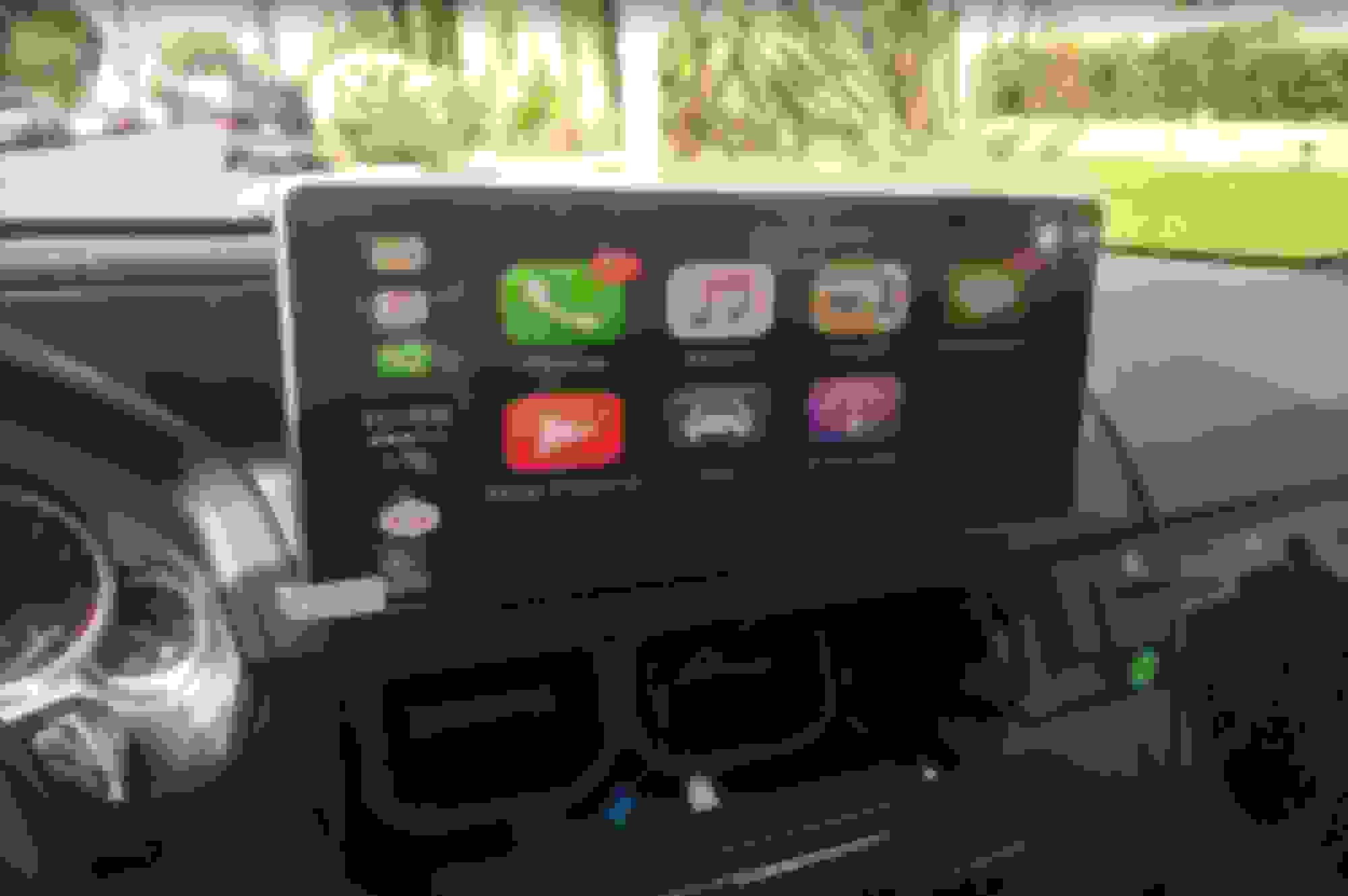
So....I got this Carplay dongle off Amazon USB AutoPlay Dongle Android Auto for PUMPKIN Car Stereos, iPhone and Android Phone, Free 8GB SD Card Included https://www.amazon.com/dp/B079NZ581V/ref=cm_sw_r_cp_api_o1WVAbNK094YY
It was delivered today and I just installed it. I can't get it to use the mic (I get kicked into app settings). But other than that, everything seems to work perfectly; touchscreen, maps, Spotify, Pandora, etc with full steering wheel controls. I will experiment more next week (traveling over the next couple of days) and will post more as I discover more. For now, I just thought I'd let everyone know that there is a path to Carplay on the W212, albeit an expensive one. 😁
It was delivered today and I just installed it. I can't get it to use the mic (I get kicked into app settings). But other than that, everything seems to work perfectly; touchscreen, maps, Spotify, Pandora, etc with full steering wheel controls. I will experiment more next week (traveling over the next couple of days) and will post more as I discover more. For now, I just thought I'd let everyone know that there is a path to Carplay on the W212, albeit an expensive one. 😁
So the way this stands now is either, say carplay, or dashcam, because there's one USB port.
I haven't had time to work on the unit for a few days but still stuck with getting the OEM Comand to come up. I emailed my seller and he says that it is the unit, and I may need a replacement. They had a few listings, 2013-2014 and a 2015 listing. My question is if there is a real difference in the internals in a unit for the 2013 model and 2015 model (mine is a 2014). I'm just trying to figure out if I should just return the unit since I'm not getting anywhere with what I have currently. Maybe Chris (or anyone else) could help me with this. Thanks.
Good to see the Bluetooth audio works, so I won't have to make all the connections to get the AUX -> MMI set up.
I cannot find anywhere to connect this spare plug from my sceen, the metal plugs connects to the metal conversion module, but where does this plug need to be connected to? Do I just leave it disconnected?
EDIT; forgot to mention that everything works as inteneded without that plug being plugged in. Screen works (after connecting red cable from metal converter box to yellow accessory power cable off the loom), command knob works, audio switching works but that's another issue, see next post.
My car the the rear entertainment package, could that be the plug that brings audio from the rear DVD player to the main speakers?
Last edited by Ungarisch; Mar 31, 2018 at 06:22 PM.
So, I have a very unique issue when it comes to automatic Audio Swithching. I have probably one of 5 E-Classes out there that was spec'd out to have a rear enterainment & screen package. So when the audio switching happens, instead of switching to AUX, it switches to REAR option on the Comand's audio dropdown menu because REAR is the last possible selection. When REAR is selected, that means that whatever is in the DVD player in the rear seat bottom, is what's playing through the speakers.
I'm gonna have to play with it to figure out to to get around this.
It was delivered today and I just installed it. I can't get it to use the mic (I get kicked into app settings). But other than that, everything seems to work perfectly; touchscreen, maps, Spotify, Pandora, etc with full steering wheel controls. I will experiment more next week (traveling over the next couple of days) and will post more as I discover more. For now, I just thought I'd let everyone know that there is a path to Carplay on the W212, albeit an expensive one. 😁
Are you using it with an iPhone or Android?
I bough a similar adapter from Chris made by CarLife( same as the head unit), I turned on USB debuggin on my BlackBerry KeyOne (Android 7.1.1), but when I pug it in it's just stuck at the "connect your phone" screen. I'll try it with my dad's iPhone later today to see if it works.
So, I have a very unique issue when it comes to automatic Audio Swithching. I have probably one of 5 E-Classes out there that was spec'd out to have a rear enterainment & screen package. So when the audio switching happens, instead of switching to AUX, it switches to REAR option on the Comand's audio dropdown menu because REAR is the last possible selection. When REAR is selected, that means that whatever is in the DVD player in the rear seat bottom, is what's playing through the speakers.
I'm gonna have to play with it to figure out to to get around this.
You will just have to manually switch to aux. Half of the time my android unit wont properly switch to aux and it will end up in bluetooth or some other menu in the stock comand. Very clever though to have it try to navigate the stock unit though not perfect.
word of advice to all who going to do the install, drop your glove box, its only (7) T20 screws and it slides forward.
Before I dropped the glove box it seemed impossible to put the the Comand unit back in its place. Also, I was super skeched out that I was going to kink or break the fiber optics cable.
After dropping the glow box you have TONS of rooms to route the harness, fuse box and extra leeds in the gap to the right of the Comand support cage. Also you're going to have to drill a hole in your glovebox anyways to pass the USB and headphone jack through.
EDIT: another tip, if your wood trim is not trashed like mine, it's probably a good idea to blue-tape all of your ashtray wood trim pieces because you will scratch it while wrestling with the Comand unit.
Last edited by Ungarisch; Mar 31, 2018 at 10:27 PM.
I bough a similar adapter from Chris made by CarLife( same as the head unit), I turned on USB debuggin on my BlackBerry KeyOne (Android 7.1.1), but when I pug it in it's just stuck at the "connect your phone" screen. I'll try it with my dad's iPhone later today to see if it works.
I cannot find anywhere to connect this spare plug from my sceen, the metal plugs connects to the metal conversion module, but where does this plug need to be connected to? Do I just leave it disconnected?
EDIT; forgot to mention that everything works as inteneded without that plug being plugged in. Screen works (after connecting red cable from metal converter box to yellow accessory power cable off the loom), command knob works, audio switching works but that's another issue, see next post.
My car the the rear entertainment package, could that be the plug that brings audio from the rear DVD player to the main speakers?
Did you finally get your OEM screen to display? If not, then I have two theories - (a) user error. This is the dumber one of my two theories, and apologies in advance if I offend you in any way....but is it possible that you may have accidentally pressed the "ON" button at the center of the COMAND unit? Which as you know turns off the OEM display? If pressed, then the OEM display will not show on your Android screen. It may even be worth it to reset the COMAND using the OEM Engineering menu. (b) you have a bad LVDS cable. In one of your posts you mention that your OEM screen works when reconnected. So if I am right, the video feed to the OEM screen comes via that blue round connector. The LVDS cable connects to that blue round connector....and it also has the USB port (that you pull into your glove box or whatever). If the video works all the way to the OEM blue round connector...then the LVDS cable/connector that you got with your Android screen is the likely culprit. Thoughts?
Thanks for the ideas. Still haven't got the OEM screen to show up. No offense taken, and I made sure Comand was on since I had it on Radio and could hear it playing as well as see that the button lights on the Comand unit were on. It may be the LVDS cable, but I'm not sure what else could be the issue. My vendor did send me the wrong Quad cable to begin with, so I'm trying to work it out with him. I tried to reconnect the original screen and it's baffling how easily the OEM quad connector slips into the Comand unit and how much wrangling is needed with these aftermarket cables. I did confirm, as you probably already know, that to get bluetooth audio, you do have to confirm the passkey through the OEM screen, or it won't connect. I had hooked up the OEM screen and the Android screen at the same time, and was able to make a bluetooth connection. It still won't auto-switch for some reason.
Is there a different APK for AndroindAuto than for CarPlay? It was already pre installed on the android unit, but because it didnt work I uninstalled it and downloaded it from the URL on the box http://121.40.123.198:8080/autobox/autoplaybox.apk
If I connect an Adroid to it this is what I get, iPhone connects just fine.
I've downloaded a different, older version (12.20.2017 vs. 02.06.2018) and while at least the option for AndroidAUTO shows up, my phone still does not connect.
I use an old iPhone 5c for Carplay, not Android. On a related note, does anyone know how to make a particular app autolaunch on screen start? What I'm trying to solve for is - start up car, screen goes on, and an app of my choice autolaunches. Maybe Spotify, or Carplay or whatever. I tried the Google Play version of Tasker but that didn't work. Anyone know of any other method to enable this behavior?
Mercedes SLR McLaren 722 S Is Extremely Rare Example Modified by McLaren
Slideshow: A one-of-one U.S.-spec Mercedes-Benz SLR McLaren Roadster became even rarer after a factory-backed transformation at McLaren's headquarters.