


W221 ANDROID touchscreen...

Senior Member


Joined: Jan 2020
Posts: 262
Likes: 106
W222, W221, W218, W211
hi @aximus , there are two UI/launchers from what I have just learnt... Settings -> Factory -> Code 190627 and there are plenty of things to configure. Launcher either MBUX (the one you see) or NTG5 (I've just set it to compare). I managed to fix the boot logo, but no luck with the screen cropping. I tried several options - none seems to be working. I'll live with that.
The same factory menu allowed me to update the "Music" application - so now I have a quick way to run Zlink by selecting Music (I play music from my phone anyways).
As for the audio quality - I would say it is identical to what it used to be. Of course, there is a noticeable difference between playing OE DVD / HDD and AUX line in, so if you can live with AUX-in quality - this is pretty much the same.
The same factory menu allowed me to update the "Music" application - so now I have a quick way to run Zlink by selecting Music (I play music from my phone anyways).
As for the audio quality - I would say it is identical to what it used to be. Of course, there is a noticeable difference between playing OE DVD / HDD and AUX line in, so if you can live with AUX-in quality - this is pretty much the same.

Thread Starter
MBWorld Fanatic!


Joined: Oct 2009
Posts: 3,433
Likes: 213
From: Sweden, Stockholm
W222 S63L, ML/GLE350
hi @aximus , there are two UI/launchers from what I have just learnt... Settings -> Factory -> Code 190627 and there are plenty of things to configure. Launcher either MBUX (the one you see) or NTG5 (I've just set it to compare). I managed to fix the boot logo, but no luck with the screen cropping. I tried several options - none seems to be working. I'll live with that.
The same factory menu allowed me to update the "Music" application - so now I have a quick way to run Zlink by selecting Music (I play music from my phone anyways).
As for the audio quality - I would say it is identical to what it used to be. Of course, there is a noticeable difference between playing OE DVD / HDD and AUX line in, so if you can live with AUX-in quality - this is pretty much the same.
The same factory menu allowed me to update the "Music" application - so now I have a quick way to run Zlink by selecting Music (I play music from my phone anyways).
As for the audio quality - I would say it is identical to what it used to be. Of course, there is a noticeable difference between playing OE DVD / HDD and AUX line in, so if you can live with AUX-in quality - this is pretty much the same.
Senior Member
Joined: Jan 2020
Posts: 262
Likes: 106
W222, W221, W218, W211
yes, I tried them all ;-) In my case only setting 21 and 22 work. I actually prefer the stretched view now...
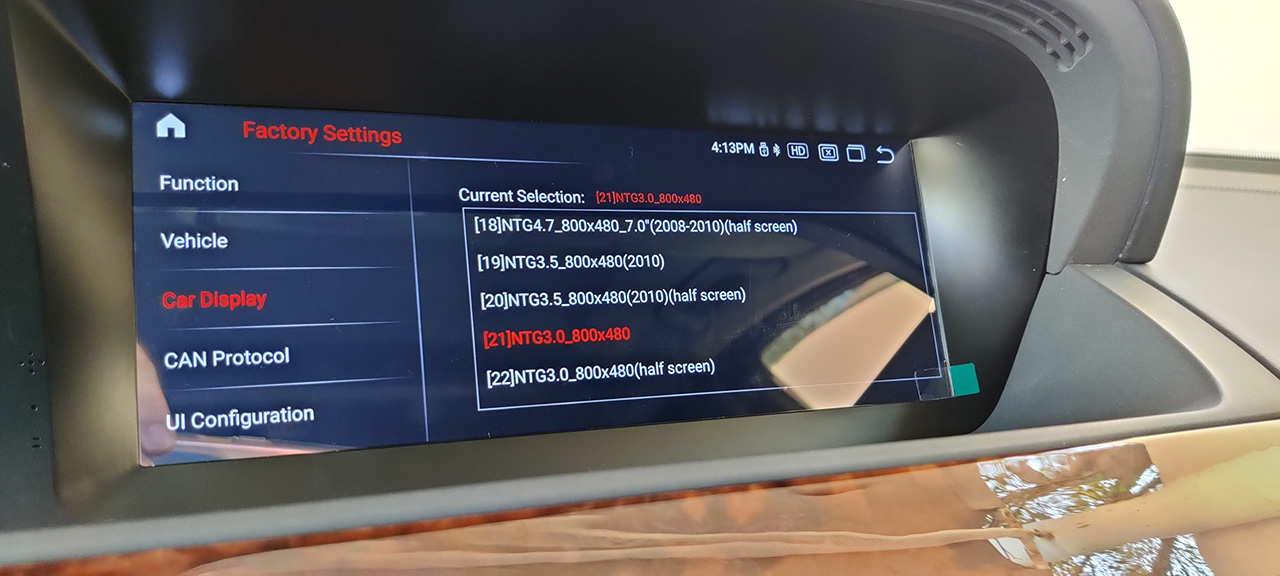
All NTG4x and newer settings result in a black screen. When trying with NTG 3.5 options (19 or 20), I get distorted view like this:
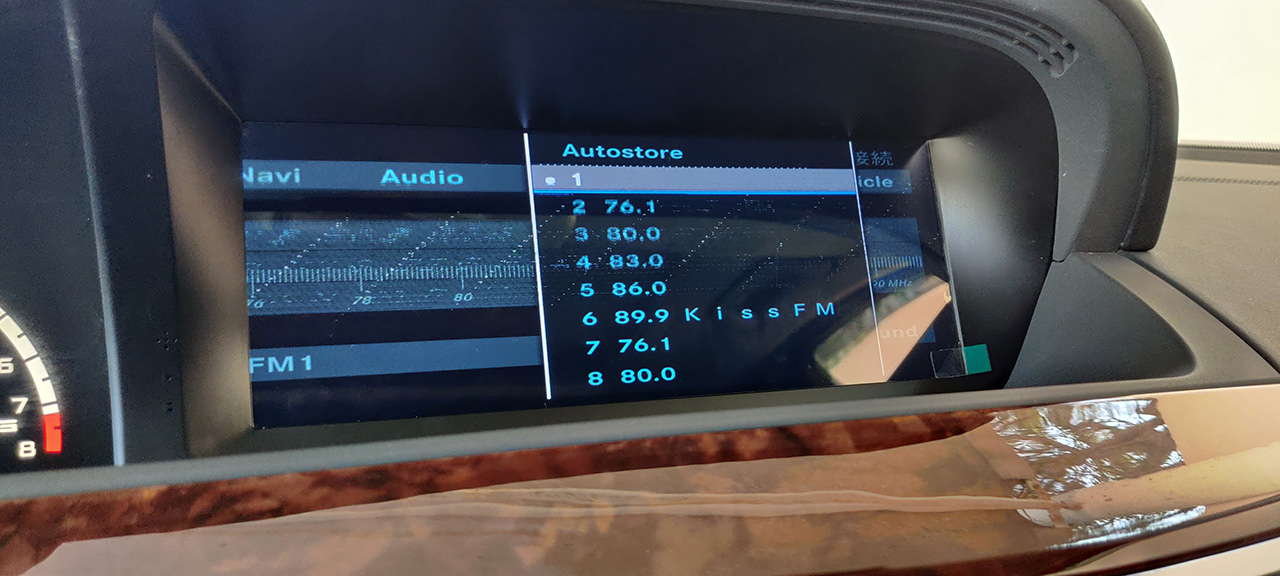
One thing I noticed is that you need to be super careful when scrolling through these FACTORY settings because it is super easy to set things wrong (when scrolling you can actually press something). Like... I somehow broke the knob functions (then I learnt I need to set to type B), then also I managed to configure it so that when you select AUX in the source, it automagically turns the Android screen on (you don't need to tap it). This is cool, actually!
//EDIT: Aux Switching Mode --> Automatic does the job. Cool!
All NTG4x and newer settings result in a black screen. When trying with NTG 3.5 options (19 or 20), I get distorted view like this:
One thing I noticed is that you need to be super careful when scrolling through these FACTORY settings because it is super easy to set things wrong (when scrolling you can actually press something). Like... I somehow broke the knob functions (then I learnt I need to set to type B), then also I managed to configure it so that when you select AUX in the source, it automagically turns the Android screen on (you don't need to tap it). This is cool, actually!
//EDIT: Aux Switching Mode --> Automatic does the job. Cool!
Last edited by amgs63dxb; Oct 22, 2020 at 08:57 AM.

Super Member

Joined: May 2019
Posts: 687
Likes: 293
From: Omaha, NE
2023 S500
Looking at a bunch of these systems on Fleabay, I see prices all the way from the $700 range up to about $850. Some are obviously older - Android 7 or 8. Looking at just he Android 10 units, they vary from quad core, 2G RAM/32G FLASH to 8-core, 4G/64G. Is there such thing as overkill here? I would assume that one would not be installing a ton of Android apps on the thing... I also notice that none seem to list NTG3 as a compatible system, but they do claim to be compatible with a 2007 W221. Hundreds of listings, it's difficult to tell which ones are good bets and which are probably not.
How's the quality of the plastic bezel and hardware? I'd hate to find it's got some cheesy looking cheap plastic, doesn't fit quite right, or rattles around. The car may be old, but it is an S-class after all.
How's the quality of the plastic bezel and hardware? I'd hate to find it's got some cheesy looking cheap plastic, doesn't fit quite right, or rattles around. The car may be old, but it is an S-class after all.
Senior Member
Joined: Jan 2020
Posts: 262
Likes: 106
W222, W221, W218, W211
@DaleB , I got the latest and greatest 8 core / 64GB - and not because I am expecting to install hundreds of apps but for the simple reason that I wanted it to be fast. And fast it is. I never paid attention to its plastic trim - it "disappears" under the original trim and since the screen is so large, you don't pay attention to its surroundings. Check some vids on yt for W221 android. And there is no rattle, it is fixed solid ;-) My car is 2008 model, ntg3.0

Super Member

Joined: Jun 2003
Posts: 713
Likes: 147
From: Aridzona
'15 S550, '10 E350 P1/P2, '02 ML320
Amgs63dxb ... I'm driving to your house and removing the shipping film from your screen dude! Seriously I thought mine was defective until I removed the film and then it gave me its full brightness.
MBWorld Fanatic!


Joined: Oct 2012
Posts: 1,401
Likes: 313
CLK55 W209, CL63 W216
I don't think these units are as bad as some of you guys make them out to be. The latest one with Android 10 and a faster processor and higher res screen is pretty damn good. Not only does it handle the OEM system and lets you control all car functions with the OEM controls but also gives you the latest and greatest android...for 450$....come on now. Yeah, there may be some pixels missing from the OEM display or it might be cropped weird...so what? It didn't go for a cool 5k like the OEM system and guess what...the software is constantly fixed, unlike Mercedes who gave the finger to all its customers when they refused to fix the GPS lock issue with the clock..for example. So be very thankful they decided to build one for these cars...or you'd be stuck with your maps from 2015 and software from 2008.
That being said, here are my observations for the Android 10 version:
- Definitely go for the faster processor and higher res screen. Prices are the same. You should be paying around 450-500 shipped DHL from one of the big vendors.
- Harness is improved, including having fixed the issue with the AUX wiring we rain into on this thread.
- They now don't ship the AUX box anymore as it was useless. TV box still in the mix if your car has TV.
- The bluetooth stack is totally f-ed up. That means you can't use their phone app for bluetooth and use other devices at the same time like OBD dongles or anything else. There is a workaround which basically means you either use one or the other.
- The built in carplay has software issues. I got it to work once but never again. The external one I was using with the Android 8 unit still works fine.
- Sound is better with the built in DSP.
If you are on Android 8...should you upgrade? Not really...not until the software issues are fixed. You're not getting anything ground breaking to justify the upgrade.
These guys here did a good job keeping track of all the issues and the latest firmware. You can install the UI files, as they are the same, but not the MCU files. All explained here: https://f30.bimmerpost.com/forums/sh....php?t=1699764.
That being said, here are my observations for the Android 10 version:
- Definitely go for the faster processor and higher res screen. Prices are the same. You should be paying around 450-500 shipped DHL from one of the big vendors.
- Harness is improved, including having fixed the issue with the AUX wiring we rain into on this thread.
- They now don't ship the AUX box anymore as it was useless. TV box still in the mix if your car has TV.
- The bluetooth stack is totally f-ed up. That means you can't use their phone app for bluetooth and use other devices at the same time like OBD dongles or anything else. There is a workaround which basically means you either use one or the other.
- The built in carplay has software issues. I got it to work once but never again. The external one I was using with the Android 8 unit still works fine.
- Sound is better with the built in DSP.
If you are on Android 8...should you upgrade? Not really...not until the software issues are fixed. You're not getting anything ground breaking to justify the upgrade.
These guys here did a good job keeping track of all the issues and the latest firmware. You can install the UI files, as they are the same, but not the MCU files. All explained here: https://f30.bimmerpost.com/forums/sh....php?t=1699764.
Super Member
Joined: May 2019
Posts: 687
Likes: 293
From: Omaha, NE
2023 S500
I originally just had the M-B Bluetooth adapter (the "puck"). Cell phone calls, and that was it -- no other BT capability. Then I installed one of the little $12 Chinese BT dongles that connects to the AUX input. That works great for audio to the AUX input, but doesn't integrate with the car's phone "awareness". The phone sees two separate BT devices -- the M-B puck, and the new dongle. It works great. I can hear my streaming music, Waze directions, all of that stuff -- and phone calls are handled seamlessly, muting the other audio during the call. It even lets me use say Siri while driving down the road for completely hands-free operation. No button pushing at all, I just say, "Hey Diri" and it works. The phone will read my text messages to me, send replies, etc. Now that I think about it, I haven't tried just removing the M-B puck to see if it all works without it. That would be acceptable, as all I'd lose would be the use of the dial pad on the center arm rest or dialing through the COMAND screen, two things I can definitely live without.
I don't care about OBD devices, but I do care about the above -- streaming music, nav directions, making phone calls, reading and sending text messages without needing to screw with the phone while driving. How well (or poorly) do those functions work?
And if Car Play doesn't work, I'd think that would be a pretty big defect... but I don't know, I've never actually been in a vehicle that has it, so I've never used it.
MB World Stories
The Best of Mercedes & AMG

8 Oddball Mercedes Ideas That Actually Made it to Production
Verdad Gallardo
Dubai Tuner Gives the Mercedes G-Class An Entirely New Look
Verdad Gallardo
Six Gift Ideas Your AMG Loving Dad or Grad Will Cherish

7 Craziest Things AMG Gas Ever Built
Verdad Gallardo
New Electric Mercedes-AMG GT 4-Door Coupe Unveiled: 10 Things You Need to Know
Verdad Gallardo
6 Mercedes Models That Did NOT Age Well (But Are Somehow Still Cool)
Verdad Gallardo
Manual Mercedes? 6 Times Sindelfingen Let Drivers Have All The Fun
Verdad Gallardo
Mercedes SLR McLaren 722 S Is Extremely Rare Example Modified by McLaren
Verdad Gallardo
8 Classic Boxy Mercedes Designs That Have Aged Like Fine Wine
Verdad Gallardo
MBWorld Fanatic!
Joined: Oct 2012
Posts: 1,401
Likes: 313
CLK55 W209, CL63 W216
Can you elaborate on this a little?
I originally just had the M-B Bluetooth adapter (the "puck"). Cell phone calls, and that was it -- no other BT capability. Then I installed one of the little $12 Chinese BT dongles that connects to the AUX input. That works great for audio to the AUX input, but doesn't integrate with the car's phone "awareness". The phone sees two separate BT devices -- the M-B puck, and the new dongle. It works great. I can hear my streaming music, Waze directions, all of that stuff -- and phone calls are handled seamlessly, muting the other audio during the call. It even lets me use say Siri while driving down the road for completely hands-free operation. No button pushing at all, I just say, "Hey Diri" and it works. The phone will read my text messages to me, send replies, etc. Now that I think about it, I haven't tried just removing the M-B puck to see if it all works without it. That would be acceptable, as all I'd lose would be the use of the dial pad on the center arm rest or dialing through the COMAND screen, two things I can definitely live without.
I don't care about OBD devices, but I do care about the above -- streaming music, nav directions, making phone calls, reading and sending text messages without needing to screw with the phone while driving. How well (or poorly) do those functions work?
And if Car Play doesn't work, I'd think that would be a pretty big defect... but I don't know, I've never actually been in a vehicle that has it, so I've never used it.
I originally just had the M-B Bluetooth adapter (the "puck"). Cell phone calls, and that was it -- no other BT capability. Then I installed one of the little $12 Chinese BT dongles that connects to the AUX input. That works great for audio to the AUX input, but doesn't integrate with the car's phone "awareness". The phone sees two separate BT devices -- the M-B puck, and the new dongle. It works great. I can hear my streaming music, Waze directions, all of that stuff -- and phone calls are handled seamlessly, muting the other audio during the call. It even lets me use say Siri while driving down the road for completely hands-free operation. No button pushing at all, I just say, "Hey Diri" and it works. The phone will read my text messages to me, send replies, etc. Now that I think about it, I haven't tried just removing the M-B puck to see if it all works without it. That would be acceptable, as all I'd lose would be the use of the dial pad on the center arm rest or dialing through the COMAND screen, two things I can definitely live without.
I don't care about OBD devices, but I do care about the above -- streaming music, nav directions, making phone calls, reading and sending text messages without needing to screw with the phone while driving. How well (or poorly) do those functions work?
And if Car Play doesn't work, I'd think that would be a pretty big defect... but I don't know, I've never actually been in a vehicle that has it, so I've never used it.
All these units mess with the standard implementation of Android bluetooth, to make their custom dialer apps work better supposedly. Long story short they have no idea what they're doing and mess up Bluetooth many times. So you really can't pair anything bluetooth like you would with normal Android. You have to go through their dialer app to pair your phone...There are workarounds though to pair anything. In this particular version of the firmware, 2.3.0 there are a few bluetooth issues:
- Problem pairing phones with their dialer app and getting the built in wireless carplay to work
- Problems pairing other devices (anything but a phone) using the standard Android pairing process
- Their bluetooth (phone dialer) app completely cuts access to bluetooth for any other app
- Bluetooth defaults to OFF every time the unit boots (probably to prevent other apps to use BT before their dialer app starts)
Workarounds so far:
- Disable BT in the factory config (so their crappy app never starts)
- Root the unit
- User tasker to turn on BT on boot
- Pair your devices with apps like nRFConnect
- Use external carplay.or MB Puck for BT calls.
I am sure it will be fixed in a newer firmware as the older Android 8 Firmware worked fine and none of these issues existed. I have also extracted their BT app and will take a close look at what they're doing when I have some time. I am sure it can be fixed if they decide not to tackle it. This is a big issue for me as all my external stuff (to control ambient lighting, CAN, LIN, etc is on BLE).

Junior Member
Joined: Aug 2019
Posts: 19
Likes: 1
CL500 2008
Should the password for the settings be the same regardless from which seller the screen was bought? Tried 190627 but no luck. Of course the seller does not communicate at all. So for everyone in Europe, who is looking to buy the unit from Mekede Bestnavi from aliexpress, don't do it.
Unit itself works quite well, but should the built-in carplay work only with wifi or does it need the BT as well? Like Megacrazy stated, the custom dialler is total bs.
Unit itself works quite well, but should the built-in carplay work only with wifi or does it need the BT as well? Like Megacrazy stated, the custom dialler is total bs.
MBWorld Fanatic!
Joined: Oct 2012
Posts: 1,401
Likes: 313
CLK55 W209, CL63 W216
Should the password for the settings be the same regardless from which seller the screen was bought? Tried 190627 but no luck. Of course the seller does not communicate at all. So for everyone in Europe, who is looking to buy the unit from Mekede Bestnavi from aliexpress, don't do it.
Unit itself works quite well, but should the built-in carplay work only with wifi or does it need the BT as well? Like Megacrazy stated, the custom dialler is total bs.
Unit itself works quite well, but should the built-in carplay work only with wifi or does it need the BT as well? Like Megacrazy stated, the custom dialler is total bs.

The carplay needs both bluetooth and wifi unfortunately....BT to pair and wifi to actually work.
Junior Member
Joined: Aug 2019
Posts: 19
Likes: 1
CL500 2008
Thanks, somehow missed it while browsing with phone, owe you a beer.
I was wondering should I buy another ashtray, break it and install a wireless charging mat, but might as well skip the mat and buy a wired carplay instead if the BT pairing starts bugging enough.
I was wondering should I buy another ashtray, break it and install a wireless charging mat, but might as well skip the mat and buy a wired carplay instead if the BT pairing starts bugging enough.
MBWorld Fanatic!
Joined: Oct 2012
Posts: 1,401
Likes: 313
CLK55 W209, CL63 W216
Have a case of beer on hand if you’re dealing with the Android10 unit haha. I pretty much had the same thought process. Ended up doing a wireless charger in the center console where the MB puck used to be and wireless carplay adapter installed in the glovebox. Works well.
Junior Member
Joined: Aug 2019
Posts: 19
Likes: 1
CL500 2008
Wasn’t a great success as i hoped. Had a chance to take the car for a ride and while using CarPlay, gps/map lags significantly and isn’t accurate at all. Unit is hooked with the unit’s gps antenna, fakra splitter hasn’t arrived yet.
while browsing and googling, there are two different opinions, system uses its own gps antenna and shares it with the phone, or system uses iPhone’s gps. Which one is it, and has anyone else had this problem? Seems that it’s common with Jeep head units. Software glitch?
I’m using iPhone X with the latest IOS.
while browsing and googling, there are two different opinions, system uses its own gps antenna and shares it with the phone, or system uses iPhone’s gps. Which one is it, and has anyone else had this problem? Seems that it’s common with Jeep head units. Software glitch?
I’m using iPhone X with the latest IOS.

Junior Member
Joined: Aug 2019
Posts: 19
Likes: 1
CL500 2008
https://shudhtech.blogspot.com/2019/...issue.html?m=1
Going to try this next. Maybe it helps, maybe not.
Going to try this next. Maybe it helps, maybe not.
Senior Member
Joined: Jan 2020
Posts: 262
Likes: 106
W222, W221, W218, W211
Two more issues with the Android 10 unit noticed:
1/ audio quality - much higher when streaming things via bluetooth than when using Android Auto (e.g. playing spotify using AA native app). Built-in phone dialer app working to play music over Bluetooth does seem to have a much louder signal...
the only reason I noticed that is because of problem number 2): sometimes I am unable to play anything that originates from my phone - music stops after 1 second. I hit play, it stops after a second. No matter which method is used - be it bluetooth audio stream or Android Auto Spotify. Disconnecting the cable (disabling AA) and reverting to Bluetooth only streaming solves it (but I loose the carplay/AA experience). And this is totally random - most of the time it just works fine.
So yeah... expectations from this unit are high, but there is still a lot to be done.
1/ audio quality - much higher when streaming things via bluetooth than when using Android Auto (e.g. playing spotify using AA native app). Built-in phone dialer app working to play music over Bluetooth does seem to have a much louder signal...
the only reason I noticed that is because of problem number 2): sometimes I am unable to play anything that originates from my phone - music stops after 1 second. I hit play, it stops after a second. No matter which method is used - be it bluetooth audio stream or Android Auto Spotify. Disconnecting the cable (disabling AA) and reverting to Bluetooth only streaming solves it (but I loose the carplay/AA experience). And this is totally random - most of the time it just works fine.
So yeah... expectations from this unit are high, but there is still a lot to be done.
MBWorld Fanatic!
Joined: Oct 2012
Posts: 1,401
Likes: 313
CLK55 W209, CL63 W216
Two more issues with the Android 10 unit noticed:
1/ audio quality - much higher when streaming things via bluetooth than when using Android Auto (e.g. playing spotify using AA native app). Built-in phone dialer app working to play music over Bluetooth does seem to have a much louder signal...
the only reason I noticed that is because of problem number 2): sometimes I am unable to play anything that originates from my phone - music stops after 1 second. I hit play, it stops after a second. No matter which method is used - be it bluetooth audio stream or Android Auto Spotify. Disconnecting the cable (disabling AA) and reverting to Bluetooth only streaming solves it (but I loose the carplay/AA experience). And this is totally random - most of the time it just works fine.
So yeah... expectations from this unit are high, but there is still a lot to be done.
1/ audio quality - much higher when streaming things via bluetooth than when using Android Auto (e.g. playing spotify using AA native app). Built-in phone dialer app working to play music over Bluetooth does seem to have a much louder signal...
the only reason I noticed that is because of problem number 2): sometimes I am unable to play anything that originates from my phone - music stops after 1 second. I hit play, it stops after a second. No matter which method is used - be it bluetooth audio stream or Android Auto Spotify. Disconnecting the cable (disabling AA) and reverting to Bluetooth only streaming solves it (but I loose the carplay/AA experience). And this is totally random - most of the time it just works fine.
So yeah... expectations from this unit are high, but there is still a lot to be done.
In terms of audio quality, try installing a USB DAC/sound card. Apparently it improves sound quality a lot. I have one on order and I’ll report findings. It’s been covered in the BMW forums link I posted earlier.
Junior Member
Joined: Aug 2019
Posts: 19
Likes: 1
CL500 2008
Quality is better with this unit than it was with Qualcomm's BT chip I used previously.
But I can confirm that the same issue is with carplay, unit stops playing music randomly.
Edit: Btw, how often these units get a new update?
But I can confirm that the same issue is with carplay, unit stops playing music randomly.
Edit: Btw, how often these units get a new update?
Last edited by WranglerYJ; Oct 28, 2020 at 08:52 AM.
Super Member
Joined: May 2019
Posts: 687
Likes: 293
From: Omaha, NE
2023 S500
Thanks for posting your experiences, guys. Good to know these kinds of things. I learned long ago to never buy anything on promises of future upgrades, apps, software fixes, etc... too often they just never seem to happen. Even on Android devices and iPhones. "Oh, yeah, that's in the new release. Your hardware isn't supported, though, you'll need to upgrade..."
Senior Member
Joined: Jan 2020
Posts: 262
Likes: 106
W222, W221, W218, W211
@megacrazy , if I could, I would liked your post twice! This beamer thread opened my eyes to certain things I was not aware of before! I wish I found it earlier! All my problems are gone thanks to cooperation of few folks on discord. Also, crappy Zlink application (which earned its popularity due to wifi CarPlay feature I could not care about less!!!) is gone - I replaced it with Headunit Reloaded and I FINALLY got what I needed in the first place: beautiful Android Auto experience.
Also, the latest Q OS version 2.3.0 fixed the issue with audio quality problem I had (difference between BT and AA) - it is perfectly loud and clear now M E G A H A P P Y !!!!
Teasers:
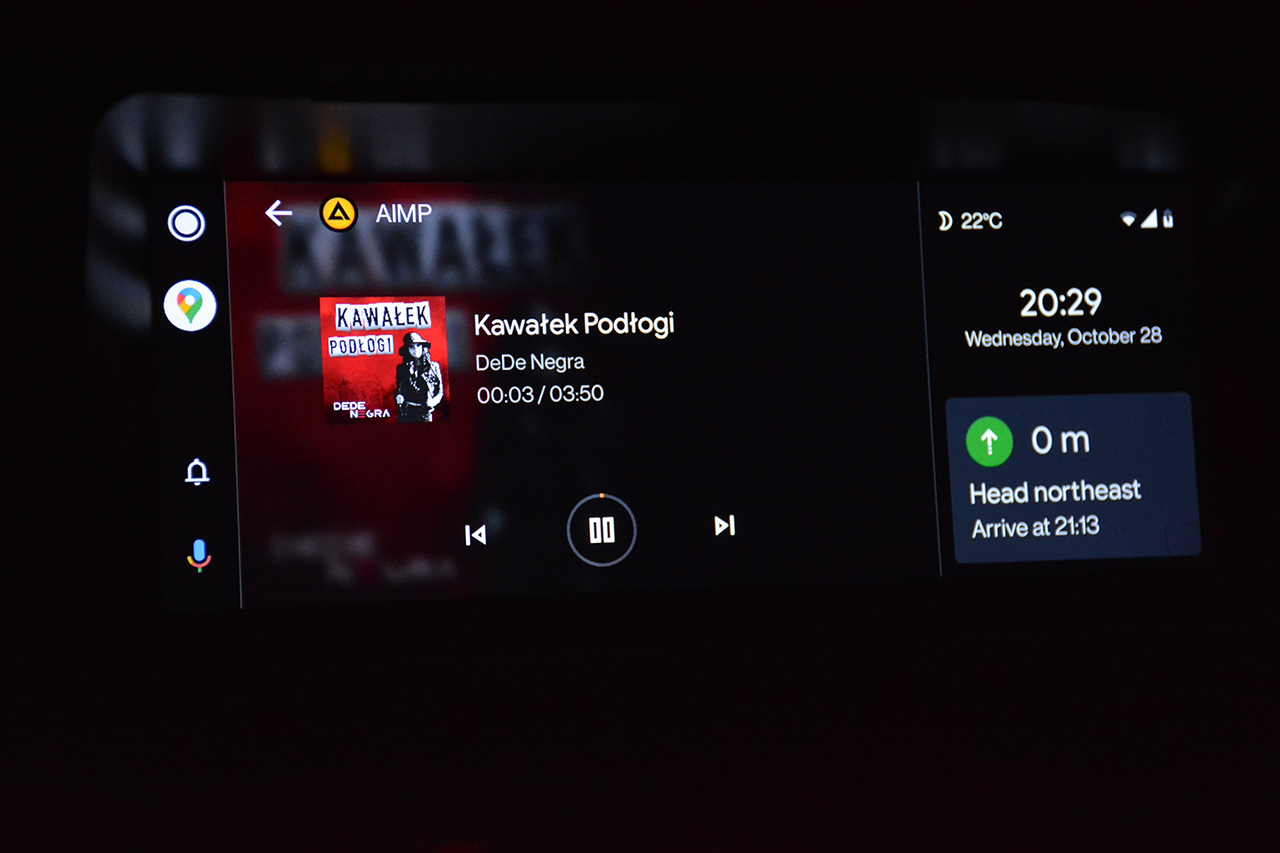
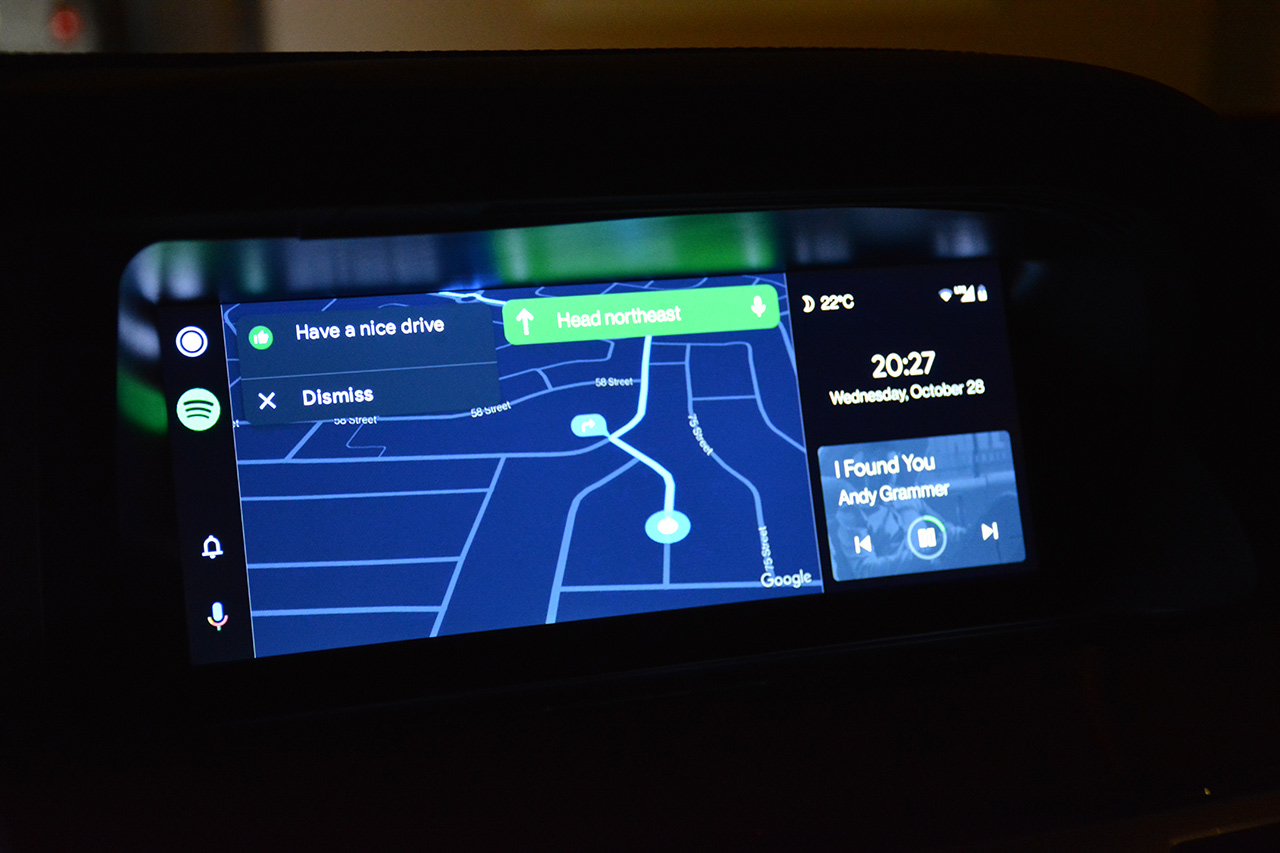
One minor inconvenience (last, I promise!) is that I need to tap the screen for the knob to start working over the segment with controls - but I bet I can solve it directly with Headunit Reloaded app owner!
Also, the latest Q OS version 2.3.0 fixed the issue with audio quality problem I had (difference between BT and AA) - it is perfectly loud and clear now
M E G A H A P P Y !!!!Teasers:
One minor inconvenience (last, I promise!) is that I need to tap the screen for the knob to start working over the segment with controls - but I bet I can solve it directly with Headunit Reloaded app owner!

MBWorld Fanatic!
Joined: Oct 2012
Posts: 1,401
Likes: 313
CLK55 W209, CL63 W216
Haha I am glad you got some of the issued you had resolved. If it's software it can be fixed. The other issue you are having is definitely an app focus issue. They can probably fix that easily if you bring it to their attention.

Member
Joined: Dec 2017
Posts: 230
Likes: 38
From: NYC
2008 S550 4Matic, 2007 GL450, 2008 C300, 2018 GLE63 AMG
Chinese sellers just sells stuff they don't care after, and the problem is they don't even use the stuff they sell, so they don't understand the issues and thinks buyers are annoying
Junior Member
Joined: Aug 2019
Posts: 19
Likes: 1
CL500 2008
Ofc I was naive to assume that the unit is loaded with the newest firmware, and surprise, it wasn't. Will try to update from 2.0.9 to the newest 2.3.0 and see what happens.
amgs63dxb:
Was all of your problems solved, missing pixels from the left side of the screen when in NTG mode as well?


