When you click on links to various merchants on this site and make a purchase, this can result in this site earning a commission. Affiliate programs and affiliations include, but are not limited to, the eBay Partner Network.
That's interesting. Not sure what I'm missing. I downloaded the apk I needed from apkmirror.com. I know the apk works cause I successfully installed it on other devices. Are you referring to the apk installer in the "storage" options in android settings? I've tried using that to install it but the only apk it finds is the iGO_North America_Ext.apk. It can't seem to find any other apks. I even tried installing an apk installer from the playstore but it can't find apks either. How are you doing the installs? I must be doing something wrong. Thanks.
So I bought a bluetooth OBDII scanner that plugs into my OBDII. This way I can see information such as RPM, speed, boost, temp etc on the screen. Except I can't get it to pair. When I go to my bluetooth setting, I see the OBDII on the list but when I try to pair, it won't pop up the screen to where I can enter the pairing code. Do you guys know of any bluetooth OBDII devices that do not require a pairing code?
Not sure I like the interface of Torque Pro so I will keep searching for one that I like.
+
Hi, I hawe installed the 10.25 Android Screen in my B250 W246 - but I'm not able to connect the TorquePro App to my OBDII device...
The OBDII are shown on the Android, but when looking for it in the TorquePro it do not exist???
You are referring to a program for UPDATE, but I can't get into the webside...
Anybody have a hint?
Kind Regards.
That's interesting. Not sure what I'm missing. I downloaded the apk I needed from apkmirror.com. I know the apk works cause I successfully installed it on other devices. Are you referring to the apk installer in the "storage" options in android settings? I've tried using that to install it but the only apk it finds is the iGO_North America_Ext.apk. It can't seem to find any other apks. I even tried installing an apk installer from the playstore but it can't find apks either. How are you doing the installs? I must be doing something wrong. Thanks.
Where are you launching the APK from? If it is on a USB stick, move it to the download folder on the device and launch it from there.
This will use android auto on your phone and you will be able to output it on the 10.25 screen. You can use either usb or wifi hotspot on your phone to activate it. Using on my note 9. YMMV. What I like about android auto is it will announce when you have a notification, which it can read to you. It will give you an option to reply and will also read out your reply. Also since android auto is running off your phone, it is using your phone data so no need for tethering. It is limited however to mainly music streaming, navigation (waze or gmaps), phone calls/ messages.
1. Download android auto on your phone.
2. Download the Headunit Reloaded Trial version to see if this will work first before you buy. Developer has included instruction there.
2. Once confirmed working, then buy it here Headunit Reloaded and install on your 10.25 screen. Delete the Trial version after.
Hi, I hawe installed the 10.25 Android Screen in my B250 W246 - but I'm not able to connect the TorquePro App to my OBDII device...
The OBDII are shown on the Android, but when looking for it in the TorquePro it do not exist???
You are referring to a program for UPDATE, but I can't get into the webside...
Anybody have a hint?
Kind Regards.
I have had the same kind of problem in my MB250, but have solved it, by using a BDOII WiFi - That one connect to the TorquePro automatically, and you have all your engine details on the 10,25 screen... :-)
I assume then that you are doing a direct wifi connect and as such can't also have a tethered wifi to internet connection. Or have you created a wifi network that multiple devices are connected to?
If direct, then I think most people will want to avoid that as they will want to be using that for tethering.
Its frustrating in that it is a blacklisting that the firmware has put in which they could remove quite easily. Have asked Chris if he can ask the supplier to remove the restriction, but not had any response from him on the matter at all. Its one of the things that may drive me to looking at rooting it, but want to avoid that if possible.
I assume then that you are doing a direct wifi connect and as such can't also have a tethered wifi to internet connection. Or have you created a wifi network that multiple devices are connected to?
If direct, then I think most people will want to avoid that as they will want to be using that for tethering.
Its frustrating in that it is a blacklisting that the firmware has put in which they could remove quite easily. Have asked Chris if he can ask the supplier to remove the restriction, but not had any response from him on the matter at all. Its one of the things that may drive me to looking at rooting it, but want to avoid that if possible.
Yes You are so right, and I haven't found a way to have both thing available, the App and the internet... The engineer - from 10.25 android Screen - answer me back:
>>Hi Stefan, sorry that our HEAD UNIT neither support OBD nor 2 WiFi devices at same time<<
>>If our engineers can make a new version head unit, I will let you know. But at this moment, not have plan to develop new head units<<
They don't need to develop a new head unit, they just need to remove the restrictions of which bluetooth devices appear for pairing and then that way wifi is freed up for thethering.
They don't need to develop a new head unit, they just need to remove the restrictions of which bluetooth devices appear for pairing and then that way wifi is freed up for thethering.
Thank You, and I have relayed that to them... Then we will see what happen...
I'm in the middle of installing this in my 2013
How the F$@# do you fit the headunit back in?
I've spent a good hour shoving all the cables and connectors down but the #$@#$ still won't go back in
Plus the hazard light connector gets in the way also
I'm tempted to sit in the backseat and use my foot to push the @#$@#$ back in but something tells me I would instantly regret doing that
I'm in the middle of installing this in my 2013
How the F$@# do you fit the headunit back in?
I've spent a good hour shoving all the cables and connectors down but the #$@#$ still won't go back in
Plus the hazard light connector gets in the way also
I'm tempted to sit in the backseat and use my foot to push the @#$@#$ back in but something tells me I would instantly regret doing that
HAHAHA!!! Everytime...The more you remove the easier it is..
And I thought mine was a pain to get in correctly. At least there are a lot of you guys have the same unit so you can get advice and help from each other! I'm still happy I went my route, but it sure would have been nice to have help with getting it installed. I feel your pain, I thought about just tossing the unit several times in frustration while working on it.
Hi everyone. I'm thinking of buying this. However since I'm in there I'd like to attach a backup camera as well. Can anyone recommend a backup camera with nightvision and radar?
Hi everyone. I'm thinking of buying this. However since I'm in there I'd like to attach a backup camera as well. Can anyone recommend a backup camera with nightvision and radar?
FWIW I used the wireless type and am having some transmission issues. I originally quick tapped it directly into the backup light 12V wire for both turn on and power. . I may change it to a relay triggered by the backup wire and powered off the rear fuse panel to see if the extra current helps out.
I'm in the middle of installing this in my 2013
How the F$@# do you fit the headunit back in?
I've spent a good hour shoving all the cables and connectors down but the #$@#$ still won't go back in
Plus the hazard light connector gets in the way also
I'm tempted to sit in the backseat and use my foot to push the @#$@#$ back in but something tells me I would instantly regret doing that
I just fit the unit back into my 2014 E350 and it is difficult, scraped both my hands up trying to feed the wires. I noticed a few things:
1. if your large wire bundles hanging from the headunit in the back are all jumbled up, it helps to take the wires off and reconnect them so they are more streamlined.
2. the fiber optic cable is connected fairly close to one of the large cable bundles, so I pulled this back some to give the large bundle a little more leeway and movement. It kept on wanting to creep up since it was so closely taped to the fiber optic cable
3. the large square connector MUST be pushed below the headunit
4. try to push the larger cables as far under the airconditioning ducts as possible, so they can continue to slide further in.
5. at least in the 2014 model (and likely more recent models, absolutely no help taking out the glove box. I took it out on suggestion of one of the other members with an older model, but there is no room to access the back of the headunit from the side. Don't waste your time.
Hope this helps.
If you ended up wiring through the center console, remember to reattach the airconditioning controls before sliding back the headunit since there are two screws that need to go in to secure the controls that are only accessible with the headunit pulled out a little. I had to slide it back out after I realized this.
Question - looking at one of the no-name units identical to this on amazon, (so I can return it if it's garbage) however it says android 6 on it, the unit is branded AIMTOM. I see some people on ebay selling identical looking units saying 'android 6 flashed to 8' is that something you can do to your own unit from an sd card by getting an image somewhere? I've done android dev before and familiar with adb if that's needed. I've done custom roms on phones before usually involved rooting the device, unlocking bootloader, then some sequence of buttons on boot to load and flash an image from sd card. Haven't seen much discussion on this though or if anyone here has attempted it?
Also anyone get their hands on one of these 4gb ram/64 storage versions? I see lots of complaints about apps not having enough space sounds like it would make a big difference. The video
their english isn't too good in the comments but it sounds like its android 6 and they force installed some 8 stuff onto it to look like oreo. Plus the stats on their page are kind of funny like cpu cores: 64G heh 8 core in one place, quad core in another all over the place.
Last edited by rvanderwerf; Dec 7, 2018 at 07:57 PM.
Reason: addl info
Question - looking at one of the no-name units identical to this on amazon, (so I can return it if it's garbage) however it says android 6 on it, the unit is branded AIMTOM. I see some people on ebay selling identical looking units saying 'android 6 flashed to 8' is that something you can do to your own unit from an sd card by getting an image somewhere? I've done android dev before and familiar with adb if that's needed. I've done custom roms on phones before usually involved rooting the device, unlocking bootloader, then some sequence of buttons on boot to load and flash an image from sd card. Haven't seen much discussion on this though or if anyone here has attempted it?
Also anyone get their hands on one of these 4gb ram/64 storage versions? I see lots of complaints about apps not having enough space sounds like it would make a big difference. The video https://www.youtube.com/watch?v=BJKfjUaOQzU their english isn't too good in the comments but it sounds like its android 6 and they force installed some 8 stuff onto it to look like oreo. Plus the stats on their page are kind of funny like cpu cores: 64G heh 8 core in one place, quad core in another all over the place.
I've been able to connect through ADB on the V1 unit, so I'm pretty sure you could do that on these units as well. I can see two problems with buying an android 6 and flashing a new ROM. 1. It may be difficult to get to the bootloader. I've seen a video of how to get to it since using a combination of screen swipes and buttons. 2. Finding a proper ROM. that's probably going to be the hardest part since they're not freely available.
Having said that, you may just want to ask if the vendor you're thinking of buying from has an updated unit. Most of these no-name vendors should have access to the updated units.
And I thought mine was a pain to get in correctly. At least there are a lot of you guys have the same unit so you can get advice and help from each other! I'm still happy I went my route, but it sure would have been nice to have help with getting it installed. I feel your pain, I thought about just tossing the unit several times in frustration while working on it.
Who sells this unit!? I hate the exposed/bulging screen everyone else is using. I love this clean in dash look.
Mercedes SLR McLaren 722 S Is Extremely Rare Example Modified by McLaren
Slideshow: A one-of-one U.S.-spec Mercedes-Benz SLR McLaren Roadster became even rarer after a factory-backed transformation at McLaren's headquarters.





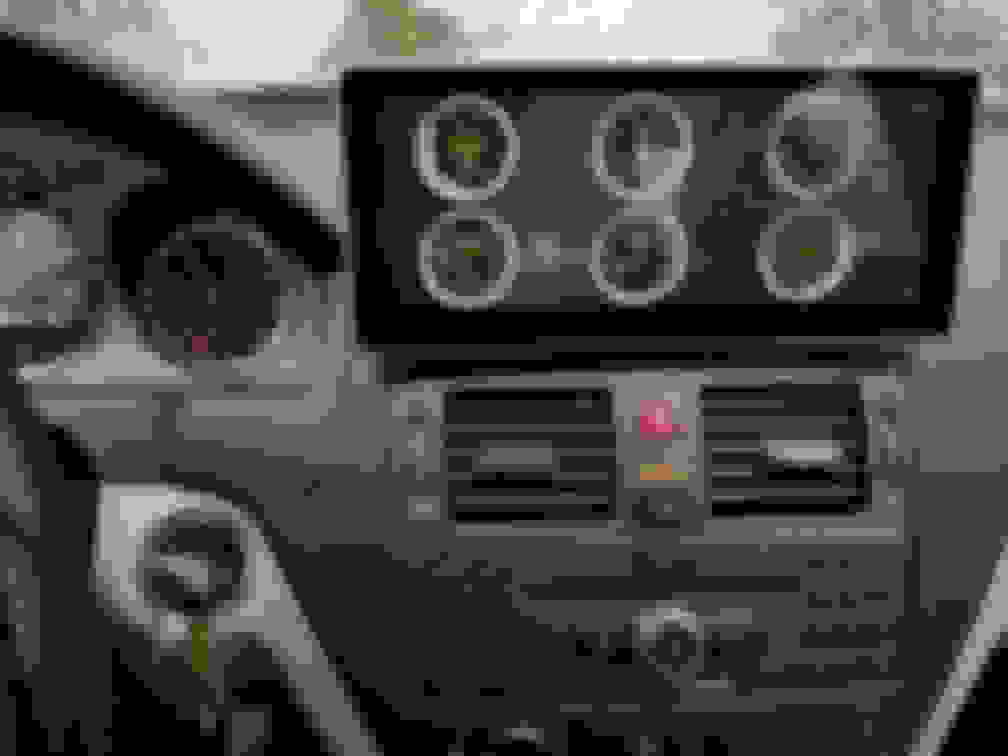




 TorquePro works with OBDII WiFi!